1. Introduction
The Eyoyo EY-019Y is a versatile 1D and 2D USB wired barcode scanner designed for efficient inventory management and point-of-sale operations. This handheld scanner features an adjustable stand, auto-sensing capabilities, and broad barcode compatibility, making it suitable for various environments such as warehouses, retail stores, and libraries. Its plug-and-play design ensures easy setup with Windows, MacOS, and Linux systems.
2. Package Contents
- 1x Eyoyo 2D Barcode Scanner
- 1x Adjustable Stand
- 1x USB Cable
- 1x User Manual
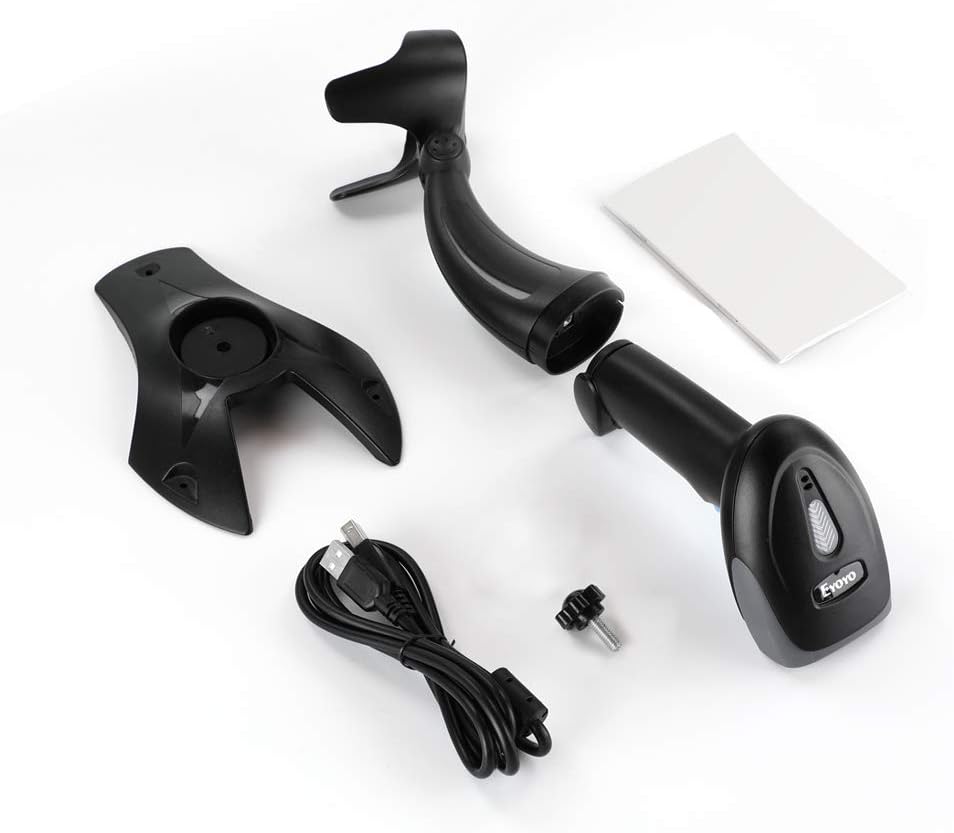
The image displays the complete package contents: the main scanner unit, a separate adjustable stand, a USB cable for connection, and the instruction manual.
3. Setup
3.1 USB Connection (Plug and Play)
The Eyoyo EY-019Y barcode scanner is designed for plug-and-play operation. No driver or software installation is required. Simply connect the USB cable from the scanner to an available USB port on your computer.

This image illustrates the scanner connected to a laptop via its USB cable, highlighting its compatibility with Windows, Mac OS, and Linux operating systems without requiring additional software.
3.2 Assembling the Adjustable Stand
The scanner comes with an adjustable stand that allows for hands-free operation. Attach the scanner to the stand, ensuring it is securely in place. The stand can be adjusted up to 45 degrees to achieve an optimal scanning angle.

The image shows the scanner being inserted into its stand, with an inset demonstrating the 45-degree adjustability of the stand for various scanning positions.
4. Operating Modes
The Eyoyo EY-019Y supports two primary scanning modes:
- Key Trigger Mode: Press the trigger button to initiate a scan.
- Auto-Sensing Mode: The scanner automatically detects a barcode when presented within its scanning range, eliminating the need to press the trigger. This mode is ideal for hands-free operation when the scanner is placed on its stand.

This image visually distinguishes between the manual trigger mode, where the user holds the scanner and presses a button, and the self-sensing mode, where the scanner is on its stand and automatically scans items placed in front of it.
4.1 Screen Scanning
The scanner is capable of reading 1D and 2D barcodes directly from digital screens, such as those on smartphones, tablets, or computer monitors. This feature is useful for scanning digital coupons or tickets.

The image shows the scanner being used to read barcodes from a smartphone, a laptop screen, and a desktop monitor, emphasizing its screen scanning capability.
5. Barcode Compatibility
The Eyoyo EY-019Y scanner supports a wide range of 1D and 2D barcodes, including those that are damaged, distorted, or blurred.
- 1D Barcodes: UPC-A, UPC-E, EAN-8, EAN-13, Code 128, Code 39, Code 93, Code 11, Interleaved 2 of 5, Matrix 2 of 5, Standard 2 of 5, Codabar, MSI Plessey, GS1, China Post, Databar (RSS), etc.
- 2D Barcodes: PDF417, Data Matrix, QR Code, etc.
Note: This 2D barcode scanner may scan 1D barcodes slower compared to a laser barcode scanner. It is not compatible with Square, Shopify, or Shopkeep POS systems.

This image highlights the scanner's ability to read different types of barcodes, including Data Matrix, PDF417, colorful barcodes, and damaged barcodes, indicating its robust decoding capabilities.
6. Configuration Options
The scanner offers multiple configuration options to customize its behavior:
- Beep Setting: Adjust or turn off the beep sound.
- Sleep Time Setting: Configure the idle time before the scanner enters sleep mode.
- Add Keyboard Keys: Customize additional keyboard keys.
- Add Prefix and Suffix: Add custom characters before or after scanned data.
- Hide Front and Back Characters: Remove specific characters from the beginning or end of scanned data.

The image shows the scanner connected to a computer, with text overlays indicating various customizable settings like beep control, sleep timer, and options to add prefixes or suffixes to scanned data.
7. Durability
Constructed from shock-resistant ABS plastic, the Eyoyo EY-019Y is designed to withstand drops from up to 6.6 feet (2 meters), ensuring long-term reliability in demanding environments. Its ergonomic design provides a comfortable grip for extended use.

This image graphically represents the scanner's shockproof design, showing it falling onto a cracked surface with a scale indicating its 2-meter drop resistance.
8. Specifications
| Feature | Specification |
|---|---|
| Brand | Eyoyo |
| Model | EY-019Y |
| Connectivity Technology | USB Cable (Wired) |
| Compatible Devices | Desktop, Laptop, POS, Tablet, iPad |
| Operating Systems | Windows, MacOS, Linux |
| Power Source | Corded Electric |
| Product Dimensions | 8.99 x 7 x 15.98 cm; 410 g |
| 1D Barcodes Supported | UPC-A, UPC-E, EAN-8, EAN-13, Code 128, Code 39, Code 93, Code 11, Interleaved 2 of 5, Matrix 2 of 5, Standard 2 of 5, Codabar, MSI Plessey, GS1, China Post, Databar (RSS) |
| 2D Barcodes Supported | PDF417, Data Matrix, QR Code |
| Special Features | Adjustable Stand, Auto-Sensing, Screen Scanning, Anti-Shock Design |
9. Troubleshooting
- Scanner not recognized: Ensure the USB cable is securely connected to both the scanner and the computer. Try a different USB port.
- No data output: Verify that the scanner is in the correct operating mode (e.g., Key Trigger or Auto-Sensing). Ensure the cursor is active in the target application (e.g., Notepad, Excel).
- Unable to scan certain barcodes: Check if the barcode type is supported by the scanner. Ensure the barcode is clean, flat, and well-lit. Adjust the scanning distance.
- Incorrect data output: Review the configuration settings for prefixes, suffixes, or character hiding. Reset the scanner to factory defaults if necessary (refer to the full manual for specific barcode commands).
10. Warranty and Support
Eyoyo products typically come with a manufacturer's warranty. For specific warranty details, technical support, or service inquiries, please refer to the warranty card included in your package or visit the official Eyoyo website. Keep your purchase receipt for warranty claims.
11. Product Videos
11.1 Eyoyo USB Wired 2D Barcode Scanner Overview
This video provides a general overview of the Eyoyo USB Wired 2D Barcode Scanner, demonstrating its features and functionality in various settings.
11.2 Eyoyo 1D 2D Wired USB Barcode Scanner with Gooseneck Stand Demonstration
This video showcases the Eyoyo 1D 2D Wired USB Barcode Scanner, specifically highlighting its use with the gooseneck stand and demonstrating its scanning capabilities for different barcode types.


