
1. Introduction
This manual provides instructions for the ZKYMZL 30W LED Moving Head Stage Light, model TY-30. This device is designed to produce dynamic lighting effects for various events. It features a 30W white LED, 8 primary colors, 7 blended colors, and 8 gobo patterns. The light offers multiple control modes including DMX512, sound control, automatic, and master-slave.
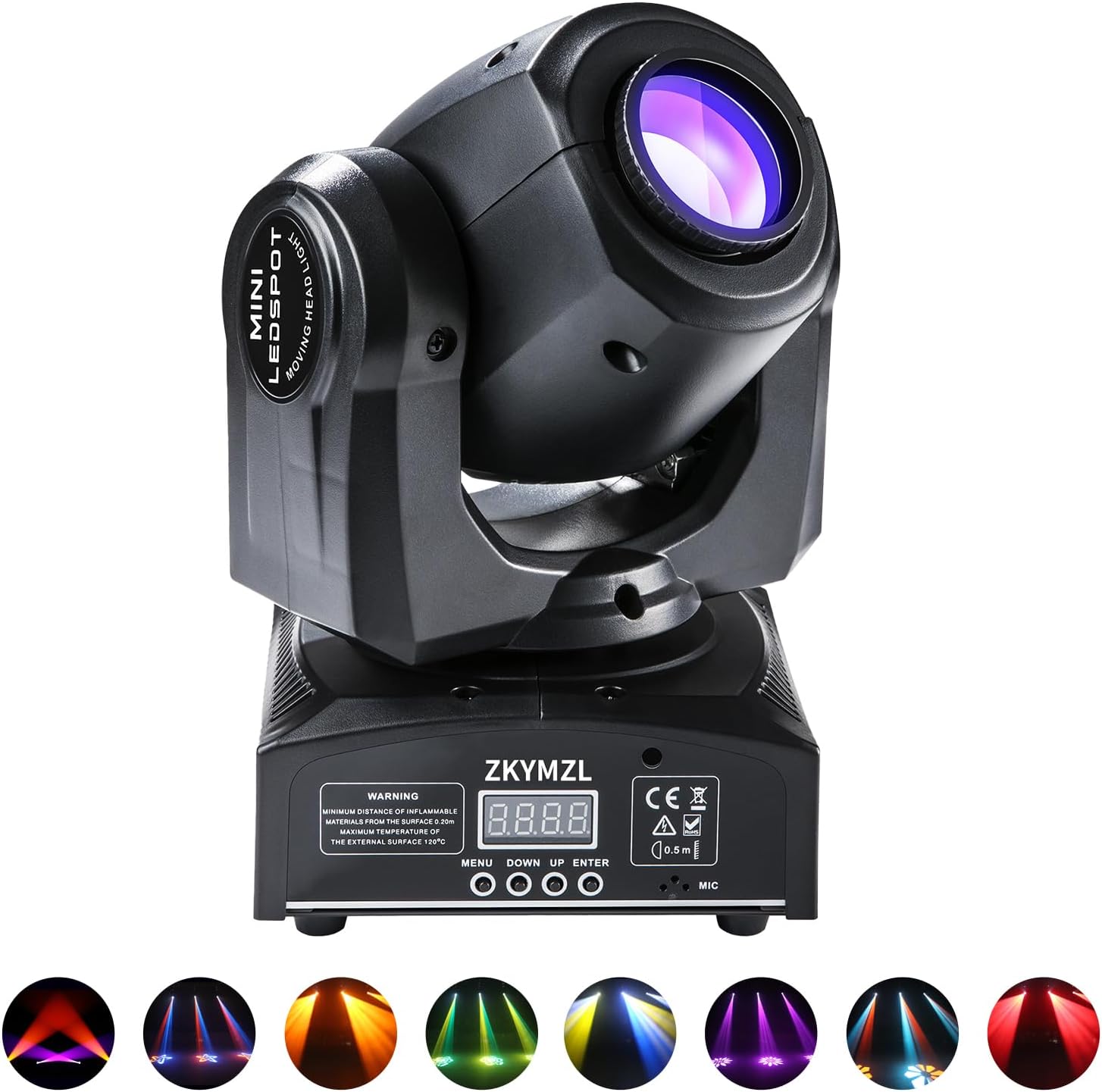
Figure 1: ZKYMZL 30W LED Moving Head Stage Light
2. Safety Information
- Electrical Safety: Ensure the power supply voltage matches the device's requirements (110 Volts). Always disconnect power before cleaning or servicing.
- Placement: Maintain a minimum distance of 0.5 meters (approximately 20 inches) from flammable materials. Ensure adequate ventilation around the unit to prevent overheating. The maximum external surface temperature can reach 70°C.
- Environment: This product is not waterproof. Avoid exposure to moisture or liquids. It is intended for indoor use only.
- Handling: Do not open the housing. There are no user-serviceable parts inside. Refer all servicing to qualified personnel.
- Mounting: Securely mount the light using appropriate hardware. Ensure the mounting surface can support the weight of the fixture.
3. Package Contents
Verify that all items are present in the package:
- 1 x ZKYMZL 30W LED Moving Head Stage Light (Model: TY-30)
- 1 x Power Cable
- 1 x Mounting Bracket
- 2 x Screws (pre-installed on the bottom of the light)
- 1 x User Manual (this document)
4. Product Overview
4.1. Dimensions

Figure 2: Product Dimensions (Approx. 10"L x 8.5"W x 7.9"H)
4.2. Movement Capabilities
The moving head features dynamic movement for wide coverage:
- Pan (X-axis): 540° horizontal rotation
- Tilt (Y-axis): 180° vertical movement

Figure 3: Pan (X: 540°) and Tilt (Y: 180°) Movement
4.3. Optical System
The light incorporates an optical lens combination for clear and vibrant projections.

Figure 4: Optical Lens Combination
4.4. Gobo and Color Wheels
The fixture includes a gobo wheel with 8 distinct patterns and a color wheel offering 8 primary colors and 7 blended colors.

Figure 5: Available Gobo Patterns
5. Setup
5.1. Mounting
The ZKYMZL 30W LED Moving Head Stage Light can be installed in several ways:
- Flat Surface: Place the unit on a stable, flat surface.
- Suspended: Use the included mounting bracket to hang the light from a truss or lighting stand. Ensure the bracket is securely fastened and an additional safety cable is used. The light can be mounted upside-down or sideways.
5.2. Power Connection
Connect the provided power cable to the power input on the rear of the unit and then to a suitable power outlet (110V).
5.3. DMX Connection (Optional)
For DMX control, connect a DMX cable from your DMX controller to the DMX IN port on the light. If linking multiple lights, connect from the DMX OUT of the first light to the DMX IN of the next, and so on.
6. Operating Modes
The ZKYMZL 30W LED Moving Head Stage Light supports the following operating modes:
- Automatic Mode: The light runs through pre-programmed sequences.
- Sound Control Mode: The light reacts to ambient sound or music via its built-in microphone.
- Master-Slave Mode: One unit acts as the master, controlling other linked units (slaves) to synchronize effects.
- DMX512 Mode: Professional control using a DMX controller (9 or 11 channel options).
- Strobe Mode: Produces a flashing light effect.
7. Control Panel Operations
The control panel on the base of the unit features an LED display and four buttons: MENU, UP, DOWN, and ENTER. To release the LED screen lock status, press and hold the MENU button for approximately 3 seconds.
7.1. Light Auto Mode Setting
- Press MENU.
- Display will show "Shnd". Press ENTER.
- Use DOWN/UP to select a range from Sh 0 to Sh 4.
- Press ENTER.
- Press MENU for about two seconds to reset the product.

Figure 6: Auto Mode Setting Steps
7.2. Light Sound Control Mode Setting
- Press MENU.
- Display will show "SoUn". Press ENTER.
- Use DOWN/UP to select "on".
- Press ENTER.
- Press MENU for about two seconds to reset the product.

Figure 7: Sound Control Mode Setting Steps
7.3. Adjusting Sound Sensitivity
- Press MENU.
- Display will show "SenS". Press ENTER.
- Use DOWN/UP to select a value from 001 to 100. (Higher value = more sensitive. Factory setting is typically 50).
- Press ENTER.
- Press MENU for about two seconds to reset the product.

Figure 8: Sound Sensitivity Adjustment Steps
7.4. Setting LED Display Always On
- Press MENU.
- Display will show "LEd". Press ENTER.
- Use DOWN/UP to select "on".
- Press ENTER.
- Press MENU for about two seconds to reset the product.

Figure 9: LED Display Always On Setting Steps
7.5. Correcting Garbled Display Text
If the display text appears garbled or reversed:
- Navigate to the display setting (e.g., "0.45").
- Press MENU.
- Display will show "dSIP". Press ENTER.
- Press dSIP (likely refers to pressing ENTER again or navigating to a specific option).
- Press MENU for about two seconds to reset the product.

Figure 10: Display Text Correction Steps
8. Maintenance
- Cleaning: Regularly clean the exterior of the light with a soft, dry cloth. For the lens, use a specialized lens cleaning solution and a microfiber cloth to avoid scratches. Ensure the unit is powered off and unplugged before cleaning.
- Inspection: Periodically check all cables, connections, and mounting hardware for any signs of wear, damage, or looseness.
- Ventilation: Ensure the ventilation openings are clear of dust and debris to maintain proper airflow and prevent overheating.
9. Troubleshooting
| Problem | Possible Cause | Solution |
|---|---|---|
| Light does not power on | No power supply; faulty cable; internal issue | Check power cable connection; try a different outlet; contact support if issue persists. |
| No light output | Dimmer setting at 0; lamp issue | Check dimmer settings in DMX or control panel; contact support. |
| No DMX control | Incorrect DMX address; faulty DMX cable; incorrect mode | Verify DMX address setting; check DMX cable connections; ensure light is in DMX mode. |
| Light not responding to sound | Sound control mode not active; low sensitivity | Activate sound control mode; increase sound sensitivity via control panel. |
| Movement erratic or stuck | Obstruction; internal motor issue; calibration needed | Ensure no physical obstructions; power cycle the unit; contact support if issue persists. |
| LED display garbled/reversed | Display setting error | Follow instructions in Section 7.5 to correct display text. |
10. Specifications
| Feature | Detail |
|---|---|
| Brand | ZKYMZL |
| Model Number | TY-30 |
| Light Source | 30W White LED |
| Colors | 8 primary colors + 7 blended colors |
| Gobos | 8 patterns |
| Pan Movement | 540° |
| Tilt Movement | 180° |
| Control Modes | DMX512 (9/11 channels), Sound Control, Automatic, Master-Slave, Strobe |
| Voltage | 110 Volts |
| Wattage | 30 Watts |
| Brightness | 135 Lux |
| Color Temperature | 6500 Kelvin |
| Material | Aluminum, Iron, Plastic |
| Product Dimensions | 10"L x 8.5"W x 7.9"H |
| Item Weight | 5.59 pounds (2.54 kg) |
| UPC | 606157108172 |
11. Warranty and Support
ZKYMZL provides technical support and after-sales consultation for this product. For any inquiries or assistance, please contact ZKYMZL customer service. They are available to promptly address your concerns.


