
1. Introduction
This manual provides comprehensive instructions for the USARMT Replacement Remote Control, designed specifically for use with HITACHI Roku TVs. This remote is pre-programmed and requires no setup or pairing. Simply insert batteries to begin use.

Image 1.1: Front view of the USARMT replacement remote control, showing the power button, navigation pad, and dedicated app keys.
2. Compatibility
This USARMT replacement remote control is exclusively compatible with HITACHI Roku TVs. It is not designed for use with Roku Streaming Boxes, Roku Sticks, or any other non-Roku TV devices.
- Compatible with: HITACHI Roku TVs.
- Not compatible with: Roku Streaming Boxes, Roku Sticks, or other non-Roku TV models.

Image 2.1: Visual compatibility guide illustrating that the remote works only with Roku TVs and not with Roku streaming boxes or sticks.
3. Setup: Battery Installation
The remote control requires two AAA batteries (not included). Follow these steps to install them:
- Locate the battery compartment cover on the back of the remote control.
- Press down on the tab and slide the cover downwards to open the compartment.
- Insert two new AAA batteries, ensuring the positive (+) and negative (-) terminals align correctly with the markings inside the compartment.
- Slide the battery compartment cover back into place until it clicks securely.
Once batteries are installed, the remote is ready for immediate use with your compatible HITACHI Roku TV.
4. Operating Instructions
This remote control features standard navigation and playback buttons, along with dedicated application keys for quick access to popular streaming services. Refer to the diagram below for button functions.
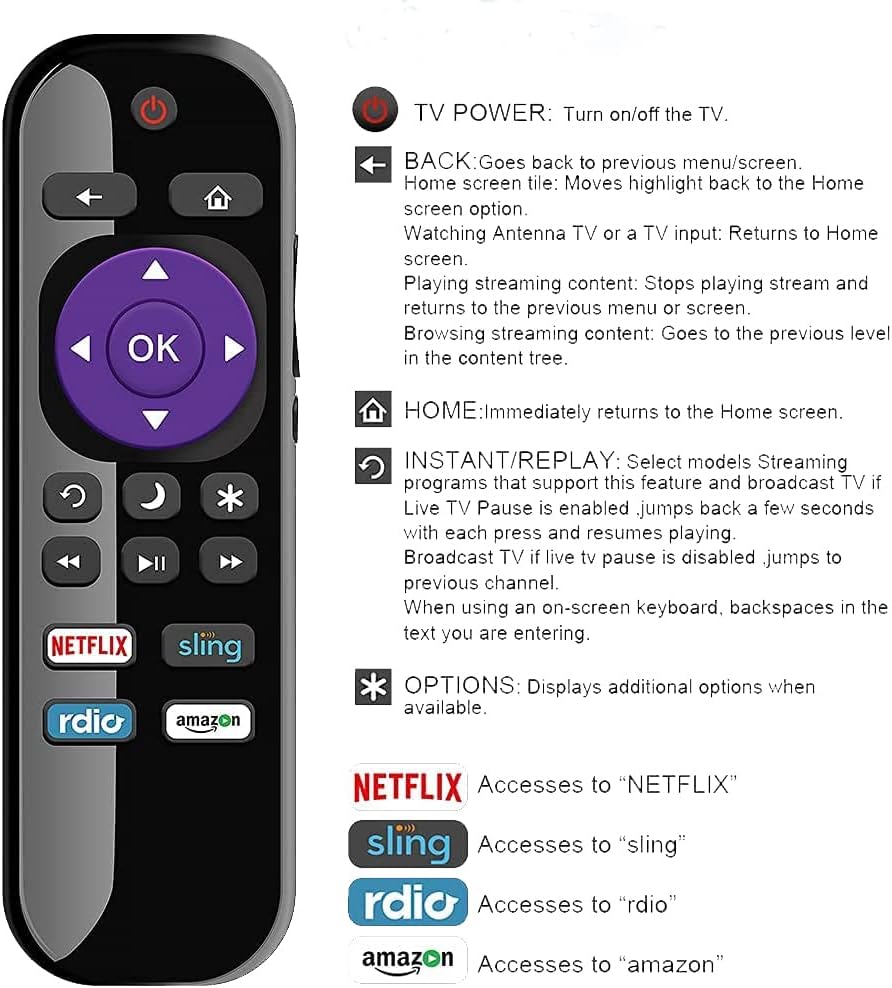
Image 4.1: Detailed diagram illustrating the function of each button on the remote control.
- Power Button (⏻): Turns the TV on or off.
- Back Button (←): Returns to the previous menu or screen.
- Home Button (⌂): Immediately returns to the Home screen.
- Navigation Pad (Up, Down, Left, Right, OK): Used to navigate menus and select items. The OK button confirms selections.
- Instant Replay (↺): Jumps back a few seconds in streaming content or broadcast TV (if Live TV Pause is enabled).
- Sleep Timer (⌶): Accesses sleep timer settings (functionality may vary by TV model).
- Asterisk/Options (∗): Displays additional options or settings relevant to the current screen.
- Rewind (⏪), Play/Pause (⏯), Fast Forward (⏭): Control media playback.
- Dedicated App Keys (Netflix, Sling, Rdio, Amazon): Provide direct access to these streaming applications.
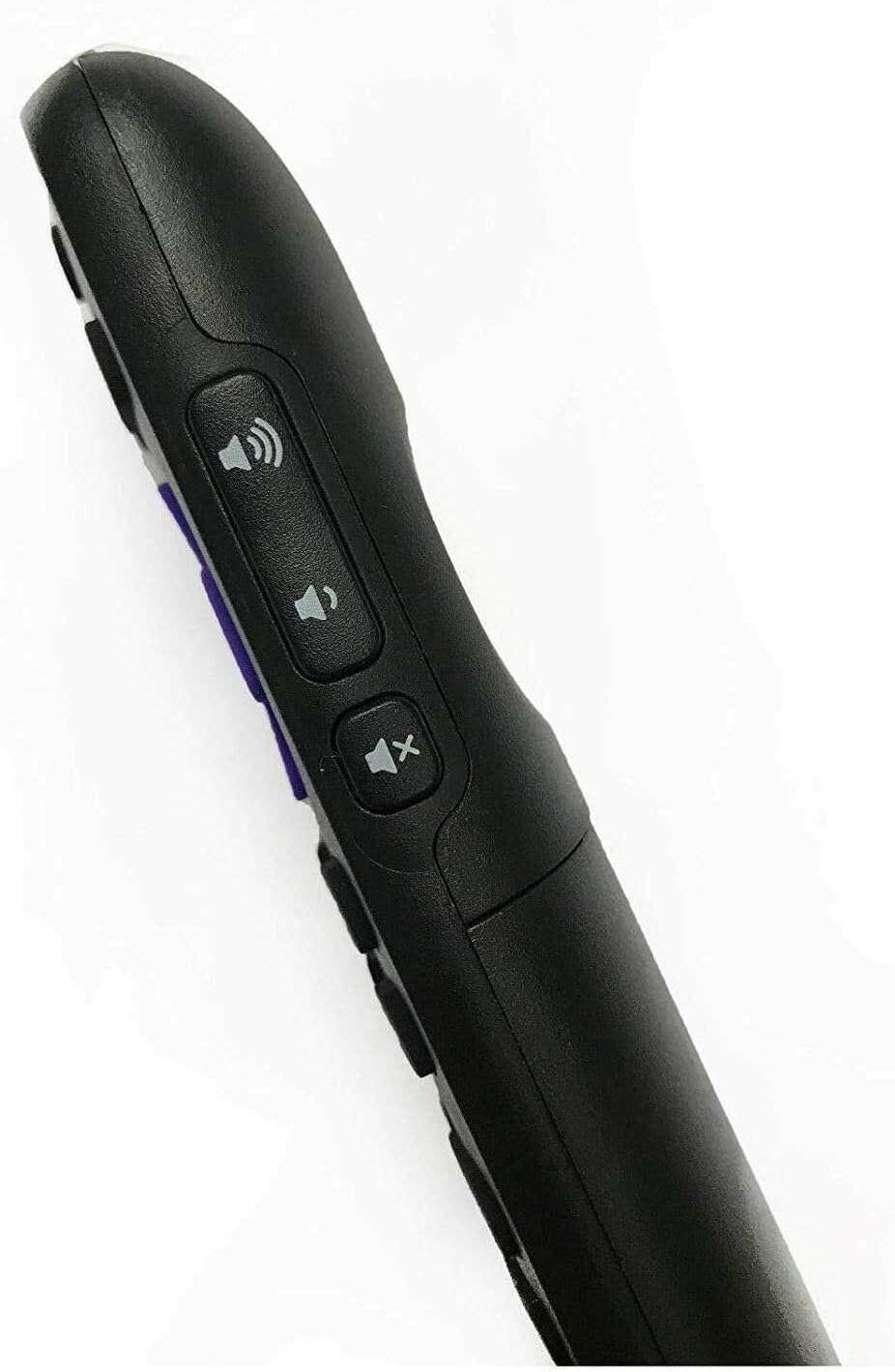
Image 4.2: Side view of the remote control, highlighting the volume up, volume down, and mute buttons.
- Volume Up (🔊): Increases TV volume.
- Volume Down (🔉): Decreases TV volume.
- Mute (🔇): Mutes or unmutes TV audio.
5. Maintenance
To ensure the longevity and proper functioning of your remote control, follow these maintenance guidelines:
- Cleaning: Wipe the remote with a soft, dry cloth. Do not use liquid cleaners or abrasive materials.
- Battery Replacement: Replace batteries when the remote's responsiveness decreases. Always replace both batteries at the same time with new ones.
- Storage: Store the remote in a cool, dry place away from direct sunlight and extreme temperatures.
- Avoid Drops: Protect the remote from physical impact, as drops can damage internal components.
6. Troubleshooting
If you encounter issues with your remote control, try the following solutions:
| Problem | Solution |
|---|---|
| Remote is not responding. |
|
| Certain buttons do not work. |
|
| Remote works intermittently. |
|
7. Specifications
- Model Number: 5502-AKB-AIO-HITACHI
- Brand: USARMT
- Compatibility: HITACHI Roku TVs ONLY
- Connectivity Technology: Infrared (IR)
- Power Source: 2 x AAA Batteries (not included)
- Dimensions: Approximately 6 x 1.5 x 0.5 inches (15.24 x 3.81 x 1.27 cm)
- Item Weight: Approximately 15 ounces (425 grams)
- Special Features: Ergonomic design, dedicated app keys (Netflix, Sling, Rdio, Amazon)
8. Warranty and Support
USARMT is committed to providing premium customer service. This product includes a 30-day hassle-free return policy from the date of purchase. If you experience any issues or have questions regarding your remote control, please contact USARMT customer support through your purchase platform for assistance.
For further support, please refer to the contact information provided by your retailer or the USARMT official channels.