
Product Overview
The X9 Performance Wired Keyboard and Mouse Combo is designed to provide a highly efficient and comfortable workspace. This set includes a full-size wired keyboard, a wired optical mouse, and a memory foam mouse pad with wrist rest.
The keyboard features 104 concave keys, 14 shortcut/media keys, a 17-key numeric keypad, and an adjustable kickstand for ergonomic typing. The mouse is designed with an ambidextrous body, a high-resolution optical sensor with adjustable DPI settings (1000/1600/2400/3200), and 6 buttons for enhanced control.
This combo offers plug-and-play compatibility with Windows PC and Chrome OS, requiring no additional drivers or batteries.

Image: The X9 Performance Wired Keyboard and Mouse Combo, including the keyboard, mouse, and mouse pad with wrist rest.
Setup Instructions
- Unpack the Components: Carefully remove the keyboard, mouse, and mouse pad from their packaging.
- Connect the Keyboard: Locate an available USB-A port on your computer (PC or Chromebook). Insert the USB connector of the keyboard into the USB-A port.
- Connect the Mouse: Locate another available USB-A port on your computer. Insert the USB connector of the mouse into the USB-A port.
- Placement: Position the mouse pad on your desk. Place the keyboard and mouse in comfortable positions for use.
- Automatic Recognition: Your operating system (Windows or Chrome OS) will automatically detect and install the necessary drivers. No manual driver installation is required. The devices are ready for use once connected.

Image: Close-up of USB-A cables from the keyboard and mouse connected to the back of a computer tower.
Operating Instructions - Keyboard
The X9 Performance keyboard is a full-size 104-key layout with additional features for enhanced productivity.
- Standard Typing: Use the main alphanumeric keys for text input.
- Numeric Keypad: The dedicated 17-key numeric keypad on the right allows for efficient data entry. Ensure 'Num Lock' is active (indicated by an LED).
- Shortcut/Media Keys: The keyboard includes 14 dedicated shortcut or media keys (F1-F12, etc.) for quick access to functions like volume control, media playback, and web browsing. Refer to your operating system's documentation for specific functions of these keys.
- Adjustable Kickstand: Flip out the kickstands located on the underside of the keyboard to adjust the typing angle for improved comfort.
- LED Indicators: LEDs above the numeric keypad indicate the status of Num Lock, Caps Lock, and Scroll Lock.
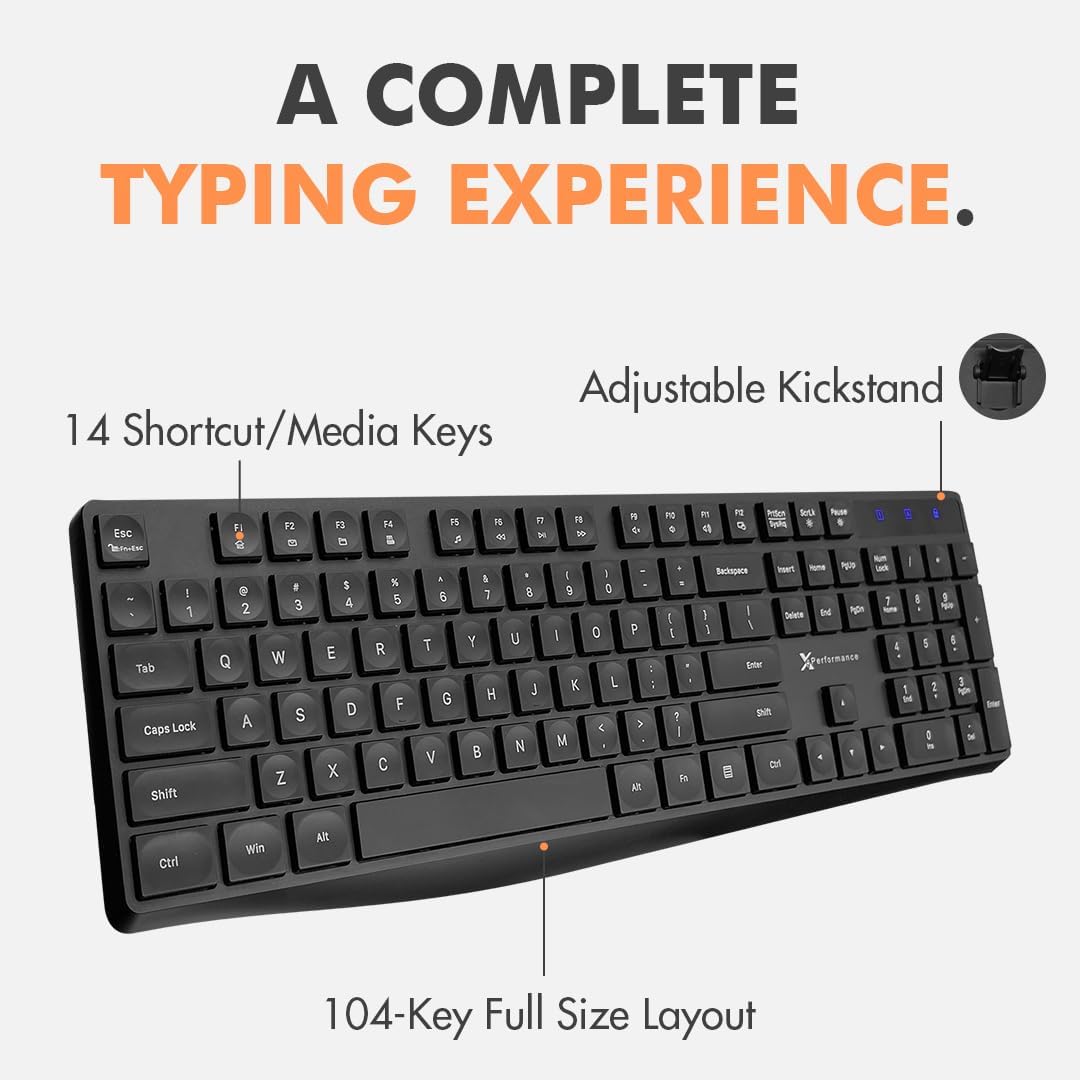
Image: The X9 Performance wired keyboard, highlighting its 104-key full-size layout and 14 shortcut/media keys.
Operating Instructions - Mouse
The X9 Performance wired mouse offers precise control and an ergonomic design.
- Basic Functions: Use the left and right click buttons for standard operations. The scroll wheel allows for vertical scrolling and can also function as a middle click button.
- DPI Adjustment: The mouse features a DPI button, typically located behind the scroll wheel. Press this button to cycle through different sensitivity settings: 1000, 1600, 2400, and 3200 DPI. Choose the setting that best suits your preference and task.
- Side Buttons: Two side buttons are provided for quick navigation, commonly configured as 'Forward' and 'Back' in web browsers and file explorers.
- Ergonomic Design: The ambidextrous shape is designed for comfortable use by both left and right-handed users. The included memory foam mouse pad provides wrist support to reduce strain during extended use.

Image: The X9 Performance wired mouse, showcasing its ergonomic design, DPI button, and side navigation buttons.
Maintenance
To ensure the longevity and optimal performance of your X9 Performance Keyboard and Mouse Combo, follow these maintenance guidelines:
- Cleaning: Regularly clean the keyboard and mouse with a soft, dry, lint-free cloth. For stubborn dirt, slightly dampen the cloth with water or a mild, non-abrasive cleaner. Avoid spraying liquids directly onto the devices.
- Dust Removal: Use compressed air to remove dust and debris from between the keyboard keys and from the mouse's optical sensor area.
- Avoid Extreme Conditions: Do not expose the devices to extreme temperatures, direct sunlight, or high humidity.
- Cable Care: Avoid bending or twisting the USB cables excessively to prevent internal damage.
Troubleshooting
If you encounter issues with your keyboard or mouse, try the following troubleshooting steps:
- Device Not Recognized:
- Ensure the USB cables are securely plugged into the computer's USB-A ports.
- Try plugging the devices into different USB ports on your computer.
- Restart your computer.
- Check your computer's Device Manager (Windows) or System Information (Chrome OS) to see if the devices are listed.
- Keys Not Responding (Keyboard):
- Ensure the keyboard is properly connected.
- If specific keys are not working, check for any physical obstructions or debris under the keys.
- Test the keyboard on another computer to determine if the issue is with the keyboard or the computer.
- Mouse Cursor Not Moving or Erratic:
- Ensure the mouse is properly connected.
- Clean the optical sensor on the underside of the mouse.
- Ensure you are using the mouse on a suitable surface (the included mouse pad is ideal).
- Adjust the DPI setting using the DPI button on the mouse.
- Test the mouse on another computer.
If these steps do not resolve the issue, please contact X9 Performance customer support.
Specifications
| Feature | Description |
|---|---|
| Brand | X9 Performance |
| Model | B08LZLMY3B |
| Connectivity Technology | USB (Wired) |
| Compatible Devices | Laptop, Personal Computer |
| Operating System | Chrome OS, Windows OS |
| Keyboard Layout | QWERTY, Full-Size (104 keys) |
| Keyboard Special Features | 14 Shortcut/Media Keys, Adjustable Kickstand |
| Mouse Movement Detection | Optical |
| Mouse DPI Settings | 1000/1600/2400/3200 |
| Mouse Hand Orientation | Ambidextrous |
| Power Source | Corded Electric (USB) |
| Batteries Required | No |
Official Product Video
Video: An official product video from X9 Performance showcasing the features and setup of the USB Wired Keyboard and Mouse Combo.
Warranty and Support
X9 Performance values customer satisfaction. This product comes with a warranty and support:
- Warranty: Up to 2 years of warranty from the date of purchase.
- Returns: Free returns are available.
- Customer Support: Friendly support is available for any questions or issues you may encounter. Please refer to the contact information provided with your purchase or on the X9 Performance official website for assistance.