
OIVO NG-P5334-01
OIVO PS5 Dual Controller Charging Station
Model: NG-P5334-01
Introduction
This OIVO PS5 Controller Charging Station is designed to efficiently charge two PlayStation 5 DualSense or Edge controllers simultaneously. Featuring rapid charging capabilities, clear LED indicators for charging status, and an integrated on/off switch, it provides a convenient and safe charging solution for your gaming setup. Built-in protection chips ensure safety against overcharge, overcurrent, and overvoltage, allowing for safe overnight charging.

Image: The OIVO PS5 Dual Controller Charging Station with two white PS5 DualSense controllers docked, showcasing its compact design and included power cable.

Image: Overview of the charging station's key features, including 2.0-hour fast charging, clear blue and red LED indicators, a touch switch for control, and integrated safety chip for protection.
What's in the Box
Please check the contents of the package to ensure all items are present:
- 1 x OIVO PS5 Controller Charging Station
- 1 x EU Power Adapter
- 1 x USB-A to USB-C Cable
- 1 x User Manual

Image: A visual representation of the charging station and its components, emphasizing the built-in safety protections against various electrical hazards.
Setup
Follow these steps to set up your OIVO PS5 Controller Charging Station:
- Connect the Power Adapter: Insert the USB-C end of the provided cable into the Type-C input port on the charging station. Connect the USB-A end to the EU power adapter, then plug the adapter into a wall outlet.
- Alternative Power Sources: The charging station can also be powered by a PS5 console, PC, or a USB hub using the provided USB-A to USB-C cable. However, for optimal performance and charging speed, it is recommended to use the included EU power adapter.
- Place Controllers: Gently align your PS5 DualSense or Edge controllers with the charging pins on the station. Ensure the controllers are securely seated for proper contact. The station features anti-slip pads on the bottom for stability.
- Power On: Locate the On/Off switch near the USB-C port and slide it to the 'ON' position to activate the charging station.

Image: Demonstrates the flexibility of powering the charging station from different sources like a PS5 console, PC, USB hub, or a standard AC adapter.

Image: A close-up view of the charging pins, highlighting the contact points where the controller connects to the station.
Operating Instructions
Understand how to use your charging station effectively:
- Charging Process: Once controllers are correctly placed and the station is powered on, charging will begin automatically. The station is designed to fully charge two PS5 controllers in approximately 2 hours.
- LED Indicators: The front LED display clearly indicates the charging status for each controller:
- Red Light: Indicates that the controller is currently charging.
- Blue Light: Indicates that the controller is fully charged or in standby mode.
Note: The charging light on the front of the PS5 controller charging station also features a blue strip light that blinks to indicate charging, differing from the official version.
- On/Off Switch: An integrated on/off switch is located near the USB-C port, allowing you to easily turn off the LED lights or the entire charging process when not in use.
- RGB Illumination: The charging station features RGB accent lighting with 9 different modes, which can be controlled via a touch switch to enhance your gaming environment.
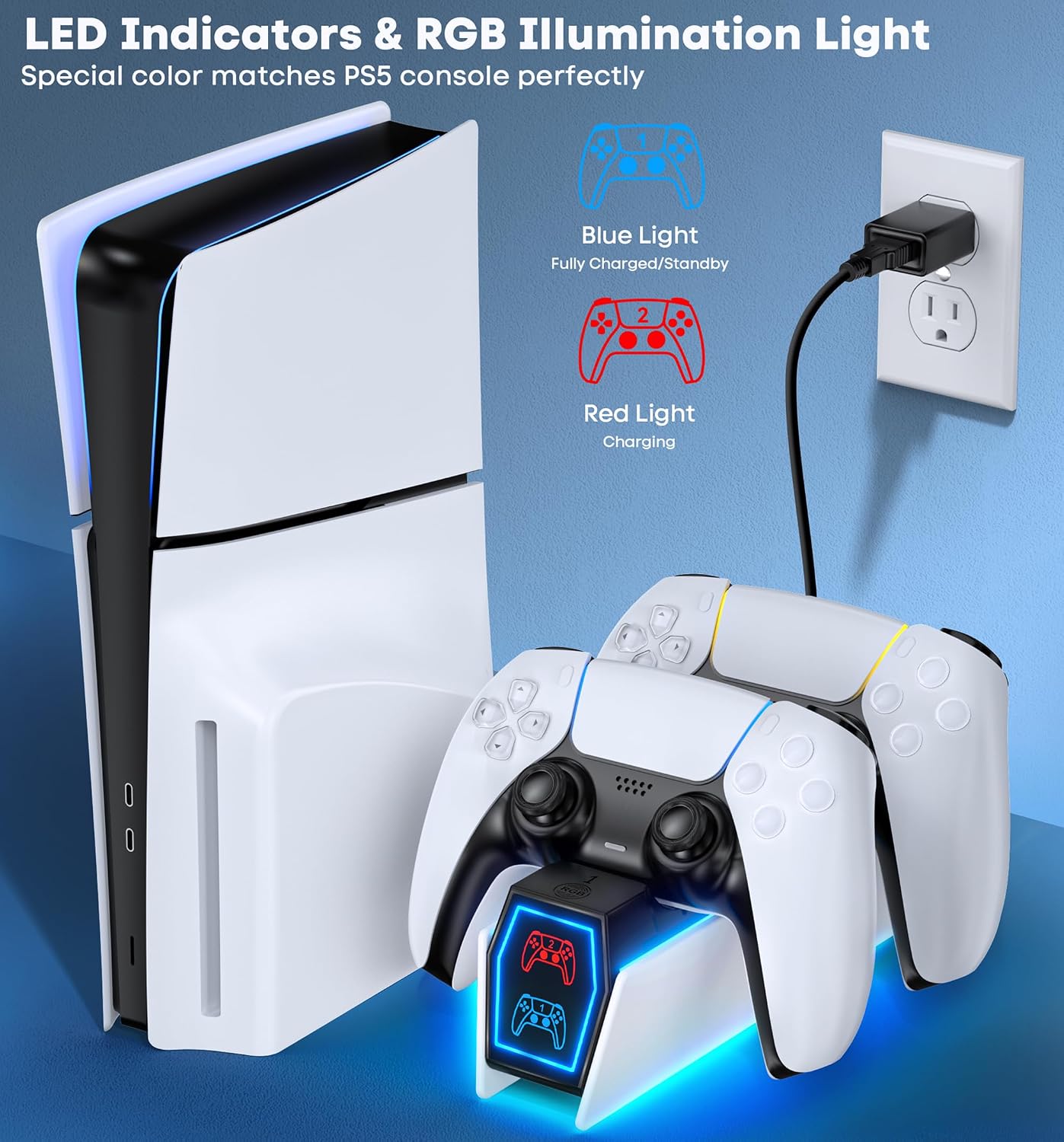
Image: The charging station positioned beside a PS5 console, clearly showing the blue and red LED indicators for charging status.

Image: A detailed view of the convenient On/Off switch located on the charging station.
Maintenance
To ensure the longevity and optimal performance of your charging station, follow these maintenance guidelines:
- Cleaning: Disconnect the power adapter before cleaning. Use a soft, dry cloth to wipe the surface of the charging station. Do not use abrasive cleaners, solvents, or harsh chemicals, as these may damage the finish.
- Storage: When not in use for extended periods, store the charging station in a cool, dry place away from direct sunlight and extreme temperatures.
- Handle with Care: Avoid dropping or subjecting the charging station to strong impacts, as this can damage internal components.
Troubleshooting
If you encounter any issues with your OIVO PS5 Controller Charging Station, please refer to the following common problems and solutions:
| Problem | Possible Cause | Solution |
|---|---|---|
| Controllers are not charging. |
|
|
| LED indicators are not lighting up. |
|
|
| Charging is slow. | Using an underpowered USB port or non-original adapter. | Use the provided EU power adapter for optimal charging speed. |
| Official PS5 controller stops charging at 70%. | Built-in protection chip in the official controller. | This is normal behavior for official PS5 controllers due to their internal protection chip. The charging station is designed to work with this feature. |
Specifications
| Model Number | NG-P5334-01 |
| Product Dimensions | 17.91 x 6.1 x 22.35 cm |
| Weight | 250 Grams |
| Connectivity Technology | USB |
| Connector Type | EU Power Adapter |
| Compatible Controllers | PS5 DualSense Controller, PS5 Edge Controller |
| Included Components | PS5 Charger, EU Power Adapter |
| Cable Length | 3 Yards |
| Special Features | Fast Charging, Short Circuit Protection, Charging Indicator |
| Color | White |
| Input Voltage | 5 Volts |
| Manufacturer | OIVO |
| Country of Origin | China |
Warranty and Support
OIVO is committed to providing high-quality products and excellent customer service. While specific warranty details may vary by region or retailer, OIVO strives to ensure customer satisfaction.
If you experience any issues with your OIVO PS5 Controller Charging Station or require technical assistance, please contact OIVO customer support through the retailer's platform or the official OIVO website. Please have your model number (NG-P5334-01) and purchase information ready when contacting support.
Ask a question about this manual
Ask about setup, troubleshooting, compatibility, parts, safety, or missing instructions. Manuals+ will review the question and use this page’s manual context to help answer it.