
Introduction
This manual provides detailed instructions for the installation, operation, and maintenance of your MOES Smart WiFi Electric Motorized Splicing Curtain Tracks System. Please read this manual thoroughly before installation and use to ensure proper function and safety.
Safety Information
- Ensure all power is disconnected before installation or maintenance.
- Do not attempt to repair or modify the device yourself. Contact qualified personnel for service.
- Keep children and pets away from the motorized curtain system during operation.
- Ensure the track system is securely mounted to prevent falling.
- Use only the specified power adapter and components.
Package Contents
Verify that all components are present before beginning installation:
- Curtain Motor
- DIY Track Sections (e.g., 1m, 0.5m, 0.2m, 0.1m)
- Track Connectors (e.g., 95mm joiners)
- Ceiling Brackets
- Carriers (Runners)
- Belt
- RF Remote Control (battery not included)
- Allen Wrench
- Fix Holder
- Power Adapter
Product Overview
The MOES Smart WiFi Electric Motorized Curtain Tracks System offers automated control of your curtains through various methods including a dedicated app, voice commands, and an RF remote. The DIY track system allows for flexible length adjustments to fit your window dimensions.

Figure 1: System Components and Dimensions. This diagram illustrates the main components such as the curtain motor, track, carriers, belt, remote, and ceiling bracket, along with key dimensions of the motor (240mm length, 71mm height, 49mm width).
Setup and Installation
1. DIY Track Splicing and Adjustment
The track system is designed for DIY assembly, allowing you to customize the length using various track sections and connectors.

Figure 2: DIY Track Components. This image displays different track lengths (1 meter, 0.5 meter, 0.2 meter, 0.1 meter) and a 95mm joiner, illustrating how tracks can be spliced together to achieve desired lengths.
You can combine 1-meter, 0.5-meter, 0.2-meter, and 0.1-meter track sections with 95mm joiners to achieve the required total length for your curtain. Refer to the "Solutions of Intelligent Curtain Model" table in the Specifications section for recommended track configurations based on total length.
2. Track Installation Steps

Figure 3: Track Installation Steps. This diagram illustrates the assembly process, including connecting track sections, inserting the belt, and securing components.
- Prepare Components: Lay out the tracks, connections, belt, carriers, and Allen wrench on a clean, flat surface.
- Assemble Tracks:
- Push the track sections into the connections. It is recommended to wear gloves to protect your fingers during this step.
- Tighten the screws on the connections. You can adjust the gap between the two tracks when tightening the screws to ensure a smooth, continuous track without gaps or dissociation.
- Install Belt:
- Measure the required length of the belt and cut it with scissors.
- Carefully put the belt into the track.
- Mounting: Securely mount the assembled track system to the ceiling using the provided ceiling brackets. Ensure the distance between the track and the wall is at least 10mm.
- Motor Installation: Install the curtain motor on the designated side of the track. Ensure the motor is properly aligned and secured.
Important Note: When using adjustable tracks (500mm, 200mm, 100mm), pay attention that the shortest track should be mounted on the head of the curtain tracks (closest to the wall) for optimal performance.
Optional accessories, such as side mounting brackets or 90-degree angle connectors, may be available and need to be customized separately.
Operating Instructions
1. Smart Life / Tuya App Control
The built-in Tuya WiFi module allows for smart control via the Smart Life App. Download the Smart Life or Tuya App from your smartphone's app store.

Figure 4: App Remote Control. This image shows a smartphone displaying the Smart Life app interface, used to remotely control the curtain system via WiFi.
- Pairing: Follow the in-app instructions to pair your curtain motor with the Smart Life/Tuya App.
- Remote Control: Once paired, you can remotely open, close, or stop your curtains from anywhere using the app.
- Scheduling: Set up schedules within the app to automatically open or close your curtains at specific times.
2. Voice Control (Alexa & Google Home)
Integrate your curtain system with Amazon Alexa or Google Home for convenient voice control.

Figure 5: Voice Control Integration. This image depicts a user interacting with Alexa and Google Home devices to control curtains using voice commands like "Alexa, open the curtain."
- Enable Skill/Service: In the Alexa or Google Home app, enable the "Smart Life" or "Tuya" skill/service.
- Discover Devices: Allow the voice assistant to discover your curtain motor.
- Voice Commands: Use simple commands such as:
- "Alexa, open the curtain."
- "Hey Google, close the living room curtains."
- "Alexa, stop the curtain."
3. RF Remote Control
The system includes an RF433 frequency remote control for direct operation without needing a smart hub.

Figure 6: RF Remote Control. This image shows a hand holding the RF remote control, demonstrating its use for direct operation of the curtain system.
- Pairing: Refer to the remote control's specific instructions for pairing with the motor.
- Operation: Use the buttons on the remote to open, close, or stop the curtains.
4. Touch Motion Control
The system supports a gentle pull start function for manual initiation of movement.

Figure 7: Touch Motion Activation. This image illustrates how a slight pull of approximately 10cm on the curtain can energize the motor, causing it to automatically open or close.
- Activation: Slightly pull the curtain in one direction by approximately 10cm.
- Automatic Movement: Once energized, the motor will automatically open or close the curtain completely.
5. Obstacle Stop and Memory Function
The system is equipped with smart reactions to resistance and self-protection features.
- Obstacle Detection: If the curtain encounters any physical obstruction during movement, it will automatically stop to protect the entire system from damage.
- Memory Position: The motor can remember an intermediate position between the fully open and fully closed states. It will slow down as it approaches this memorized stop position, as well as the full open/close positions, to ensure smooth operation and system protection.
Maintenance
- Cleaning: Periodically wipe the tracks and motor housing with a soft, dry cloth. Do not use abrasive cleaners or solvents.
- Track Inspection: Regularly check the tracks for any debris or obstructions that might hinder smooth curtain movement.
- Belt Tension: Ensure the belt maintains appropriate tension. If it appears loose or too tight, consult support.
- Battery Replacement: Replace the remote control battery as needed (typically CR2032, refer to remote for exact type).
Troubleshooting
- Curtain not moving:
- Check if the motor is properly plugged in and receiving power.
- Ensure the remote control has working batteries.
- Verify WiFi connectivity for app and voice control.
- Check for any physical obstructions in the track.
- Curtain stops unexpectedly:
- This may be due to the obstacle detection feature. Remove any obstructions.
- Check if the track is clean and free of debris.
- Remote control not responding:
- Replace the remote control battery.
- Ensure the remote is within range and pointed towards the motor (if applicable).
- Re-pair the remote with the motor if necessary.
- App or voice control not working:
- Verify your home WiFi network is active and the motor is connected.
- Check the Smart Life/Tuya app for device status.
- Ensure the Alexa/Google Home skill/service is enabled and devices are discovered.
If you encounter issues not listed here or require further assistance, please contact MOES customer support.
Specifications
| Brand Name | MOES |
| Model | Smart WiFi Electric Motorized Splicing Curtain Tracks System |
| ASIN | B08LSK5D74 |
| Control Methods | Smart Life/Tuya App (WiFi), RF Remote Control, Voice Control (Alexa/Google Home), Touch Motion |
| Motor Dimensions | Approx. 240mm (Length) x 71mm (Height) x 49mm (Width) |
| Unit Count | 1 Count |
| Manufacturer | WENZHOU NOVA NEW ENERGY CO.,LTD |
Solutions of Intelligent Curtain Model (Track Lengths)
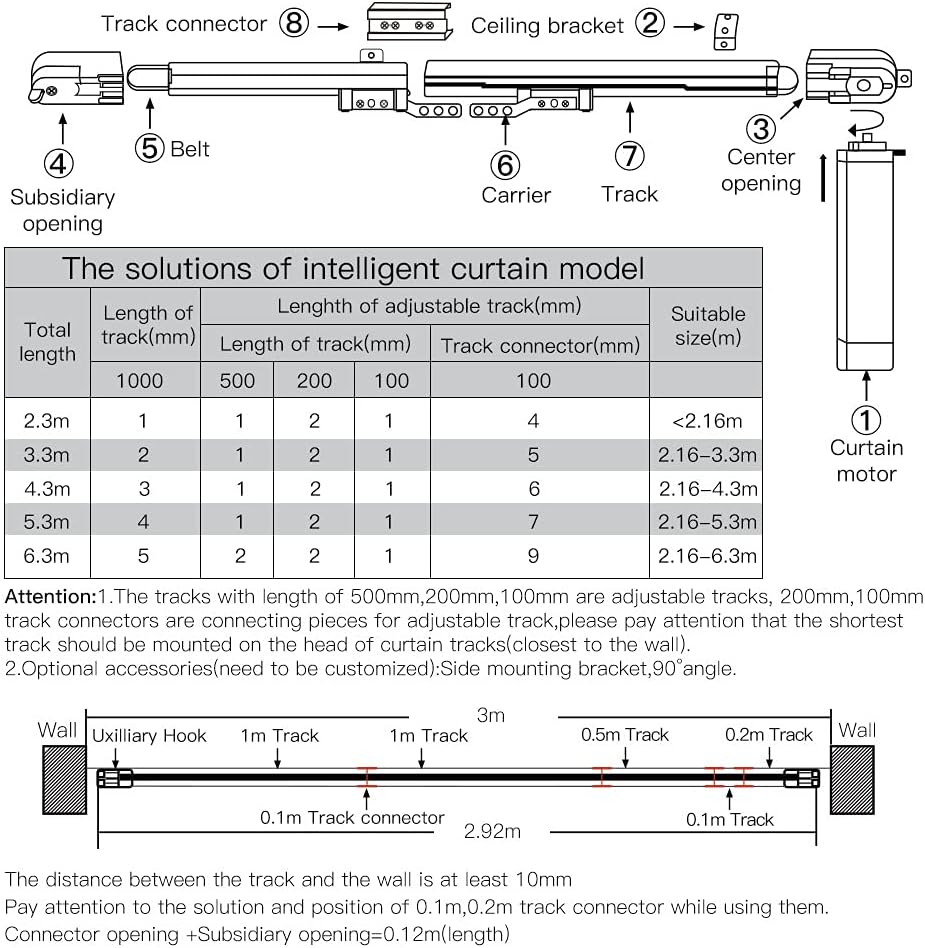
Figure 8: Track Length Configuration Table. This table provides guidance on combining different track lengths (1000mm, 500mm, 200mm, 100mm) and track connectors to achieve various total curtain lengths, along with suitable window sizes.
| Total Length | Length of adjustable track (mm) | Track connector (mm) | Suitable Size (m) | |||
|---|---|---|---|---|---|---|
| 1000 | 500 | 200 | 100 | 100 | ||
| 2.3m | 1 | 1 | 2 | 1 | 4 | <2.16m |
| 3.3m | 2 | 1 | 2 | 1 | 5 | 2.16–3.3m |
| 4.3m | 3 | 1 | 2 | 1 | 6 | 2.16–4.3m |
| 5.3m | 4 | 1 | 2 | 1 | 7 | 2.16–5.3m |
| 6.3m | 5 | 2 | 2 | 1 | 9 | 2.16–6.3m |
Order Suggestion Table:
| Total length | Order Suggestion | ||||
|---|---|---|---|---|---|
| 2.3m | <2.16m (<85.04in) | ||||
| 3.3m | 2.16–3.3m (85.04–129.92in) | ||||
| 4.3m | 2.16–4.3m (85.04–169.29in) | ||||
| 5.3m | 2.16–5.3m (85.04–208.66in) | ||||
| 6.3m | 2.16–6.3m (85.04–248.03in) | ||||
Warranty and Support
MOES products are designed for reliability and performance. For warranty information, please refer to the documentation included with your purchase or visit the official MOES website.
If you encounter any issues or have questions regarding your Smart WiFi Electric Motorized Curtain Tracks System, please contact MOES customer support for assistance. Provide your product model number (Smart WiFi Electric Motorized Splicing Curtain Tracks System) and ASIN (B08LSK5D74) when contacting support.
You can find more information and support resources on the MOES Store on Amazon.