1. Introduction
This manual provides detailed instructions for the installation, operation, and maintenance of your Minka-Aire DC Fan Wall Control, model WC1000. This wall control is designed to enhance the functionality of compatible Minka-Aire DC ceiling fans, offering convenient control over fan speeds, direction, and lighting.
Please read these instructions thoroughly before installation and use to ensure proper function and safety.

Image: Minka-Aire WC1000 Wall Control seamlessly integrated into a modern living room setting.
2. Safety Information
- Electrical Safety: Installation must be performed by a qualified electrician or a person with electrical knowledge. Always turn off power at the circuit breaker before installing or servicing the wall control.
- Compatibility: This wall control is designed exclusively for use with Minka-Aire DC ceiling fans. It is not compatible with other fan brands or AC-powered fans.
- Indoor Use Only: This device is intended for indoor use in dry locations.
- Voltage: Ensure the power supply voltage matches the requirements of the wall control (120 Volts AC).
3. Package Contents
Verify that all components are present before beginning installation:
- Minka-Aire WC1000 Wall Control Unit
- Decorative Faceplates (Brown, Ivory, and White options included)
- Mounting Screws
- Wire Connectors

Image: Minka-Aire WC1000 Wall Control, showing the main unit with a white faceplate.
4. Setup and Installation
Follow these steps for proper installation of the WC1000 Wall Control:
- Power Disconnection: Before starting, ensure the power to the ceiling fan circuit is turned off at the main electrical panel.
- Remove Existing Switch: Carefully remove the existing wall switch or cover plate from the wall box.
- Wiring: Connect the WC1000 wall control wires to the corresponding household wiring. Refer to the wiring diagram provided with your Minka-Aire fan for specific connections. Typically, this involves connecting Line In, Load Out to the fan, and Ground.
- Dip Switch Settings: The WC1000 wall control uses dip switches to communicate with your Minka-Aire fan. Ensure the dip switch settings on the WC1000 match the settings on the receiver unit inside your ceiling fan. Incorrect settings will prevent the control from operating the fan.
- Mounting: Secure the wall control unit into the wall box using the provided mounting screws.
- Faceplate Installation: Choose the desired faceplate (White, Ivory, or Brown) and snap it onto the wall control unit.
- Power Restoration: Restore power to the circuit at the main electrical panel.
- Pairing (if necessary): Some Minka-Aire fans may require a pairing process after installation. Refer to your specific fan's instruction manual for pairing procedures. This often involves turning the power on and pressing a button on the wall control within a short timeframe.

Image: Labeled diagram of the WC1000 wall control, indicating LED Light On/Off, Full Range Dimmer, 6-Speed Control, Power On/Off, and Reversible functions.
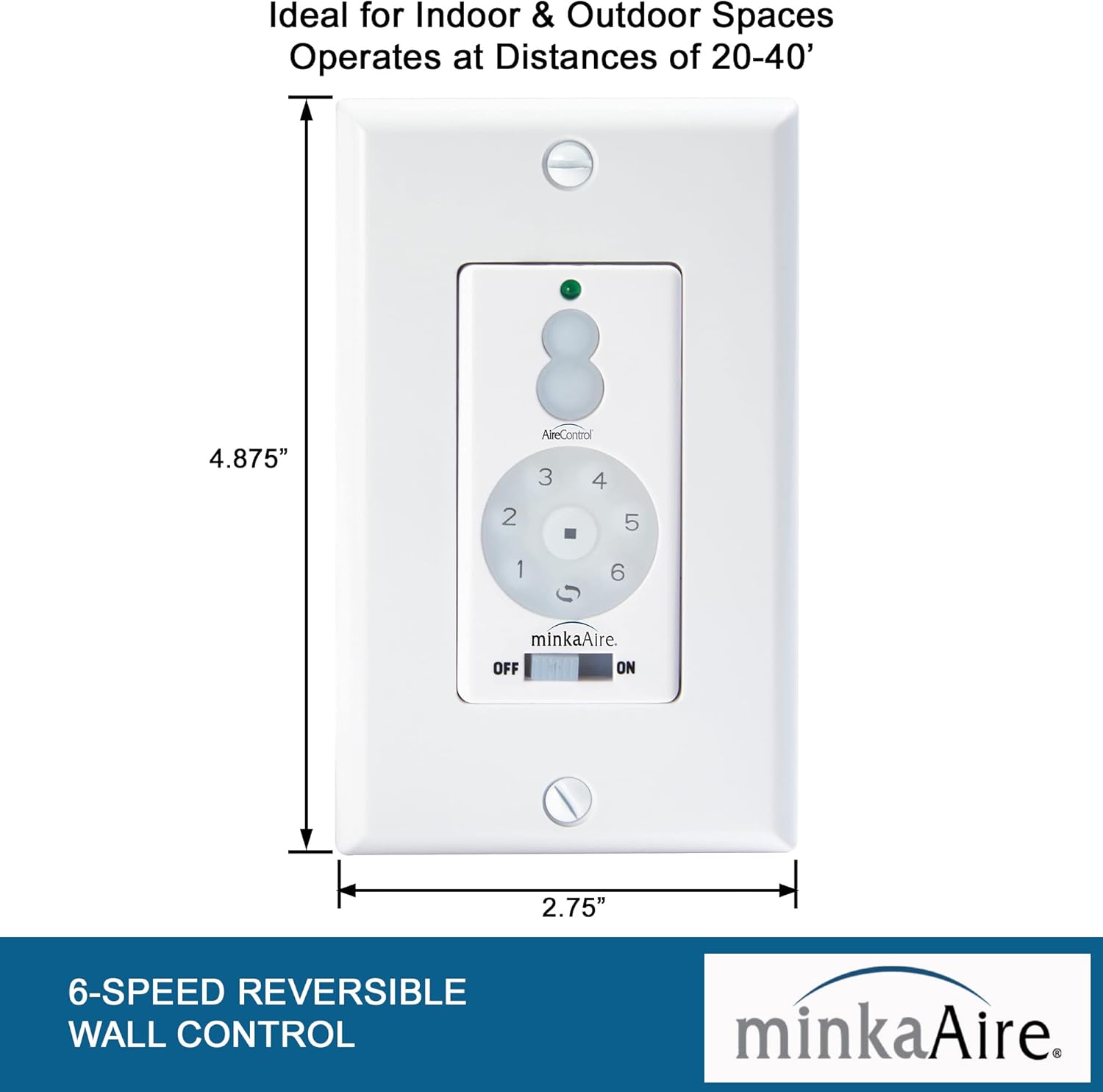
Image: Diagram showing the dimensions of the WC1000 wall control: 4.87 inches high by 2.75 inches wide.
5. Operating Instructions
The WC1000 wall control provides comprehensive control over your Minka-Aire DC ceiling fan and its integrated lighting.
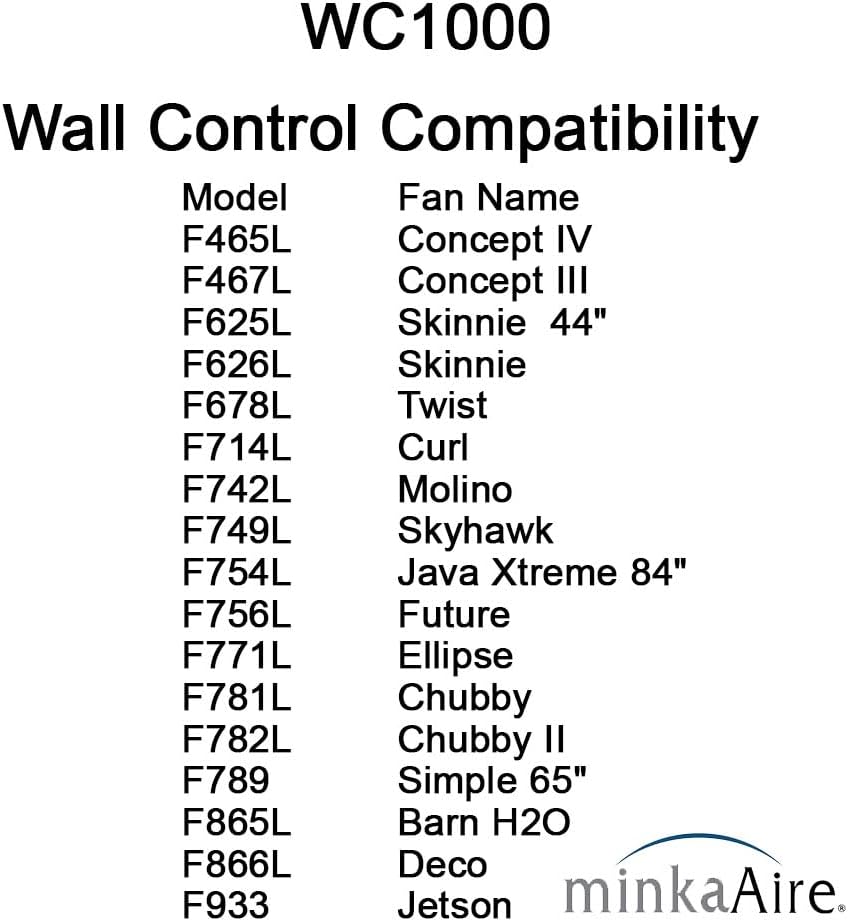
Image: Detailed diagram illustrating each button on the WC1000 wall control: Up-Light, Down-Light, Minimum Speed (1), Low Speed (2), Medium Low Speed (3), Medium Speed (4), Medium High Speed (5), High Speed (6), Stop, Reverse, and ON/OFF Switch.
- Power On/Off: Use the sliding switch at the bottom labeled "OFF" and "ON" to turn the entire unit on or off.
- Fan Speed Control: The circular button array controls the fan speed.
- Press numbers 1 through 6 to select the desired fan speed, from minimum (1) to high (6).
- Press the square Stop button in the center to turn the fan off.
- Fan Reverse Function: Press the Reverse button (curved arrow icon) to change the fan's direction. This is useful for seasonal air circulation (downward airflow for cooling in summer, upward airflow for heat distribution in winter).
- Light Control and Dimming: The two oval buttons at the top control the fan's light.
- Press the Up-Light button to turn the light on or increase brightness.
- Press the Down-Light button to turn the light off or decrease brightness.
- To dim the light, press and hold either the Up-Light or Down-Light button until the desired brightness is achieved.
6. Compatibility
The Minka-Aire WC1000 Wall Control is specifically designed for use with Minka-Aire DC ceiling fans. It is not compatible with other brands or AC-powered fans. This control can also be used in conjunction with the Minka-Aire RC1000 Handheld Remote Control and Receiver (sold separately).
The WC1000 is compatible with Smart by Bond technology, allowing for integration with smart home systems like Amazon Alexa and Google Home Assistant via the Bond Home App. Additional drivers are available for SmartThings, Control4, ELAN, and Hubitat.

Image: List of Minka-Aire fan models compatible with the WC1000 wall control, including F465L Concept IV, F678L Twist, F781L Chubby, and others.

Image: Logo indicating "Bond Compatible" with a wireless signal icon, highlighting smart home integration capabilities.
7. Specifications
| Brand | MINKA-AIRE |
| Model Name | DC Fan Wall Control WC1000 |
| Color | White (includes Brown, Ivory, and White faceplates) |
| Product Dimensions | 2"D x 2.75"W x 4.87"H |
| Item Weight | 0.46 Pounds (7.4 ounces) |
| Power Source | Corded Electric |
| Voltage | 120 Volts (AC) |
| Control Method | Touch |
| Number of Power Levels | 6 (fan speeds) |
| Indoor/Outdoor Usage | Indoor |
| UPC | 706411065712 |
8. Troubleshooting
If you encounter issues with your WC1000 Wall Control, refer to the following common problems and solutions:
- Fan or Light Not Responding:
- Ensure the main power switch on the wall control is in the "ON" position.
- Verify that power is supplied to the circuit breaker.
- Check the dip switch settings on the WC1000 and the fan's receiver. They must match.
- If recently installed, ensure the pairing process (if required by your fan model) was completed successfully.
- Blue LED Indicator is Too Bright:
Some users find the blue LED indicator light to be excessively bright, especially in bedrooms. While there is no official setting to adjust its brightness, a common user modification involves carefully applying a small piece of electrical tape over the LED from the inside of the faceplate to reduce its intensity. This modification is not officially supported and should be done with caution.
- Intermittent Operation:
- Check for loose wiring connections at the wall control and the fan receiver.
- Ensure the operating range (20-40 feet) is not exceeded and there are no significant obstructions (e.g., thick walls) interfering with the signal.
9. Maintenance
The Minka-Aire WC1000 Wall Control requires minimal maintenance.
- Cleaning: Wipe the surface of the wall control with a soft, dry cloth. Do not use abrasive cleaners, solvents, or harsh chemicals, as these can damage the finish.
- No User-Serviceable Parts: The internal components of the wall control are not user-serviceable. Do not attempt to open or repair the unit yourself.
10. Warranty and Support
For warranty information, please refer to the documentation provided with your Minka-Aire ceiling fan or visit the official Minka-Aire website. Protection plans may also be available for purchase separately.
If you require technical assistance or have questions not covered in this manual, please contact Minka-Aire customer support through their official channels.


