
1. Introduction
Thank you for purchasing the JJC TP-S1 Wireless Bluetooth Remote Control Shooting Grip Mini Tabletop Tripod. This versatile accessory is designed to enhance your photography and videography experience with compatible Sony cameras. It functions as both a comfortable shooting grip and a stable tabletop tripod, featuring a detachable Bluetooth remote for convenient wireless control.
2. Product Overview
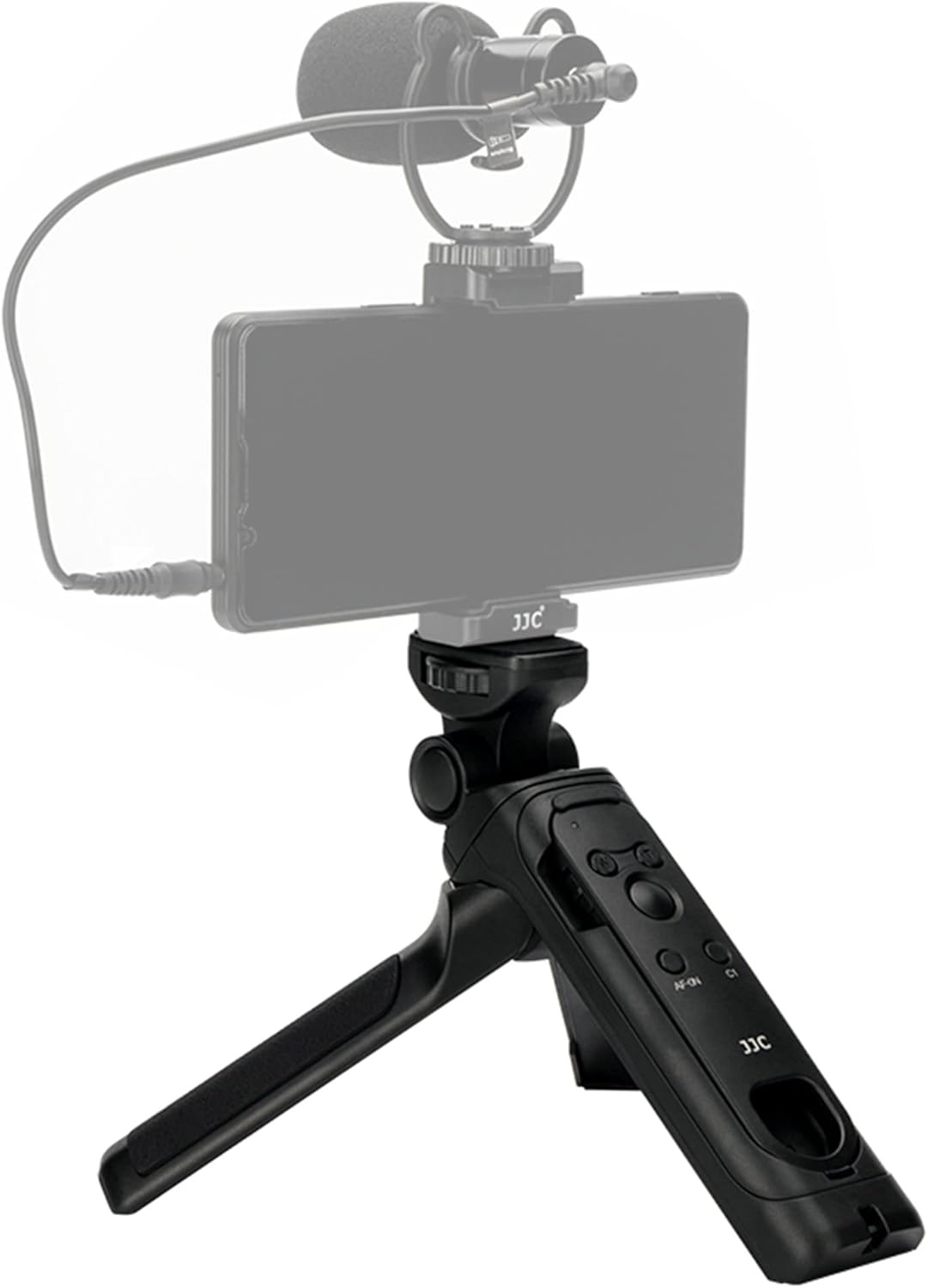
The JJC TP-S1 is engineered for flexibility and ease of use, making it ideal for vlogging, live streaming, and self-portraits. Its compact design allows for easy portability, while robust construction ensures stability for your camera equipment.
- Dual Functionality: Seamlessly switches between a comfortable handheld shooting grip and a stable mini tabletop tripod.
- Detachable Bluetooth Remote: The built-in remote is removable and replaces the Sony RMT-P1BT remote commander, offering wireless control of your camera's shutter and video functions.
- Wide Operating Range: Control your camera wirelessly via Bluetooth within a 32 ft (10m) operating range in any direction.
- Flexible Head: The integrated head can be tilted 180 degrees and rotated 360 degrees, allowing for diverse shooting angles.
- Enhanced Grip: Non-slip pads on the grip provide a secure hold and improve stability, reducing camera shake during shooting.

3. Compatibility
This device is compatible with a wide range of Sony cameras, including but not limited to:
- Sony A1 Mark II, A7CR, A7CII, A6700
- Sony ZV-E10 II, ZV-1 II, ZV-E1, ZV-1F, FX30, ZV-E10, ZV-1
- Sony A1, A7C, A9, A9II, A9III
- Sony A7R V, A7R IV, A7R III, A7R II
- Sony A7S III, A7S II
- Sony A7 III, A7 II
- Sony A6600, A6500, A6400, A6300, A6100, A6000
- Sony RX100 Series cameras
4. Components
4.1. Shooting Grip / Tripod
The main body of the device serves as both a comfortable grip and a stable tripod. It features a standard 1/4"-20 mounting screw for attaching your camera.

4.2. Detachable Bluetooth Remote
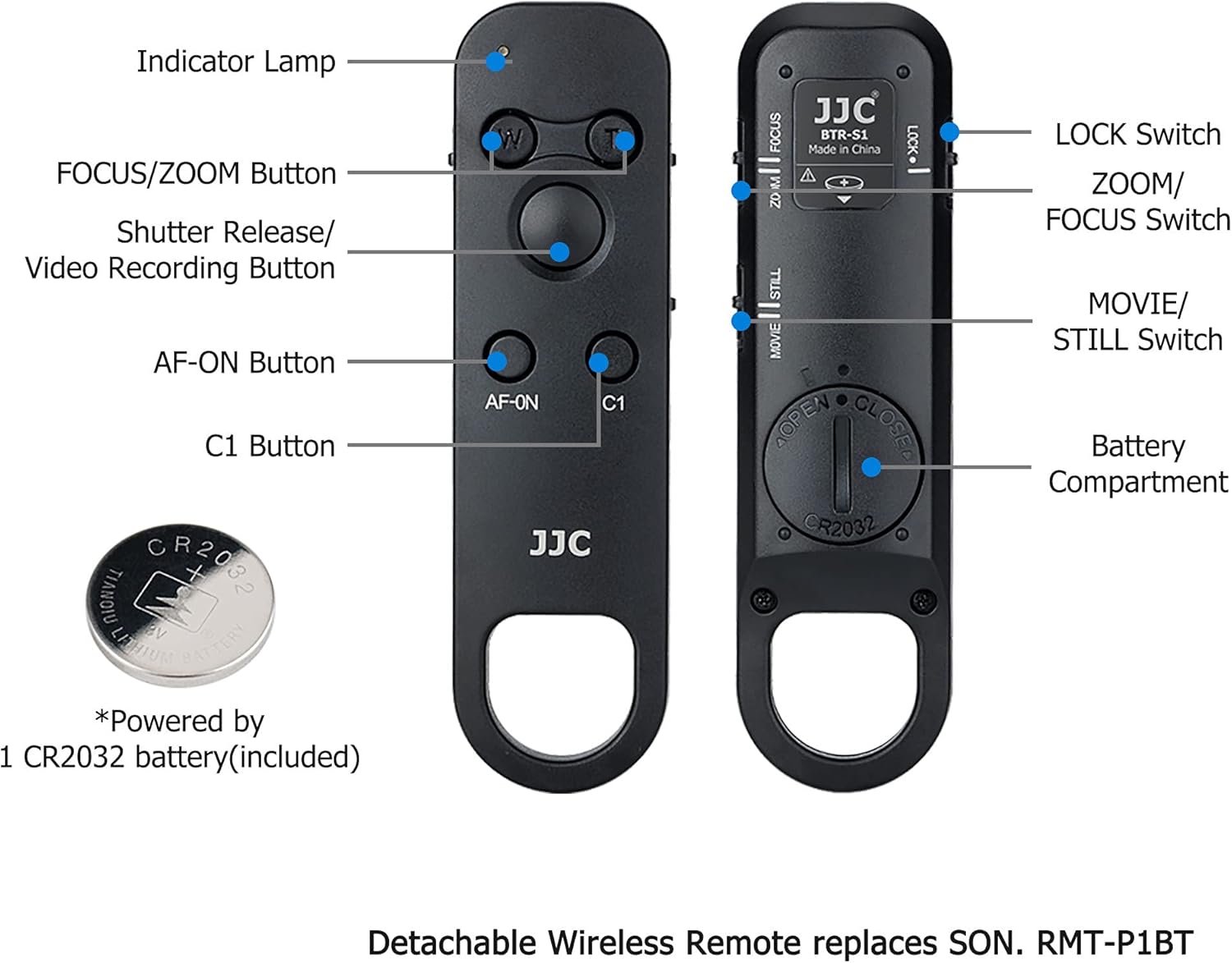
The remote control unit slides into the grip and can be easily detached for wireless operation. It is powered by a CR2032 battery (included).
5. Setup
5.1. Attaching Your Camera
- Locate the 1/4"-20 mounting screw on the top of the shooting grip.
- Align your camera's tripod socket with the screw.
- Rotate the camera clockwise to securely fasten it to the grip. Use the thumbwheel on the grip for extra tightening.
5.2. Pairing the Bluetooth Remote
To enable wireless control, you must pair the remote with your compatible Sony camera via Bluetooth. Refer to your camera's instruction manual for specific Bluetooth pairing steps if needed.
- Ensure the remote control is inserted into the grip or held separately.
- On the remote, slide the LOCK switch to the UNLOCK position.
- Press and hold the Pairing button (often indicated by a Bluetooth symbol or 'Pair') on the remote for approximately 3 seconds until the indicator lamp starts flashing.
- On your Sony camera, navigate to the 'Network' or 'Bluetooth' settings in the menu.
- Select 'Bluetooth Function' and then 'Pairing'.
- Confirm the pairing on your camera when the device name (e.g., 'BRD-DBB1') appears.
- Once paired, the indicator lamp on the remote will stop flashing and remain lit, or turn off, indicating a successful connection.
6. Operating the Device
6.1. Using as a Shooting Grip
Hold the grip comfortably in your hand. The ergonomic design and non-slip pads ensure a steady hold for shooting photos or videos on the go.

6.2. Using as a Mini Tripod
To convert to a tripod, simply spread the legs of the grip outwards until they lock into a stable position. Place it on a flat surface for steady shots.

6.3. Adjusting Camera Angle
The integrated head allows for flexible camera positioning:
- Tilt: Press the button on the side of the ball head to adjust the camera's vertical tilt up to 180 degrees. Release the button to lock the angle.
- Rotation: The camera can be rotated 360 degrees horizontally for panoramic shots or quick changes in composition.

6.4. Remote Control Functions
Once paired, the remote provides the following controls:
- Shutter Release / Video Recording Button: Press to take a photo or start/stop video recording.
- FOCUS/ZOOM Buttons (W/T): Use to zoom in/out or adjust focus, depending on the camera's mode.
- AF-ON Button: Activates autofocus.
- C1 Button: Customizable function button (refer to your camera's manual for C1 function assignment).
- MOVIE/STILL Switch: Toggles between movie and still image shooting modes.
- LOCK Switch: Prevents accidental button presses.
7. Maintenance
- Keep the device clean by wiping it with a soft, dry cloth.
- Avoid exposing the device to extreme temperatures, humidity, or direct sunlight.
- Store the device in a cool, dry place when not in use.
- If the remote control battery (CR2032) runs low, replace it promptly.
8. Troubleshooting
- Remote not responding: Ensure the remote is paired correctly with your camera and the LOCK switch is in the UNLOCK position. Check the CR2032 battery.
- Intermittent connection: Ensure there are no obstructions between the remote and the camera, and that you are within the 10m operating range.
- Camera not stable on tripod: Ensure the camera is securely mounted with the thumbwheel tightened. Verify the tripod legs are fully extended and locked.
9. Specifications
| Feature | Specification |
|---|---|
| Model Number | TP-S1 |
| Package Dimensions | 8.5 x 3.27 x 2.05 inches |
| Item Weight | 8.8 ounces (0.55 Pounds) |
| Batteries | 1 Lithium Metal battery (CR2032, included) |
| Maximum Height | 193.5 Millimeters (7.6 inches) |
| Folded Size | 35*40*150mm |
| Tripod Head Type | Pan Heads |
| Special Feature | Adjustable, Flexible, Rotatable |
10. Warranty and Support
For warranty information or technical support, please refer to the documentation included with your product or visit the official JJC website. Keep your purchase receipt for warranty claims.


