
1. Introduction
This manual provides essential instructions for the proper setup, operation, and maintenance of your Dalmbox Quick Access Handgun Safe. Please read this manual thoroughly before using the safe to ensure optimal performance and security. This safe is designed for secure storage of handguns, ammunition, and other valuables, providing quick access when needed.
2. Safety Guidelines
- Always store firearms unloaded and separate from ammunition.
- Keep the safe locked at all times when not in use.
- Store backup keys in a secure location away from the safe and out of reach of children.
- Do not share your digital code with unauthorized individuals.
- Ensure the safe is placed on a stable surface and, if possible, secured to prevent unauthorized removal.
- Keep children away from the safe and its contents.
3. Product Components
Familiarize yourself with the key components of your Dalmbox Handgun Safe:


4. Setup
4.1 Battery Installation
The safe requires four (4) AA alkaline batteries for operation. Ensure batteries are inserted with the correct polarity.
- Use the backup key to open the safe.
- Locate the battery compartment inside the safe.
- Insert four AA alkaline batteries, observing the correct positive (+) and negative (-) terminals.
- Close the battery compartment cover.
4.2 Setting the Digital Code
The safe allows for a 3-8 digit programmable code. Follow these steps to set your personal code:
- With the safe open, press and hold the Reset button located inside the safe for 3 seconds. You will hear two beeps, and the green lights will flash twice.
- Enter your desired 3-8 digit code on the keypad.
- Press and hold the Reset button again for 3 seconds. You will hear two beeps, and the yellow lights will flash twice.
- Enter the same code again to confirm.
- Press and hold the Reset button for 3 seconds. If you hear two beeps with green lights flashing twice, your new digital code is successfully programmed.
4.3 Installing the Removable Shelf
The safe includes a removable metal shelf for organizing contents.

To install, simply slide the metal plate into the designated slots inside the safe. To remove, lift and pull out.
4.4 Product Dimensions
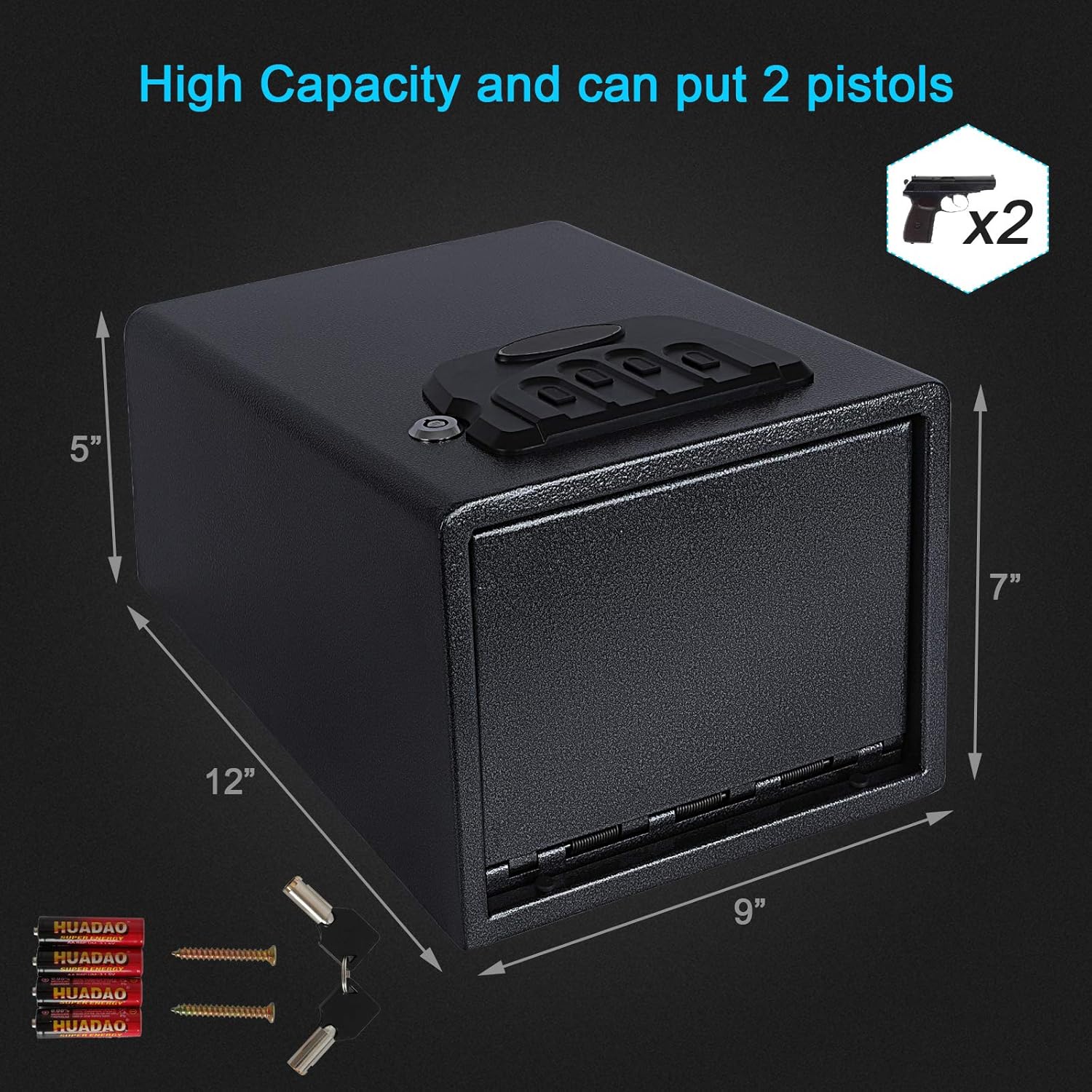
The safe measures approximately 9 inches (W) x 12 inches (D) x 7 inches (H), making it suitable for various placements such as under a car seat, in a suitcase, or a drawer.
4.5 Setup and Operation Video Guide
For a visual guide on setting up your safe and programming the digital code, please watch the video below:
5. Operating Instructions
5.1 Opening with Digital Code
To open the safe using your programmed digital code:
- Enter your 3-8 digit code on the keypad.
- The safe door will automatically pop open.
5.2 Opening with Backup Key
In case of forgotten code or battery depletion, use the backup key:
- Insert the backup key into the keyhole.
- Turn the key to unlock the safe.
- The safe door will pop open.
5.3 Alarm Mode
The safe is equipped with an alarm system for enhanced security:
- An alarm will sound for 1 minute if the safe is tampered with or moved.
- If an incorrect code is entered 3 times in succession, the alarm will activate, and the safe will lock for 2 minutes.
- To silence the alarm, remove the batteries.
- Audible beeps during operation can be muted by pressing the first button on the keypad.
6. Maintenance
- Regularly check battery levels and replace them when low to ensure continuous operation.
- Clean the exterior of the safe with a soft, dry cloth. Avoid abrasive cleaners.
- Do not lubricate the locking mechanism or keypad.
- Ensure the safe is kept in a dry environment to prevent rust.
7. Troubleshooting
| Problem | Possible Cause | Solution |
|---|---|---|
| Safe does not open with digital code. | Incorrect code entered; low batteries. | Re-enter the correct code. Replace batteries. Use backup key to open. |
| Alarm sounds unexpectedly. | Safe was moved or tampered with; incorrect code entered multiple times. | Ensure safe is stable. Enter correct code. Remove batteries to reset alarm if necessary. |
| Keypad is unresponsive. | Dead batteries. | Replace all four AA batteries with new alkaline batteries. |
| Safe door does not pop open smoothly. | Obstruction; worn mechanism. | Check for any obstructions around the door. Contact customer service if issue persists. |
8. Specifications
| Feature | Detail |
|---|---|
| Brand | Dalmbox |
| Model Number | O0-R1MZ-YJMB |
| Product Dimensions | 7"D x 9"W x 12"H |
| Lock Type | Electronic, Key |
| Color | Black |
| Material | Alloy Steel |
| Special Feature | Alarm System |
| Mounting Type | Freestanding, Tabletop |
| Included Components | Key |
| Alarm | Audible |
| Water Resistance Level | Not Water Resistant |
| UPC | 613497817244 |
9. Warranty and Support
Dalmbox is committed to customer satisfaction. If you have any questions regarding your product, require technical assistance, or need to address any issues, please contact Dalmbox customer service. We aim to provide a satisfactory response as quickly as possible.
Please refer to your purchase documentation for specific warranty terms and contact information.