
Introduction
Thank you for purchasing the DINDIN A109s-01 Wireless Bluetooth Speaker. This manual provides essential information for the safe and efficient operation of your device. Please read it thoroughly before use and retain it for future reference.
Product Features
- 10W HD Sound with Enhanced Bass
- Durable Wood Body Design
- Four Stereo Loud Speakers
- Dynamic LED Lights for Ambiance
- Multiple Connectivity: Bluetooth 5.0, TF Card, AUX, USB
- Built-in FM Radio
- Portable Design with Integrated Handle
- Multi-functional Phone Stand Holder
- Remote Control Operation
Package Contents
Please check the package for the following items:
- 1x DINDIN A109s-01 Bluetooth Speaker
- 1x Remote Control
- 1x AUX Cable
- 1x USB Charging Cable
- 1x User Manual
Product Overview
Familiarize yourself with the speaker's components and controls.

Figure 1: Internal Speaker Components. This image displays an exploded view of the DINDIN A109s-01 speaker, highlighting its two woofers and two tweeters designed for deep bass and clear high-frequency sound reproduction.
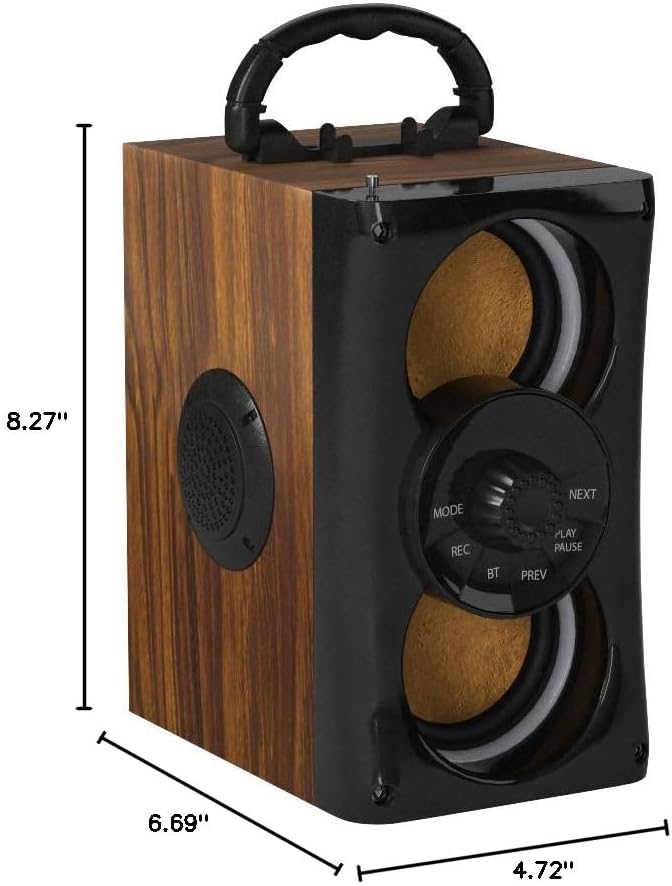
Figure 2: Product Dimensions. The speaker measures 8.27 inches in height, 6.69 inches in width, and 4.72 inches in depth, indicating its compact and portable design.

Figure 3: Connectivity Options. This image illustrates the multiple input options available on the speaker, including USB, TF Card, Bluetooth, AUX, and Microphone ports for versatile audio playback.

Figure 4: Multi-functional Phone Stand Holder. The speaker features a convenient integrated stand holder at the top, allowing users to place their smartphone for hands-free viewing while enjoying audio.
Setup
1. Charging the Speaker
Before first use, fully charge the speaker. Connect the provided USB charging cable to the speaker's charging port and a compatible USB power adapter (not included). The charging indicator light will show charging status. A full charge takes approximately 3 hours.
2. Power On/Off
To power on the speaker, press and hold the Power button until the LED lights illuminate and you hear an audible prompt. To power off, press and hold the Power button again.
Operating Instructions
1. Bluetooth Pairing
- Power on the speaker. It will automatically enter Bluetooth pairing mode, indicated by a flashing 'BT' on the display and an audible prompt.
- Enable Bluetooth on your smartphone or other device.
- Search for "DINDIN A109s-01" in the list of available devices and select it to pair.
- Once successfully paired, you will hear a confirmation sound, and the 'BT' indicator will stop flashing.
- You can now play audio from your device through the speaker.
2. FM Radio Mode
- Press the 'MODE' button to switch to FM Radio mode.
- Extend the antenna for better reception.
- Press and hold the 'PLAY/PAUSE' button to automatically scan and save available FM stations.
- Use the 'PREV' and 'NEXT' buttons to navigate between saved stations.
3. TF Card / USB Playback
- Insert a TF card or USB drive (with MP3 audio files) into the respective slot.
- The speaker will automatically detect the storage device and begin playing music.
- Use the 'PLAY/PAUSE', 'PREV', and 'NEXT' buttons to control playback.
4. AUX Input
- Connect one end of the provided AUX cable to the speaker's AUX port and the other end to the audio output of your external device.
- Press the 'MODE' button to switch to AUX mode.
- Control playback from your external device.
5. Recording Function
To use the recording function, ensure a TF card or USB drive is inserted. Press the 'REC' button to start recording. Press it again to stop and save the recording.
6. LED Lights
The speaker features dynamic LED lights that synchronize with the music. These lights can be toggled on or off using the dedicated light button on the control panel or remote control.

Figure 5: Dynamic LED Lights. The speaker's LED lights create an engaging visual experience, ideal for party environments or enhancing the listening atmosphere.
Specifications
| Feature | Specification |
|---|---|
| Output Power | 5W + 2.5W x 2 (Total 10W) |
| Frequency Response | 80Hz-20KHz |
| Input Impedance | 10 kohm |
| Input Voltage | DC 5V ---1A |
| Charging Time | Approximately 3 hours |
| Playing Time | Approximately 3-6 hours (depends on playing volume) |
| Battery Capacity | 3.7V, 2000mAh |
| Connectivity Technology | Auxiliary, Bluetooth, USB |
| Bluetooth Version | 5.0 |
| Bluetooth Range | 10 Meters |
| Audio Output Mode | Stereo (4.0 Channels) |
| Dimensions (D x W x H) | 4.72"D x 6.69"W x 8.27"H |
| Additional Functions | MP3 music player, FM radio, TF Card, AUX, USB music player, Remote control, Recording |
Maintenance
- Keep the speaker away from water, moisture, and direct sunlight.
- Clean the speaker with a soft, dry cloth. Do not use abrasive cleaners or solvents.
- Store the speaker in a cool, dry place when not in use for extended periods.
- Avoid dropping or subjecting the speaker to strong impacts.
Troubleshooting
| Problem | Possible Cause | Solution |
|---|---|---|
| No power | Battery is depleted. | Charge the speaker fully. |
| Cannot pair via Bluetooth | Bluetooth is not enabled on your device or speaker is not in pairing mode. | Ensure Bluetooth is active on your device and the speaker is in pairing mode. Move devices closer. |
| Poor FM reception | Antenna not extended or weak signal. | Extend the antenna fully. Try repositioning the speaker. |
| No sound from TF card/USB | Incorrect file format or faulty storage device. | Ensure files are in MP3 format. Try a different TF card or USB drive. |
Safety Information
- Do not disassemble, repair, or modify the speaker.
- Avoid exposing the speaker to extreme temperatures.
- Do not use the speaker near water or in wet conditions.
- Keep out of reach of children.
- Dispose of the battery according to local regulations.
Official Product Videos
DINDIN Bluetooth Speaker with Happy
This video demonstrates the DINDIN Bluetooth Speaker in use, showcasing its features and sound quality in a lively setting. It highlights the speaker's portability and ease of use for various occasions.
Wireless Bluetooth Speaker Overview
An official overview video of the DINDIN Wireless Bluetooth Speaker, detailing its design, functionality, and various connectivity options. This video provides a comprehensive look at the product's capabilities.
Warranty and Support
For warranty information and customer support, please refer to the contact details provided on the product packaging or visit the official DINDIN website. Keep your purchase receipt as proof of purchase for warranty claims.