
Phasemation PP-200
PHASEMATION PP-200 MC Cartridge User Manual
Introduction
Thank you for purchasing the Phasemation PP-200 MC Cartridge. This moving coil cartridge is engineered to deliver exceptional audio fidelity, featuring advanced design and high-quality materials. To ensure optimal performance and longevity, please read this manual thoroughly before installation and use.
Key Features
- Powerful Magnetic Circuit: Utilizes neodymium magnets for increased output and robust sound quality.
- Improved Trackability: Enhanced vibration system design for superior tracing ability.
- High-Quality Materials: Inherits premium materials from higher-end models, including a diamond stylus tip, solid boron cantilever, and 6N oxygen-free copper wire for the generating coils.
- New Generation Body Structure: Features a newly shaped body designed to control unwanted vibrations, resulting in direct and clear sound reproduction.
Setup
Unpacking
Carefully remove the PP-200 cartridge from its packaging. Retain all packaging materials for future transport or storage.
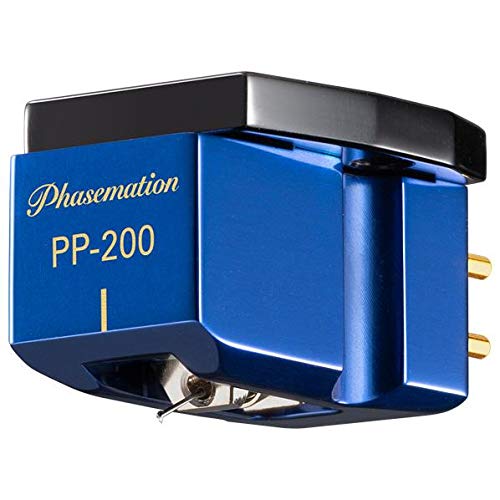
Figure 1: The Phasemation PP-200 MC Cartridge, a blue-bodied moving coil cartridge with gold-plated pins and a diamond stylus. The brand name "Phasemation" and model "PP-200" are visible on its side.
Mounting the Cartridge
The PP-200 cartridge should be mounted securely to your tonearm's headshell. Use non-magnetic screws and ensure a firm, level attachment. Refer to your tonearm's manual for specific mounting instructions and alignment procedures.
Recommended Mounting Procedure:
- Attach the cartridge to the headshell using the provided screws, ensuring they are finger-tight.
- Connect the tonearm wires to the corresponding pins on the cartridge. Ensure correct polarity (Red for Right+, Green for Right-, White for Left+, Blue for Left-).
- Adjust the cartridge position on the headshell for proper alignment (e.g., using a protractor).
- Tighten the mounting screws gently but firmly. Avoid overtightening.
Tracking Force Adjustment
Set the tracking force according to the specifications to ensure optimal performance and minimize record wear.
Recommended Tracking Force: 1.7g to 2.0g
Use a reliable tracking force gauge for accurate adjustment.
Anti-Skating Adjustment
Adjust the anti-skating mechanism on your tonearm to balance the inward force exerted by the stylus in the record groove. This helps maintain even pressure on both groove walls and improves stereo separation.
VTA/SRA Adjustment
Adjust the Vertical Tracking Angle (VTA) and Stylus Rake Angle (SRA) by raising or lowering the tonearm pivot. This fine-tuning can significantly impact sound quality. Experiment with small adjustments to find the optimal setting for your system.
Operating
Playback
Once the cartridge is properly installed and aligned, you can begin playing records. Ensure your phono preamplifier is set to the appropriate MC (Moving Coil) input with the correct impedance loading.
Recommended Impedance: 4Ω
Gently lower the tonearm onto the record using the cueing lever. Avoid dropping the stylus onto the record surface.
Break-in Period
Like many high-fidelity components, the PP-200 cartridge may benefit from a break-in period. Optimal sound quality is typically achieved after approximately 30-50 hours of playback.
Maintenance
Stylus Cleaning
Regularly clean the stylus tip to remove dust and debris that can accumulate during playback. Use a soft brush designed for stylus cleaning, brushing gently from back to front.
Avoid using harsh solvents or excessive force, as this can damage the stylus or cantilever.
Cartridge Body Cleaning
Wipe the cartridge body with a soft, dry, lint-free cloth to remove dust. Do not use abrasive cleaners or solvents.
Storage
When not in use for extended periods, store the cartridge in its original protective packaging to prevent damage to the stylus and cantilever.
Troubleshooting
If you experience issues with your PP-200 cartridge, refer to the following common problems and solutions:
| Problem | Possible Cause | Solution |
|---|---|---|
| No Sound or Low Output | Incorrect wiring; Phono stage not set to MC; Damaged stylus/cantilever. | Check wiring connections; Ensure phono stage is set to MC and correct impedance; Inspect stylus for damage. |
| Distorted Sound | Incorrect tracking force; Improper alignment; Dirty stylus; Worn stylus. | Adjust tracking force; Re-align cartridge; Clean stylus; Consider stylus replacement if worn. |
| Skipping or Sibilance | Insufficient tracking force; Incorrect anti-skating; Damaged record. | Increase tracking force slightly; Adjust anti-skating; Inspect record for damage. |
If the problem persists, please contact Phasemation customer support or your authorized dealer.
Specifications
| Parameter | Value |
|---|---|
| Generating Method | Moving Coil |
| Impedance | 4Ω |
| Recommended Tracking Force | 1.7g ~ 2.0g |
| Output Voltage | 0.3mV or more (1kHz 50mm/s horizontal) |
| Compliance | 8.5μ/mN [8.5x10⁻⁶cm/dyne] |
| Playback Frequency Range | 10Hz ~ 30kHz |
| Separation | 25dB or more (1kHz) |
| Channel Balance | Within 1dB (1kHz) |
| Cantilever | Solid Boron φ0.26 |
| Magnet | Neodymium |
| Magnetic Circuit Material | Pure Iron |
| Base Material | Duralumin Machined |
| Body Material | Aluminum Machined |
| Body Weight | 10.5g |
| Stylus Tip | Diamond (Line Contact / Curvature 0.03 x 0.003mm) |
| Package Dimensions | 10.8 x 8 x 6.8 cm |
| Package Weight | 150 g |
Warranty and Support
For warranty information and technical support, please refer to the official Phasemation website or contact your authorized dealer. Keep your purchase receipt as proof of purchase.
Related documentsPP-200


Ask a question about this manual
Ask about setup, troubleshooting, compatibility, parts, safety, or missing instructions. Manuals+ will review the question and use this page’s manual context to help answer it.