
Introduction
Thank you for purchasing the Crestlive Products Writing Computer Desk. This manual provides detailed instructions for the assembly, operation, maintenance, and troubleshooting of your new desk. Please read all instructions carefully before assembly and retain this manual for future reference.
Safety Information
Please observe the following safety precautions during assembly and use:
- Keep all packaging materials away from children.
- Ensure all parts are present and undamaged before beginning assembly. Do not use if any parts are missing or damaged.
- Assemble the desk on a soft, clean surface to prevent scratches.
- It is recommended that two adults assemble this product.
- Do not overtighten screws, as this may damage the material.
- Do not stand or sit on the desk.
- Place the desk on a level surface to prevent tipping.
- Do not exceed the maximum weight recommendation of 100 pounds for the desktop.
Parts List
Before assembly, verify that all components listed below are present. All necessary assembly tools are included with the product.

This diagram illustrates the key dimensions of the desk, including its length (47.24 inches), width (20.08 inches), and height (29.92 inches). It also details the dimensions of the keyboard tray, drawer, and shelf compartments.
Refer to the included assembly diagram for a complete list of parts and hardware.
Setup and Assembly
Follow these general steps for assembling your writing computer desk. A detailed step-by-step guide with illustrations is provided in the separate assembly instruction sheet included in the packaging.
- Unpack Components: Carefully remove all parts from the packaging. Lay them out on a clean, soft surface to prevent damage.
- Identify Hardware: Separate and identify all screws, dowels, and other hardware components using the provided hardware list.
- Assemble Frame: Begin by assembling the main frame of the desk according to the instructions, ensuring all connections are secure but not overtightened.
- Install Keyboard Tray and Drawer Slides: Attach the metal slides for the keyboard tray and the main storage drawer as directed. Ensure they are aligned correctly for smooth operation.
- Attach Shelves and Panels: Secure the internal shelves and back panels.
- Install Drawer and Keyboard Tray: Insert the assembled drawer and keyboard tray into their respective slides. Test for smooth movement.
- Final Tightening: Once the desk is fully assembled, gently tighten all screws to ensure stability. Do not overtighten.
- Placement: Position the desk in your desired location, ensuring it is stable and level.
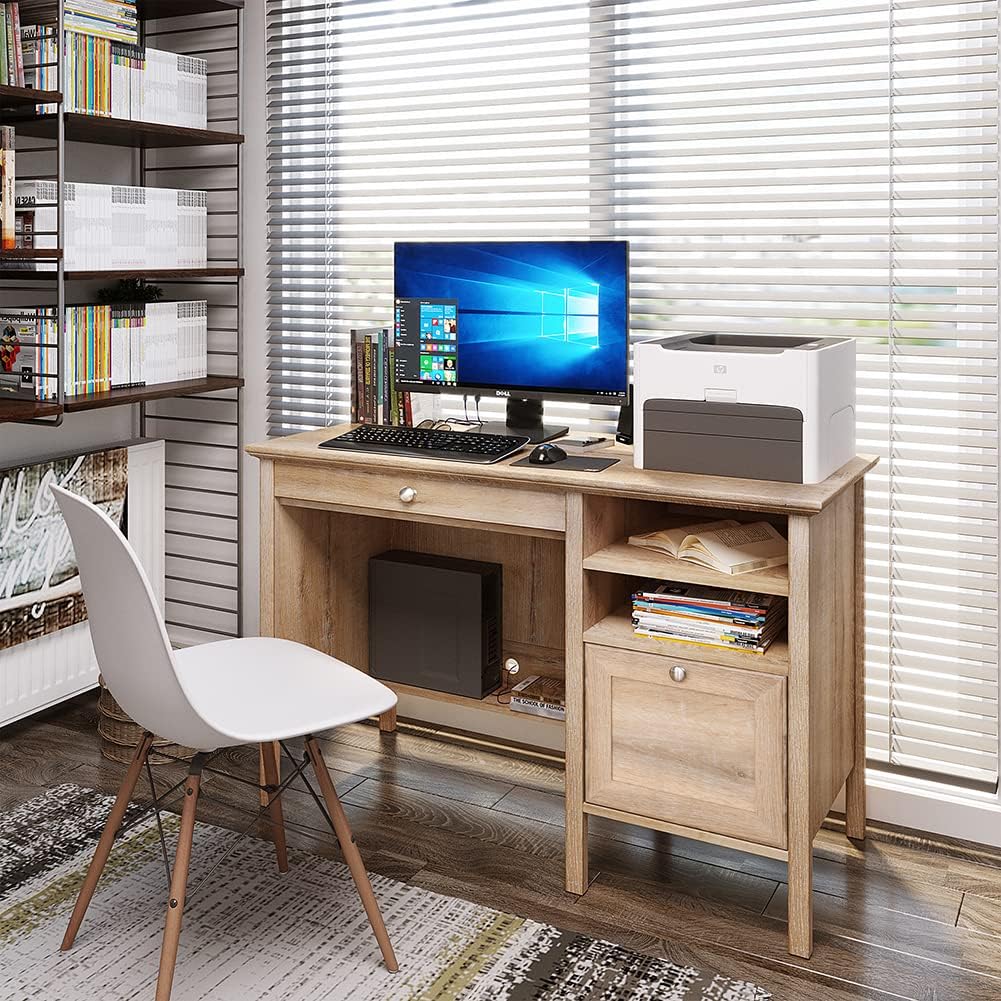
This image shows the fully assembled Crestlive Products Writing Computer Desk in an office environment, featuring a computer monitor, keyboard, and printer. The desk includes a keyboard tray, a drawer, and open shelves.
Operating Instructions
Your Crestlive Products Writing Computer Desk is designed for versatile use in home office or study environments. Here’s how to utilize its features:
- Desktop Usage: The spacious desktop provides ample surface area for a computer monitor, laptop, printer, and other work essentials. Ensure items are placed evenly to distribute weight.
- Keyboard Tray: The pull-out keyboard tray is designed to hold a standard keyboard and mouse, keeping your main desktop clear. Gently pull the tray out for use and push it back in when not needed.

A detailed view of the pull-out keyboard tray, designed to store a keyboard and mouse, demonstrating its smooth sliding mechanism.
- Storage Drawer: The large drawer offers concealed storage for documents, office supplies, or personal items. It features metal slides for smooth opening and closing.
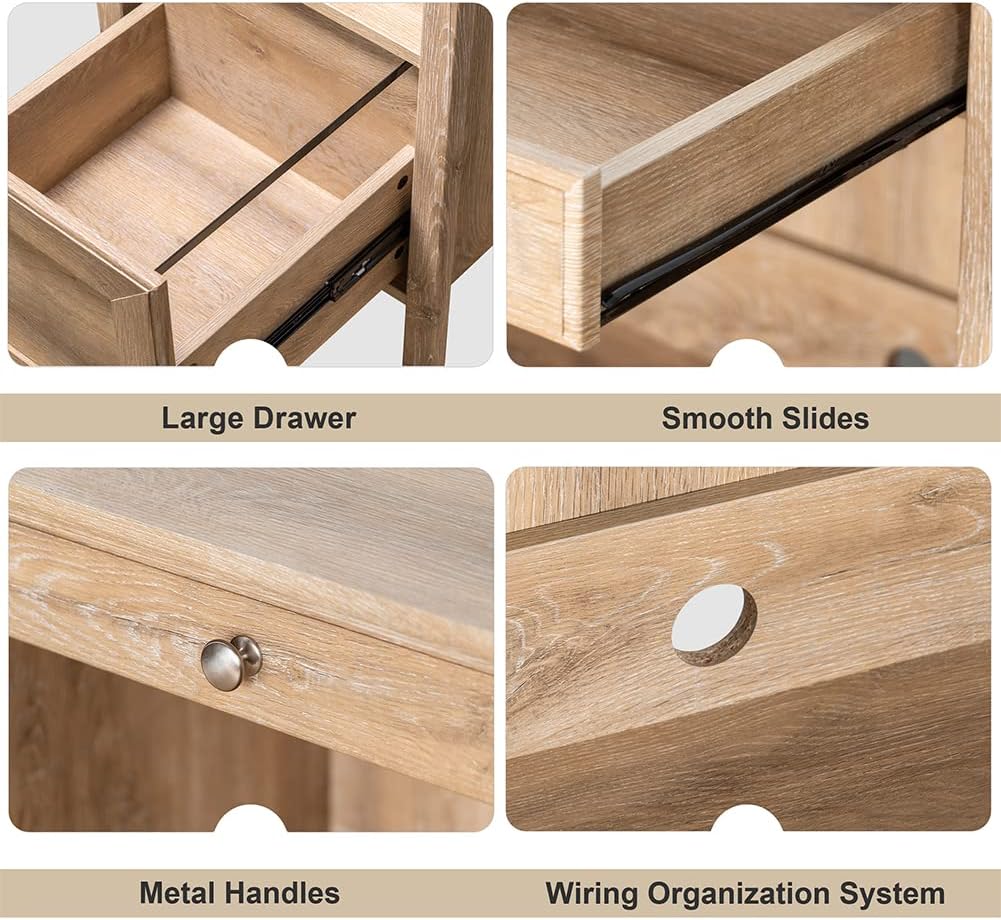
This image highlights the spacious storage drawer, equipped with metal slides for smooth operation, suitable for organizing various items.
- Open Shelves: The side shelves provide accessible storage for books, binders, or decorative items.
- Cable Management: Utilize the integrated wiring organization system to keep cables tidy and out of sight.

This collage displays various features of the desk: a large storage drawer, smooth-gliding drawer slides, durable metal handles, and a dedicated wiring organization system for cables.
Maintenance and Care
To ensure the longevity and appearance of your Crestlive Products Writing Computer Desk, follow these maintenance guidelines:
- Cleaning: The desk is made of premium MDF wood with a water and oil-proof finish. For general cleaning, wipe the surface with a soft, damp cloth. Avoid abrasive cleaners or harsh chemicals that could damage the finish.
- Spills: Wipe up spills immediately with a dry cloth to prevent moisture damage.
- Hardware: Periodically check all screws and fasteners to ensure they remain tight. Retighten if necessary, but do not overtighten.
- Avoid Direct Sunlight: Prolonged exposure to direct sunlight can cause fading or discoloration of the wood finish.
- Heat Protection: Use coasters or protective pads under hot items to prevent heat marks.
Troubleshooting
If you encounter any issues with your desk, refer to the following common problems and solutions:
| Problem | Possible Cause | Solution |
|---|---|---|
| Desk is wobbly or unstable. | Loose fasteners; uneven floor. | Check and tighten all screws. Ensure the desk is on a level surface; use shims if necessary. |
| Drawer or keyboard tray does not slide smoothly. | Misaligned slides; obstruction; damaged slides. | Ensure slides are correctly installed and aligned. Check for any objects blocking the path. If slides are damaged, contact customer support for replacement parts. |
| Parts appear damaged or defective upon arrival. | Shipping damage; manufacturing defect. | Do not proceed with assembly. Contact Crestlive Products customer support immediately with details and photos of the damaged parts. |
| Difficulty with assembly instructions. | Unclear steps; missing diagrams. | Review the assembly instruction sheet carefully. If still unclear, contact customer support for assistance. |
Specifications
| Feature | Detail |
|---|---|
| Brand | Crestlive Products |
| Model Number | B08LNTWC9Q |
| Product Dimensions (L x W x H) | 47.24" x 20.08" x 29.92" |
| Keyboard Tray Dimensions (W x D x H) | 24.41" x 12.80" x 1.77" |
| Drawer Dimensions (W x D x H) | 18.11" x 12.2" x 10.04" |
| Adjustable Cabinet Shelf Dimensions (W x D x H) | 14.37" x 18.90" x 10.63" |
| Item Weight | 78.44 Pounds |
| Material | Engineered Wood (MDF) |
| Color | Oak |
| Maximum Weight Recommendation | 100 Pounds |
| Assembly Required | Yes |
| Recommended Number of People for Assembly | 2 |
| Included Components | 1PC Writing Computer Desk |
Warranty and Customer Support
For warranty information or to report missing/damaged parts, please contact Crestlive Products customer support. Keep your purchase receipt and model number (B08LNTWC9Q) handy for faster service.
Contact information can typically be found on the packaging or through the retailer where the product was purchased.