1. Product Overview
The Cecotec ReadyWarm 6350 Ceramic Touch Connected Heater is a powerful 2000 W heating device designed for efficient room heating. It features advanced Wi-Fi control via a smartphone application, an intuitive LED display, and a remote control for convenient operation. This heater offers three operating modes: fan, low (1000W), and high (2000W), indicated by distinct LED colors. It includes a 9-hour timer, 75° oscillation for even heat distribution, and a thermostat allowing temperature selection between 16°C and 37°C. The top touch panel enhances user interaction, and a triple safety system ensures secure operation.
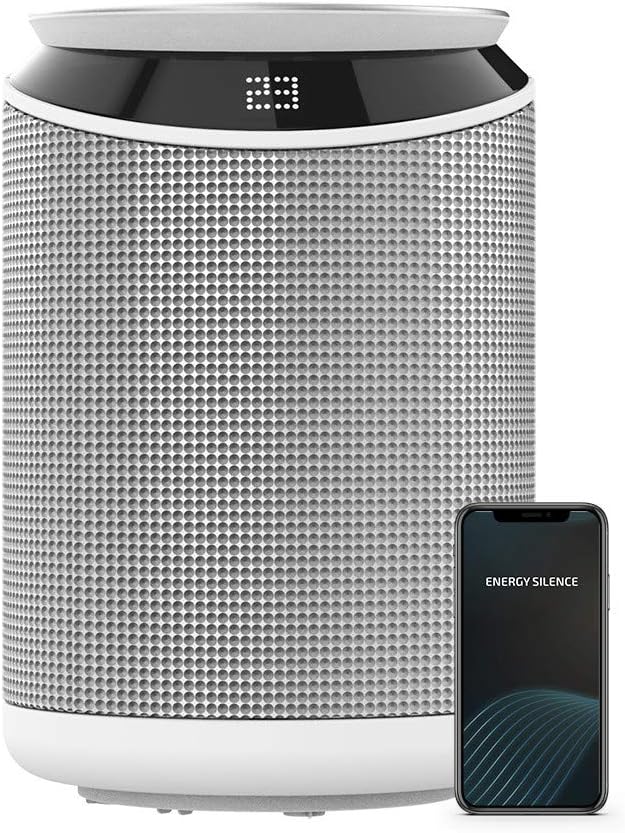
Figure 1: Cecotec ReadyWarm 6350 Ceramic Heater with a smartphone displaying the control app.
2. Important Safety Instructions
Please read all instructions carefully before using the appliance and retain them for future reference. Failure to follow these instructions may result in electric shock, fire, or serious injury.
- Always ensure the heater is placed on a stable, flat, and heat-resistant surface.
- Do not cover the heater or obstruct its air inlets/outlets, as this can lead to overheating.
- Keep the heater away from water, moisture, and flammable materials.
- Unplug the heater from the power outlet when not in use, before cleaning, or before moving it.
- Do not insert any objects into the grille or openings of the heater.
- Supervise children and individuals with reduced physical, sensory, or mental capabilities when the heater is in operation.
- The heater is equipped with a triple safety system: automatic shut-off when tipped over, overheating protection, and a protective grille to prevent finger insertion. Do not attempt to bypass these safety features.
- Do not use the heater with an external timer, separate remote-control system, or any other device that switches the heater on automatically, as a fire risk exists if the heater is covered or positioned incorrectly.
3. Product Features
- High Power Output: 2000 W for rapid room heating.
- Wi-Fi Control: Manage settings via a smartphone application.
- Intelligent Control: LED screen and remote control for easy operation.
- Three Operating Modes: Fan mode, Low mode (1000 W), and High mode (2000 W).
- LED Indicators: Blue for fan, light red for low heat, dark red for high heat.
- Timer Function: Up to 9 hours, with settings displayed on the LED screen.
- Oscillation: 75° oscillation to distribute heat evenly.
- Adjustable Thermostat: Set desired temperature between 16°C and 37°C.
- Touch Panel: Convenient controls on the top surface.
- Triple Safety System: Tip-over auto shut-off, overheating protection, and safety grille.
- Long Cable: 2-meter cable for flexible placement.

Figure 2: The Cecotec ReadyWarm 6350 heater shown with its remote control.

Figure 3: Top view of the Cecotec ReadyWarm 6350 heater, showing the touch control panel.

Figure 4: The heater's LED indicators showing heating (red) and fan (blue) modes.
4. Setup
Follow these steps to set up your Cecotec ReadyWarm 6350 heater:
- Unpack: Carefully remove the heater and all accessories from the packaging. Retain the packaging for future storage or transport.
- Placement: Place the heater on a firm, level, and stable surface. Ensure there is adequate clearance (at least 1 meter) from walls, furniture, curtains, and other flammable materials to allow for proper airflow. Do not place it directly under a power outlet.
- Power Connection: Plug the power cord into a suitable electrical outlet. Ensure the voltage matches the requirements specified on the product label.

Figure 5: Proper placement of the Cecotec ReadyWarm 6350 heater on a stable surface.
5. Operating Instructions
5.1. Power On/Off
Press the power button on the top touch panel or the remote control to turn the heater on or off. The LED display will illuminate when the unit is powered on.
5.2. Operating Modes
Cycle through the operating modes using the mode button on the control panel or remote. The LED indicator will change color to reflect the current mode:
- Fan Mode: Blue LED. Circulates air without heating.
- Low Mode: Light Red LED. Heats at 1000 W.
- High Mode: Dark Red LED. Heats at 2000 W.
5.3. Wi-Fi Control
Download the official Cecotec app to your smartphone to control the heater remotely. Follow the in-app instructions to connect your device to the heater's Wi-Fi network. This allows you to adjust settings, set timers, and monitor the heater from anywhere.

Figure 6: Controlling the heater via the smartphone app.
5.4. Remote Control
The included remote control provides convenient access to all heater functions, including power, mode selection, temperature adjustment, timer, and oscillation.
5.5. Timer Function
Press the timer button to set the desired operating duration, up to 9 hours. The remaining time will be displayed on the LED screen. The heater will automatically turn off once the timer expires.
5.6. Temperature Setting
Use the temperature adjustment buttons (up/down arrows) to select your desired room temperature between 16°C and 37°C. The heater's thermostat will maintain the set temperature.
5.7. Oscillation Function
Activate the oscillation function to enable the heater to rotate 75°, distributing warm air more widely and evenly throughout the room.

Figure 7: The heater in a typical room setting, providing warmth.
6. Maintenance
Regular maintenance ensures the longevity and efficient operation of your heater.
- Cleaning: Always unplug the heater and allow it to cool completely before cleaning. Use a soft, damp cloth to wipe the exterior surfaces. Do not use abrasive cleaners, solvents, or harsh chemicals, as these can damage the finish.
- Air Inlets/Outlets: Periodically check and clean the air inlets and outlets to ensure they are free from dust and debris. A vacuum cleaner with a brush attachment can be used for this purpose.
- Storage: If storing the heater for an extended period, unplug it, clean it thoroughly, and store it in its original packaging in a cool, dry place, away from direct sunlight and moisture.
7. Troubleshooting
If you encounter issues with your Cecotec ReadyWarm 6350 heater, refer to the following table for common problems and solutions:
| Problem | Possible Cause | Solution |
|---|---|---|
| Heater does not turn on. | No power supply; Tip-over switch activated; Overheating protection activated. | Check if the power cord is securely plugged in. Ensure the heater is upright on a flat surface. Allow the unit to cool down if it has overheated. |
| No heat output. | Fan mode selected; Temperature setting too low; Air inlets/outlets blocked. | Switch to Low or High heating mode. Increase the desired temperature setting. Clear any obstructions from air vents. |
| Wi-Fi connection fails. | Incorrect Wi-Fi password; Router too far; App issues. | Ensure correct Wi-Fi password. Move heater closer to router. Restart the app and/or heater. Consult app's troubleshooting guide. |
| Oscillation not working. | Oscillation function not activated. | Press the oscillation button on the control panel or remote control. |
8. Specifications
| Feature | Specification |
|---|---|
| Brand | Cecotec |
| Model Number | 05369 |
| Power/Wattage | 2000 W |
| Voltage | 240 V |
| Product Dimensions | 30 x 20 x 22 cm |
| Item Weight | 1.7 kg |
| Material | Stainless steel |
| Special Features | Remote Control, Overheat Protection, Wi-Fi Control, Oscillation, Timer |
| Auto Shut-off | Yes (Tip-over protection) |
| Color | White / Black |
9. Warranty and Support
This product comes with a standard manufacturer's warranty. Please refer to the warranty card included in your product packaging for specific terms and conditions, including the warranty period and coverage details. Keep your purchase receipt as proof of purchase.
For technical support, service, or inquiries regarding your Cecotec ReadyWarm 6350 heater, please contact Cecotec customer service through their official website or the contact information provided in your product documentation. Do not attempt to repair the appliance yourself, as this will void the warranty and may pose a safety risk.


