1. Product Overview
The Kaixin MSU1 Plus 3.5 MHz Ultrasound Scanner is a compact and lightweight device designed for obstetric measurements in various animals, including pigs, cattle, canines, equines, felines, goats, camels, and sheep. Its portable design makes it suitable for field work.
The unit features a 5.7-inch LCD screen with high brightness, high contrast, and a wide viewing angle, providing fine and smooth images. It includes a high-speed USB port for real-time image download and TV output for connecting to a thermal printer or workstation.
The standard configuration includes the main unit, a 3.5 MHz water-resistant mechanical sector probe, a charger, two lithium batteries (providing 3-4 hours of operation), a leather case, and a belt trigger.

Image 1.1: The Kaixin MSU1 Plus 3.5 MHz Ultrasound Scanner, showing the main display unit and the connected probe.
2. Setup and Components
Before first use, ensure all components are present and the batteries are fully charged.
2.1 Package Contents
- Main Ultrasound Unit
- 3.5 MHz Water-Resistant Mechanical Sector Probe
- Charger
- 2 x Lithium Batteries
- Leather Case
- Belt Trigger
2.2 Charging the Batteries
Connect the charger to the main unit and a power outlet. The lithium batteries provide approximately 3-4 hours of continuous operation when fully charged. It is recommended to fully charge both batteries before initial use.
2.3 Connecting the Probe
Carefully align the connector of the 3.5 MHz mechanical sector probe with the corresponding port on the main unit. Gently push until it clicks into place, ensuring a secure connection. Do not force the connection.
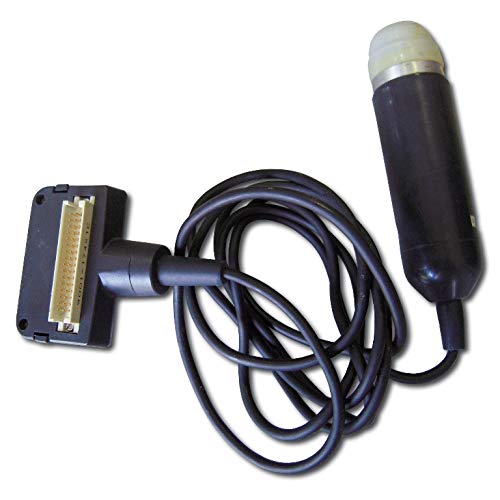
Image 2.1: The 3.5 MHz mechanical sector probe with its connecting cable.
2.4 Carrying and Positioning
The device is designed for portability. It can be carried using the provided shoulder strap or a wrist strap (if applicable) for hands-free operation in the field. The unit also features a built-in stand for stable placement on flat surfaces.

Image 2.2: The ultrasound scanner being worn with a shoulder strap for portability during use.
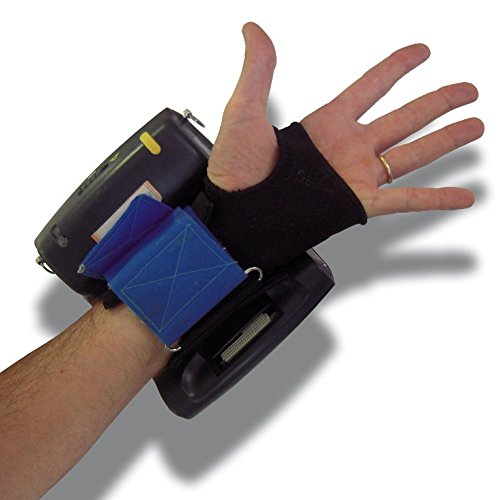
Image 2.3: An alternative view showing the device held with a wrist strap, indicating its compact and portable design.

Image 2.4: Side view of the ultrasound scanner, highlighting the integrated stand for desktop use.
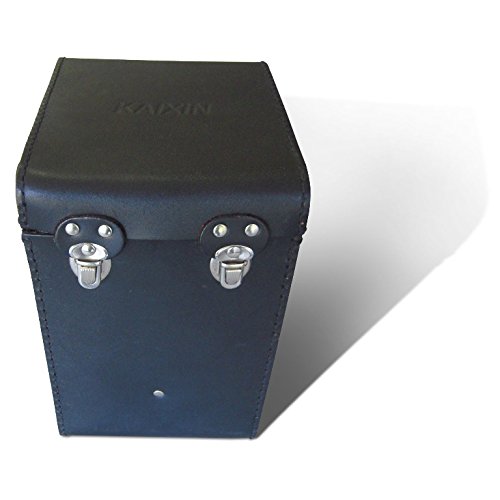
Image 2.5: The durable black leather case provided for safe storage and transport of the ultrasound scanner.
3. Operating Instructions
3.1 Power On/Off
Press and hold the 'Power' button located on the control panel to turn the unit on or off. The LCD screen will illuminate upon successful power-on.
3.2 Menu Navigation and Language Selection
Use the directional buttons and 'Enter' button on the control panel to navigate through the menu options. The menu language can be switched between Chinese and English. Refer to the on-screen prompts for specific navigation steps.
3.3 Performing Obstetric Measurements
The device supports obstetric measurements and estimated delivery dates for various animal species. Select the appropriate animal profile from the menu before beginning the scan. Apply ultrasound gel to the probe and the animal's skin for optimal image quality.
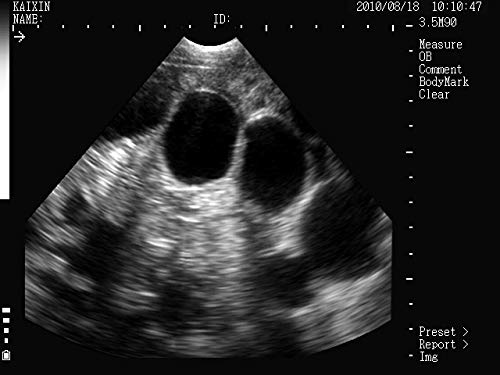
Image 3.1: Example ultrasound image displaying ovarian follicles, demonstrating the clarity of the scanner's output.
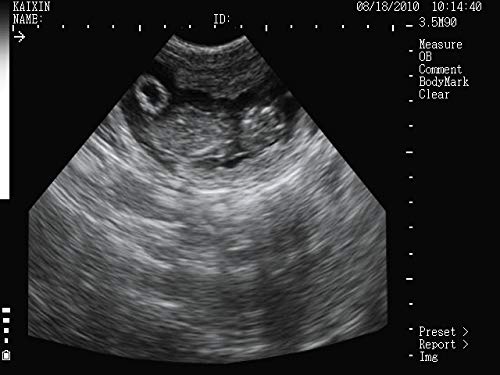
Image 3.2: Example ultrasound image showing a fetal sac, illustrating the device's capability for pregnancy detection.
3.4 Image Download and External Display
Images can be downloaded in real-time via the high-speed USB port. Connect the unit to a computer using a standard USB cable. The device also features a TV output, allowing connection to an external monitor, thermal printer, or workstation for larger display or printing of results.
4. Maintenance
4.1 Probe Care and Cleaning
The 3.5 MHz mechanical sector probe is water-resistant. After each use, clean the probe thoroughly with a soft cloth and a mild disinfectant solution. Ensure no gel residue remains. Do not submerge the main unit in water.

Image 4.1: The water-resistant probe partially submerged in water, demonstrating its durability for cleaning.
4.2 Battery Maintenance
To prolong battery life, avoid fully discharging the lithium batteries frequently. Recharge them when the battery indicator shows low power. Store the unit and batteries in a cool, dry place when not in use for extended periods.
4.3 Unit Cleaning
Wipe the main unit's exterior with a soft, damp cloth. Avoid using abrasive cleaners or solvents that could damage the screen or casing. Ensure all ports are free of dust and debris.
5. Troubleshooting
This section provides general guidance for common issues. For more complex problems, please contact customer support.
| Problem | Possible Cause | Solution |
|---|---|---|
| Unit does not power on. | Low or depleted battery; loose battery connection. | Ensure batteries are charged. Check battery compartment for secure connection. |
| No image on screen. | Probe not connected properly; no ultrasound gel applied. | Verify probe connection. Apply sufficient ultrasound gel to the probe and scanning area. |
| Poor image quality. | Insufficient gel; incorrect settings; probe not positioned correctly. | Reapply gel. Adjust depth and gain settings. Reposition the probe for better contact. |
| Cannot download images. | USB cable not connected; driver issues on computer. | Ensure USB cable is securely connected to both devices. Try a different USB port or computer. |
6. Specifications
| Feature | Detail |
|---|---|
| Screen | 5.7-inch LCD, high brightness, high contrast, wide vision |
| Probe Type | 3.5 MHz Mechanical Sector Probe, Water-Resistant |
| Measurement Capabilities | Obstetric measurements, estimated delivery date for pig, bovine, canine, equine, feline, caprine, camel, ovine |
| Maximum Exploration Depth | 200 mm |
| Connectivity | High-speed USB port, TV output |
| Power Source | 2 x Lithium Batteries (3-4 hours operation) |
| Menu Language | Chinese / English |
| Dimensions (L x W x H) | 155 x 180 x 80 mm |
| Net Weight | 1 kg |
| Manufacturer | Kaixin |
| Model Number | 7427002949169 |
7. Warranty and Support
For information regarding warranty coverage, technical support, or spare parts availability, please contact your point of purchase or the manufacturer directly. Keep your purchase receipt and model number handy for faster service.
Manufacturer: Kaixin
ASIN: B08LMKW41P


