
Orion Motor Tech B08LLFQNNJ
Orion Motor Tech 12V Battery Charger and Maintainer User Manual
Model: B08LLFQNNJ
Introduction
This manual provides essential information for the safe and effective operation of your Orion Motor Tech 12V Battery Charger and Maintainer. This device is designed to charge and maintain various types of 12V lead-acid batteries, including flooded, AGM, and gel batteries, ensuring optimal performance and longevity.
Please read this manual thoroughly before using the product and retain it for future reference.
Product Overview

The Orion Motor Tech 12V Battery Charger and Maintainer is a compact and efficient unit. It features a main charging unit, an AC power plug, and battery clamps for connection to your vehicle's battery. The unit is designed for ease of use and portability.

The charger is equipped with sturdy battery clamps that offer secure holding and superior conductivity. The internal wiring utilizes a pure copper core, ensuring stable and efficient charging performance.
Setup
- Identify Battery Terminals: Locate the positive (+) and negative (-) terminals on your 12V lead-acid battery. The positive terminal is usually marked with a plus sign and is larger, while the negative terminal is marked with a minus sign.
- Connect Clamps: Connect the red positive (+) clamp of the charger to the positive (+) terminal of the battery. Connect the black negative (-) clamp of the charger to the negative (-) terminal of the battery. Ensure a secure connection.
- Plug into Power: Once the clamps are securely connected to the battery, plug the charger's AC power cord into a standard 120V AC electrical outlet.
- Verify Connection: The charger's indicator light will illuminate, indicating that charging has begun.
Important: Always connect the battery clamps to the battery first before plugging the charger into the power outlet. Disconnect the power from the outlet first before removing the battery clamps.
Operating Instructions
3-Stage Smart Charging Process

- Bulk Charge: This initial stage applies a high and constant current to maximize charging efficiency, quickly bringing the battery to approximately 80% of its capacity.
- Absorption Mode: Once the battery reaches 80%, the charger switches to a precise and steady voltage. This stage fully activates the battery without overheating, ensuring a complete charge.
- Float Mode: After the battery is fully charged, the charger automatically transitions to float mode. In this stage, a trickle current is supplied to maintain a full charge safely, preventing overcharging and extending battery life.
Wide Compatibility

This battery charger and maintainer is suitable for a wide range of 12V lead-acid batteries found in various applications. It can be used for charging boats, motorcycles, ATVs, and riding mowers. Additionally, it is ideal for maintaining batteries in cars, trucks, SUVs, and RVs, helping to restore or preserve lost battery performance.
Maintenance and Safety
Battery Maintenance
The Float Mode of this charger is specifically designed for long-term battery maintenance. Once your battery is fully charged, the charger will automatically switch to this mode, providing a small, continuous current to keep the battery at optimal charge without the risk of overcharging. This is ideal for vehicles stored for extended periods, such as seasonal vehicles or those not used daily.
Safe Operation Features

- Short-Circuit Protection: Prevents damage in case of accidental shorting of the battery clamps.
- Overcurrent Protection: Safeguards against excessive current flow, protecting both the charger and the battery.
- Overheating Protection: The charger is designed to prevent overheating during operation, ensuring stable performance.
- Overvoltage Protection: Protects the battery from damage due to high-voltage spikes.
- Low-Voltage Dropout Protection: Prevents issues from low-voltage conditions.
The internal circuit boards are precisely engineered to automatically sense and fix any potential problems during charging, enhancing overall safety and reliability.
Troubleshooting
- Charger Not Turning On: Ensure the AC power cord is securely plugged into a live outlet and the battery clamps are correctly connected to the battery terminals (positive to positive, negative to negative).
- Indicator Light Always Green: Some users may observe the indicator light remaining green even when the battery is not fully charged. This can occur if the battery voltage is not extremely low. The charger is still functioning correctly and will proceed through its charging stages. Allow sufficient time for the charging process to complete.
- Slow Charging: Verify that the battery is a 12V lead-acid type. Ensure good contact between the clamps and battery terminals. Extreme battery discharge or very cold temperatures can prolong charging time.
- Charger Feels Warm: It is normal for the charger to feel warm during operation, especially during the Bulk Charge stage. The built-in overheating protection will prevent unsafe temperatures.
- Battery Not Holding Charge: If the battery does not hold a charge after using the maintainer, the battery itself may be faulty or at the end of its service life. This charger is designed to charge and maintain, not to repair severely damaged batteries.
Specifications
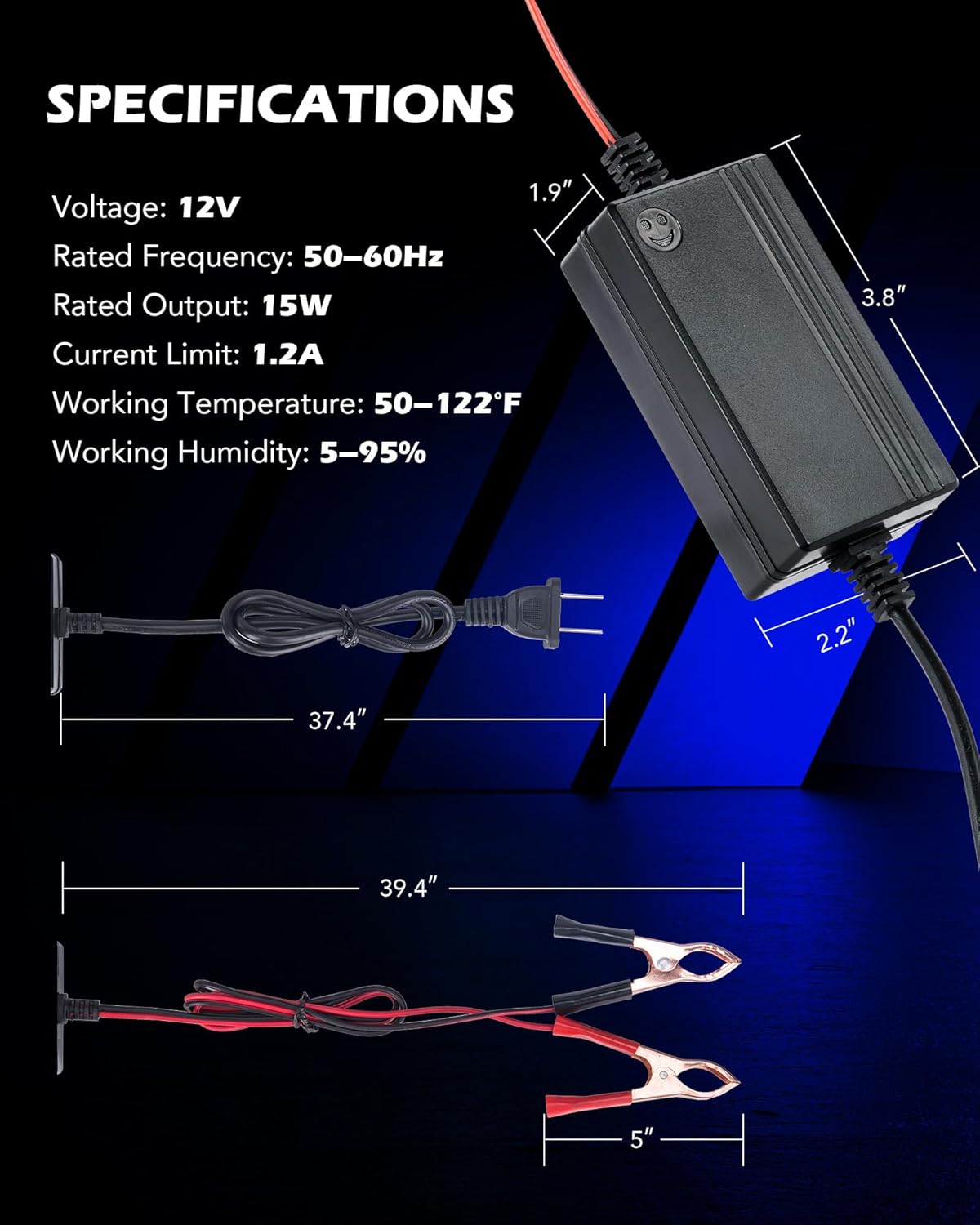
| Voltage | 12 Volts (DC) |
| Rated Frequency | 50-60Hz |
| Rated Output | 15W |
| Current Limit | 1.2A |
| Working Temperature | 50-122°F (10-50°C) |
| Working Humidity | 5-95% |
| Product Dimensions | 3.82 x 1.89 x 2.2 inches (9.7 x 4.8 x 5.6 cm) |
| Item Weight | 5.3 ounces (150 grams) |
Warranty and Support
Information regarding product warranty and customer support is not available in the provided data. Please refer to the product packaging or the official Orion Motor Tech website for detailed warranty terms and support contact information.
For further assistance, you may visit the Orion Motor Tech Store on Amazon.
Ask a question about this manual
Ask about setup, troubleshooting, compatibility, parts, safety, or missing instructions. Manuals+ will review the question and use this page’s manual context to help answer it.