
Sorand AC 230V Floor Heating Thermostat
Sorand AC 230V Digital Programmable Floor Heating Thermostat User Manual
Model: AC 230V Floor Heating Thermostat
Introduction
This manual provides comprehensive instructions for the installation, operation, and maintenance of your Sorand AC 230V Digital Programmable Floor Heating Thermostat. Please read this manual carefully before installation and use to ensure proper function and safety.
The thermostat is designed for electronic floor heating systems and other electrical heating elements. It features a large LCD with backlight, programmable temperature settings, and internal/external temperature sensing capabilities.
Safety Information
- Installation must be performed by a qualified electrician.
- Ensure power is disconnected before installation or maintenance.
- Do not expose the thermostat to water or excessive humidity.
- Operate within the specified voltage and current limits.
Package Contents
Verify that all items are present in the package:
- 1 x Sorand AC 230V Digital Programmable Floor Heating Thermostat
- 1 x External Temperature Sensor Cable (approx. 3 meters)
- 2 x Mounting Screws
- 1 x User Manual (this document)

Image: Contents of the Sorand thermostat package, showing the main unit, external sensor cable, mounting screws, and the instruction manual.
Setup and Installation
Important: Installation should only be carried out by a qualified electrician. Ensure the main power supply is turned off before commencing any wiring work.
Wiring Diagram
Refer to the wiring diagram on the back of the thermostat unit for correct connections. The terminals are typically labeled as follows:
- L1, N1: Power input (AC 230V)
- LOAD (1, 2): Connection to the heating element
- NTC (5, 6): Connection for the external floor temperature sensor

Image: Rear view of the Sorand thermostat, displaying the wiring terminals and a simplified diagram for electrical connections.
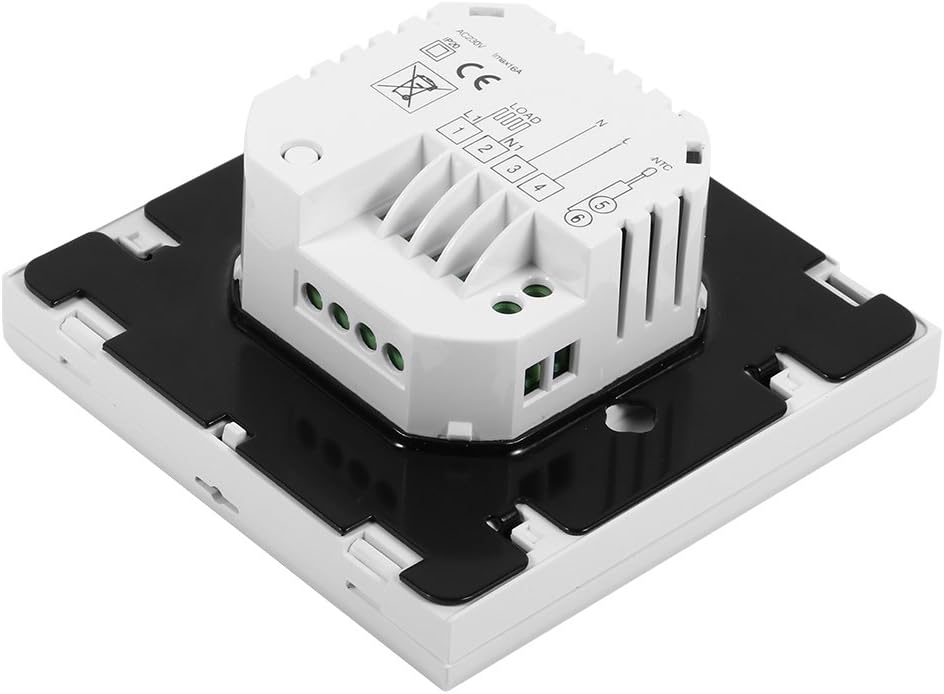
Image: Side view of the Sorand thermostat, illustrating the internal components and ports for wiring connections.
Mounting
- Prepare a standard electrical wall box (86x86mm recommended).
- Connect the power supply, heating load, and external sensor wires according to the wiring diagram.
- Carefully push the wired thermostat into the wall box.
- Secure the thermostat to the wall box using the provided screws.
- Attach the front panel of the thermostat.
Operating Instructions
The thermostat features a large LCD and touch-sensitive buttons for easy operation.
Button Functions
- ⏻ (Power): Turns the thermostat ON/OFF.
- ↻ (Mode/Cycle): Switches between manual mode and programmable mode.
- ⏱ (Clock/Time): Sets the time and enters programming mode.
- ▲ (Up Arrow): Increases temperature setting or adjusts values.
- ▼ (Down Arrow): Decreases temperature setting or adjusts values.

Image: Front view of the Sorand thermostat, highlighting the LCD screen and the five touch-sensitive control buttons below it.
Setting Time and Day
- Press and hold the ⏱ button for 3 seconds to enter time setting mode.
- Use the ▲ and ▼ buttons to adjust the hour, then press ⏱ to confirm and move to minutes, then day of the week.
- Press ⏱ again to exit, or wait for 10 seconds for automatic exit.
Manual Mode Operation
In manual mode, the thermostat maintains a constant temperature set by the user.
- Press the ↻ button to switch to manual mode (indicated by a hand icon or similar on the display).
- Use the ▲ and ▼ buttons to set your desired temperature.
- The thermostat will now maintain this temperature.
Programmable Mode Operation (6 Periods)
The thermostat allows for 6 programmable periods per day, enabling different temperature settings at different times.
- Press the ↻ button to switch to programmable mode (indicated by a clock icon or similar).
- Press and hold the ⏱ button for 3 seconds to enter programming mode.
- The display will show the first period (e.g., "Period 1"). Use ▲ and ▼ to set the start time and desired temperature for this period.
- Press ⏱ to move to the next period and repeat the process for all 6 periods.
- After setting all periods, press ⏱ again or wait for automatic exit to save settings.
The thermostat will automatically follow the programmed schedule.
Sensor Selection (Internal/External)
The thermostat can use its internal sensor or the external floor sensor. The selection method is typically found in advanced settings or by a specific button combination. Refer to the on-screen indicators for the active sensor.
Maintenance
- Clean the thermostat's display and casing with a soft, dry cloth. Do not use abrasive cleaners or solvents.
- Ensure the thermostat is free from dust and debris to maintain optimal performance.
- No user-serviceable parts inside. Do not attempt to open or repair the unit.
Troubleshooting
| Problem | Possible Cause | Solution |
|---|---|---|
| Thermostat not powering on. | No power supply; incorrect wiring. | Check circuit breaker. Verify wiring connections (consult a qualified electrician). |
| Heating not turning on/off. | Incorrect temperature setting; thermostat in OFF mode; wiring issue. | Adjust set temperature. Ensure thermostat is ON. Check heating element wiring. |
| Inaccurate temperature reading. | Sensor malfunction; incorrect sensor selected. | Verify sensor connection. Check if internal or external sensor is active. |
| Display is blank or flickering. | Power fluctuation; internal fault. | Reset power to the thermostat. If issue persists, contact support. |
Specifications
| Feature | Detail |
|---|---|
| Brand | Sorand |
| Model | AC 230V Floor Heating Thermostat |
| Working Voltage | AC 230V, 50/60Hz |
| Load Current | 12/16A (Electric Heating) |
| Accuracy | ±0.5℃ |
| Set-point Temperature Range | 5℃ - 35℃ |
| Limit Temperature Range | 5℃ - 99℃ |
| Power Consumption | <0.3W |
| Temperature Sensor | NTC (Internal and External) |
| Surface Size | Approx. 86 x 86 x 40mm (3.4 x 3.4 x 1.6 inches) |
| External Sensor Cable Length | Approx. 3 meters (9.8 feet) |
| Material | PC+ABS |
| Display Type | Digital LCD with Backlight |
| Control Method | Touchpad Control |
Warranty and Support
This product is covered by the manufacturer's standard warranty. Please refer to the product packaging or your point of purchase for specific warranty terms and conditions.
For technical support, troubleshooting assistance, or warranty claims, please contact your retailer or the manufacturer directly. Keep your purchase receipt as proof of purchase.
Ask a question about this manual
Ask about setup, troubleshooting, compatibility, parts, safety, or missing instructions. Manuals+ will review the question and use this page’s manual context to help answer it.