1. Product Overview
This manual provides instructions for the SHINEAR HB4H1 1000mAh Li-ion battery, model CS-HUT211SL, designed as a replacement for various Huawei devices. This battery is engineered to meet specific power requirements and safety standards.

Image 1.1: Top view of the SHINEAR HB4H1 replacement battery, displaying model number, capacity, voltage, and safety warnings.
1.1 Key Features
- Capacity: 1000mAh (3.7Wh)
- Voltage: 3.7V
- Type: Li-ion (Lithium-ion)
- Part Number (P/N): HB4H1
- Certifications: CE, ISO9001, RoHS, MSDS
1.2 Compatible Devices
This battery is compatible with the following Huawei device models:
- T2251
- G6600
- T2211
- T1600
- T2281
- G6608
- G6603
2. Safety Information
Read all safety instructions before installing or using the battery. Failure to follow these instructions may result in fire, explosion, electric shock, or other hazards.
- Do not disassemble, open, or service the battery pack.
- Do not crush, puncture, short external contacts, or dispose of in fire or water.
- Do not store above 60°C (140°F).
- Replace only with the battery pack designated for this product.
- Recycle or dispose of used batteries according to local regulations.
- Keep the battery out of reach of children.
3. Installation Guide
This section outlines the general procedure for replacing the battery. Specific steps may vary depending on your device model. It is recommended to consult your device's original service manual or a qualified technician if you are unsure about the process.
3.1 Tools Required (Typical)
- Small Phillips head screwdriver
- Plastic prying tool (spudger)
- Anti-static wrist strap (recommended)
3.2 Step-by-Step Installation
- Power Off Device: Ensure your device is completely powered off and disconnected from any charging source.
- Remove Back Cover: Carefully remove the back cover of your device. This may involve prying it open with a plastic tool or unscrewing small screws.
- Locate Old Battery: Identify the existing battery. It is usually a rectangular component connected by a small ribbon cable or pins.
- Disconnect Old Battery: Gently disconnect the battery connector from the device's motherboard. Avoid pulling on the wires.
- Remove Old Battery: Carefully remove the old battery. It might be secured with adhesive or a small bracket. Use a plastic prying tool if necessary.
- Insert New Battery: Place the new SHINEAR HB4H1 battery into the battery compartment. Ensure it fits correctly.
- Connect New Battery: Connect the new battery's connector to the motherboard. Ensure it is securely seated.
- Replace Back Cover: Reattach the device's back cover and secure it with any screws removed earlier.
- Initial Charge: Connect the device to its charger and allow the new battery to charge fully before first use.
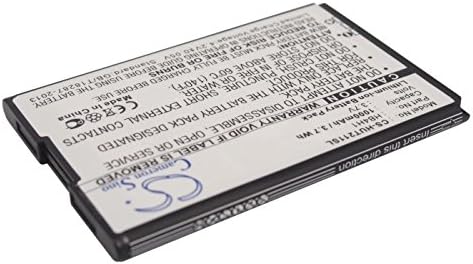
Image 3.1: Bottom view of the SHINEAR HB4H1 battery, showing the barcode and 'Insert this direction' text, indicating proper orientation.

Image 3.2: Angled view of the SHINEAR HB4H1 battery, highlighting the 'CS' logo and part of the serial number.
4. Operating Instructions
Once installed, the SHINEAR HB4H1 battery operates like the original battery in your device. For specific operating instructions related to your device, refer to its original user manual.
4.1 First Use and Calibration
- For optimal performance, fully charge the new battery before its first use.
- It is recommended to perform a battery calibration cycle after installation:
- Charge the battery to 100%.
- Use the device until the battery completely drains and the device shuts off.
- Recharge the battery to 100% without interruption.
5. Maintenance and Storage
Proper maintenance and storage can extend the lifespan of your battery.
- Charging: Use only chargers approved for your device. Avoid overcharging or deep discharging the battery regularly.
- Temperature: Store and operate the battery within recommended temperature ranges (typically 0°C to 45°C or 32°F to 113°F). Avoid extreme heat or cold.
- Long-Term Storage: If storing the device or battery for an extended period, charge the battery to approximately 50-60% before storage. Recharge every 3-6 months to prevent deep discharge.
- Cleaning: Keep battery contacts clean and dry.
6. Troubleshooting
If you encounter issues after installing the new battery, consider the following troubleshooting steps:
| Problem | Possible Cause | Solution |
|---|---|---|
| Device does not power on after battery replacement. | Battery not properly connected; battery completely discharged. | Ensure battery connector is securely seated. Connect device to charger for at least 30 minutes. |
| Battery drains quickly. | New battery not calibrated; background apps consuming power; faulty charging port. | Perform battery calibration (Section 4.1). Close unnecessary background applications. Check charging port for damage. |
| Device not charging. | Faulty charger/cable; dirty charging port; battery not recognized. | Try a different charger and cable. Clean the charging port gently. Re-seat the battery connector. |
| Battery swells or overheats. | Defective battery; internal short circuit. | Immediately discontinue use. Remove the battery carefully if safe to do so and dispose of it properly. Contact customer support. |
If issues persist, contact customer support or a qualified service technician.
7. Specifications
| Attribute | Value |
|---|---|
| Model Number | CS-HUT211SL |
| Part Number (P/N) | HB4H1 |
| Battery Type | Li-ion |
| Capacity | 1000mAh |
| Watt-Hours (Wh) | 3.7Wh |
| Voltage | 3.7V |
| Product Dimensions | 1.56 x 2.35 x 0.17 inches |
| Item Weight | 4.2 ounces |
| Certifications | CE, ISO9001, RoHS, MSDS |
8. Warranty and Support
This SHINEAR battery comes with a 60-day warranty from the date of purchase. This warranty covers manufacturing defects. It does not cover damage caused by misuse, accident, unauthorized modification, or normal wear and tear.
For warranty claims or technical support, please contact your retailer or the manufacturer directly. Please have your purchase receipt and the battery's model number (CS-HUT211SL) available when contacting support.


