
Introduction
The ORIA Wireless Thermometer Hygrometer (Model WA64) is a compact, Bluetooth-enabled device designed for accurate real-time monitoring of temperature and humidity. This sensor is ideal for various environments, including homes, wine cellars, cigar humidors, living rooms, and baby rooms. It provides data export capabilities and smart alerts via a dedicated mobile application, allowing users to maintain optimal environmental conditions.

Image: The ORIA Wireless Thermometer Hygrometer shown alongside a smartphone displaying its companion application, illustrating real-time temperature and humidity readings.
Product Features
- High Accuracy Sensor: Equipped with an upgraded MEMS sensor, providing real-time data refresh every second. Temperature accuracy is ±0.5 °C (±1 °F), and humidity accuracy is ±5%.
- Bluetooth 5.0 Connectivity: Features a 5.0 Bluetooth chip for stable wireless monitoring up to 50 meters (164 ft) in open areas.
- Wireless APP Control: Connects to a mobile application (Sensor Blue) for viewing real-time data, maximum/minimum values, and managing up to 100 sensors simultaneously. Supports Android 4.3+ and iOS 4s+.
- Smart Alert System: Sends notifications to your mobile phone when temperature or humidity exceeds pre-set values, with data turning red in the app for easy identification.
- Data Storage & Export: Records data every 10 seconds, storing up to 100 days of historical data within the app. Data can be downloaded in CSV format after account registration.
- Mini & Portable Design: Compact dimensions (3.3 x 3.3 x 1.19 cm) and lightweight (30g), with a built-in CR2477 battery offering approximately 10 months of lifespan. Includes a hanging hole for versatile placement.

Image: Visual representation of the ORIA sensor highlighting its key features: temperature, humidity, 1-second refresh rate, °C/°F switch, app monitoring, and CR2477 battery.
Package Contents
Upon opening the package, please verify that all components are present and in good condition:
- 1 x ORIA Wireless Thermometer Hygrometer (Model WA64)
- 1 x CR2477 Lithium Metal Battery (pre-installed or included separately)
- 1 x User Manual (this document)
Setup Guide
1. App Installation
The ORIA Wireless Thermometer Hygrometer requires the "Sensor Blue" application for operation. Please follow these steps to download and install the app:
- Scan the QR code provided in the product packaging or on the device itself (if available) to directly download the "Sensor Blue" app.
- Alternatively, search for "Sensor Blue" in your device's app store:
- For iOS devices (iPhone 4s or above): Download from Apple App Store
- For Android devices (Android 4.3 or above): Search "Sensor Blue" in Google Play Store.
- Install the application on your smartphone or tablet.
- Grant necessary permissions (e.g., Bluetooth, Location) when prompted by the app to ensure proper functionality.
2. Battery Installation / Activation
The device comes with a CR2477 battery. If the battery is not pre-installed or if there is an insulation sheet, follow these steps:
- Locate the battery compartment on the back of the sensor.
- If an insulation sheet is present, gently pull it out to activate the battery.
- If installing a new battery, ensure the positive (+) side faces upwards.
- Close the battery compartment securely.
3. Device Pairing
Once the app is installed and the battery is activated, proceed with pairing the device:
- Ensure Bluetooth is enabled on your smartphone or tablet.
- Open the "Sensor Blue" application.
- The app will typically prompt you to add a new device. Tap "Add device" or the "+" icon.
- Press the small button on the ORIA sensor to initiate the connection. The sensor should appear in the app's device list.
- Select your ORIA sensor from the list to complete the pairing process. You may be prompted to name your sensor (e.g., "Living Room", "Baby Room").

Image: A visual guide demonstrating the setup process: 1. Scan QR code for app, 2. Pull out battery insulation sheet, 3. Open app and Bluetooth, 4. Press button to connect the product.
Operating Instructions
1. Monitoring Data
Once connected, the "Sensor Blue" app provides comprehensive monitoring features:
- Real-time Readings: The main screen of the app displays current temperature and humidity readings from your connected sensors. Data refreshes every second.
- Historical Data: Tap on a sensor to view its historical data. The app records data every 10 seconds and stores up to 100 days of information. You can view trends over various timeframes (e.g., hourly, daily, weekly).
- Max/Min Values: The app shows the maximum and minimum temperature and humidity values recorded for the selected period.

Image: The Sensor Blue app interface showing temperature and humidity trend graphs, demonstrating the Bluetooth 5.0 connectivity range of 50 meters (164 feet) without obstructions.
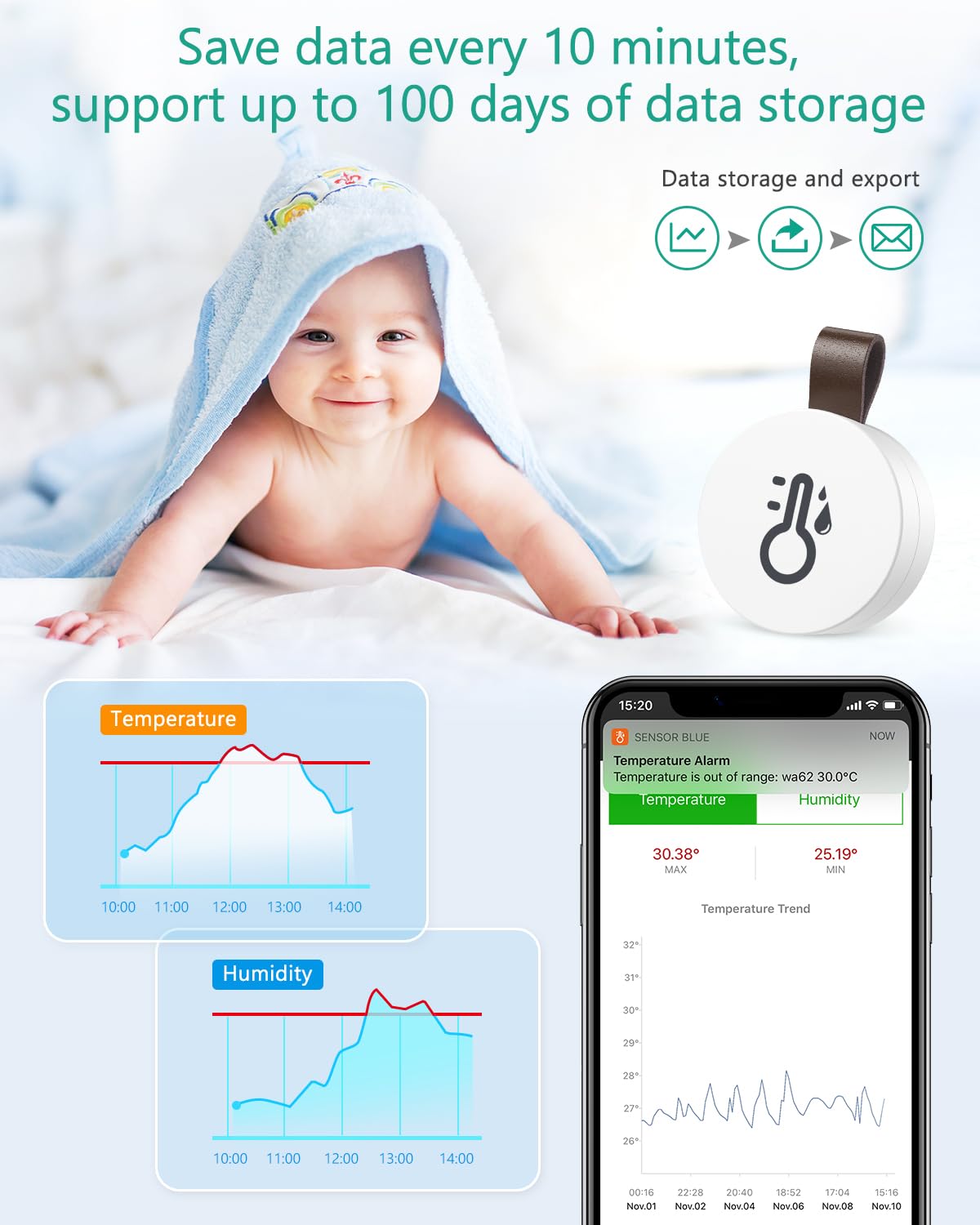
Image: The ORIA sensor placed near a baby, emphasizing its ability to save data every 10 minutes and support up to 100 days of data storage, with icons for data storage and export.
2. Setting Smart Alerts
To receive notifications when conditions fall outside your desired range:
- In the "Sensor Blue" app, select the sensor for which you want to set alerts.
- Navigate to the alert settings section (often indicated by a bell or alarm icon).
- Set your desired upper and lower limits for both temperature and humidity.
- Enable notifications. When the readings exceed your pre-set values, the data in the app will turn red, and you will receive a notification on your mobile phone.
3. Data Export
The app allows you to export historical data for further analysis:
- Ensure you have registered an account within the "Sensor Blue" app.
- Select the sensor and navigate to the data export option.
- Choose the desired date range for the data you wish to export.
- The data will be exported in CSV (Comma Separated Values) format, which can be opened and analyzed using spreadsheet software like Microsoft Excel or Google Sheets.

Image: A laptop displaying a file explorer with CSV files, indicating the ability to export data from the ORIA sensor's app for detailed analysis.
Maintenance
1. Battery Replacement
The ORIA sensor uses a CR2477 Lithium Metal battery, which typically lasts about 10 months. When the battery level is low, replace it as follows:
- Gently open the battery compartment cover on the back of the device.
- Remove the old CR2477 battery.
- Insert a new CR2477 battery, ensuring the positive (+) side is facing up.
- Close the battery compartment cover securely.
Note: Dispose of used batteries responsibly according to local regulations.
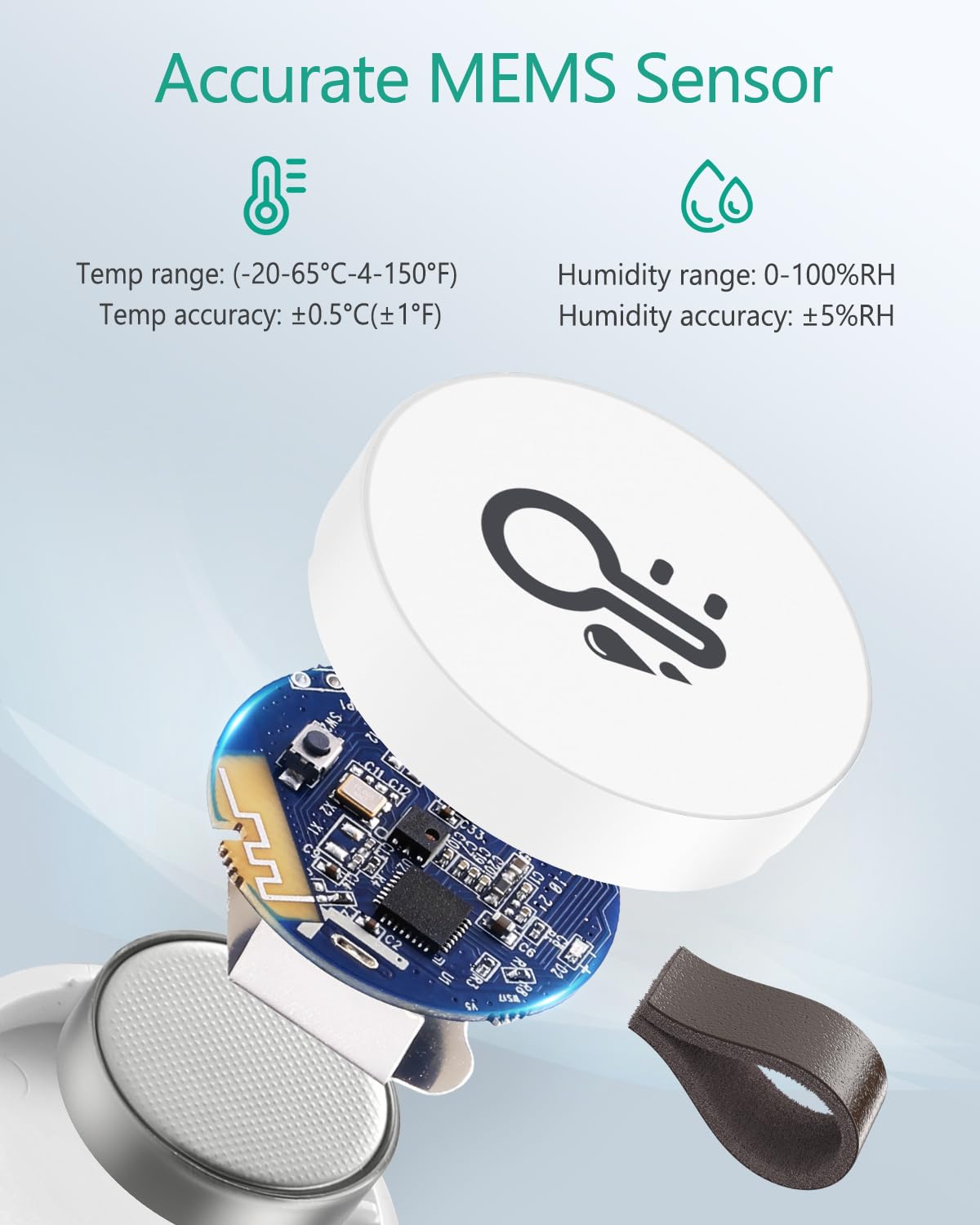
Image: An exploded view of the ORIA sensor, revealing its internal components including the accurate MEMS sensor and the CR2477 battery, highlighting its precision and ease of battery access.
2. Cleaning
To ensure accurate readings and prolong the life of your sensor:
- Wipe the exterior of the device with a soft, dry cloth.
- Do not use abrasive cleaners, solvents, or immerse the device in water.
- Keep the sensor free from dust and debris, especially around the sensor opening.
Troubleshooting
| Problem | Possible Cause | Solution |
|---|---|---|
| Device not connecting to app. | Bluetooth is off; battery is low/dead; insulation sheet not removed; device out of range. | Ensure Bluetooth is on. Check/replace battery. Remove insulation sheet. Move device closer to your phone (within 50m/164ft). |
| Inaccurate readings. | Sensor obstructed; placed in extreme conditions; calibration needed. | Ensure sensor is in an open area. Avoid direct sunlight or extreme drafts. Check app for calibration options if available. |
| No data recorded in app. | App not running in background; phone not within range periodically. | Ensure the app has background refresh permissions. Bring your phone within range of the sensor at least once a day to sync data. |
| Alerts not received. | Notifications disabled for the app; alert thresholds not set. | Check your phone's notification settings for the "Sensor Blue" app. Verify that alert thresholds are correctly set within the app. |
Specifications
| Model Number | WA64 |
| Dimensions | 3.3 x 3.3 x 1.19 cm (1.5 x 1.5 x 0.62 inches) |
| Weight | 30 g (1.3 ounces) |
| Temperature Range | -20 °C to 60 °C (-4 °F to 140 °F) |
| Temperature Accuracy | ±0.5 °C (±1 °F) |
| Humidity Range | 0% to 100% RH |
| Humidity Accuracy | ±5% RH |
| Connectivity | Bluetooth 5.0 |
| Wireless Range | Up to 50 m (164 ft) in open area |
| Battery Type | CR2477 Lithium Metal (included) |
| Battery Lifespan | Approximately 10 months |
| Material | ABS (Acrylonitrile Butadiene Styrene) |
| Supported OS | Android 4.3 or above, iOS 4s or above |

Image: The ORIA sensor depicted in various application settings, including a greenhouse, a wine cellar, and an incubation room, demonstrating its versatility for environmental monitoring.
Warranty and Support
ORIA is committed to providing high-quality products and excellent customer service. Your ORIA Wireless Thermometer Hygrometer comes with:
- 12 Months Quality Assurance: We stand by the quality of our products.
- Lifetime Customer Service: Our dedicated support team is available to assist you with any inquiries or issues.
- Professional Help: Access to professional assistance for product usage and troubleshooting.
For support, please refer to the contact information provided in your product packaging or visit the official ORIA website.
