Introduction
This manual provides detailed instructions for the safe and effective use of your Philips Sonicare Power Flosser & Toothbrush System 7000. This system combines the Power Flosser with Quad Stream technology and the ExpertClean 7300 electric toothbrush for comprehensive oral care.
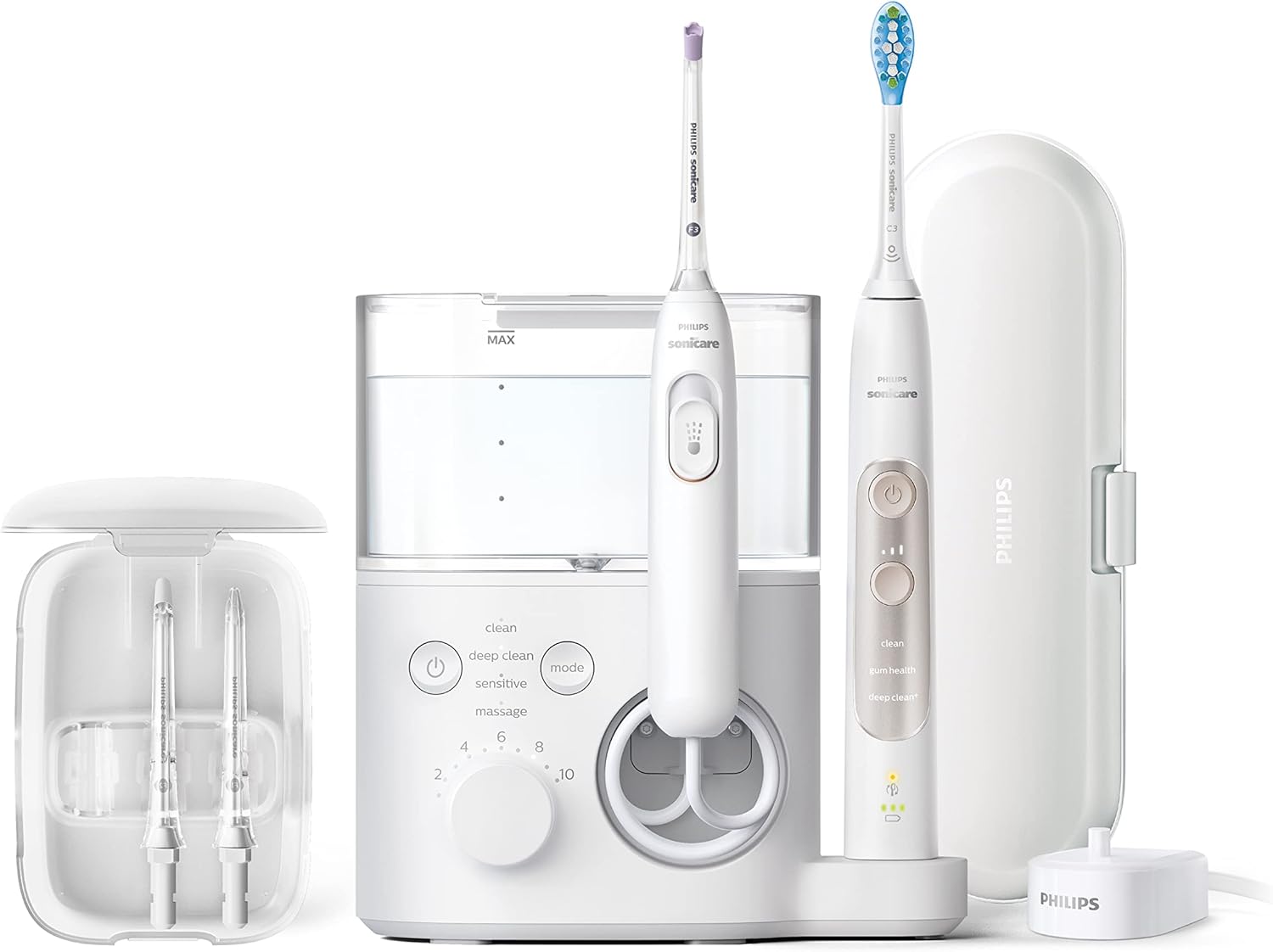
Image: The complete Philips Sonicare Power Flosser and Toothbrush System 7000, including the flosser unit, electric toothbrush, and accessories.
Important Safety Information
This product is battery-powered. Keep it away from children and water. Consult with healthcare professionals for use if you have certain medical conditions. Always use the product according to the provided instructions for proper handling and maintenance.
Package Contents
- Philips Sonicare Power Flosser 7000 unit
- Philips Sonicare ExpertClean 7300 Toothbrush
- Quad Stream nozzle (F3)
- Standard nozzle (F1)
- Comfort nozzle (F2)
- Nozzle storage case
- Brush head
- Travel case for toothbrush
- Charger
- User Manual
Video: An official overview of the Philips Sonicare Power Flosser & Toothbrush System 7000, showcasing its features and components.
Setup
Initial Setup
- Unpack all components from the box.
- Place the Power Flosser unit on a stable, flat surface near an electrical outlet.
- Fill the Power Flosser reservoir with water. Open the hinged lid and pour lukewarm water into the reservoir up to the MAX line. Close the lid.
- Attach the desired nozzle (e.g., Quad Stream nozzle) to the Power Flosser handle.
- Plug the Power Flosser into a power outlet.
- Attach the brush head to the ExpertClean 7300 toothbrush handle.
- Place the toothbrush on its charging dock to ensure it is fully charged before first use.

Image: A hand filling the large, clear reservoir of the Philips Sonicare Power Flosser with water.

Image: The Philips Sonicare ExpertClean 7300 electric toothbrush, its travel case, and charger, ready for use.
Operating the Power Flosser
Modes and Intensities
The Power Flosser offers 4 flossing modes and 10 intensity settings:
- Clean Mode: Standard cleaning.
- Deep Clean Mode: For a more intensive clean.
- Sensitive Mode: Gentle cleaning for sensitive gums.
- Gum Care Mode: Massages gums.
Adjust the intensity using the dial on the unit (settings 1-10).

Image: A close-up of the Power Flosser's control panel, highlighting the power button, mode selection, and intensity dial with settings from 1 to 10.
Quad Stream Technology
The unique Quad Stream nozzle creates an X-shaped stream of water that covers a larger surface area, reaching deep between teeth and along the gum line.

Image: A detailed view of the innovative Quad Stream nozzle in action, demonstrating its X-shaped water spray pattern for enhanced cleaning.
Pulse Wave Technology
Gentle pulses of water guide you from tooth to tooth, ensuring thorough coverage.

Image: A visual representation of the Pulse Wave feature, showing arrows indicating how the flosser gently guides users from one tooth to the next.
Flossing Procedure
- Direct the X-shaped stream of water between teeth.
- Move the Power Flosser along the gum line, allowing the Pulse Wave technology to guide you from tooth to tooth.
- Ensure the nozzle is positioned at a 90-degree angle to the gum line.
Operating the Electric Toothbrush
Modes
The ExpertClean 7300 offers various brushing modes for different needs:
- Clean: For daily cleaning.
- White: For surface stain removal.
- Gum Care: Gently massages gums.
- Deep Clean+: For an invigorating deep clean.
Brushing Procedure
Apply a small amount of toothpaste to the brush head. Place the brush head against your teeth at a slight angle towards the gum line. Press the power button to start. Gently glide the brush across your teeth, allowing the sonic vibrations to clean. The toothbrush will pause to indicate when to move to the next section of your mouth.
Maintenance
Power Flosser
After each use, empty any remaining water from the reservoir. The reservoir can be removed for easy cleaning. Wipe the unit and handle with a damp cloth.
Toothbrush
Rinse the brush head and handle after each use. Store the brush head in the provided nozzle storage case. Store the toothbrush in a dry place. Replace brush heads every 3 months or sooner if bristles are frayed.

Image: A clear plastic case designed to store multiple Philips Sonicare flosser nozzles, keeping them clean and organized.
Troubleshooting
Common Issues
- No water flow: Ensure the reservoir is filled and the nozzle is correctly attached. Check for any blockages in the nozzle.
- Weak water pressure: Adjust the intensity dial to a higher setting.
- Toothbrush not charging: Ensure the charger is properly connected to the power outlet and the toothbrush is correctly placed on the charging base.
- Unusual noise: If the device makes unusual noises, discontinue use and contact customer support.
Specifications
| Feature | Detail |
|---|---|
| Product Dimensions | 8.62 x 7.48 x 10.43 inches; 3.27 Pounds |
| Item Model Number | HX3921/40 |
| Brand | Philips Sonicare |
| Power Source | Battery Powered |
| Special Feature | Bluetooth Connectivity |
| Unit Count | 1 Count |
| Flossing Modes | 4 (Clean, Deep Clean, Sensitive, Gum Care) |
| Flossing Intensities | 10 |
| Water Flosser Technology | Quad Stream, Pulse Wave |
| Toothbrush Modes | Clean, White, Gum Care, Deep Clean+ |
Warranty and Support
Warranty Information
Philips Sonicare products typically come with a manufacturer's warranty. Please refer to the warranty card included in your product packaging or visit the official Philips Sonicare website for detailed warranty terms and conditions.
Customer Support
For further assistance, product registration, or to purchase replacement parts, please visit the official Philips Sonicare website or contact their customer service.


