
1. Product Overview
The NETGEAR 300 Series Gigabit Ethernet Unmanaged Switches provide easy, reliable, and affordable network connectivity for home and small offices. This unmanaged plug-and-play switch allows for instant expansion of network connections to multiple devices. The GS305P model features Power-over-Ethernet (PoE+) capabilities, delivering both power and data through a single Ethernet (CAT-5) cable to compatible devices.

Figure 1: Front and rear view of the NETGEAR GS305P switch, highlighting its 5 Gigabit Ethernet ports, 4 PoE+ ports, and power input.
Key Features
- 5 Gigabit Ethernet ports for high-speed network connections.
- 4 PoE+ ports with a total power budget of 63W, capable of delivering up to 30W per port.
- Simple plug-and-play setup requiring no software installation or configuration.
- Supports flexible desktop or wall mount placement (hardware included).
- Energy-efficient design compliant with IEEE802.3az standards.
- Silent operation, making it suitable for noise-sensitive environments.
2. What's in the Box
Verify that your package contains the following items:
- NETGEAR GS305P 5-Port Gigabit Ethernet Unmanaged PoE+ Switch
- Power adapter
- Wallmount kit
- Installation guide
3. Installation and Setup
Connecting the Switch
The GS305P is designed for simple plug-and-play operation. Follow these steps to set up your switch:
- Connect the provided power adapter to the switch's power input and then to a power outlet.
- Connect your network router or modem to any of the switch's Gigabit Ethernet ports using an Ethernet cable.
- Connect your network devices (e.g., computers, network-attached storage, IP cameras, VoIP phones, wireless access points) to the remaining Ethernet ports. For PoE-compatible devices, use ports 1-4.

Figure 2: Example of connecting various devices to the unmanaged switch for plug-and-play functionality.
Power over Ethernet (PoE+)
The GS305P switch features four PoE+ ports (ports 1-4) that can supply power to compatible devices over the Ethernet cable. This eliminates the need for separate power adapters for devices like IP cameras, VoIP phones, and wireless access points, simplifying installation and reducing cable clutter.

Figure 3: Power over Ethernet (PoE) capabilities for different device types, showing the power per port for PoE, PoE+, and PoE++ standards.
Ensure that the total power consumption of all connected PoE+ devices does not exceed the switch's total power budget of 63W. Each PoE+ port can deliver up to 30W.
4. Operation
LED Indicators
The switch features LED indicators on the front panel to provide status information:

Figure 4: Front panel of the GS305P switch with LED indicators.
| LED Indicator | Status | Description |
|---|---|---|
| Power LED | Green | The switch is powered on. |
| PoE Max LED | Green | Total PoE power consumption is less than 50% of the maximum. |
| PoE Max LED | Amber | Total PoE power consumption is between 50% and 70% of the maximum. |
| PoE Max LED | Flashing Amber | Total PoE power consumption is between 70% and 100% of the maximum. |
| PoE Max LED | Red | Total PoE power consumption exceeds 100% of the maximum. Disconnect one or more PoE devices. |
| Left LED (Ports 1-5) | Green | 1000 Mbps link. |
| Left LED (Ports 1-5) | Yellow | 10/100 Mbps link. |
| Right LED (Ports 1-4) | Green | PoE powered device connected. |
| Right LED (Ports 1-4) | Yellow | PoE fault detected. |
Plug-and-Play Functionality
As an unmanaged switch, the GS305P operates automatically without requiring any software configuration. Simply connect your devices, and the switch will handle network traffic efficiently. It automatically detects network speed and duplex mode for each connected device.
5. Maintenance
To ensure optimal performance and longevity of your NETGEAR switch, consider the following maintenance tips:
- Placement: Place the switch in a well-ventilated area to prevent overheating. Avoid placing it near heat sources or in enclosed spaces.
- Cleaning: Periodically clean the exterior of the switch with a soft, dry cloth. Do not use liquid or aerosol cleaners.
- Cable Management: Ensure network cables are neatly organized and not excessively bent or strained.
- Power Supply: Use only the power adapter supplied with the switch.
6. Troubleshooting
If you encounter issues with your NETGEAR GS305P switch, try the following troubleshooting steps:
- No Power: Check if the power adapter is securely connected to the switch and a working power outlet. Verify the Power LED is illuminated.
- No Link on a Port: Ensure the Ethernet cable is securely connected to both the switch port and the device. Try a different Ethernet cable or port. Check the device's network settings.
- PoE Device Not Powering On: Verify the device is PoE compatible. Check the Right LED for the port; if it's yellow, there might be a PoE fault. Ensure the total PoE power budget (63W) is not exceeded. Try connecting the device to a different PoE port.
- Slow Network Speed: Ensure all connected devices and cables support Gigabit Ethernet (1000 Mbps). Check for excessive network traffic or faulty cables.
- Intermittent Connection: Check for loose cable connections. Ensure the switch is not overheating.
7. Technical Specifications
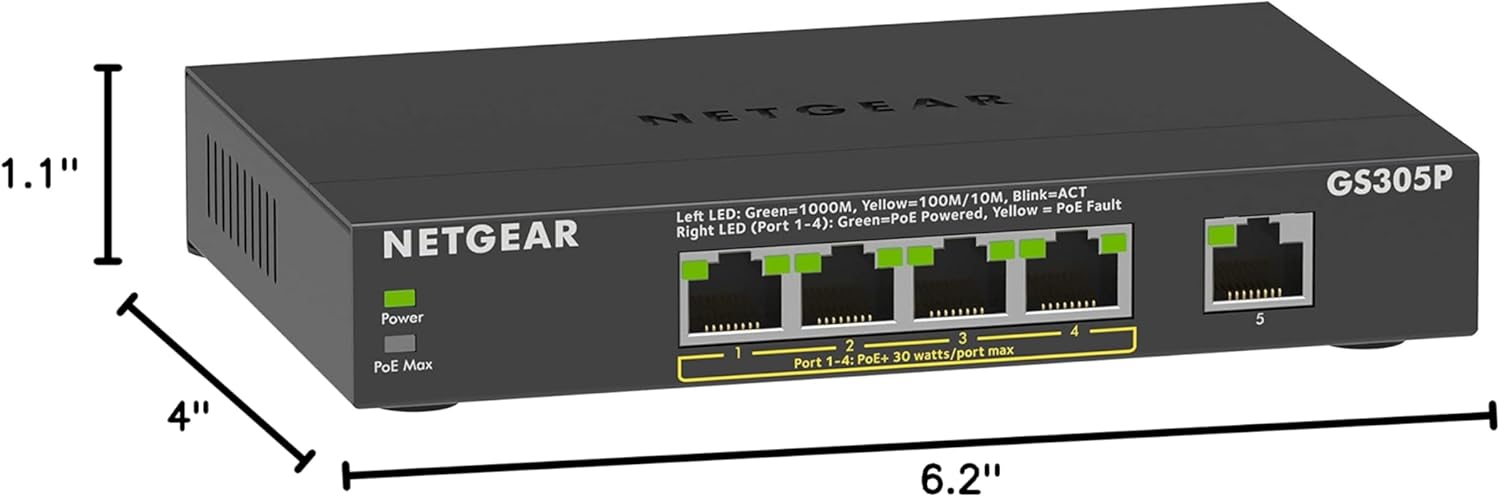
Figure 5: Dimensions of the NETGEAR GS305P switch.
| Specification | Value |
|---|---|
| Brand | NETGEAR |
| Model Number | GS305P-200NAS |
| Number of Ports | 5 Gigabit Ethernet ports |
| PoE+ Ports | 4 (Ports 1-4) |
| Total PoE Power Budget | 63 Watts |
| Data Transfer Rate | 1000 Megabits Per Second (Gigabit) |
| Switch Type | Unmanaged |
| Case Material Type | Metal |
| Item Dimensions (L x W x H) | 6.2"L x 4"W x 1.1"H |
| Item Weight | 971 Grams |
| Operating Temperature | 32°F to 104°F (0°C to 40°C) |
| Current Rating | 1.25 Amps |
| UPC | 606449151398 |
8. Warranty and Support
This NETGEAR switch comes with an industry-leading 3-year limited hardware warranty. For detailed warranty terms and conditions, please refer to the official NETGEAR website or the documentation included with your product.
For technical support, product registration, and additional resources, visit the official NETGEAR support website. You may need your product model number (GS305P-200NAS) and serial number for support inquiries.
9. Product Video
Official product video for the NETGEAR 5-Port Gigabit Ethernet Unmanaged PoE Switch, demonstrating its features and applications.