
1. Introduction
Thank you for choosing the Lumisky Beverly Black Wireless LED Table Lamp. This manual provides essential information for the safe and efficient use of your new lamp. The Beverly Black is a versatile, wireless LED table lamp featuring warm white, dimmable light. Its modern design, portability, and up to 5 hours of battery life make it suitable for both indoor and outdoor environments.

The Lumisky Beverly Black lamp provides warm white LED light, perfect for creating ambiance in various settings.
2. Safety Instructions
- Read all instructions before use and retain for future reference.
- This lamp is rated IP44, meaning it is protected against solid objects larger than 1mm and against splashing water from any direction. It is suitable for outdoor use but should not be submerged in water.
- Do not attempt to open or modify the lamp. Internal components are not user-serviceable.
- Use only the provided Micro-USB cable for charging. Ensure the charging voltage is 5V DC.
- Keep the lamp away from extreme temperatures, direct sunlight, and open flames.
- Clean the lamp with a soft, damp cloth. Do not use abrasive cleaners or solvents.
3. Package Contents
Please check that all items are present in the package:
- 1 x Lumisky Beverly Black Wireless LED Table Lamp (H34cm)
- 1 x Micro-USB Charging Cable
4. Setup
4.1 Initial Charge
- Unpack the lamp and all accessories.
- Connect the Micro-USB charging cable to the charging port on the lamp.
- Connect the other end of the USB cable to a compatible 5V DC USB power adapter (not included) or a powered USB port.
- Allow the lamp to charge for approximately 4 hours for a full charge before first use. The charging indicator (if present) will typically change color or turn off when fully charged.
4.2 Placement
The Beverly Black lamp is designed for versatile use:
- Indoor Use: Ideal as a table lamp, bedside lamp, or decorative accent in living rooms, bedrooms, or children's rooms.
- Outdoor Use: Suitable for terraces, patios, or garden tables due to its IP44 splash-proof rating. Ensure it is not exposed to heavy rain or submerged.

This image shows the lamp's modern design complementing an indoor dining area, highlighting its versatility.

The lamp is suitable for outdoor use, as demonstrated by its placement on a patio table, offering portable illumination.
5. Operating Instructions
5.1 Power On/Off
The lamp is equipped with a touch or push-button switch. To turn the lamp ON or OFF, simply press or touch the designated area on the lamp base.
5.2 Brightness Adjustment
The Beverly Black lamp features a dimmable warm white LED. It can be adjusted to 4 different brightness levels. Repeatedly press or touch the power button to cycle through the brightness settings:
- Press 1: Low brightness
- Press 2: Medium brightness
- Press 3: High brightness
- Press 4: Maximum brightness
- Press 5: Turn OFF
This allows you to adapt the light intensity to your preference and environment.
6. Maintenance
- Cleaning: Wipe the lamp with a soft, slightly damp cloth. Do not use harsh chemicals, abrasive cleaners, or spray water directly onto the lamp.
- Storage: If storing the lamp for an extended period, ensure it is fully charged and store it in a cool, dry place. Recharge it periodically (e.g., every 3-6 months) to maintain battery health.
- Battery: The integrated battery is not replaceable by the user. Do not attempt to remove or replace it.
7. Troubleshooting
| Problem | Possible Cause | Solution |
|---|---|---|
| Lamp does not turn on | Battery is depleted | Charge the lamp for 4 hours using the Micro-USB cable. |
| Lamp does not charge | Charging cable or adapter faulty; improper connection | Ensure the Micro-USB cable is securely connected to both the lamp and a working 5V DC USB power source. Try a different cable or adapter. |
| Short battery life | Not fully charged; high brightness setting; aging battery | Ensure a full 4-hour charge. Use lower brightness settings for longer battery life. Battery capacity may decrease over time. |
| Brightness adjustment not working | Incorrect operation; sensor issue | Ensure you are pressing/touching the correct area. Try turning the lamp off and on again. |
8. Specifications
| Model Number | BEVERLY BLACK |
| Dimensions (L x W x H) | 13 x 13 x 34 cm |
| Weight | 460 grams |
| Material (Base/Shade) | Plastic / Plastic |
| Lamp Type | LED (Warm White) |
| Luminous Flux | >100 Lumens |
| Color | Black |
| Switch Type | Touch or Push Button |
| Features | Dimmable (4 positions) |
| Power Source | Rechargeable via Micro-USB Cable |
| Voltage | 5 Volts (DC) |
| Wireless | Yes |
| IP Rating | IP44 (Splash-proof) |
| Battery Life | Up to 5 hours (depending on brightness) |
| Charging Time | Approx. 4 hours |
| Components Included | Micro-USB cable |
| Usage | Indoor / Outdoor |
8.1 Energy Label
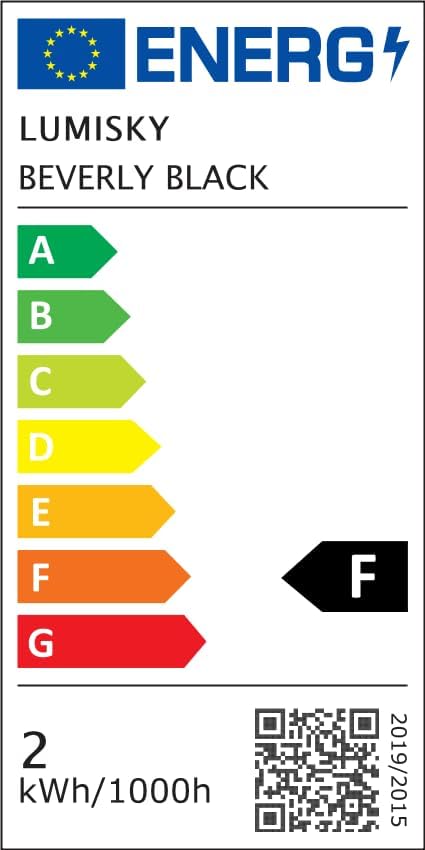
The energy label provides information on the lamp's energy efficiency, rated as class F. More details can be found at the EPREL database via the QR code or the following link: EPREL Database Link
9. Warranty
The Lumisky Beverly Black Wireless LED Table Lamp comes with a 2-year manufacturer's warranty from the date of purchase. This warranty covers manufacturing defects under normal use. It does not cover damage caused by misuse, accidents, unauthorized modifications, or normal wear and tear. Please retain your proof of purchase for warranty claims.
10. Support
For any questions, technical assistance, or warranty claims, please contact your retailer or the Lumisky customer support team. Refer to your purchase documentation for contact details.