
1. Introduction
This manual provides instructions for the proper setup, operation, and maintenance of your NKF RC-1214 replacement remote control. This remote is designed to be fully compatible with Denon CD Receiver models RCD-M41-SP, RCD-M41DAB, and RCD-M41, offering complete functionality without the need for complex programming.

Image 1.1: Angled view of the NKF RC-1214 remote control. This image displays the overall design and button layout from a slightly elevated perspective.
2. Setup and Battery Installation
The NKF RC-1214 remote control requires two AAA alkaline batteries (not included) for operation. No programming or pairing is necessary; simply install the batteries, and the remote will be ready for use with your compatible Denon CD Receiver.
2.1 Battery Installation Steps:
- Locate the battery compartment on the back of the remote control.
- Press down on the latch and slide the battery cover downwards to open it.
- Insert two new AAA alkaline batteries, ensuring the positive (+) and negative (-) terminals align correctly with the markings inside the compartment.
- Slide the battery cover back into place until it clicks securely.

Image 2.1: Rear view of the NKF RC-1214 remote control with the battery compartment open, showing the placement for two AAA batteries.
3. Operating Instructions
The RC-1214 remote control provides full access to all essential functions of your Denon CD Receiver. Point the remote control directly at the receiver's infrared sensor for optimal performance.
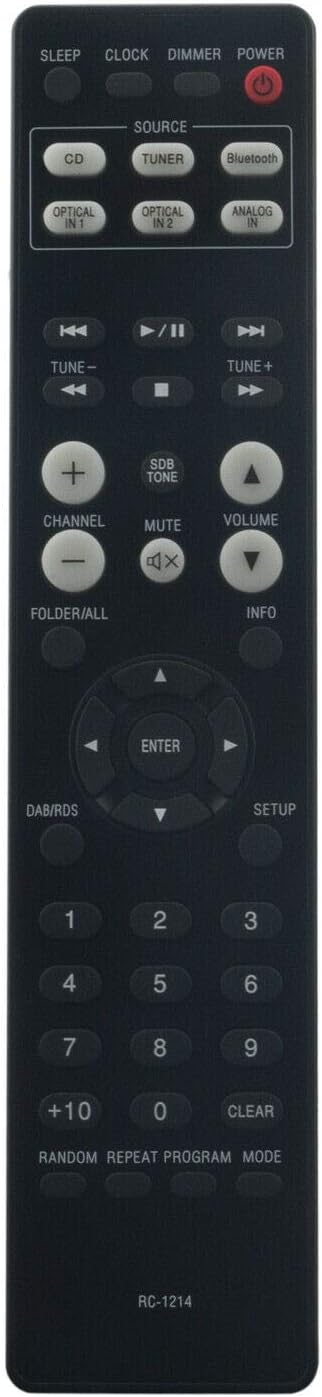
Image 3.1: Front view of the NKF RC-1214 remote control, clearly showing the layout of all function buttons.
3.1 Key Functions:
- POWER: Turns the receiver on or off.
- SOURCE (CD, TUNER, Bluetooth, OPTICAL IN, ANALOG IN): Selects the input source.
- VOLUME (+/-): Adjusts the master volume level.
- MUTE: Temporarily silences the audio output.
- PLAY/PAUSE (►/‖), STOP (■), SKIP (◀◀ / ►►): Controls playback for CD and other media.
- TUNE (+/-): Adjusts radio frequency.
- CHANNEL (+/-): Navigates through preset radio stations or tracks.
- ENTER / Navigation Arrows: Confirms selections and navigates menus.
- SETUP: Accesses the receiver's setup menu.
- DAB/RDS: Toggles DAB/RDS information display.
- Number Buttons (0-9, +10): Direct track selection or input.
- RANDOM, REPEAT, PROGRAM, MODE: Controls playback modes.
- CLEAR: Clears current input or selection.
- SLEEP: Sets a sleep timer.
- CLOCK: Displays or sets the clock.
- DIMMER: Adjusts display brightness.
- SDB TONE: Activates/deactivates Super Dynamic Bass and Tone control.
- FOLDER/ALL: Navigates folders or displays all tracks.
- INFO: Displays track or system information.
4. Maintenance
4.1 Battery Replacement:
Replace batteries when the remote control's response becomes sluggish or stops functioning. Always replace both batteries simultaneously with new AAA alkaline batteries. Do not mix old and new batteries, or different types of batteries.
4.2 Cleaning:
To clean the remote control, gently wipe its surface with a soft, dry cloth. Avoid using abrasive cleaners, solvents, or chemical sprays, as these can damage the remote's finish or internal components.
5. Troubleshooting
If you experience issues with your NKF RC-1214 remote control, please refer to the following common solutions:
- Remote not responding:
- Check if the batteries are inserted correctly with the correct polarity.
- Replace old batteries with new AAA alkaline batteries.
- Ensure there are no obstructions between the remote control and the receiver's infrared sensor.
- Confirm you are within the effective operating range and pointing the remote directly at the receiver.
- Specific functions not working:
- Verify that your Denon CD Receiver model is one of the compatible models (RCD-M41-SP, RCD-M41DAB, RCD-M41).
- Some functions may require the receiver to be in a specific mode (e.g., CD playback for CD controls).
6. Specifications
| Feature | Detail |
|---|---|
| Model | RC-1214 |
| Compatible Devices | Denon CD Receiver RCD-M41-SP, RCD-M41DAB, RCD-M41 |
| Connectivity Technology | Infrared (IR) |
| Batteries Required | 2 x AAA (Alkaline recommended, not included) |
| Product Dimensions | 6 x 1 x 0.6 inches (approximately) |
| Item Weight | 1 ounce (approximately, without batteries) |
| Manufacturer | NKF |
7. Support
If you encounter any issues that cannot be resolved using the troubleshooting steps provided, or if you have further questions regarding your NKF RC-1214 remote control, please contact the seller or manufacturer for assistance. Providing details about the issue and your receiver model will help expedite support.