1. Introduction
The GTMEDIA N4 Digital Infrared Night Vision Binoculars are designed for enhanced visibility in low-light and complete darkness conditions. Featuring advanced infrared technology, high-resolution photo and video capabilities, and versatile mounting options, this device is ideal for outdoor activities such as hunting, camping, animal observation, and security monitoring.
2. Package Contents
Please verify that all items listed below are included in your package. If any items are missing or damaged, please contact customer support.

Image: All components included in the GTMEDIA N4 package, including the night vision device, head strap, storage bag, USB cable, 32GB TF card, card reader, lens cloth, and cloth bag.
- 1 x GTMEDIA N4 Night Vision Binoculars
- 1 x Adjustable Head Strap
- 1 x Storage Bag
- 1 x USB-A to USB-C Cable
- 1 x 32GB TF Memory Card
- 1 x Card Reader
- 1 x Lens Cloth
- 1 x Cloth Bag
- 1 x Wrist Strap
- 1 x User Manual (this document)
3. Product Features
The GTMEDIA N4 Night Vision Binoculars offer a range of features designed for optimal performance in various conditions:
- Powerful Night Vision: Equipped with 3W 850nm infrared LEDs (7-level brightness adjustable) and an F1.2 large aperture lens for clear observation up to 984ft (300m) in total darkness.
- HD Video and Photos: Records crisp 1080p video and 10MP photos.
- Integrated Display: 1.54" TFT display (320x320 circular screen) for instant review of footage.
- 5x Digital Zoom: Allows for closer observation of distant subjects.
- Versatile Use: Can be used handheld, head-mounted (head strap included), or helmet-mounted (helmet/mount not included).
- Rechargeable Battery: Built-in 3.7V 2000mAh rechargeable lithium battery provides up to 5 hours of continuous use with IR on, and up to 10 hours with IR off.
- Durable Design: IPX6 waterproof rating protects against rain, rainstorm, humidity, and other harsh environments.
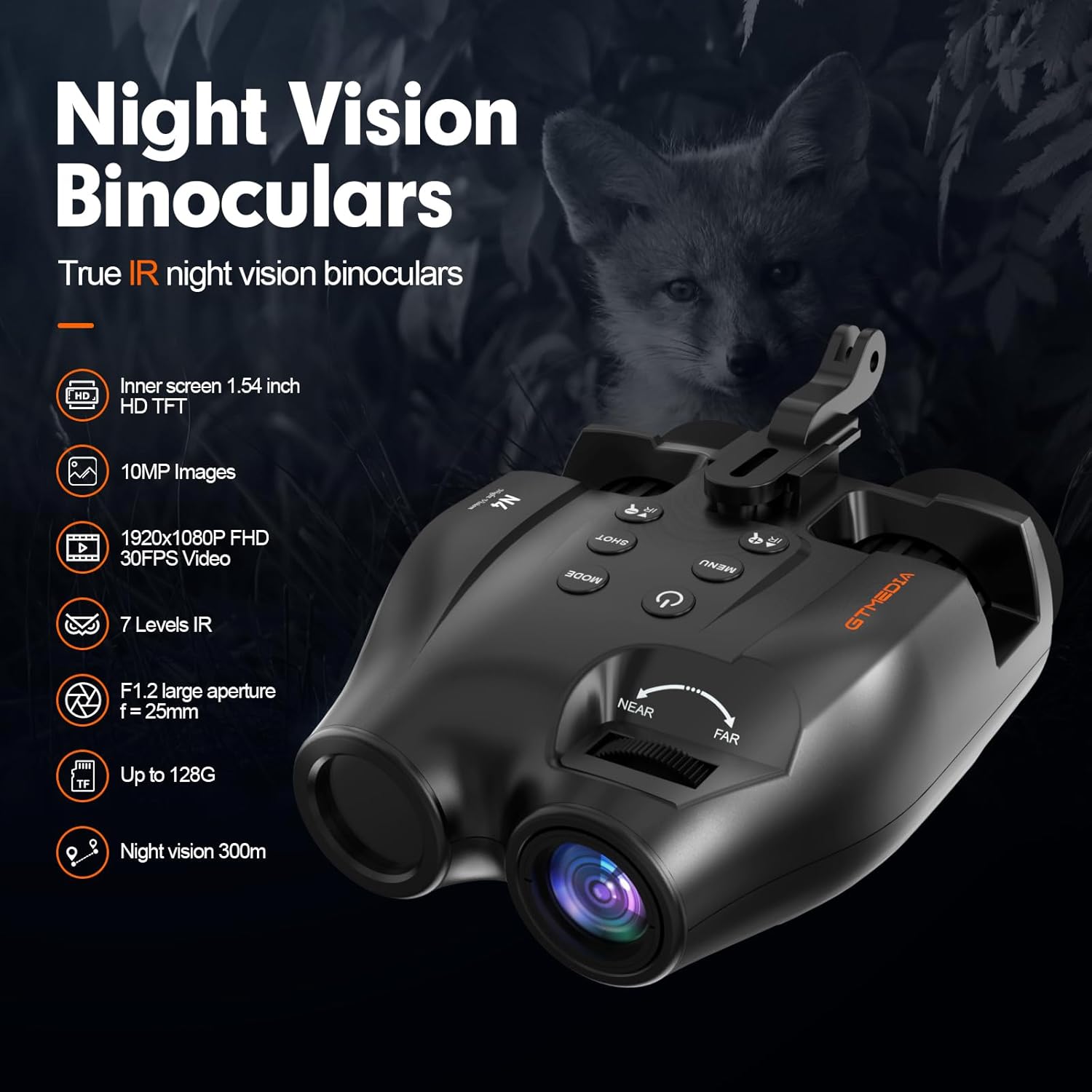
Image: Overview of the GTMEDIA N4 Night Vision Binoculars highlighting features such as 1.54 inch HD TFT screen, 10MP images, 1920x1080P FHD 30FPS video, 7 levels IR, F1.2 large aperture, up to 128G memory support, and 300m night vision range.

Image: Illustration demonstrating the powerful 7-level infrared illumination and 5x digital zoom capabilities of the GTMEDIA N4, showing how it enhances visibility in dark environments.

Image: Comparison of day and night use with the GTMEDIA N4, showing clear color images during the day and detailed black and white infrared images at night, with time and resolution stamps.
4. Setup
4.1 Charging the Device
Before first use, fully charge the night vision binoculars. Connect the included USB-A to USB-C cable to the device's charging port and a compatible USB power source (e.g., computer, wall adapter). The charging indicator light will show charging status.
4.2 Inserting the Memory Card
The device supports a TF (microSD) card for storing photos and videos. Locate the memory card slot, typically protected by a rubber cover. Insert the 32GB TF card (included) into the slot until it clicks into place. Ensure the card is inserted in the correct orientation.
4.3 Attaching the Head Strap
For hands-free operation, attach the adjustable head strap to the night vision binoculars. Align the mounting bracket on the device with the head strap's attachment point and secure it firmly. Adjust the straps for a comfortable and stable fit on your head.

Image: Demonstrates three ways to use the GTMEDIA N4: head-mounted with the included strap, handheld for quick observation, and helmet-mounted (helmet not included) for tactical applications.
5. Operating Instructions
5.1 Power On/Off
- To power on, press and hold the Power button (symbol: circle with vertical line) until the display illuminates.
- To power off, press and hold the Power button again until the display turns off.
5.2 Adjusting Infrared (IR) Brightness
- In night vision mode, press the IR+ button (symbol: IR with plus sign) to increase IR brightness (7 levels available).
- Press the IR- button (symbol: IR with minus sign) to decrease IR brightness.
- Adjust IR brightness based on ambient light conditions for optimal visibility.
5.3 Capturing Photos and Videos
- Press the MODE button to switch between Photo, Video, and Playback modes.
- In Photo mode, press the SHOT button (symbol: camera icon) to take a picture.
- In Video mode, press the SHOT button to start recording. Press again to stop recording.
5.4 Focusing
Rotate the focus wheel located on the top of the device (marked "NEAR" and "FAR") to achieve a clear image of your subject. Adjust as needed for different distances.

Image: Top-down view of the GTMEDIA N4 Night Vision Binoculars, clearly showing the power button, mode button, shot button, menu button, IR adjustment buttons, and the near/far focus wheel.
5.5 Menu Navigation
- Press the MENU button to access settings.
- Use the IR+ and IR- buttons to navigate through menu options.
- Press the SHOT button to confirm a selection.
- Press the MENU button again to exit the menu.
5.6 Viewing on Display
The integrated 1.54" TFT display provides a clear view of your surroundings and recorded media. Adjust the eyepiece focus for personal comfort.

Image: A user holding the GTMEDIA N4 Night Vision Binoculars, illustrating the view through the eyepieces which shows the 1.54-inch high-definition TFT circular screen for clear viewing.
6. Maintenance
6.1 Cleaning
- Use the included lens cloth to gently wipe the lenses and display screen. Do not use abrasive materials or harsh chemicals.
- For the body of the device, use a soft, damp cloth.
- Ensure the device is dry before storing.
6.2 Storage
- Store the night vision binoculars in the provided storage bag when not in use to protect them from dust and scratches.
- Keep the device in a cool, dry place, away from direct sunlight and extreme temperatures.
6.3 Battery Care
- To prolong battery life, avoid fully discharging the battery frequently.
- Charge the device regularly, even if not in use, to maintain battery health.

Image: The GTMEDIA N4 Night Vision Binoculars shown with water droplets, illustrating its IPX6 waterproof rating, indicating protection against rain, rainstorms, humidity, and other harsh outdoor environments.
7. Troubleshooting
| Problem | Possible Cause | Solution |
|---|---|---|
| Device does not power on. | Low battery; device malfunction. | Charge the device fully. If problem persists, contact support. |
| Image is blurry. | Improper focus; dirty lens. | Adjust the focus wheel. Clean the lens with the provided cloth. |
| IR illumination is weak or not working. | IR brightness level too low; battery low. | Increase IR brightness using the IR+ button. Ensure battery is charged. |
| Cannot record photos/videos. | Memory card full or not inserted correctly; incorrect mode. | Check memory card insertion. Delete old files or replace card. Ensure device is in Photo or Video mode. |
8. Specifications
| Feature | Detail |
|---|---|
| Brand | GTMEDIA |
| Model Name | N4 |
| Night Vision Range | Up to 984ft (300m) |
| Infrared LEDs | 3W 850nm (7-level adjustable) |
| Digital Zoom | 5x |
| Photo Resolution | 10MP |
| Video Resolution | 1080p FHD 30FPS |
| Display Screen | 1.54" TFT (320x320 circular) |
| Battery | Built-in 3.7V 2000mAh rechargeable lithium battery |
| Battery Life (IR on) | Up to 5 hours |
| Battery Life (IR off) | Up to 10 hours |
| Waterproof Rating | IPX6 |
| Storage | Supports TF (microSD) card (32GB included) |
| Item Weight | 350 Grams |
| Material | Plastic |
9. Warranty and Support
The GTMEDIA N4 Night Vision Binoculars come with a 2-year warranty from the date of purchase, covering manufacturing defects. Please retain your proof of purchase for warranty claims.
For technical support, troubleshooting assistance, or warranty inquiries, please contact GTMEDIA customer service through the retailer where the product was purchased or visit the official GTMEDIA website for contact information.
Official Product Video:
Video: An introduction to the GTMEDIA N4 Night Vision Goggle accessories, demonstrating the unboxing and various components included in the package.


