1. Introduction
Thank you for choosing Tiksounds X15 Wireless Earbuds. These high-fidelity stereo earphones are designed for sports and work, offering a seamless audio experience with advanced features. This manual provides detailed instructions to help you get the most out of your earbuds.

Figure 1: Tiksounds X15 Wireless Earbuds and Charging Case
2. What's in the Box
- Tiksounds X15 Wireless Earbuds (Left and Right)
- Charging Case
- USB-C Charging Cable
- User Manual
- Multiple Sizes of Eartips (S, M, L)

Figure 2: Package Contents
3. Product Features
3.1 Extended Playtime & HiFi Stereo Sound
Enjoy up to 7 hours of listening on a single charge. The portable charging case extends the total playtime to an impressive 35 hours. Equipped with advanced polyurethane drivers, these earbuds deliver authentic sound with deep bass, ensuring a high-fidelity stereo experience.

Figure 3: 35-Hour Playtime Overview
3.2 Bluetooth 5.3 Connectivity
The X15 earbuds utilize Bluetooth 5.3 technology for a fast, stable, and reliable wireless connection. This ensures minimal delays or dropouts during audio playback or calls.

Figure 4: Bluetooth 5.3 Technology
3.3 IPX7 Waterproof Rating
With an IPX7 waterproof rating, the X15 earbuds are protected against daily splashes of water, sweat, and rain. This makes them ideal for fitness activities and travel, providing durability and peace of mind.
3.4 Ergonomic Design & Portability
The earbuds feature an ergonomic design for a comfortable and secure fit, complemented by three sizes of silicone eartips to suit different ear shapes. The charging case is compact and lightweight (only 42g), making it easy to carry in your pocket.

Figure 5: Ergonomic and Lightweight Design
3.5 Accurate LED Power Display
The charging case incorporates a unique LED display technology that accurately shows the remaining power level of the case, allowing you to monitor battery status at a glance.
4. Setup
4.1 Initial Charging
Before first use, fully charge the earbuds and the charging case. Connect the USB-C charging cable to the charging port on the case and a power source. The LED display on the case will indicate the charging progress.
4.2 One-Step Pairing
The X15 earbuds feature one-step pairing for convenience:
- Ensure Bluetooth is enabled on your device (smartphone, tablet, etc.).
- Open the lid of the charging case. The earbuds will automatically enter pairing mode.
- On your device, search for Bluetooth devices and select "X15" from the list to connect.
- Once paired, the earbuds will automatically connect to the last paired device when the case lid is opened.

Figure 6: One-Step Pairing
5. Operating Instructions
5.1 Smart Touch Control
The X15 earbuds are equipped with intelligent touch control buttons on each earbud, allowing you to manage music, calls, and voice assistants with simple taps.
| Function | Action |
|---|---|
| Play/Pause | Single tap (L/R) |
| Next Song | Double tap (R) |
| Previous Song | Double tap (L) |
| Volume Up | Triple tap (R) |
| Volume Down | Triple tap (L) |
| Answer/End Call | Single tap (L/R) |
| Reject Call | Press and hold for 2 seconds (L/R) |
| Activate Voice Assistant (Siri) | Press and hold for 2 seconds (L/R) |
| Power On/Off | Press and hold for 5 seconds (L/R) |

Figure 7: Touch Control Gestures

Figure 8: Detailed Smart Touch Control
5.2 Wearing the Earbuds
Gently insert the earbuds into your ears, ensuring a snug and comfortable fit. You can try different sizes of silicone eartips provided to find the best seal for optimal sound quality and noise isolation.
6. Maintenance
6.1 Cleaning
To maintain optimal performance and charging efficiency, regularly clean the earbuds and charging case:
- Charging Contacts: If the earbuds cannot be charged, use alcohol to clean the charging contacts on both the earbuds and inside the charging case.
- Eartips and Mesh: Clean the eartips and the mesh on the earbuds regularly to prevent wax buildup, which can affect sound quality.
6.2 Charging the Case and Earbuds
Place the earbuds back into the charging case to charge them. The case itself can be charged via the USB-C port. Always ensure the charging contacts are clean for efficient charging.
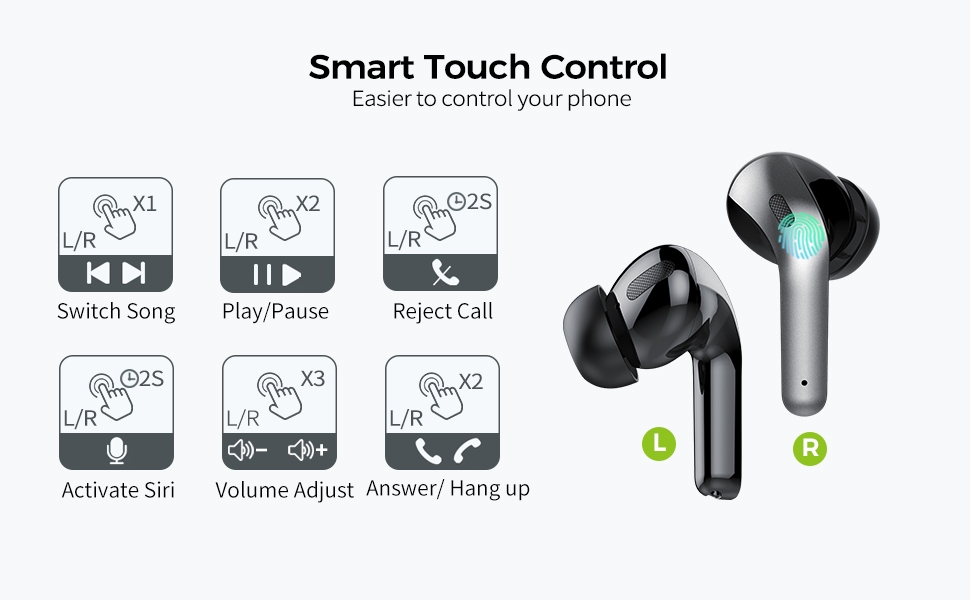
Figure 9: Cleaning and Maintenance Tips
7. Troubleshooting
If you encounter any issues with your Tiksounds X15 Earbuds, please refer to the following common solutions:
- Earbuds not charging: Ensure the charging contacts on both the earbuds and the case are clean and free of debris. Use a cotton swab with a small amount of alcohol to gently clean them.
- Poor sound quality:
- Ensure you have chosen the correct size eartips for a proper seal. A good seal provides better bass and noise isolation.
- Clean the eartips and the mesh on the earbuds to remove any blockages.
- Earbuds not pairing/connecting:
- Make sure Bluetooth is enabled on your device and the earbuds are within range.
- Forget the device from your phone's Bluetooth settings and try pairing again.
- Ensure the earbuds and case are sufficiently charged.
If the issue persists, please contact customer support for further assistance.
8. Specifications
| Feature | Detail |
|---|---|
| Model Name | X15 |
| Connectivity Technology | Wireless, Bluetooth |
| Wireless Communication | Bluetooth 5.3 |
| Earbud Battery Life | Up to 7 Hours (single charge) |
| Total Playtime (with case) | Up to 35 Hours |
| Control Method | Touch Control, Volume Control |
| Water Resistance Level | IPX7 Waterproof |
| Frequency Range | 20 Hz - 20,000 Hz |
| Bluetooth Range | 10 Meters |
| Earbud Weight | Approx. 4g (ultra-light) |
| Charging Case Weight | 42 Grams |
| Manufacturer | Tiksounds |
9. Warranty and Support
Tiksounds X15 Wireless Earbuds come with a 2-Year Warranty. If the product fails due to manufacturing defects, it can be replaced with a new product for free.
For any questions, technical support, or warranty claims, please contact Tiksounds customer service through the retailer's platform or the official Tiksounds website. Please have your purchase details and model number ready when contacting support.


