
SabineTek S610
SabineTek SmartMike+ S610 Wireless Bluetooth Microphone User Manual
Model: S610
1. Introduction
This manual provides instructions for the proper use and maintenance of your SabineTek SmartMike+ S610 wireless Bluetooth microphone. Please read this manual thoroughly before operating the device to ensure optimal performance and longevity.
2. Package Contents
Verify that all items are present in your package:
- SabineTek SmartMike+ S610 Wireless Bluetooth Microphone
- Charging Cable
3. Product Overview
The SabineTek SmartMike+ S610 is an ultra-compact, lightweight (approximately 15.6g) wireless lavalier microphone designed for audio and video recording. It features Bluetooth 5.0 connectivity and multi-level noise cancellation.
3.1. Device Components

Figure 1: Exploded view of the SmartMike+ S610, showing the Qualcomm 5.0 chip, Apple MFi certification, power button, charging port, 3.5mm jack, and both unidirectional and non-directional microphone elements.
- Microphone Element: Captures audio. The device includes both unidirectional and non-directional microphone options.
- Power Button: Used to turn the device on/off and initiate pairing.
- Charging Port: For connecting the charging cable.
- 3.5mm Jack: For connecting an external lavalier microphone or headphones for monitoring.
- Clip: Allows easy attachment to clothing.
3.2. Key Features
- Wireless Connectivity: Bluetooth 5.0 for stable connection up to 50 feet.
- Noise Reduction: Advanced multi-level noise cancellation algorithm to reduce environmental sounds.
- Portability: Ultra-compact and lightweight design (15.6g) for easy clipping and transport.
- Battery Life: Integrated 110mAh lithium battery provides over 6 hours of operation on a full charge.
- App Integration: Designed to work with the SmartMike+ app for enhanced functionality.

Figure 2: Visual representation of algorithmic noise reduction, showing sound wave changes before and after processing.
4. Setup
4.1. Charging the Microphone
- Connect the provided charging cable to the charging port on the SmartMike+ S610.
- Connect the other end of the cable to a USB power source (e.g., computer, wall adapter).
- The indicator light will show charging status. A full charge typically takes approximately 1 hour.
4.2. Downloading the SmartMike+ App
The SmartMike+ S610 is designed to function optimally with the dedicated SmartMike+ application. Search for "SmartMike+" in your device's app store (Apple App Store for iOS, Google Play Store for Android). Note: App availability and functionality may vary by region and operating system version. It is recommended to verify app availability before purchase.
4.3. Pairing with Your Smartphone
- Ensure the SmartMike+ S610 is charged.
- Press and hold the power button on the microphone until the indicator light flashes, indicating pairing mode.
- Enable Bluetooth on your smartphone.
- Open the SmartMike+ app. The app should detect the microphone and guide you through the pairing process.
- Confirm the pairing request on your smartphone.
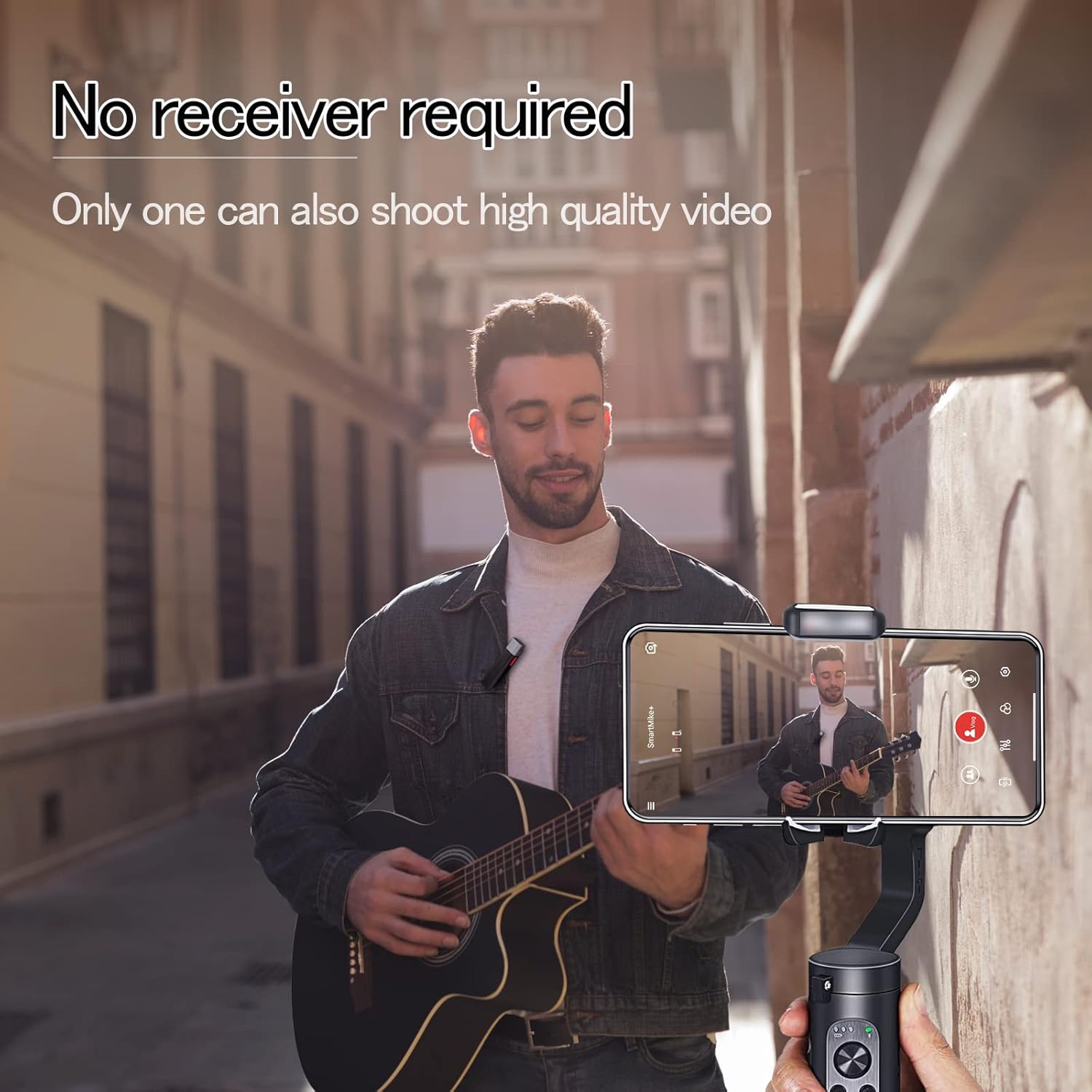
Figure 3: The SmartMike+ S610 clipped to clothing, recording audio directly to a smartphone without a separate receiver.
5. Operation
5.1. Basic Audio Recording
- Once paired, open the SmartMike+ app.
- Select the desired recording mode (audio or video).
- Ensure the microphone is properly clipped to your collar or clothing, positioned for optimal sound capture.
- Press the record button within the app to begin recording.
- Press the record button again to stop recording.
5.2. Using App Features
The SmartMike+ app provides several features to enhance your recording experience:
- Noise Reduction: Adjust the multi-level noise cancellation settings within the app to minimize background noise.
- Teleprompter: The app includes a teleprompter function where text can be auto-scrolled, and speed, color, and size are adjustable.
- Audio Filters: Apply various audio filters to customize your sound.
- Monitoring: Use the 3.5mm jack to connect headphones for real-time audio monitoring during recording.
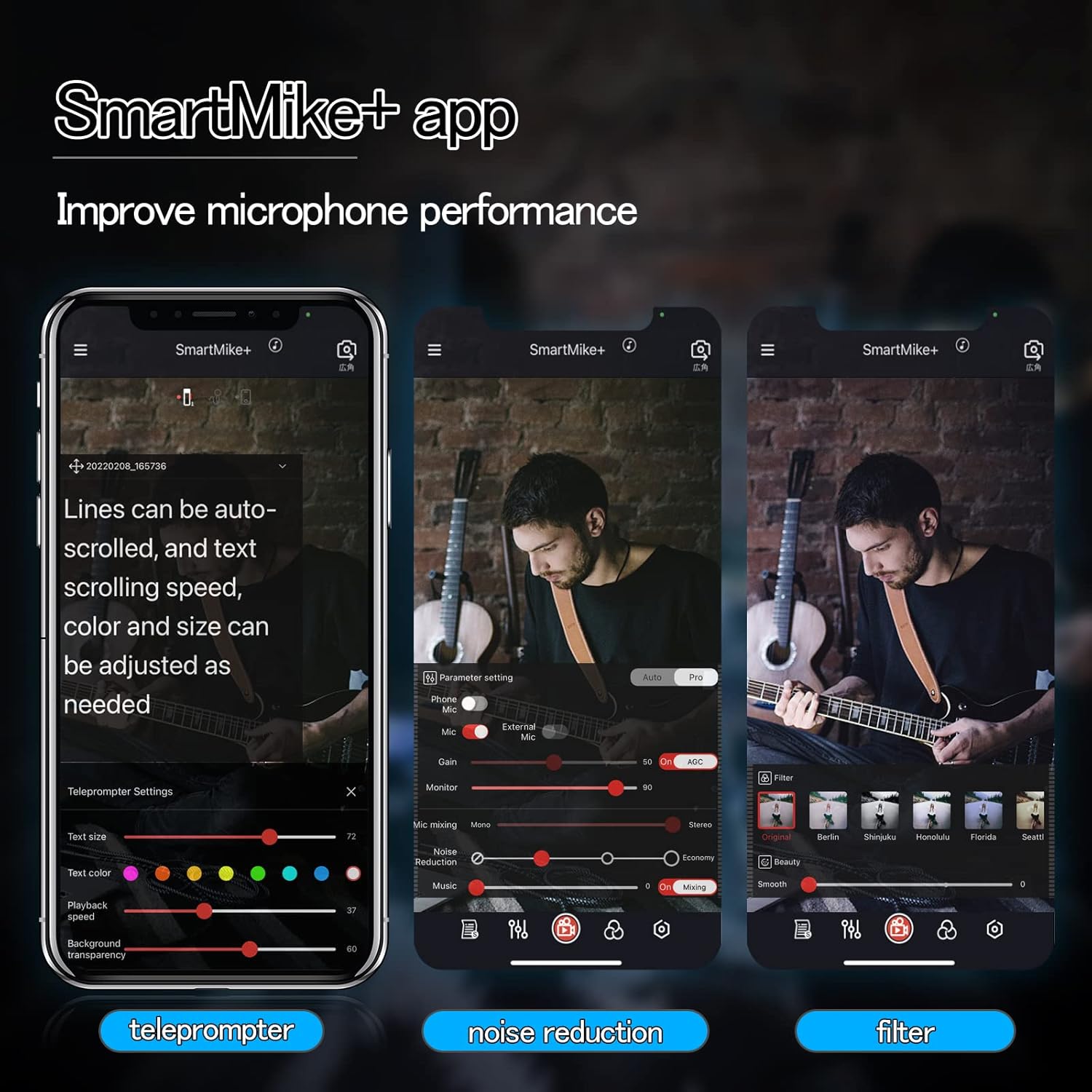
Figure 4: SmartMike+ app interface displaying teleprompter, noise reduction, and audio filter settings.
5.3. Using with Other Devices
While primarily designed for smartphone use with the SmartMike+ app, some users have reported success in pairing two SmartMike+ units to enable broader compatibility with other recording devices such as DSLRs or GoPros that accept a microphone input. This advanced setup may require specific configurations not detailed in this manual.
6. Maintenance
- Cleaning: Use a soft, dry cloth to clean the exterior of the microphone. Do not use liquid cleaners or solvents.
- Storage: Store the microphone in a cool, dry place away from direct sunlight and extreme temperatures.
- Battery Care: To prolong battery life, avoid fully discharging the device frequently. Charge it regularly, even if not in use for extended periods.
- Avoid Moisture: Do not expose the microphone to water or high humidity.
7. Troubleshooting
7.1. Microphone Not Pairing
- Ensure the microphone is charged and powered on.
- Verify Bluetooth is enabled on your smartphone.
- Restart both the microphone and your smartphone.
- Try resetting the microphone (if a reset option is available, refer to manufacturer's website for specific instructions).
7.2. Poor Audio Quality
- Check microphone placement; ensure it is not obstructed and is close enough to the sound source.
- Adjust noise reduction settings in the SmartMike+ app.
- Ensure there are no strong electromagnetic interferences nearby.
- Confirm the microphone is fully charged. Low battery can affect performance.
7.3. SmartMike+ App Issues
- App Not Found/Working: Some users have reported issues with the SmartMike+ app availability or functionality on certain app stores (e.g., Apple App Store, Google Play Store) or with specific operating system versions. Verify the app's current status and compatibility with your device's operating system.
- App Crashing/Freezing: Try restarting the app or reinstalling it. Ensure your smartphone's operating system is up to date.
- Microphone Not Recognized by App: Ensure the microphone is paired via Bluetooth before opening the app.
8. Specifications
| Feature | Detail |
|---|---|
| Model Name | S610 |
| Brand | SabineTek |
| Connectivity Technology | Bluetooth 5.0 |
| Microphone Form Factor | Lavalier |
| Polar Pattern | Omnidirectional |
| Audio Sensitivity | 110 Decibels |
| Signal-to-Noise Ratio | 70 dB |
| Item Weight | 0.52 Ounces (approx. 14.7g) |
| Product Dimensions (L x W x H) | 2.36 x 0.39 x 0.39 inches |
| Power Source | Battery Powered, Lithium Battery |
| Battery Type | 1 Lithium Polymer battery (included) |
| Compatible Devices | Smartphone, Camera, Tablet |
| Material | Metal |
| Color | White |
| Recommended Uses | Streaming Media |
9. Warranty and Support
For warranty information and technical support, please refer to the official SabineTek website or contact their customer service directly. Keep your purchase receipt as proof of purchase for warranty claims.
For further assistance, visit: SabineTek Official Store
Ask a question about this manual
Ask about setup, troubleshooting, compatibility, parts, safety, or missing instructions. Manuals+ will review the question and use this page’s manual context to help answer it.