
Introduction
This manual provides detailed instructions for the safe and effective use of your Phiaton 900 Legacy Bluetooth On-Ear Headphones. Please read this manual thoroughly before using the product and retain it for future reference.
Product Overview
The Phiaton 900 Legacy headphones are designed for an immersive audio experience with digital hybrid noise-canceling technology. They feature customized 40mm drivers, Bluetooth 5.1 connectivity, and intuitive touch controls.

Image: Phiaton 900 Legacy headphones, showcasing their sleek black design.
What's in the Box
- Phiaton 900 Legacy Headphones
- Carrying Case
- 3.5mm Audio Cable
- USB-C Charging Cable
- Quick Start Guide
- User Manual (this document)

Image: The complete package contents of the Phiaton 900 Legacy headphones.
Components and Controls
Familiarize yourself with the various parts and controls of your headphones.

Image: Illustration of the touch control panel located on the right earcup.
- Power Button: Located on the bottom of the right earcup. Used for powering on/off and Bluetooth pairing.
- ANC Button: Activates or deactivates Digital Hybrid Noise-Canceling.
- Touch Control Panel (Right Earcup):
- Swipe Up/Down: Volume control.
- Swipe Forward/Backward: Track navigation (Next/Previous).
- Double Tap: Play/Pause music, Answer/End calls.
- Microphone: Integrated for calls and voice commands.
- USB-C Port: For charging.
- 3.5mm Audio Jack: For wired connection.
Setup
Charging the Headphones
Before first use, fully charge your headphones. A full charge provides up to 43 hours of playback time with Active Noise Canceling (ANC) on.
- Connect the USB-C charging cable to the USB-C port on the headphones.
- Connect the other end of the cable to a USB power adapter (not included) or a computer's USB port.
- The LED indicator will show charging status (e.g., red for charging, blue for fully charged).
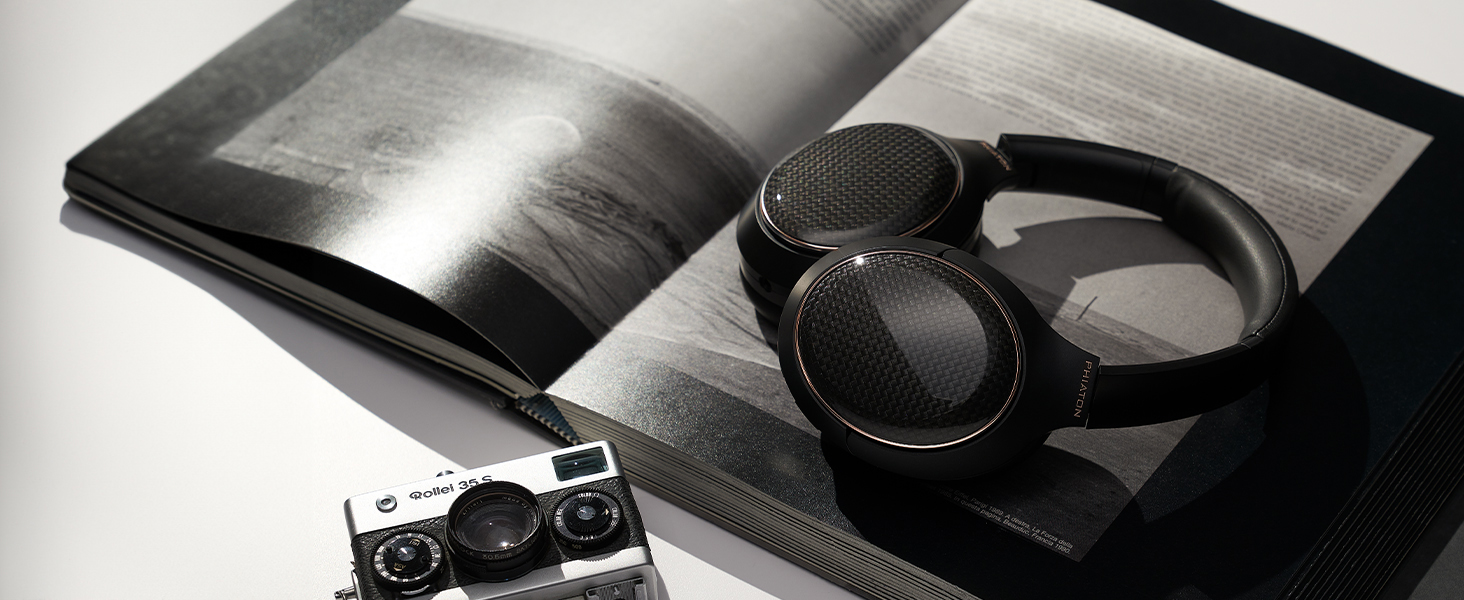
Image: Visual representation of the headphones' extended battery life.
Bluetooth Pairing
To connect your headphones to a Bluetooth-enabled device:
- Ensure the headphones are powered off.
- Press and hold the Power button until the LED indicator flashes blue and red alternately, indicating pairing mode.
- On your device, enable Bluetooth and search for available devices.
- Select "Phiaton 900 Legacy" from the list.
- Once connected, the LED indicator will flash blue periodically.
Operating the Headphones
Power On/Off
- Power On: Press and hold the Power button for approximately 2 seconds until the LED indicator lights up blue.
- Power Off: Press and hold the Power button for approximately 3 seconds until the LED indicator lights up red and then turns off.
Digital Hybrid Noise-Canceling (ANC)
The Phiaton 900 Legacy features advanced digital hybrid noise-canceling to reduce ambient sound.
- Activate ANC: Press the ANC button once. The ANC LED indicator will light up green.
- Deactivate ANC: Press the ANC button again. The ANC LED indicator will turn off.

Image: Visual representation of the digital hybrid noise-canceling technology in action.
Touch Controls
Manage your audio playback and calls using the intuitive touch panel on the right earcup.
- Volume Up: Swipe up on the touch panel.
- Volume Down: Swipe down on the touch panel.
- Next Track: Swipe forward (right) on the touch panel.
- Previous Track: Swipe backward (left) on the touch panel.
- Play/Pause: Double-tap the center of the touch panel.
Smart Play & Pause
The headphones automatically pause music when removed and resume when placed back on your head.

Image: A user demonstrating the smart play and pause feature by removing and wearing the headphones.
Multipoint Connection
Connect your headphones to two Bluetooth devices simultaneously and switch between them seamlessly.
- Pair the headphones with the first device.
- Put the headphones into pairing mode again and pair with the second device.
- The headphones will automatically switch audio sources based on active playback or incoming calls.

Image: Diagram showing headphones connected to a laptop and a smartphone simultaneously.
Making and Receiving Calls
The integrated Qualcomm cVc dual microphones ensure clear voice transmission during calls.
- Answer/End Call: Double-tap the center of the touch panel.
- Reject Call: Press and hold the center of the touch panel for 2 seconds.
- Voice Assistant: Triple-tap the center of the touch panel to activate your device's voice assistant (e.g., Siri, Google Assistant).

Image: Icon representing Qualcomm cVc technology for enhanced call clarity.
Wired Mode (Everplay-X)
Use the included 3.5mm audio cable for a wired connection, which also conserves battery life.
- Connect one end of the 3.5mm audio cable to the audio jack on the headphones.
- Connect the other end to your audio source's 3.5mm output.
- The headphones can be used in wired mode even if the battery is depleted.

Image: Icon representing the Everplay-X feature, allowing wired audio playback.
Maintenance
Proper care will extend the life of your Phiaton 900 Legacy headphones.
- Cleaning: Wipe the headphones with a soft, dry cloth. Do not use harsh chemicals or abrasive materials.
- Storage: When not in use, store the headphones in the provided carrying case to protect them from dust and damage.
- Battery Care: Avoid fully discharging the battery frequently. Charge regularly to maintain battery health.
- Ear Pads: The ear pads are made of high-quality memory foam for lasting comfort. Inspect them periodically for wear and tear.

Image: Headphones neatly folded and stored in their protective carrying case.
Troubleshooting
If you encounter issues with your headphones, refer to the following common solutions:
| Problem | Solution |
|---|---|
| Headphones do not power on. | Ensure the battery is charged. Connect to a power source using the USB-C cable. |
| Cannot pair via Bluetooth. |
|
| No sound or low volume. |
|
| Noise-canceling is not effective. |
|
| Call quality is poor. |
|
Specifications
| Feature | Detail |
|---|---|
| Model Number | PPU-BN0600BK01 |
| Connectivity | Bluetooth 5.1 |
| Bluetooth Range | Up to 33 feet (10 meters) |
| Driver Size | Customized 40mm |
| Headphone Frequency Response | 10 Hz - 27 kHz |
| Microphone Frequency Response | 50 Hz - 4 kHz |
| Impedance | 32 Ohms |
| Noise Control | Digital Hybrid Active Noise Cancellation |
| Battery Life | Up to 43 hours (with ANC on) |
| Control Type | Touch, Media Control |
| Microphone Technology | Qualcomm cVc Dual Microphones |
| Audio Codec Support | Qualcomm aptX HD |
| Ear Placement | Over Ear |
| Material | Plastic |
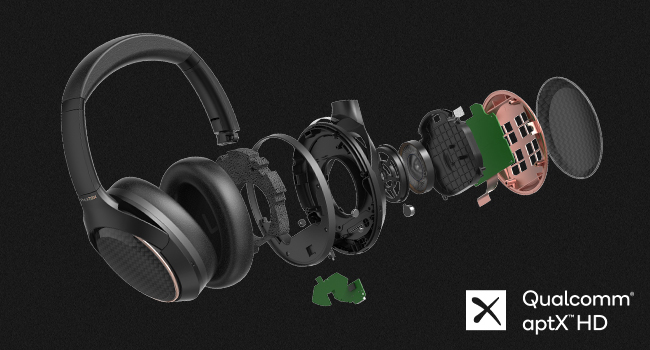
Image: Detailed view of the internal components, including the customized 40mm speaker driver.
Image: Qualcomm aptX HD logo, signifying high-definition audio streaming capability.
Warranty and Support
Warranty Information
The Phiaton 900 Legacy headphones come with a 1-year limited warranty from the date of purchase. This warranty covers manufacturing defects in materials and workmanship. It does not cover damage caused by misuse, accidents, unauthorized modifications, or normal wear and tear.
Please retain your proof of purchase for warranty claims.
Customer Support
For technical assistance, warranty claims, or product inquiries, please visit the official Phiaton website or contact their customer service department.
Online Support: www.phiaton.com/support
Product Videos
900 Legacy Features Introduction
Video: An official introduction to the key features and design of the Phiaton 900 Legacy headphones.


