
1. Introduction
This manual provides detailed instructions for the safe and proper installation and operation of your Barkan Full Motion Articulating TV Wall Mount. This mount is designed for televisions ranging from 13 to 56 inches and supports a maximum weight of 79 lbs (36 kg). It offers four movement capabilities: rotation, folding, swivel, and tilt, allowing for optimal viewing angles.
2. Safety Information
Important Safety Notice: Child safety is paramount. To prevent tip-over accidents, always secure your TV to the wall using a strong and safe mount. All Barkan TV mounts include a Fall Proof system designed to prevent accidental disengagement of the screen.
- Ensure the wall structure can support the combined weight of the mount and your television.
- Use appropriate tools and follow all installation steps carefully.
- If your screen requires different screen-connection screws than those provided, obtain suitable ones from a local hardware store or contact Barkan support.
- Do not exceed the maximum weight capacity of 79 lbs (36 kg).
3. Package Contents
Verify that all components are present before beginning installation. The package should contain:
- TV Mount Assembly
- Hardware Kit (including various screws, anchors, and spacers)
- Assembly Instructions (this document)
If any parts are missing, please contact Barkan support.

Image: Contents of the Barkan Hardware Kit, showing various screws, anchors, and washers for wall and TV mounting.
4. Specifications
| Mounting Type | Wall Mount |
| Movement Type | Articulating (Full Motion) |
| Compatible Screen Sizes | 13 to 56 Inches |
| Maximum Load Capacity | 79 lbs (36 kg) |
| VESA Compatibility | 75x75, 100x100, 100x200, 200x100, 200x200, 300x300, 300x400, 400x200, 400x300, 400x400 mm (and non-VESA up to 400x400 mm) |
| Minimum Distance from Wall | 2.6 inches (6.5 cm) |
| Maximum Distance from Wall | 15.9 inches (40.5 cm) |
| Tilt Angle | -5° to +15° |
| Swivel Angle | Up to 360° (at screen connection plate) |
| Rotation (near wall) | 180° |
| Leveling Adjustment | ±5° |
| Material | Iron |
| Color | Black |

Image: Detailed diagram showing the dimensions, VESA patterns, tilt, swivel, and extension capabilities of the Barkan TV wall mount.
5. Setup and Installation
5.1 Required Tools
Before starting, ensure you have the following tools:
- Drill (with 1/4" - 6mm and 3/8" - 10mm bits for wood/concrete, and 5/32" - 4mm for wood studs)
- Level
- Safety Glasses
- Stud Finder (recommended for drywall installation)
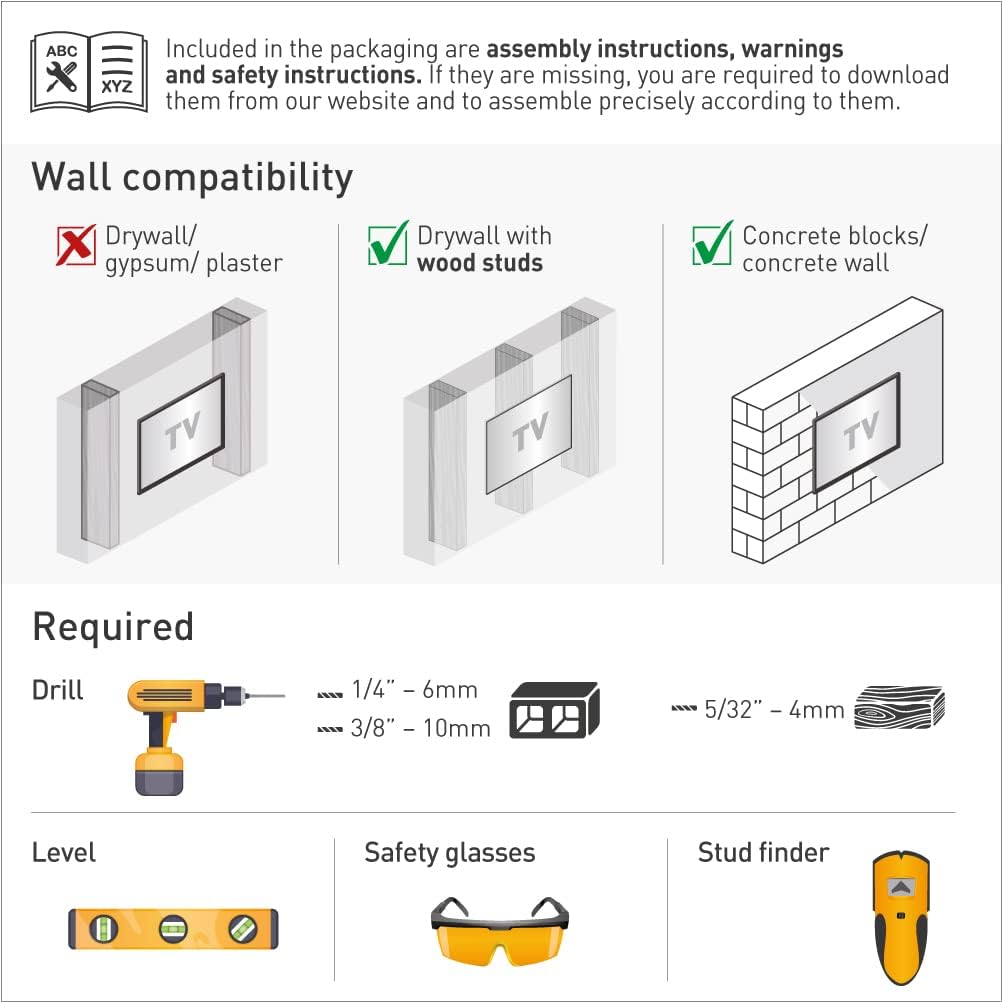
Image: Illustration of required tools (drill, level, safety glasses, stud finder) and wall compatibility types (drywall with wood studs, concrete blocks/concrete wall).
5.2 Wall Compatibility
This mount is compatible with:
- Drywall with wood studs
- Concrete blocks / Concrete wall
Note: Not compatible with drywall/gypsum/plaster walls without wood studs.
5.3 Assembly Steps
Follow these three main steps for assembly:
- Connect the TV plate to the back of the TV: Attach the adapter plates to the rear side of your television using the appropriate screws from the hardware kit. Ensure a secure fit.
- Install the bracket on the wall: Mark the desired mounting location on the wall. Use a stud finder for wood stud installations. Drill pilot holes and securely fasten the wall bracket using the provided wall screws and anchors suitable for your wall type. Use a level to ensure the bracket is straight.
- Snap the TV onto the bracket: Carefully lift the television and align the TV plate with the wall bracket. Snap the TV onto the bracket, ensuring it is securely engaged. The Fall Proof system will help prevent accidental disengagement.

Image: Visual guide illustrating the three easy steps for installing the TV mount: connecting the TV plate, installing the wall bracket, and snapping the TV onto the bracket.
5.4 Backscreen Connection Positioning
The mount supports various VESA and non-VESA backscreen connection patterns. Refer to the diagram below to identify the correct adapter configuration for your TV. If your TV's connection points are not shown, please contact Barkan support.

Image: Diagram showing various backscreen connection positioning options in millimeters (Width x Height) for different VESA patterns, including the use of adapters.
6. Operating Instructions
The Barkan Full Motion Articulating TV Wall Mount allows for flexible positioning of your television to achieve the best viewing experience.
- Tilt: Adjust the screen vertically from -5° to +15° by gently pushing or pulling the top or bottom edge of the TV.
- Swivel: Rotate the screen horizontally up to 360° at the screen connection plate to change the viewing angle.
- Rotation (near wall): The arm can rotate 180° near the wall, allowing for broad lateral movement.
- Extension: The mount can extend from a minimum of 2.6 inches (6.5 cm) to a maximum of 15.9 inches (40.5 cm) from the wall.
- Leveling: Fine-tune the horizontal level of the screen by ±5°.
To adjust, gently push or pull the TV to the desired angle. Avoid excessive force.

Image: Diagram illustrating the full motion capabilities of the mount, including tilt (0°-15°), swivel (180°), leveling (±5°), and extension (2.6" to 15.9").
7. Maintenance
The Barkan TV Wall Mount requires minimal maintenance. Periodically check all screws and connections to ensure they remain tight and secure. Do not use abrasive cleaners on the mount; a soft, damp cloth is sufficient for cleaning.
8. Troubleshooting
If you encounter issues during installation or operation:
- TV not level: Use the leveling adjustment feature to correct the horizontal alignment.
- Mount feels unstable: Re-check all wall and TV connections to ensure they are securely fastened. Verify that the wall type is compatible and that appropriate anchors were used. Ensure the TV weight does not exceed the maximum capacity.
- Difficulty with screen-connection screws: If the provided screws do not fit your TV, please purchase suitable ones from a local hardware store.
For further assistance, please contact Barkan support.
9. Warranty and Support
9.1 Warranty
The Barkan TV Wall Mount comes with a 5-year warranty. Please retain your proof of purchase for warranty claims.
9.2 Support
For any questions, assistance, or if you are not satisfied with the product, please contact Barkan support:
- Email: sales.usa@barkanmounts.com
- Website: https://www.barkanmounts.com/support
Our customer service experts are available to assist you.


