
1. Introduction
Thank you for purchasing the S-Link SL-3656 LED Floodlight. This portable and rechargeable floodlight is designed to provide reliable illumination in various situations, from outdoor activities to emergency lighting. Please read this manual carefully before using the product to ensure proper operation and to maximize its lifespan. Keep this manual for future reference.
2. Safety Instructions
- Do not expose the floodlight to extreme temperatures, direct sunlight, or high humidity.
- Avoid dropping or subjecting the device to strong impacts.
- Do not attempt to disassemble or modify the floodlight. This will void the warranty and may cause damage or injury.
- Keep out of reach of children.
- Use only the specified charging adapter (if included) or a compatible 4.3V charger.
- Do not look directly into the LED light when it is on, as it may cause eye strain or damage.
- If the product shows signs of damage or malfunction, discontinue use immediately and contact customer support.
3. Package Contents
Please check the package contents upon opening. If any items are missing or damaged, contact your retailer.
- S-Link SL-3656 LED Floodlight
- Charging Cable (AC)
- User Manual
4. Setup and Initial Charging
Before first use, fully charge the floodlight's internal battery.
- Locate the charging port on the floodlight.
- Connect the provided AC charging cable to the floodlight's charging port.
- Plug the other end of the charging cable into a standard AC power outlet.
- The charging indicator light (if present) will illuminate, typically red, to show that the device is charging.
- Allow approximately 15 hours for a full charge. The indicator light may change color (e.g., to green) or turn off when charging is complete.
- Once fully charged, disconnect the charging cable from both the floodlight and the power outlet.
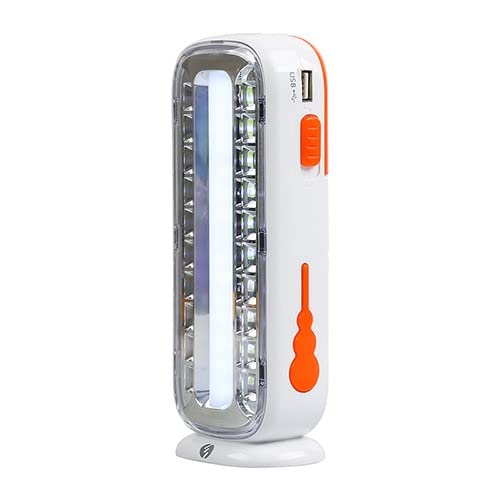
Figure 1: S-Link SL-3656 LED Floodlight. This image displays the overall design of the floodlight, highlighting its orange casing and the LED panel. The charging port is typically located on one side of the device.
5. Operating Instructions
The S-Link SL-3656 features 20 SMD LEDs and an internal 1600mAh battery.
- Power On/Off: Locate the power button, usually on the handle or side of the floodlight. Press the button once to turn the floodlight on. Press it again to turn it off.
- Light Modes: Some models may have multiple light modes (e.g., high brightness, low brightness, flashing). If available, repeatedly press the power button to cycle through the different modes. Refer to the product's specific button functions for details.
- Positioning: The floodlight is designed for portability. Place it on a stable surface or hold it to direct light as needed.
6. Maintenance
- Cleaning: Wipe the floodlight with a soft, dry cloth. Do not use abrasive cleaners or solvents, as they may damage the surface.
- Storage: When not in use for extended periods, store the floodlight in a cool, dry place. It is recommended to charge the battery every 3-6 months to maintain its health.
- Battery Care: To prolong battery life, avoid fully discharging the battery frequently. Recharge the floodlight when the light output noticeably diminishes.
7. Troubleshooting
| Problem | Possible Cause | Solution |
|---|---|---|
| Floodlight does not turn on. | Battery is discharged. | Charge the floodlight for 15 hours. |
| Light is dim or flickers. | Low battery. | Recharge the floodlight. |
| Floodlight does not charge. | Charging cable or adapter faulty; power outlet issue. | Check the charging cable and adapter. Try a different power outlet. Ensure connections are secure. |
| Short operating time after full charge. | Battery degradation (after long use); not fully charged. | Ensure a full 15-hour charge. If the issue persists, the battery may need replacement (contact support). |
8. Specifications
- Model: SL-3656
- Brand: S-Link
- Battery: 4.3V 1600mAh
- LED Type: 20 SMD LEDs (15 SMD inside tube)
- AC Charging Time: Approximately 15 hours
- Product Weight: 1 Kilogram
- Package Dimensions: 22 x 16.5 x 8.5 cm
- Manufacturer Reference: 94.05.40.39.00.00
- First Available Date: October 16, 2020
9. Warranty Information
The S-Link SL-3656 LED Floodlight comes with a standard manufacturer's warranty. Please refer to the warranty card included in your package or contact your retailer for specific terms and conditions. The warranty typically covers defects in materials and workmanship under normal use. Damage caused by misuse, unauthorized modification, or failure to follow instructions is not covered.
10. Customer Support
If you have any questions, encounter issues, or require technical assistance with your S-Link SL-3656 LED Floodlight, please contact your point of purchase or visit the official S-Link website for support contact information. Please have your product model number (SL-3656) and purchase details ready when contacting support.