
Introduction
The ProGrade Digital PG09 is a high-speed, dual-slot memory card reader designed for efficient data transfer from CFexpress Type A and SDXC/SDHC UHS-II memory cards. Utilizing the USB 3.2 Gen 2 interface, it facilitates rapid workflow for professionals requiring quick access to large files.

Image: The ProGrade Digital PG09 card reader shown with a CFexpress Type A card and an SD card, illustrating its dual compatibility.
Setup
- Connect to Host Device: Connect the card reader to your computer, tablet, or mobile device using the integrated USB-C connector. The device is compatible with Mac, PC, Android, and iPad operating systems.
- Magnetic Attachment: The card reader features a magnetic bottom for secure attachment to compatible surfaces, such as a laptop or a metal mounting plate (included). This helps create a stable mobile workstation.
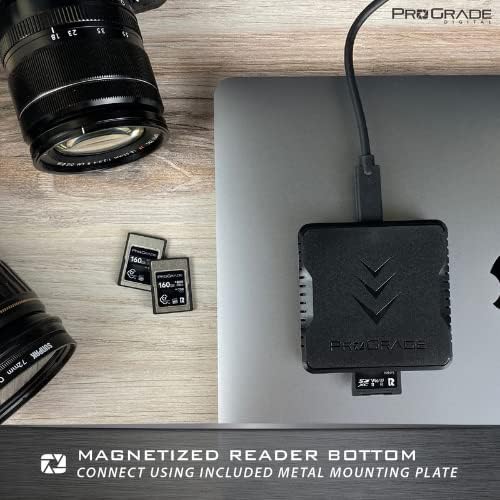
Image: The ProGrade Digital PG09 card reader shown magnetically attached to the side of a laptop, highlighting its portable and secure design.
Operating Instructions
- Insert Memory Card: Carefully insert your CFexpress Type A card into its designated slot or your SDXC/SDHC UHS-II card into its slot. Ensure the card is fully seated.
- Data Transfer: The card reader supports data transfer speeds of up to 1.25 GBytes per second (10 Gbps) from both cards simultaneously. Once connected, your device should recognize the inserted cards as external drives.
- LED Indicator: An integrated LED power indicator will illuminate to confirm the device is powered and actively transferring data.
- Eject Safely: Always safely eject the memory cards from your operating system before physically removing them from the reader to prevent data corruption.

Image: The ProGrade Digital PG09 card reader connected to a laptop, with a file transfer progress bar visible on the screen, demonstrating efficient workflow.
Official Product Video
Video: An official video from ProGrade Digital showcasing the PG09 card reader as an essential tool for mobile filmmakers and content creators, highlighting its features and benefits in a professional workflow.
Maintenance
- Cleaning: Use a soft, dry cloth to clean the exterior of the card reader. Avoid liquid cleaners or solvents.
- Storage: Store the card reader in a cool, dry place away from direct sunlight and extreme temperatures.
- Card Care: Ensure memory cards are clean and free of debris before insertion to prevent damage to the reader's slots.
- Refresh Pro (TM): When enabled, Refresh Pro (TM) ensures optimal performance of your ProGrade Digital memory cards. Refer to your memory card's documentation for details on this feature.
Troubleshooting
- Device Not Recognized: Ensure the USB-C cable is securely connected to both the card reader and your host device. Try connecting to a different USB-C port or a different host device.
- Slow Transfer Speeds: Verify that your host device's USB-C port supports USB 3.2 Gen 2 speeds. Older USB standards or incompatible cables may limit transfer rates. Ensure your memory cards are also rated for high-speed transfer.
- Card Not Reading: Remove and reinsert the memory card. Ensure the card is inserted correctly into the appropriate slot. Test with a different memory card to rule out a card issue.
- Overheating: While designed for durability, prolonged high-speed transfers of large files can generate heat. Ensure adequate ventilation around the device.
Specifications
- Brand: ProGrade Digital
- Series: PG09
- Item Model Number: Card Reader
- Operating System Compatibility: All operating systems (Mac, PC, Android, iPad)
- Item Weight: 8.8 ounces
- Product Dimensions: 5.91 x 4.72 x 1.18 inches
- Media Type: CFexpress Type A, SDXC/SDHC UHS-II
- Connectivity Technology: USB Type C (USB 3.2 Gen 2)
- Special Feature: Compact, Magnetic bottom
- Color: Black

Image: The ProGrade Digital PG09 card reader displayed alongside its technical specifications, including transfer speed, dimensions, and operating temperature.
Warranty and Support
The ProGrade Digital PG09 Card Reader comes with an industry-leading 2-year warranty. In the event of any issues, ProGrade Digital offers replacement, repair, or refund for your item. For support, please refer to the contact information provided with your product packaging or visit the official ProGrade Digital website.


