
1. Introduction
This manual provides essential information for the safe and efficient operation, maintenance, and troubleshooting of your Powermate PM2000 Portable Gas Generator. Please read this manual thoroughly before operating the generator and keep it for future reference. The Powermate PM2000 is designed to provide reliable portable power for various applications, including home backup, camping, RV use, and outdoor activities.
2. Important Safety Information
WARNING: Carbon Monoxide Hazard
Using a generator indoors CAN KILL YOU IN MINUTES. Generator exhaust contains carbon monoxide (CO), a colorless, odorless gas. You CANNOT see or smell it. If you start to feel sick, dizzy, or weak while using the generator, get to fresh air RIGHT AWAY. See a doctor. You could have carbon monoxide poisoning.
- Always operate the generator outdoors in a well-ventilated area, far away from windows, doors, and vents.
- Never operate the generator in an enclosed space, such as a garage or shed.
- Install battery-operated carbon monoxide alarms in your home.
WARNING: Electrical Shock Hazard
- Never operate the generator in wet conditions. Keep the generator dry.
- Do not touch the generator or any connected cords with wet hands.
- Ensure all electrical connections are secure and properly grounded.
WARNING: Fire Hazard
- Gasoline is highly flammable. Store fuel in an approved container in a well-ventilated area.
- Never refuel the generator while it is running or hot. Allow the engine to cool before adding fuel.
- Keep flammable materials away from the generator during operation.
3. Key Features
The Powermate PM2000 generator is equipped with several features designed for ease of use and reliable performance:
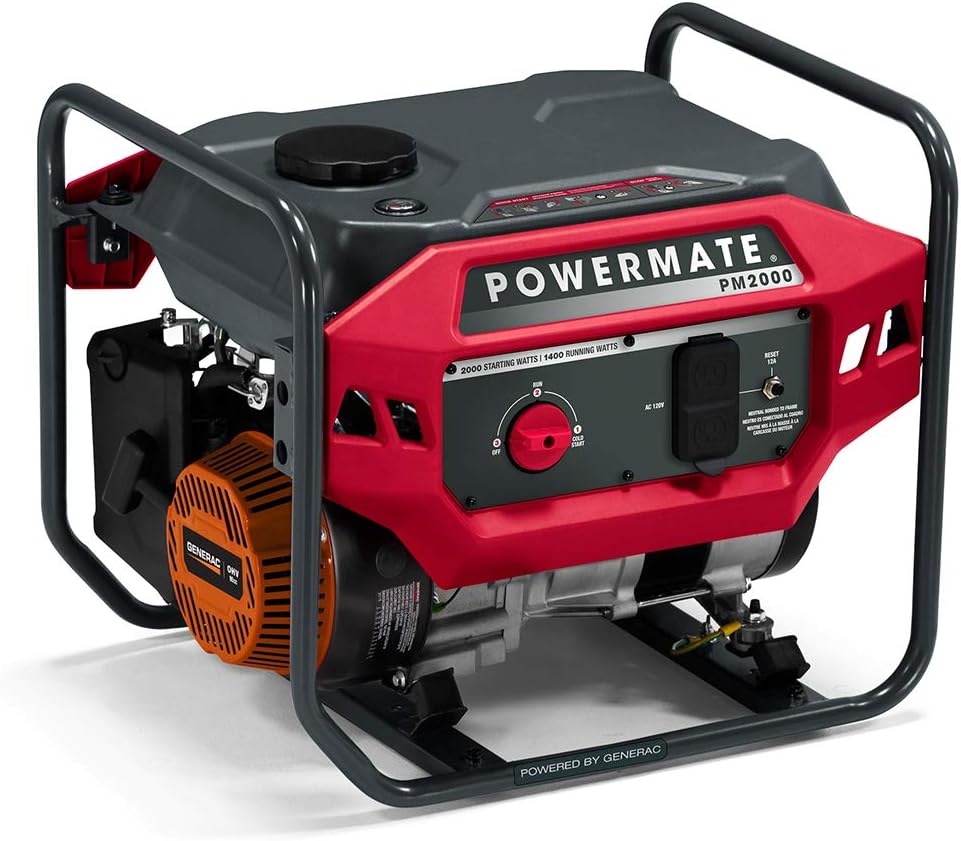
- Convenient PowerDial Start: The PM2000 features a PowerDial Recoil Start with Off, Run, or Cold Start settings integrated into one simple-to-use dial, providing easy operation.
- Reliable Power from Generac Engine: Powered by a robust 98cc Generac OHV engine, the PM2000 ensures consistent and reliable power for various applications.
- Large Capacity Steel Fuel Tank: A durable 2.25-gallon tank offers an impressive runtime of up to 14 hours at 25% load, ensuring extended power availability.
- Ergonomic Frame for Easy Portability: The generator features an ergonomic frame design that allows for effortless transportation and maneuverability.
- Fuel Gauge and Covered Outlets: Monitor fuel levels at a glance with the convenient fuel gauge, and enjoy the added protection of covered outlets that keep debris and dust out, ensuring reliable connections.


Product Overview Video
This official video provides a visual overview of the Powermate PM2000 Gas Generator, highlighting its key features and benefits for various uses.
4. Setup Instructions
Before starting your generator for the first time, follow these steps:
- Unpacking: Carefully remove the generator from its packaging. Inspect for any shipping damage.
- Add Engine Oil: The engine is shipped without oil. Remove the oil fill cap/dipstick and add the recommended amount and type of engine oil (refer to the 'Specifications' section for details). Do not overfill.
- Add Fuel: Ensure the generator is on a level surface. Remove the fuel cap and carefully fill the fuel tank with fresh, unleaded gasoline. Do not fill above the fuel filter.
- Positioning: Place the generator outdoors in a well-ventilated area, at least 20 feet (6 meters) away from any building openings (windows, doors, vents) and at least 5 feet (1.5 meters) from any other combustible materials. Ensure the exhaust is directed away from people and buildings.
5. Operating Instructions
Starting the Generator
- Ensure the generator is properly set up and fueled.
- Turn the PowerDial to the 'COLD START' position if the engine is cold, or 'RUN' if the engine is warm.
- Pull the recoil starter handle firmly and steadily until the engine starts. Do not let the rope snap back.
- Once the engine starts, slowly move the PowerDial to the 'RUN' position.
Connecting Electrical Loads
- Allow the generator to run for a few minutes to stabilize.
- Plug in your appliances or extension cords into the appropriate outlets. Do not overload the generator.
- Always ensure the total wattage of connected devices does not exceed the generator's running wattage.
Stopping the Generator
- Disconnect all electrical loads from the generator outlets.
- Allow the generator to run for a few minutes without load to cool down.
- Turn the PowerDial to the 'OFF' position.
6. Maintenance
Regular maintenance is crucial for the longevity and performance of your generator. Always ensure the generator is off and cooled before performing any maintenance.
Maintenance Schedule
- Before Each Use: Check engine oil level, inspect air filter, check fuel level.
- Every 25 Hours or Annually: Change engine oil.
- Every 50 Hours or Annually: Clean/replace air filter, inspect spark plug.
- Every 100 Hours or Annually: Replace spark plug, inspect fuel filter.
Storage
For extended storage, drain the fuel tank and carburetor, or add a fuel stabilizer. Store the generator in a clean, dry, and well-ventilated area.
7. Troubleshooting
If you encounter issues with your generator, refer to the following common problems and solutions:
| Problem | Possible Cause | Solution |
|---|---|---|
| Engine will not start | No fuel, low oil, PowerDial in wrong position, fouled spark plug | Add fuel, add oil, set PowerDial to 'COLD START' or 'RUN', clean/replace spark plug |
| No power output | Circuit breaker tripped, overloaded generator, faulty connection | Reset circuit breaker, reduce load, check connections |
| Engine runs rough | Stale fuel, dirty air filter, incorrect spark plug gap | Use fresh fuel, clean/replace air filter, adjust/replace spark plug |
8. Specifications
| Feature | Detail |
|---|---|
| Brand | Powermate |
| Model Name | PM2000 |
| Model Number | P0080900 |
| Starting Wattage | 2000 Watts |
| Running Wattage | 1400 Watts |
| Fuel Type | Gasoline |
| Engine Type | 98cc Generac OHV, 4 Stroke |
| Tank Volume | 2.25 Gallons |
| Runtime (at 25% load) | Up to 14 hours |
| Voltage | 120 Volts (AC) |
| Frequency | 50 Hz |
| Total Power Outlets | 2 |
| Item Weight | 61.9 Pounds |
| Item Dimensions (L x W x H) | 19.7"L x 15.6"W x 17"H |
| Material Type | Steel, Metal |
| Ignition System Type | Recoil Start |
9. Warranty Information
The Powermate PM2000 Portable Gas Generator comes with a 3 Year Limited Warranty. For specific terms, conditions, and to register your product, please refer to the warranty documentation included with your purchase or visit the official Powermate website.
10. Customer Support
If you require assistance, have questions about your generator, or need to order replacement parts, please contact Powermate customer support. Have your model number (PM2000) and serial number ready when contacting support for faster service.
For the most up-to-date contact information, please visit the official Powermate website or refer to the documentation provided with your generator.


