
ONN Tilting TV Wall Mount Kit
Contents
User Manual
ONN Tilting TV Wall Mount Kit
Model: Tilting TV Wall Mount Kit
1. Introduction
Thank you for choosing the ONN Tilting TV Wall Mount Kit. This product is designed to securely mount your 24" to 84" flat panel television to the wall, optimizing your viewing space. Constructed from sturdy, heavy-gauge steel, this mount is engineered for durability and can support televisions weighing up to 132 lbs. It features a tilting mechanism for improved viewing angles and reduced glare. Please read this manual thoroughly before installation and use to ensure safe and proper operation.
2. Safety Information
WARNING: Improper installation or use of this product can result in serious injury or damage. If you do not understand these instructions, or have doubts about the safety of the installation, please contact a qualified installer.
- Do not exceed the maximum weight capacity of 132 lbs (60 kg).
- Ensure the wall structure can safely support the combined weight of the mount and the television.
- Always use appropriate mounting hardware for your wall type (wood studs, concrete, brick, etc.).
- Do not overtighten screws; this may cause damage and reduce the mount's holding capacity.
- Keep children and pets away during installation.
- Periodically check the mount for signs of wear or loose connections.
3. Package Contents
Verify that all components are present before beginning installation. If any parts are missing or damaged, do not proceed with installation and contact customer support.
- ONN Tilting TV Wall Mount Assembly
- Mounting Hardware Kit (various screws, anchors, washers)
- Instruction Manual
- Bonus 6' HDMI 2.0 Cable
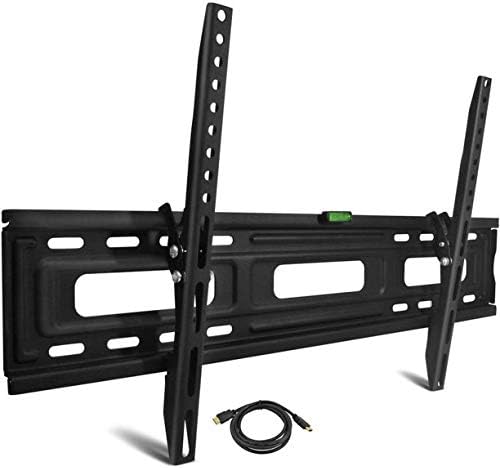
Image: The ONN Tilting TV Wall Mount Kit, featuring the main wall plate, two vertical TV brackets, and an included HDMI cable. The mount is black, made of heavy-gauge steel, and includes a small level on the top edge of the wall plate.
4. Specifications
| Product Type | Tilting TV Wall Mount |
| Compatible TV Sizes | 24" to 84" Flat Panel TVs |
| Weight Capacity | Up to 132 lbs (60 kg) |
| Material | Solid, Heavy-Gauge Alloy Steel |
| Finish | Durable Powder Coated Finish |
| Tilt Range | Up 3 degrees, Down 10 degrees |
| Wall Profile | 1.53" (3.9 cm) from the wall |
| VESA Compatibility | 100x100mm, 200x100mm, 200x200mm, 300x300mm, 400x200mm, 400x400mm, 600x400mm, 700x400mm |
| Color | Black |
| Included Cable | 6' HDMI 2.0 Cable |
5. Setup and Installation
Installation of the ONN Tilting TV Wall Mount is designed to be fast and easy. Refer to the detailed instruction manual included in your package for step-by-step guidance and specific drilling templates. Below are general steps:
- Prepare the Area: Clear the installation area. Ensure no electrical wires or plumbing are in the drilling path.
- Locate Wall Studs: For wood stud walls, use a stud finder to locate the center of two adjacent studs. Mark their positions. For concrete/brick walls, determine the desired mounting location.
- Mark Drilling Points: Hold the wall plate against the wall at the desired height and use a level to ensure it is perfectly horizontal. Mark the drilling points through the mount's holes.
- Drill Pilot Holes: Drill pilot holes at the marked locations using the appropriate drill bit size as specified in the included manual for your wall type.
- Attach Wall Plate: Secure the wall plate to the wall using the provided lag bolts and washers. Ensure it is firmly attached and level.
- Attach TV Brackets: Attach the two vertical TV brackets to the back of your television using the appropriate VESA screws and spacers from the hardware kit. Ensure the brackets are centered and securely fastened to the TV's VESA mounting holes.
- Hang TV: Carefully lift the television and hook the TV brackets onto the wall plate. Ensure the brackets are properly seated and engaged with the wall plate's locking mechanism.
- Secure TV: Tighten any safety screws or locking mechanisms on the TV brackets to prevent accidental dislodgement.
Note: Always consult the specific diagrams and instructions in the physical manual for precise measurements and hardware usage.
6. Operating Instructions (Tilting Function)
The ONN Tilting TV Wall Mount allows you to adjust your television's vertical viewing angle for optimal comfort and glare reduction.
- Adjusting Tilt: Gently push or pull the bottom or top of your television to achieve the desired tilt angle. The mount allows for a tilt range of 3 degrees upwards and 10 degrees downwards.
- Securing Tilt (if applicable): Some models may have knobs or screws on the side of the TV brackets to lock the tilt in place. Refer to your included manual for specific details on securing the tilt angle if desired.
7. Maintenance
To ensure the longevity and safe operation of your ONN TV Wall Mount, follow these simple maintenance guidelines:
- Cleaning: Use a soft, dry cloth to wipe down the mount. Avoid abrasive cleaners or solvents that could damage the finish.
- Periodic Checks: Every 6-12 months, inspect all screws and bolts to ensure they remain tight. Check for any signs of wear, corrosion, or damage to the mount components.
- Weight Limit: Do not hang additional items or exceed the maximum weight capacity of the mount.
8. Troubleshooting
If you encounter issues during installation or use, refer to the following common troubleshooting tips:
- Mount is not level: Ensure the wall plate was installed perfectly level. If not, you may need to re-drill or adjust. Some mounts have minor post-installation leveling adjustments; check your specific manual.
- TV does not fit: Verify your TV's VESA pattern matches one of the supported VESA sizes (100x100mm to 700x400mm). Ensure your TV size is within the 24" to 84" range.
- TV feels unstable: Double-check all screws and bolts are securely tightened. Ensure the TV brackets are fully engaged with the wall plate and any safety locks are activated. Do not exceed the 132 lbs weight limit.
- Missing parts: If any parts were missing from the package, do not attempt to substitute them. Contact customer support for replacements.
9. Warranty and Support
For information regarding product warranty, returns, or technical support, please refer to the documentation included with your purchase or visit the official ONN product support website. Keep your purchase receipt for warranty claims.
For further assistance, please contact ONN customer service.
Ask a question about this manual
Ask about setup, troubleshooting, compatibility, parts, safety, or missing instructions. Manuals+ will review the question and use this page’s manual context to help answer it.