
LUKO D010
LUKO 30 Pints Dehumidifier User Manual
Model: D010
1. Introduction
Thank you for choosing the LUKO 30 Pints Dehumidifier. This manual provides essential information for the safe and efficient operation of your new appliance. Please read it thoroughly before use and keep it for future reference.
This dehumidifier is designed to effectively remove excess moisture from the air, creating a more comfortable and healthy environment in spaces up to 2,000 square feet. It features multiple functions including auto defrost, dry clothes mode, and intelligent humidity control.
2. Important Safety Instructions
WARNING: To reduce the risk of fire, electric shock, or injury, observe the following:
- Read all instructions before using this appliance.
- Ensure the unit stands upright for at least 24 hours before initial use to allow refrigerant to settle.
- Do not operate the dehumidifier with a damaged cord or plug.
- Do not block air inlets or outlets.
- Keep the appliance away from heat sources and direct sunlight.
- Always unplug the unit before cleaning or performing any maintenance.
- This appliance is for residential use only.
- Do not use in areas where water is likely to accumulate.
3. Package Contents
Verify that all items are included in your package:
- LUKO 30 Pints Dehumidifier Unit
- Drain Hose (3.3 ft long)
- User Manual (this document)
4. Product Overview
Familiarize yourself with the components of your LUKO Dehumidifier.
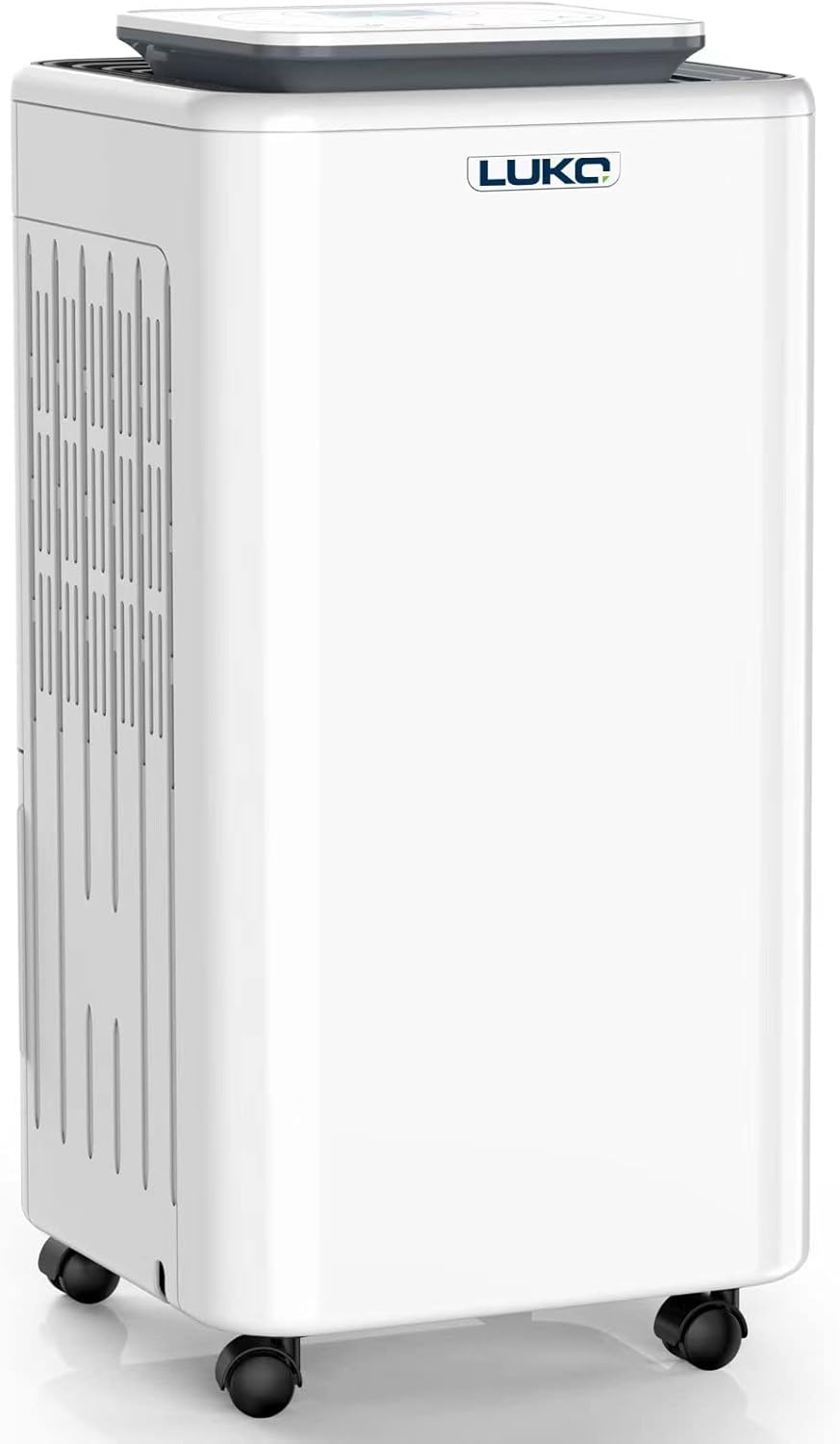
Figure 4.1: Front view of the LUKO 30 Pints Dehumidifier, showing its compact design and casters.
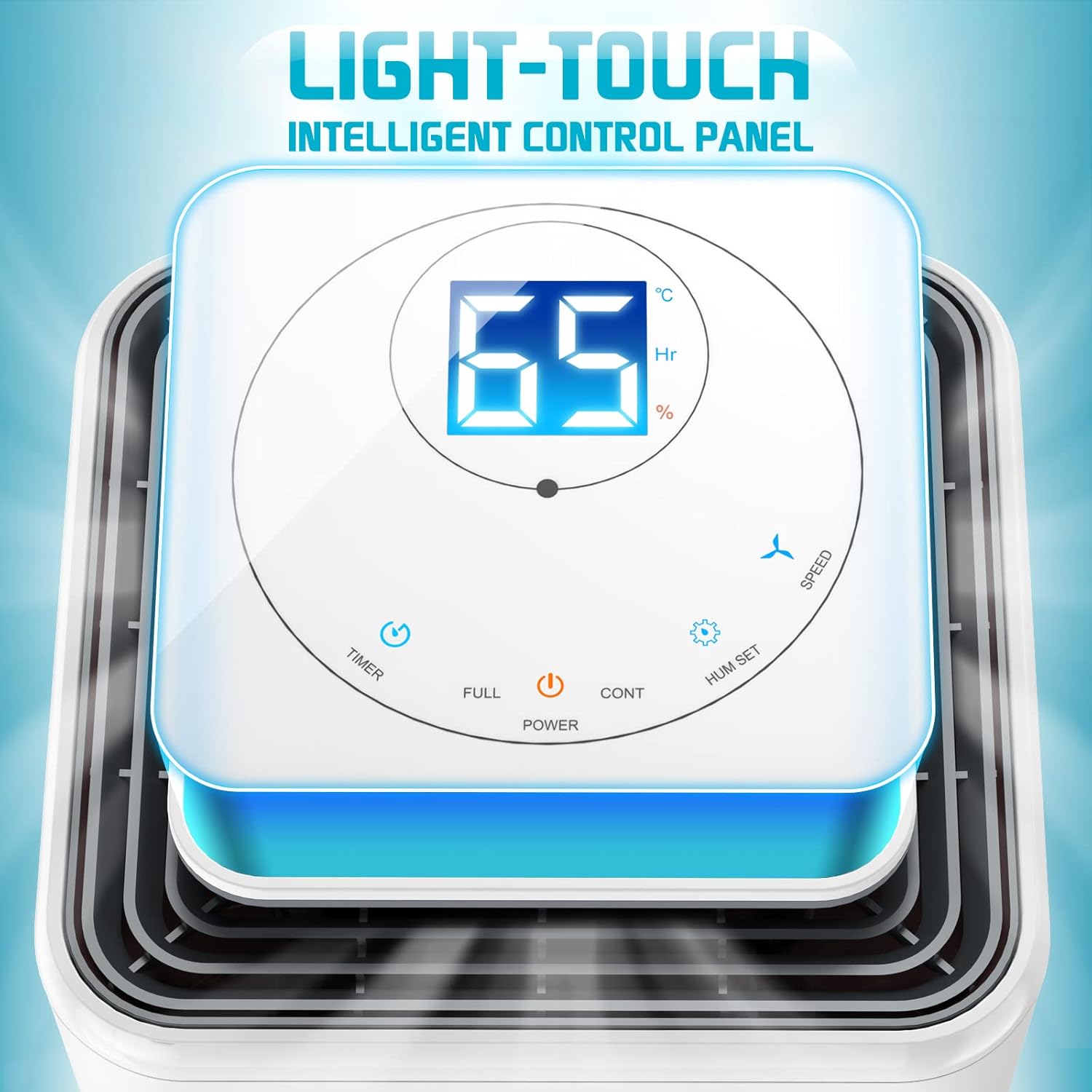
Figure 4.2: Close-up of the intelligent control panel with LED digital display, showing humidity percentage and various function buttons.

Figure 4.3: Illustration highlighting the ergonomic grip for easy lifting and 360-degree universal wheels for convenient mobility.
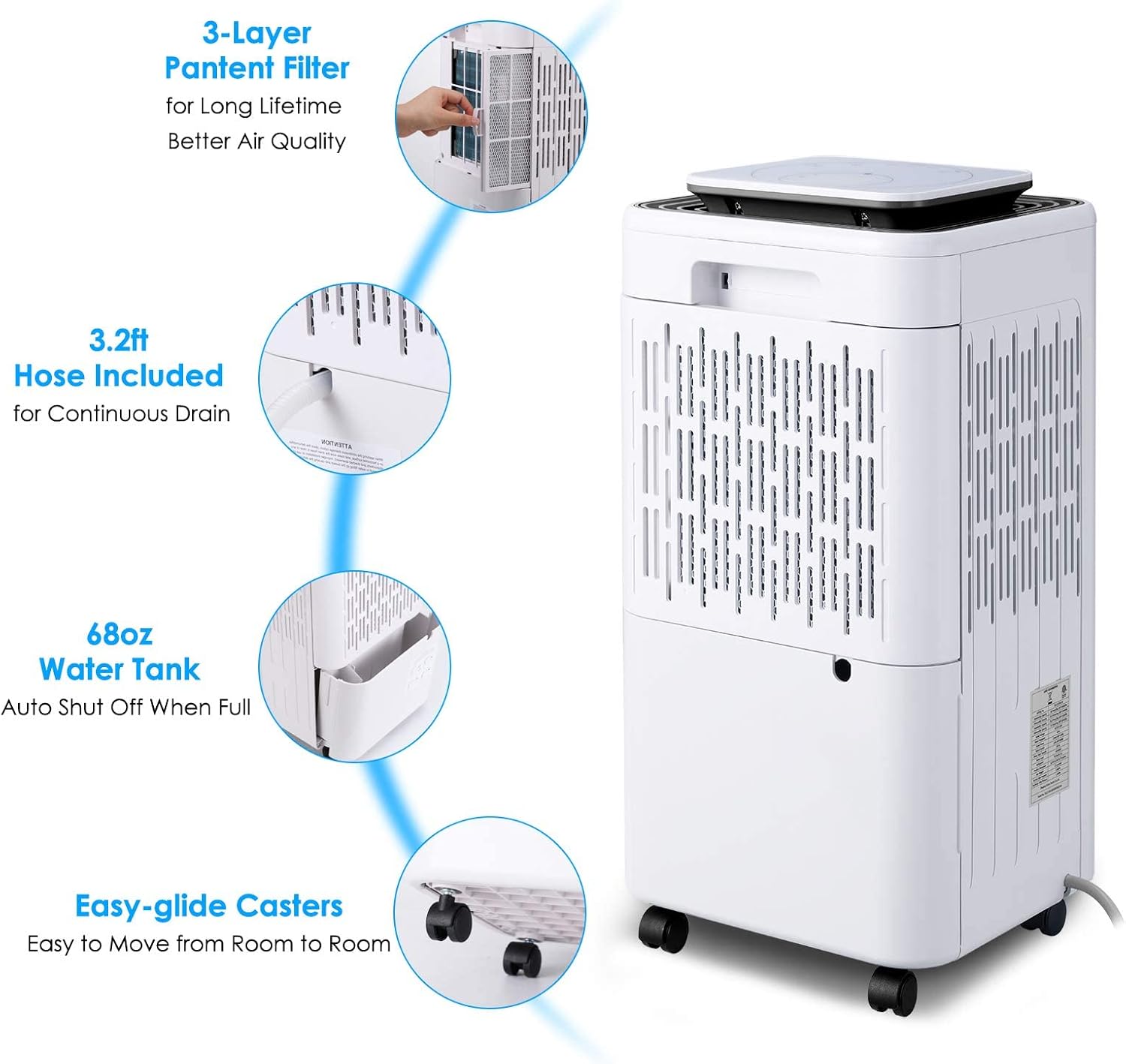
Figure 4.4: Key features including the 3-layer patent filter, 3.2ft continuous drain hose, 68oz water tank with auto shut-off, and easy-glide casters.
5. Setup
5.1 Unpacking and Placement
- Carefully remove the dehumidifier from its packaging.
- Place the unit upright on a flat, stable surface. Important: Allow the unit to stand upright for at least 24 hours before plugging it in and turning it on. This allows the refrigerant to settle after transit.
- Ensure there is at least 8 inches (20 cm) of space around all sides of the unit for proper airflow.
- Avoid placing the unit near heat-generating appliances or in direct sunlight.
5.2 Installing Casters (Optional)
The dehumidifier comes with 360-degree rotatable wheels for easy movement. If not pre-installed, you may need to attach them.
- Locate the four caster wheels and the corresponding holes on the bottom of the unit. Some units may have rubber foot pads covering these holes; gently remove them if present.
- Insert each caster stem firmly into its designated hole until it clicks into place.
5.3 Power Connection
- Plug the power cord into a grounded electrical outlet.
6. Operating Instructions
6.1 Control Panel Overview
The intelligent control panel allows for easy operation and monitoring.
Figure 6.1: Control panel showing Power, Timer, Full, Cont, Hum Set, and Speed buttons, along with the digital display.
- Power Button: Turns the unit On/Off.
- Timer Button: Sets the 24-hour auto On/Off timer.
- Full Indicator: Lights up when the water tank is full and the unit automatically shuts off.
- CONT (Continuous) Mode: Activates continuous dehumidification regardless of humidity level.
- HUM SET Button: Adjusts the desired humidity level (30% to 80%).
- Speed Button: Switches between two fan speeds (High/Low).
6.2 Initial Operation
- Press the Power button to turn on the dehumidifier. The digital display will show the current room humidity.
- Press the HUM SET button repeatedly to set your desired humidity level. The recommended range for comfort and mold prevention is 40-60%. The unit will operate until the set humidity is reached, then cycle on and off to maintain it.
- Press the Speed button to select your preferred fan speed (High or Low). High speed provides faster dehumidification, while Low speed offers quieter operation.
6.3 Special Functions
6.3.1 Auto Defrost Function
The unit is equipped with an Auto Defrost function. If frost builds up on the evaporator coils, the compressor will automatically turn off, and the fan will continue to run until the frost melts. This ensures efficient operation in cooler environments.

Figure 6.2: Visual representation of the Auto Defrost function (snowflake icon) and Dry Clothes function (laundry icon).
6.3.2 Dry Clothes Function
This mode is specifically designed to quickly dry clothes and other damp items. When activated, the unit will operate continuously at high fan speed to remove moisture from the air, assisting in faster drying.
6.3.3 24-Hour Timer
Use the Timer button to set a specific time for the unit to turn on or off automatically. Press the Timer button, then use the HUM SET buttons to adjust the desired hours (1-24). The timer will activate after a few seconds.

Figure 6.3: Illustration of the 24-hour auto on/off timer function.
6.3.4 Humidity Level Indicator Lights
The control panel features intelligent 3-color humidity level display lights:
- Red: 20%-49% humidity
- Blue: 50%-67% humidity
- Green: 68%-81% humidity

Figure 6.4: The humidity ring indicator displaying different colors based on the ambient humidity level.
6.4 Drainage Options
Your dehumidifier offers two methods for water removal:
6.4.1 Manual Drainage (Water Tank)
The unit is equipped with a large detachable 68oz (0.528 Gallon) water tank. When the tank is full, the unit will automatically shut off, and the "Full" indicator light will illuminate to prevent overflow.
- When the tank is full, gently pull out the water tank from the front of the unit.
- Empty the collected water into a sink or drain.
- Slide the empty water tank back into the unit until it is securely in place. The unit will resume operation.

Figure 6.5: Comparison of manual drainage (removing the water tank) and continuous drainage (using the drain hose).

Figure 6.6: The "FULL" indicator light on the control panel, signaling that the water tank needs to be emptied.
6.4.2 Continuous Drainage
For continuous operation without needing to empty the water tank, use the included drain hose.
- Locate the continuous drain outlet on the back or side of the dehumidifier.
- Remove the rubber stopper from the drain outlet.
- Connect the provided 3.3ft drain hose to the outlet, ensuring a secure fit.
- Direct the other end of the hose to a suitable drain (e.g., floor drain, large bucket, sink). Ensure the hose is sloped downwards to allow for gravity drainage and is free of kinks or blockages.
7. Maintenance
Regular maintenance ensures optimal performance and extends the lifespan of your dehumidifier.
7.1 Cleaning the Air Filter
The dehumidifier features a detachable and washable 3-layer filter to maintain air quality. Clean the filter every two weeks or more frequently depending on usage and air quality.
- Unplug the dehumidifier from the power outlet.
- Locate the air filter cover, usually on the back or side of the unit. Open or remove it.
- Carefully pull out the air filter.
- Wash the filter with warm, soapy water. Rinse thoroughly and allow it to air dry completely before re-installing. Do not use a dishwasher or expose to direct sunlight for drying.
- Once dry, re-insert the filter and close the cover.

Figure 7.1: Steps for removing and washing the dehumidifier's air filter.
7.2 Cleaning the Water Tank
Clean the water tank periodically to prevent mold and mildew growth.
- Remove the water tank as described in the "Manual Drainage" section.
- Wash the tank with mild detergent and warm water. Rinse thoroughly.
- Dry the tank completely before placing it back into the unit.
7.3 Cleaning the Exterior
Wipe the exterior of the dehumidifier with a soft, damp cloth. Do not use harsh chemicals, abrasives, or solvents.
8. Troubleshooting
Before contacting customer support, please refer to the following common issues and solutions:
| Problem | Possible Cause | Solution |
|---|---|---|
| Dehumidifier does not turn on. | No power; Power cord not plugged in; Water tank full or not properly seated; Unit not upright for 24 hours. | Check power outlet; Plug in power cord securely; Empty and re-seat water tank; Allow unit to stand upright for 24 hours before use. |
| No water collected or low dehumidification. | Humidity level already low; Room temperature too low; Air filter clogged; Air inlets/outlets blocked; Unit size too small for area. | Check current humidity; Ensure room temperature is above 41°F (5°C); Clean air filter; Clear obstructions; Consider a larger capacity unit for the space. |
| Unit is noisy. | Unit not on a level surface; Air filter clogged; Loose parts. | Place on a flat, stable surface; Clean air filter; Contact customer support if noise persists. |
| Frost on coils. | Room temperature too low. | This is normal. The unit has an auto-defrost function that will activate. If frost persists, increase room temperature. |
| Water leaking. | Water tank not properly seated; Drain hose not connected securely or kinked/blocked. | Re-seat water tank; Check drain hose connection and ensure it's clear and sloped downwards. |
9. Specifications
Technical details for the LUKO 30 Pints Dehumidifier:
| Feature | Detail |
|---|---|
| Model Name | 30 Pints Dehumidifier (D010) |
| Dehumidification Capacity | 30 Pints/Day (at 95°F, 90% RH) |
| Coverage Area | Up to 2,000 sq ft |
| Water Tank Capacity | 68 oz (0.528 Gallons) |
| Humidity Setting Range | 30% - 80% |
| Working Temperature | 41°F - 95°F (5°C - 35°C) |
| Noise Level | ≤45dB(A) |
| Power Consumption | 270 Watts |
| Product Dimensions (D x W x H) | 8.78"D x 10.16"W x 17.9"H |
| Item Weight | 4.25 pounds (68 ounces) |
| Material | Acrylonitrile Butadiene Styrene (ABS) |
| Included Components | Dehumidifier, Drain Hose |
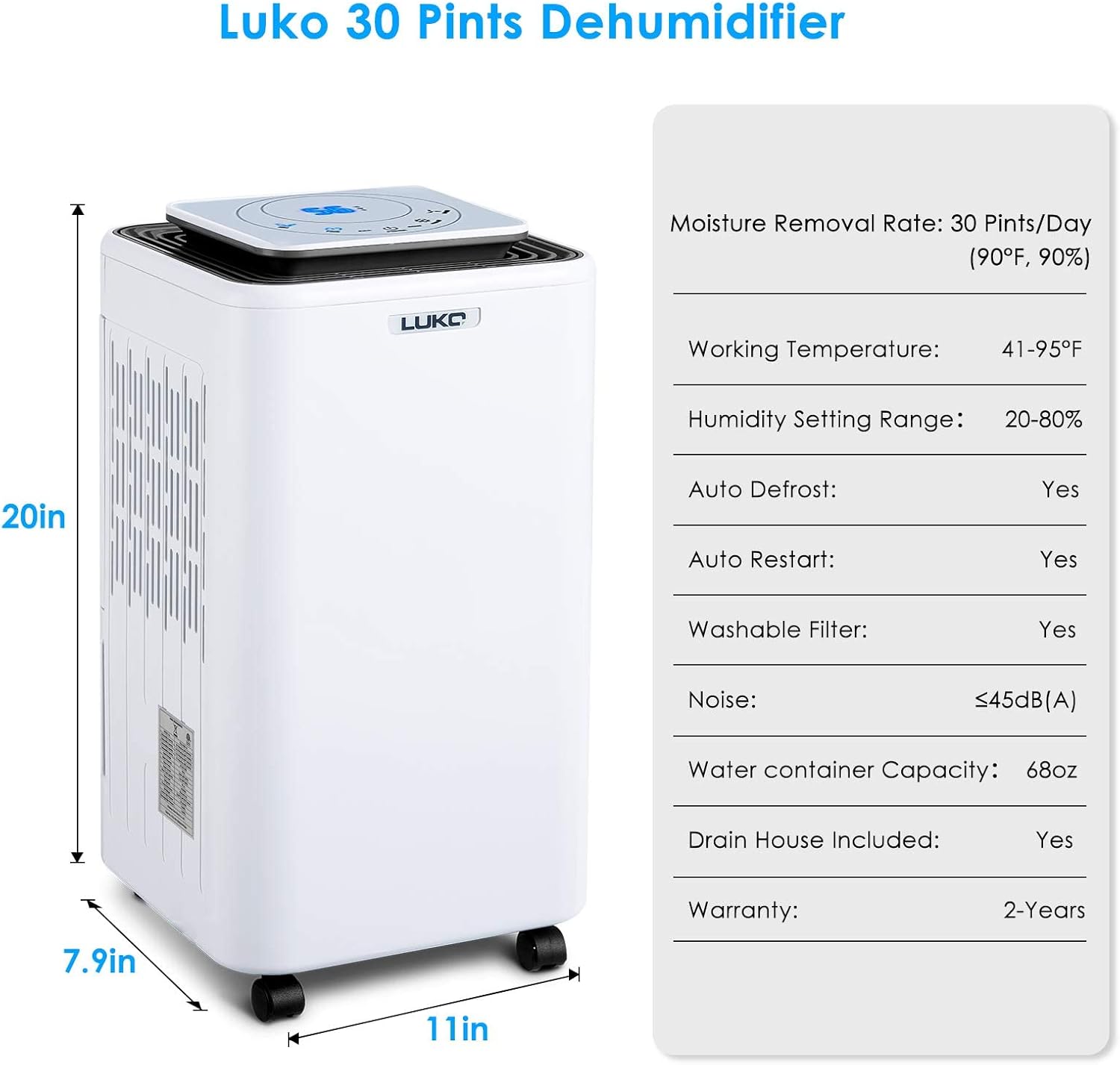
Figure 9.1: Visual summary of key specifications and dimensions.
10. Warranty and Customer Support
10.1 Warranty Information
LUKO provides a 2-year warranty for this dehumidifier, covering defects in materials and workmanship from the date of purchase. This warranty does not cover damage caused by misuse, accident, unauthorized modifications, or normal wear and tear.
10.2 Customer Support
If you have any questions, require technical assistance, or need to claim warranty service, please contact LUKO customer support. Refer to the contact information provided on the product packaging or the official LUKO website.
For the most up-to-date support information, please visit the LUKO Store on Amazon.
Ask a question about this manual
Ask about setup, troubleshooting, compatibility, parts, safety, or missing instructions. Manuals+ will review the question and use this page’s manual context to help answer it.