
Introduction
This instruction manual provides essential information for the safe and effective operation, maintenance, and troubleshooting of your Makita XBU05Z 18V LXT Lithium-Ion Cordless Blower. Please read this manual thoroughly before using the product and retain it for future reference.

Image: The Makita XBU05Z 18V LXT Lithium-Ion Cordless Blower, shown without battery, featuring its teal and black design.
Safety Instructions
Always observe basic safety precautions to reduce the risk of fire, electric shock, and personal injury when using power tools. Keep this manual handy for quick reference.
General Safety Warnings
- Work Area Safety: Keep the work area clean and well-lit. Cluttered or dark areas invite accidents.
- Electrical Safety: Do not expose power tools to rain or wet conditions. Water entering a power tool will increase the risk of electric shock.
- Personal Safety: Stay alert, watch what you are doing, and use common sense when operating a power tool. Do not use a power tool while you are tired or under the influence of drugs, alcohol, or medication.
- Tool Use and Care: Do not force the power tool. Use the correct power tool for your application. The correct power tool will do the job better and safer at the rate for which it was designed.
- Maintenance: Maintain power tools and accessories. Check for misalignment or binding of moving parts, breakage of parts, and any other condition that may affect the power tool’s operation.
Battery and Charger Safety
- Use only Makita 18V LXT Lithium-Ion batteries with Star Protection Computer Controls for optimal performance and safety.
- Star Protection technology monitors battery conditions to protect against overloading, over-discharging, and overheating.
- Caution: Using non-genuine ("knock-off") Makita Lithium-Ion batteries may burst, causing fires, personal injuries, or property damage.

Image: A warning graphic illustrating the dangers of using non-genuine batteries, showing a damaged battery and charger, emphasizing the risk of fire and injury.
Product Overview
The Makita XBU05Z is an 18V LXT Lithium-Ion Cordless Blower designed for efficient clean-up tasks. It features a Makita-built high-torque motor and a compact, ergonomic design for user comfort and reduced fatigue.
Key Features:
- Variable 3-Speed Motor: Produces a maximum air velocity of 219 MPH.
- Compact Design: Measures only 20-3/8 inches long.
- Lightweight: Weighs only 4.1 lbs with a battery (battery not included).
- Ergonomic Handle: Rubberized soft grip for increased operator comfort.
- LXT Battery System: Compatible with Makita 18V LXT Lithium-Ion batteries (sold separately).

Image: The blower's ergonomic design, highlighting its compact 20-3/8 inch length for easy handling.

Image: Close-up of the rubberized soft grip handle, designed for enhanced user comfort during operation.
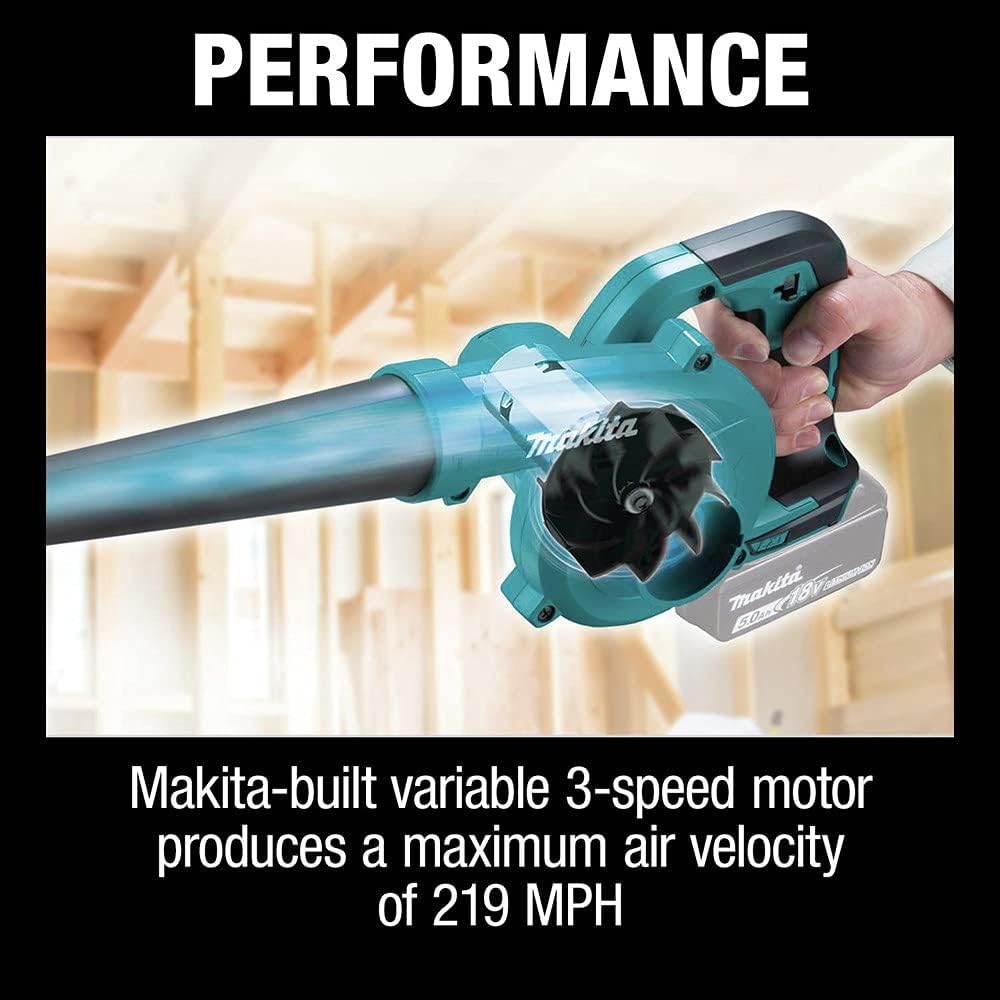
Image: Illustration of the blower's performance, showing air movement and indicating a maximum air velocity of 219 MPH.

Image: The blower in action, demonstrating its portability and lightweight design (4.1 lbs with battery) while clearing sawdust.
Setup
Battery Installation
- Ensure the blower is turned off and the trigger is disengaged.
- Align the battery pack with the battery housing on the blower.
- Slide the battery into the housing until it locks securely in place. A click sound indicates proper installation.
- To remove the battery, press the release button on the battery pack and slide it out.
Nozzle Attachment
- Align the nozzle with the air outlet on the front of the blower.
- Push the nozzle firmly onto the outlet until it is securely seated.
- Ensure the nozzle is properly attached before operation to prevent it from detaching during use.

Image: Side view of the Makita XBU05Z blower with a battery pack attached, illustrating the battery insertion point.
Operation
Starting and Stopping
- To start the blower, ensure a charged battery is installed, then press the power trigger.
- To stop the blower, release the power trigger.
Speed Control
The Makita XBU05Z features a variable 3-speed motor. Adjust the speed using the speed selector switch located on the handle.
- Speed 1: Lowest setting for light debris and delicate areas.
- Speed 2: Medium setting for general clean-up.
- Speed 3: Highest setting for stubborn debris and maximum air velocity.

Image: Close-up of the speed selector switch on the blower handle, set to the lowest speed (1).

Image: Close-up of the speed selector switch on the blower handle, set to the highest speed (3).
Usage Tips
- Hold the blower firmly with one hand, directing the nozzle towards the debris.
- Sweep the blower from side to side to gather debris into piles.
- Avoid blowing debris towards people, animals, or fragile objects.
- For optimal battery life, use the lowest effective speed setting for the task.

Image: A person operating the Makita XBU05Z blower to clear debris from a wooden surface, demonstrating typical usage.
Maintenance
Regular maintenance ensures the longevity and optimal performance of your blower. Always disconnect the battery before performing any maintenance.
Cleaning
- Wipe down the exterior of the blower with a clean, damp cloth. Do not use harsh chemicals or abrasive cleaners.
- Ensure the air intake and outlet are free from debris to maintain proper airflow. Use a soft brush or compressed air if necessary.
Battery Care and Storage
- Store batteries in a cool, dry place away from direct sunlight and extreme temperatures.
- Do not store batteries in a discharged state for extended periods. Charge them periodically if not in use.
- Avoid dropping or subjecting batteries to impact.
Troubleshooting
Refer to the following table for common issues and their solutions.
| Problem | Possible Cause | Solution |
|---|---|---|
| Blower does not start. | Battery not charged or improperly installed. | Ensure battery is fully charged and correctly inserted until it clicks. |
| Reduced air output. | Air intake or nozzle blocked by debris. | Clear any obstructions from the air intake and nozzle. |
| Blower stops unexpectedly. | Battery overheating or over-discharging (Star Protection activated). | Allow battery to cool down. Ensure you are using a genuine Makita LXT battery. |
| Excessive vibration or unusual noise. | Loose components or internal damage. | Discontinue use immediately. Contact Makita service center for inspection. |
If the problem persists after attempting these solutions, contact a Makita authorized service center.
Specifications
| Feature | Detail |
|---|---|
| Brand | Makita |
| Model Name | XBU05Z |
| Power Source | Battery Powered (18V LXT Lithium-Ion) |
| Voltage | 18 Volts |
| Maximum Air Velocity | 219 MPH |
| Speeds | Variable 3-speed |
| Item Weight (with battery) | 4.1 lbs (approximate, battery not included) |
| Product Dimensions (L x W x H) | 20.38" x 11.1" x 8.35" |
| Special Features | Lightweight, Portable, Rechargeable, Ergonomic |
| UPC | 088381897860 |
Warranty and Support
Makita products are manufactured under strict quality control standards. For information regarding warranty coverage, service, or technical support, please refer to the official Makita website or contact their customer service directly.
If you have any questions concerning your genuine Makita product, or if you have a performance issue with your Makita battery, tool, or charger, contact a Makita Factory Service Center or Authorized Service Center, or call (800)4-MAKITA.
For further assistance, visit the official Makita website: www.makitatools.com


