
Introduction
The LIQUIPEL Liquid Glass Screen Protector provides advanced, invisible screen protection for a wide range of devices, including smartphones, tablets, and smartwatches. This product is engineered to enhance your device's screen durability, offering up to 20 times more scratch resistance with a 9H Sapphire Hardness rating. It ensures an easy, wipe-on application that maintains the natural responsiveness and clarity of your screen. This manual outlines the proper application process and details on activating your product's protection plan.

Image: LIQUIPEL Liquid Glass Screen Protector packaging, highlighting key features and the protection plan.
Setup and Application
Follow these steps carefully to ensure optimal application and protection for your device screen.
- Step 1: Prepare Your Device
Use the provided alcohol wipe to thoroughly clean the surface of your device's screen. Ensure all dirt, oils, and smudges are removed. After cleaning, use the microfiber cloth to dry the screen completely. The screen must be spotless and dry before proceeding.
- Step 2: Apply Liquid Glass
Carefully open the Liquid Glass vial by twisting off the top completely. Place the tip of the Liquid Glass applicator with the opened portion facing towards the screen. Gently squeeze the bottle and spread the Liquid Glass evenly across the entire screen surface until the bottle is empty. Ensure complete coverage.
- Step 3: Drying and Curing
Allow the applied Liquid Glass to dry on your device for 5 minutes. After 5 minutes, use the microfiber cloth to gently buff off any excess solution from the screen. The product will be fully cured after 24 hours, providing maximum protection.

Image: Visual representation of the three-step application process for LIQUIPEL Liquid Glass.
Operating Principles
Once applied and fully cured, the LIQUIPEL Liquid Glass forms an invisible, ultra-thin protective layer on your device's screen. This layer works at a molecular level to fill in microscopic imperfections, creating a smoother, harder surface. This results in:
- Enhanced resistance against scratches from everyday objects.
- Improved shatter and impact resistance for accidental drops.
- Preservation of original screen clarity and touch sensitivity.

Image: Diagram illustrating the benefits of LIQUIPEL Liquid Glass protection.
Maintenance
Maintaining your LIQUIPEL protected screen is simple:
- Clean your device screen as you normally would with a soft, lint-free cloth.
- For stubborn smudges, a small amount of screen cleaner designed for electronics can be used.
- Avoid using abrasive cleaners or harsh chemicals, as these may degrade the protective layer over time.
Troubleshooting
- Uneven Application: If the liquid glass appears uneven or leaves streaks, ensure the screen was completely clean and dry before application. Reapplication may be necessary if the issue persists after the initial 5-minute buffing.
- Protection Plan Registration Issues: If you encounter difficulties registering your protection plan, double-check that you have scanned the correct QR code and followed all steps within the instaProtek app. Ensure your device has an active internet connection. If problems persist, contact LIQUIPEL customer support for assistance.
Specifications
| Feature | Detail |
|---|---|
| Brand | LIQUIPEL |
| Model Number | Phones |
| Material | Glass |
| Item Hardness | 9H Sapphire Hardness |
| Special Features | 9 H Surface Hardness, Anti-Shatter, Improved Scratch, Shatter, Impact Resistance |
| Compatible Devices | iPhone, Samsung Galaxy, Tablet, Apple Watch (Universal fit) |
| Product Dimensions | 7.8"L x 4.5"W |
| Item Weight | 1.13 ounces |
Warranty and Support
The LIQUIPEL Liquid Glass Screen Protector includes a protection plan that offers a screen repair guarantee of up to $150. To qualify for this guarantee, your device must be protected by our product at the time of damage. It is essential to register your product warranty after purchase.
How to Activate Your Protection Plan:
- Scan QR Code: Locate the green instaProtek shield with the QR code provided in your product packaging. Use your smartphone camera to scan this QR code, or directly download the instaProtek app from the Apple App Store or Google Play Store.
- Open and Register: Open the instaProtek app and follow the on-screen instructions to register your product.
- Complete Process: Complete the registration process to activate your protection plan.
For direct access to the instaProtek app, visit: http://VQR.MX/HFLM7

Image: What's in the box, including the activation card for the protection plan.
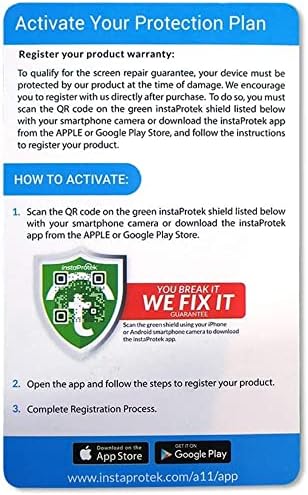
Image: Close-up of the LIQUIPEL Protection Plan activation card.
Safety Information
This product contains flammable materials. Please handle with care and keep away from open flames, sparks, or any heat sources. Always read all caution labels and warnings provided on the product packaging before use to ensure safe handling and application.
