
1. Introduction
The Autel MaxiBAS BT508 is an advanced battery and electrical system analysis tool designed for professional and DIY use. It provides comprehensive testing capabilities for 6V and 12V automotive batteries, including regular flooded, AGM flat plate, AGM spiral, GEL, and EFB types, with a capacity range of 100 to 2000 CCA. The BT508 also features in-vehicle and standalone battery testing, starter and generator system analysis, and advanced functions like battery replacement guidance, registration, BMS reset, and electrical system resets. Additionally, it offers all-system diagnostic functions for one optional vehicle brand.
This manual provides detailed instructions on how to set up, operate, and maintain your MaxiBAS BT508 to ensure accurate and reliable performance.

Figure 1: Autel MaxiBAS BT508 Battery Tester with connection clamps.
2. Key Features
The Autel MaxiBAS BT508 offers a comprehensive suite of features for battery and electrical system diagnostics:
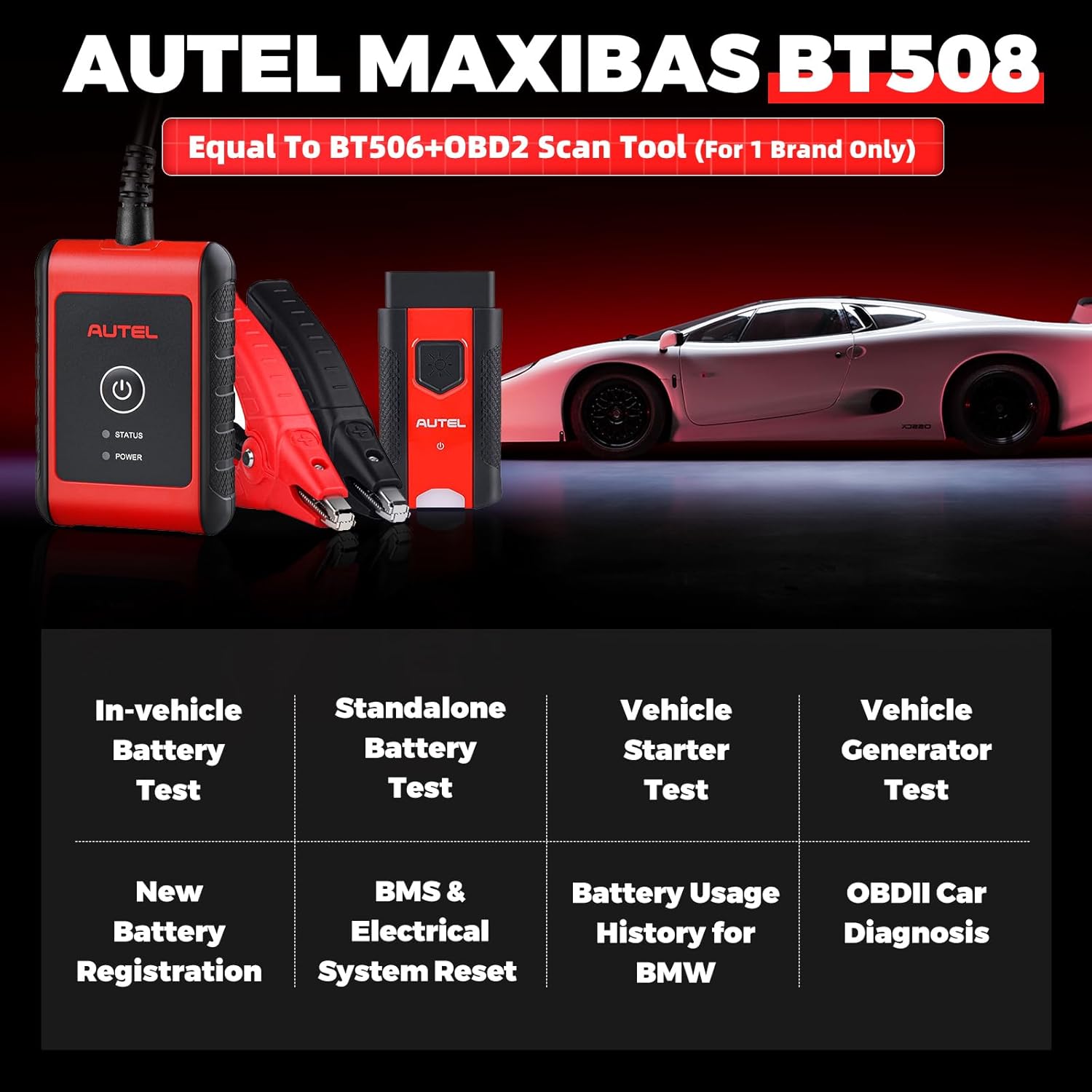
Figure 2: Overview of MaxiBAS BT508 key functions.
- Adaptive Conductance Technology: Provides highly accurate battery test results, even for low or discharged batteries.
- Battery Test: In-vehicle and standalone testing for 6V/12V batteries (100-2000 CCA) including Flooded, AGM, GEL, EFB types.
- Starter & Generator Test: Comprehensive analysis of the vehicle's starting and charging systems.
- Battery Replacement & Registration: Guided procedures for replacing and registering new batteries, supporting 53 vehicle makes.
- BMS & Electrical System Reset: Functions for resetting Battery Management Systems and various electrical components (e.g., windows, sunroof).
- All System Diagnosis: Full diagnostic capabilities (read/erase codes, live data, ECU info) for one optional vehicle brand via OBDII.
- Special Functions for BMW: Includes Battery Usage History and Reset Closed-circuit Current Monitoring Cycle.
3. Safety Information
Always observe the following safety precautions when using the MaxiBAS BT508 to prevent personal injury or damage to the vehicle and the device.
- Wear appropriate eye protection and protective clothing when working near batteries.
- Ensure the work area is well-ventilated.
- Avoid sparks, flames, and smoking near batteries, as they produce explosive gases.
- Keep the device dry and clean. Do not operate in wet or oily conditions.
- Connect the clamps correctly: red to positive (+), black to negative (-). Incorrect connection can damage the device or vehicle.
- Do not touch hot engine parts or moving components.
- Refer to the vehicle manufacturer's service manual for specific safety procedures.
4. Package Contents
Verify that all items are present in your MaxiBAS BT508 package:
- MaxiBAS BT508 Unit
- Battery Clamps (Red and Black)
- User Manual (this document)
- OBDII Cable (for diagnostic functions, if applicable)
5. Device Overview
The Autel MaxiBAS BT508 features a compact design with intuitive indicators. Refer to Figure 1 for a visual representation of the device.
- Power Button: Press to turn the device on or off.
- Status LED: Indicates the operational status of the device.
- Power LED: Indicates power supply status.
- Battery Clamps: Used for connecting to the vehicle battery terminals.
- OBDII Connector: For connecting to the vehicle's OBDII port for diagnostic functions.
6. Setup
6.1 Initial Power-Up
- Connect the BT508 to a 6V or 12V battery using the provided clamps. Ensure correct polarity (red to positive, black to negative).
- The device will power on automatically or can be powered on by pressing the Power Button.
- Follow the on-screen prompts on your paired mobile device (via the Autel MaxiBAS app) to complete initial setup, including language selection and software updates.
6.2 Connecting to a Vehicle Battery
- Ensure the vehicle ignition is off.
- Locate the vehicle battery.
- Connect the red clamp to the positive (+) battery terminal.
- Connect the black clamp to the negative (-) battery terminal.
- Ensure connections are secure.
6.3 Connecting to the OBDII Port (for Diagnostic Functions)
- Locate the vehicle's 16-pin OBDII Data Link Connector (DLC), usually under the dashboard on the driver's side.
- Connect the OBDII cable from the BT508 to the vehicle's DLC.
- The device will establish communication with the vehicle's systems.
7. Operating Instructions
The MaxiBAS BT508 operates via a paired mobile device running the Autel MaxiBAS application. All test results and navigation are displayed on the mobile device screen.
7.1 Battery Test (In-Vehicle and Standalone)
This function tests the health of the battery. The BT508 supports testing 6V to 12V batteries with 100 to 2000 CCA, including Flooded, AGM Flat Plate, AGM Spiral, GEL, and EFB types.

Figure 3: Professional Battery Test interface and supported battery types.
- Connect the BT508 to the battery as described in Section 6.2 or 6.3.
- Open the MaxiBAS app on your mobile device.
- Select "Battery Test" from the main menu.
- Follow the on-screen prompts to input battery type (e.g., Flooded, AGM) and CCA rating.
- The BT508 will perform the test and display results such as State of Charge (SOC), Voltage, Measured Capacity, and Battery Health.
7.2 Starter Test
The Starter Test evaluates the vehicle's starting system, including the starter motor and battery's ability to deliver cranking current.
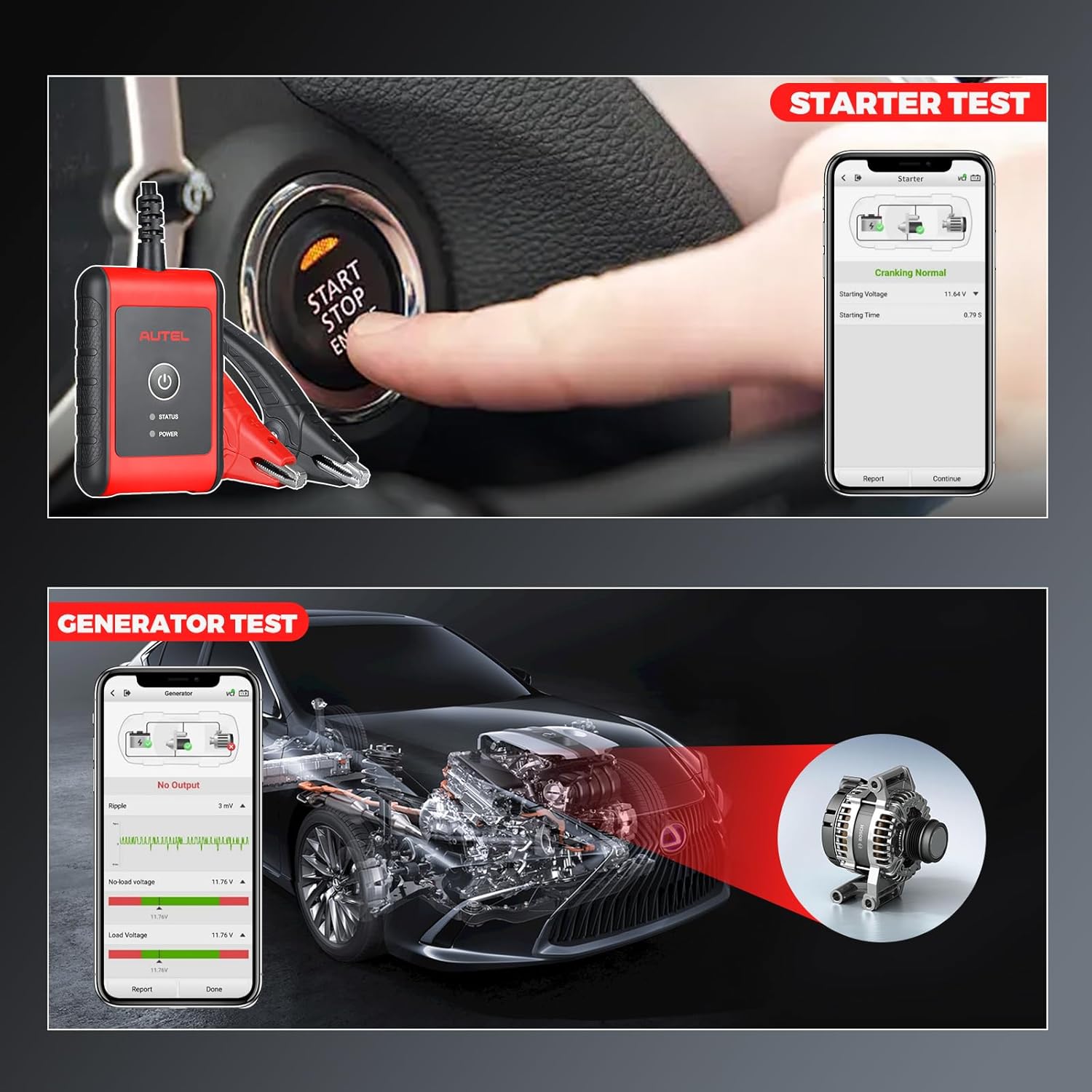
Figure 4: Starter Test in progress.
- Ensure the BT508 is connected to the vehicle battery.
- Select "Starter Test" from the app menu.
- Follow the on-screen instructions to crank the engine.
- The app will display cranking voltage and cranking time, indicating the starter system's performance.
7.3 Generator Test
The Generator Test assesses the vehicle's charging system, including the alternator and voltage regulator.
Figure 5: Generator Test results display.
- Ensure the BT508 is connected to the vehicle battery.
- Select "Generator Test" from the app menu.
- Follow the on-screen instructions to start the engine and perform various load tests.
- The app will display ripple voltage, no-load voltage, and load voltage to evaluate the charging system's efficiency.
7.4 Battery Replacement & Registration
The BT508 provides guided procedures for battery replacement and registration, crucial for modern vehicles with Battery Management Systems (BMS).
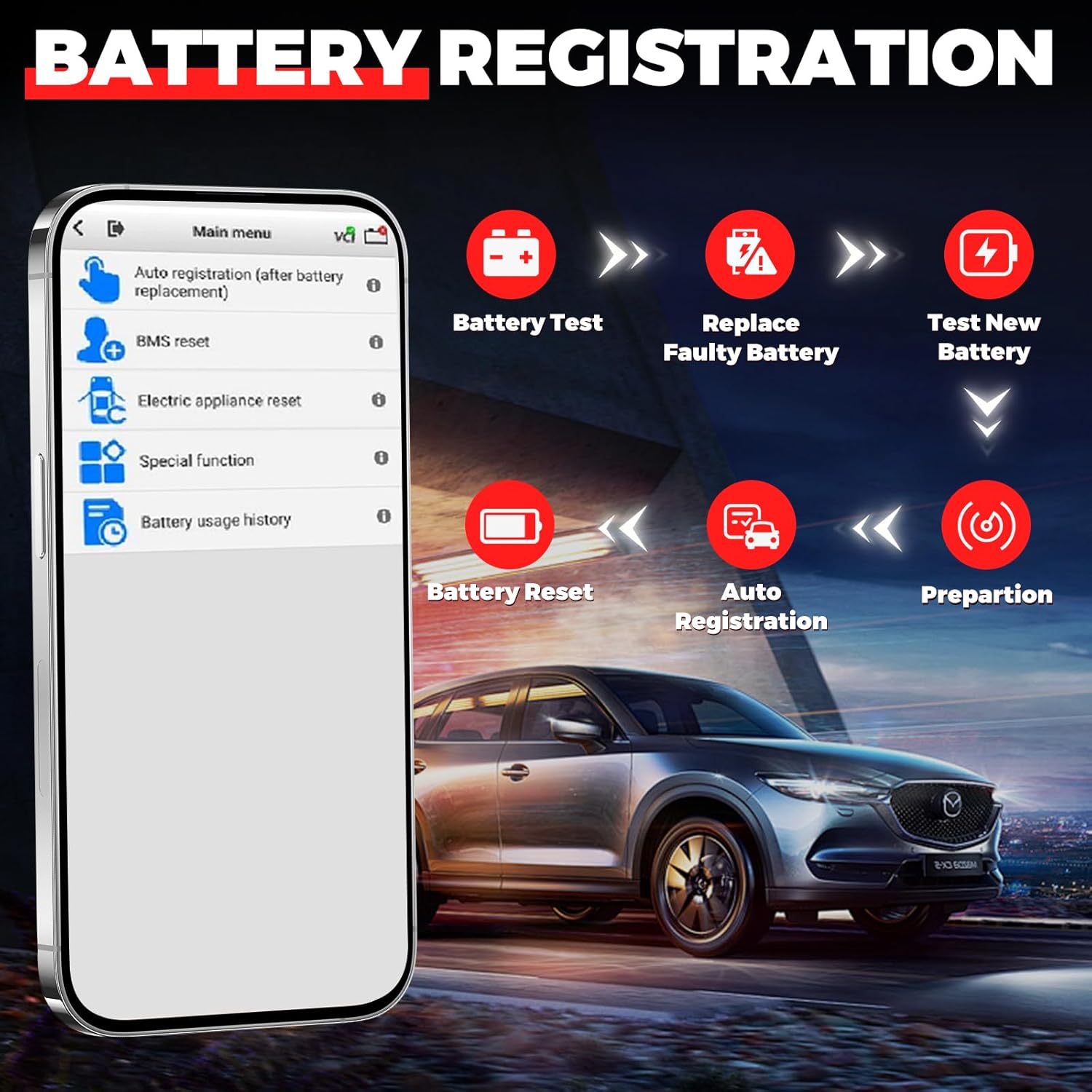
Figure 6: Battery Replacement and Registration workflow.
- Connect the BT508 to the vehicle's OBDII port.
- Select "Battery Replacement" or "Battery Registration" from the app menu.
- Follow the detailed on-screen instructions, which guide you through testing the old battery, replacing it, testing the new battery, and performing the necessary registration or reset procedures for over 53 vehicle makes.
7.5 BMS Reset & Electrical System Reset
These functions allow for resetting the Battery Management System and various electrical components after battery service or replacement.
- BMS Reset: Resets the vehicle's Battery Management System to recognize a new battery, ensuring proper charging and monitoring.
- Electrical System Reset: Resets components such as power windows, sunroof, and individual memory settings that may lose calibration during battery disconnection.
Access these functions through the "Special Functions" or "Service" menu in the MaxiBAS app and follow the on-screen prompts.
7.6 All System Diagnosis (Optional One Brand)
The BT508 can be configured to provide full system diagnostics for one selected vehicle brand, allowing access to all available modules.
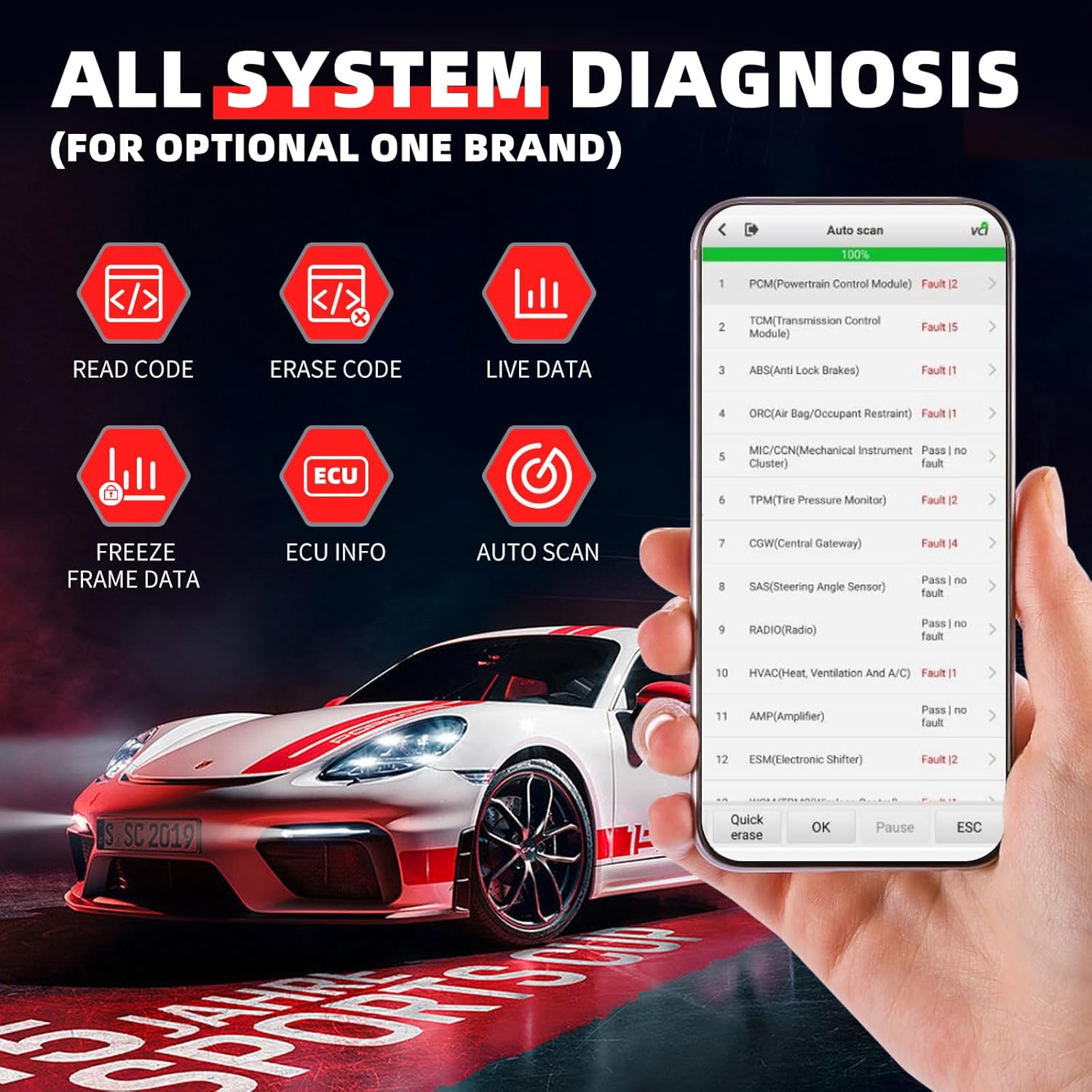
Figure 7: All System Diagnosis interface.
- Connect the BT508 to the vehicle's OBDII port.
- Select "Diagnosis" from the app menu.
- Choose the pre-selected vehicle brand.
- Perform functions such as:
- Read Codes: Retrieve Diagnostic Trouble Codes (DTCs).
- Erase Codes: Clear DTCs from vehicle modules.
- Live Data: View real-time sensor data.
- ECU Info: Retrieve Electronic Control Unit information.
- Freeze Frame Data: View data recorded at the moment a fault occurred.
- Auto Scan: Automatically scan all available modules for faults.
Note: Additional vehicle brands can be purchased and activated through the Autel MaxiBAS app's "Mall" section.
7.7 Special Functions (BMW Specific)
For BMW vehicles, the BT508 supports specific functions:
- Battery Usage History: View historical data related to battery performance.
- Reset Closed-circuit Current Monitoring Cycle: Reset the monitoring cycle for the vehicle's closed-circuit current.
Note: These functions are not universally compatible with all vehicles. Refer to the app for specific vehicle coverage.
8. Adaptive Conductance Technology
The MaxiBAS BT508 utilizes advanced Adaptive Conductance technology for highly accurate battery testing. This method automatically adjusts its algorithm based on various battery conditions, enabling precise measurements even for low or nearly discharged batteries.

Figure 8: Benefits of Adaptive Conductance Technology.
Key benefits include:
- Ability to test low capacity and discharged batteries accurately.
- Reduced need for battery charging and retesting.
- Achieves over 95% diagnosis accuracy.
- Ensures 100% detection rate for bad batteries.
9. Maintenance
9.1 Cleaning
- Clean the device casing with a soft, damp cloth. Do not use abrasive cleaners or solvents.
- Ensure the battery clamps are free from dirt, corrosion, and debris for optimal contact.
9.2 Storage
- Store the BT508 in a dry, cool environment, away from direct sunlight and extreme temperatures.
- Keep the device and its accessories in the original packaging or a protective case when not in use.
10. Troubleshooting
| Problem | Possible Cause | Solution |
|---|---|---|
| Device does not power on. | Incorrect battery connection; battery voltage too low. | Ensure clamps are securely connected to the correct battery terminals. Check battery voltage; if too low, charge the battery before testing. |
| No communication with vehicle. | Loose OBDII connection; vehicle ignition off; faulty OBDII port. | Verify the OBDII cable is securely connected. Turn the vehicle ignition to the ON position (engine off). Check the vehicle's fuse for the OBDII port. |
| Inaccurate test results. | Poor clamp connection; incorrect battery type/CCA input; battery surface corrosion. | Clean battery terminals and ensure secure clamp connections. Verify correct battery parameters are entered in the app. |
| App not connecting to BT508. | Bluetooth issue; app not updated. | Ensure Bluetooth is enabled on your mobile device. Restart both the BT508 and your mobile device. Update the MaxiBAS app to the latest version. |
11. Specifications
| Model | MaxiBAS BT508 |
| Product Dimensions | 32.99 x 26.01 x 10.01 cm |
| Item Weight | 1.64 kg |
| Power Source | Battery Powered (via vehicle battery) |
| Operating System | Android 4.4 (for companion app) |
| Screen Size | 4 Inches (referring to the device's internal display, though primary interaction is via smartphone) |
| Battery Voltage Range | 6V - 12V |
| Battery Capacity Range | 100 - 2000 CCA |
| Supported Battery Types | Regular Flooded, AGM Flat Plate, AGM Spiral, GEL, EFB |
| Testing Standards | CCA, CA, SAE, EN, IEC, DIN, JIS, MCA |
| UPC | 889327045006 |
12. Warranty Information
Autel products are manufactured to the highest quality standards. For detailed warranty information, please refer to the warranty card included with your product or visit the official Autel website. Keep your purchase receipt as proof of purchase for warranty claims.
13. Technical Support
If you encounter any issues or have questions regarding the operation of your Autel MaxiBAS BT508, please contact Autel technical support through the following channels:
- Official Website: Visit the Autel official website for FAQs, software updates, and support contact information.
- MaxiBAS App: The application often includes a support section with troubleshooting guides and direct contact options.
- Email/Phone: Refer to the contact information provided on the Autel website or in your product packaging.