
Introduction
This manual provides instructions for the safe and effective use of your URAQT Star Projector Night Light. This device projects various themes, plays soothing music, and features a 360° rotation function. Please read these instructions carefully before use and retain them for future reference.
What's in the Box
Verify that all components are present:
- Star Projector Night Light
- USB Cable
- Remote Control
- Projection Films (6 themes)

Image: The product packaging showing the projector, remote, USB cable, and various projection films.
Product Features
- 360° Dynamic Projection: Projects various patterns onto walls and ceilings with automatic rotation.
- Multiple Projection Themes: Includes 6 distinct themes (e.g., universe, ocean, starry sky, Christmas, birthday, romantic love).
- Integrated Music Player: Features 8 soothing melodies to aid sleep.
- Remote Control: Conveniently adjust settings from a distance.
- Smart Timer Function: Set for 15 or 30 minutes automatic shut-off.
- Adjustable Brightness: 7 levels of brightness to suit different environments.
- Rechargeable Battery: Built-in 1200 mAh battery for portable, wireless use.
- Night Light Mode: Can function as a gentle night light by covering the projection film.
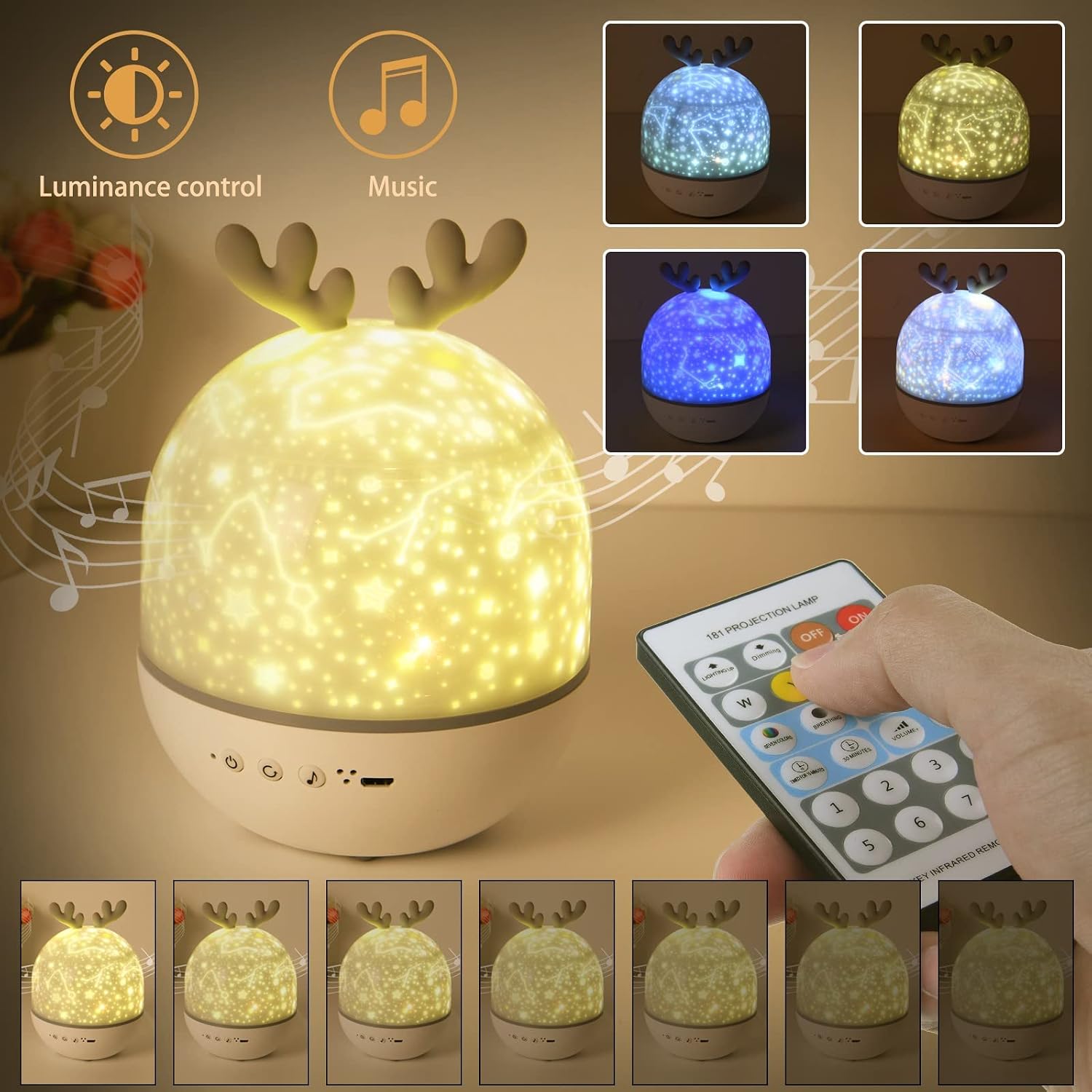
Image: Overview of the projector's features, including brightness control, music, and color options.

Image: Visual representation of the 6 projection themes: Universe, Sea World, Christmas Day, Romantic Love, Starry Sky, and Happy Birthday.

Image: A list of the 8 built-in music tracks available on the projector.
Setup
- Charging: Before first use, fully charge the projector using the provided USB cable. Connect the cable to the projector's USB port and a compatible USB power adapter (not included). A full charge takes approximately 2 hours.
- Inserting Projection Film:
- Remove the outer dome cover.
- Remove the inner transparent projection film cylinder.
- Select your desired projection film and carefully place it inside the projector.
- Reattach the inner cylinder and then the outer dome cover.
- Night Light Mode: To use as a simple night light without projection, ensure the outer dome cover is in place and no projection film is inserted.

Step 1: Remove outer dome.

Step 2: Remove inner cylinder.

Step 3: Insert film.

Step 4: Reattach dome.
Image: Step-by-step guide on how to change the projection films.
Operation
The projector can be controlled using the buttons on the device or the included remote control.
Device Buttons:
- Power Button: Press to turn the projector ON/OFF.
- Rotation Button: Activates or deactivates the 360° rotation.
- Light Mode Button: Cycles through different light colors and modes.
- Music Button: Plays or pauses music.
Remote Control Functions:
The remote control offers comprehensive control over all features:
- ON/OFF: Power the device.
- Brightness Adjustment (W, Y, B buttons): Adjust the intensity of white, yellow, or blue light.
- Color Modes (Color buttons): Select single colors or multi-color combinations.
- Rotation Control: Start or stop the projection rotation.
- Music Selection (1-8 buttons): Choose from the 8 built-in melodies.
- Volume Control (+/-): Adjust music volume.
- Timer (15/30 min): Set automatic shut-off after 15 or 30 minutes.

Image: The projector in use, showing the remote control for easy operation.
Demonstration Videos:
Video: This video demonstrates the various projection films and themes available with the night light projector.
Video: This video showcases the combination of projection and music features of the night light.
Maintenance
- Cleaning: Wipe the projector's exterior with a soft, dry cloth. Do not use abrasive cleaners or solvents.
- Storage: Store the projector in a cool, dry place when not in use.
- Battery Care: To prolong battery life, avoid fully discharging the battery frequently. Charge regularly.
Troubleshooting
| Problem | Possible Cause | Solution |
|---|---|---|
| Projector does not turn on. | Low battery or not charged. | Connect the projector to a power source using the USB cable and charge it fully. |
| Remote control is not working. | Battery in remote is dead or remote is too far/not aimed correctly. | Ensure the remote has fresh batteries. Point the remote directly at the projector. Reduce distance to the projector. |
| Projection is blurry or unclear. | Protective film not removed from projection lens or dirty lens. | Ensure all protective films are removed. Gently clean the projection lens with a soft cloth. |
| Music volume is too loud/quiet. | Volume setting needs adjustment. | Use the volume +/- buttons on the remote control to adjust the sound level. |
| Projection is not rotating. | Rotation function is off. | Press the rotation button on the device or remote control to activate rotation. |
Specifications
| Feature | Detail |
|---|---|
| Model Number | U4-LQDD200928-FBA |
| Brand | URAQT |
| Dimensions (L x W x H) | 12 x 12 x 16 cm |
| Material | Plastic, Acrylonitrile Butadiene Styrene, Wood |
| Light Source Type | LED |
| Number of Bulbs | 4 |
| Wattage | 1 Watt |
| Voltage | 36 Volts |
| Power Source | Battery Powered (Rechargeable via USB) |
| Control Method | Remote Control |
| Special Features | Remote Control, Timer, USB Charging, 360° Dynamic Projection, 6 Projection Themes |
| Recommended Age Range | Child |
| Energy Efficiency Class | G (EPREL Link) |

Image: The projector highlighting its dynamic rotation and USB charging capabilities.
Warranty and Support
For warranty information or technical support, please refer to the product packaging or contact the retailer where the product was purchased. Keep your proof of purchase for any warranty claims.