
Eureka P1002 (Compatible with NEC280TL, NEC285GR, NEC180)
Contents
Eureka Non Woven Filter Components User Manual
Model: P1002
Compatible with Eureka Cordless Stick Vacuums: NEC280TL, NEC285GR, NEC180
1. Product Overview
The Eureka Non Woven Filter Component (Model P1002) is a genuine replacement part designed to maintain the optimal performance of your Eureka Cordless Stick Vacuum. This filter is specifically engineered to fit models NEC280TL, NEC285GR, and NEC180, ensuring efficient dust and debris capture and consistent suction power.
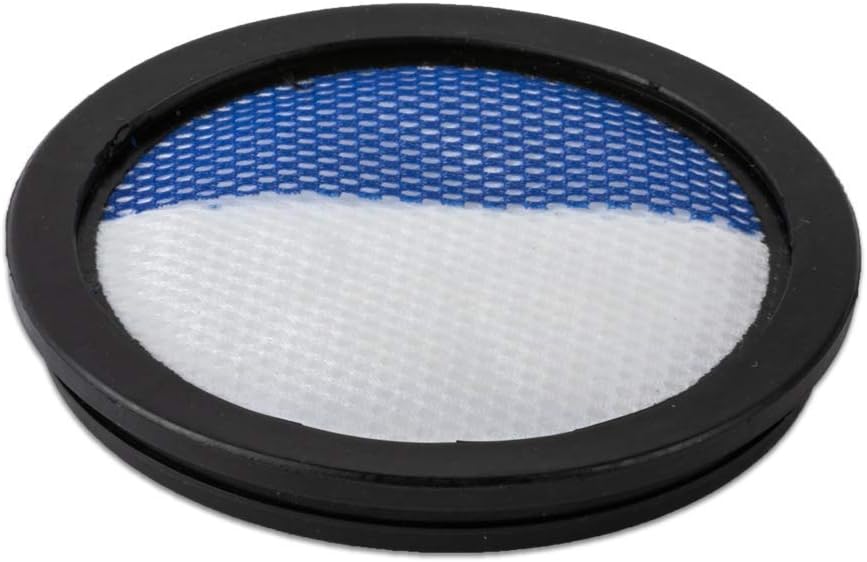
Figure 1: Eureka Non Woven Filter Component. This image shows the circular filter with a black rubber frame, featuring a blue mesh on the top half and a white non-woven material on the bottom half, designed for trapping fine particles.
2. Installation
Proper installation of the filter is crucial for your vacuum's performance and longevity. Always ensure the vacuum is turned off and unplugged (if applicable) before attempting any maintenance.
2.1. Filter Replacement Steps
- Power Off: Ensure your Eureka Cordless Stick Vacuum is powered off and disconnected from its charging base or power source.
- Locate Dust Cup: Detach the dust cup from the main body of the vacuum cleaner. Refer to your vacuum's specific user manual for instructions on dust cup removal.
- Remove Old Filter: Carefully remove the existing filter from the dust cup. It may be secured by a twist or pull mechanism. Note its orientation for correct installation of the new filter.
- Clean Dust Cup: Empty any debris from the dust cup and wipe it clean with a dry cloth.
- Install New Filter: Insert the new Eureka Non Woven Filter Component (P1002) into the dust cup. Ensure it is seated firmly and correctly, matching the orientation of the filter you removed.
- Reattach Dust Cup: Reattach the dust cup to the vacuum cleaner, ensuring it clicks securely into place.
- Test: Power on the vacuum to confirm proper operation and suction.
3. Maintenance
Regular cleaning and timely replacement of your filter are essential for maintaining optimal vacuum performance and air quality. This filter is designed to be washable and reusable.
3.1. Cleaning the Filter
- Remove Filter: Follow steps 1-3 from the Installation section to remove the filter from the dust cup.
- Tap Out Debris: Gently tap the filter over a trash can to dislodge loose dust and debris.
- Rinse: Rinse the filter under cool, running water until the water runs clear. Do not use hot water or detergents.
- Dry Completely: Allow the filter to air dry completely for at least 24 hours before reinserting it into the vacuum. Ensure it is absolutely dry to prevent mold or damage to the vacuum. Do not use a dryer or direct heat.
- Reinstall: Once completely dry, reinstall the filter as per the Installation section.
Frequency: It is recommended to clean the filter after every 4-6 uses, or more frequently if you notice a decrease in suction or if the filter appears visibly dirty. Replace the filter every 3-6 months, or as needed, depending on usage and household conditions, to ensure peak performance.
4. Troubleshooting
If you experience issues with your vacuum's performance, the filter may be a contributing factor. Here are some common problems and solutions related to the filter:
| Symptom | Possible Cause | Solution |
|---|---|---|
| Reduced Suction Power | Filter is clogged with dust and debris. | Clean the filter as described in Section 3.1. If cleaning does not restore suction, replace the filter. |
| Vacuum Emits Dust | Filter is damaged or not installed correctly. | Check filter for tears or damage. Ensure it is seated firmly and correctly in the dust cup. Replace if damaged. |
| Unusual Odor from Vacuum | Filter is dirty or has absorbed odors. | Clean the filter thoroughly. Ensure it is completely dry before reinstallation. Consider replacing the filter if odors persist. |
5. Specifications
Key specifications for the Eureka Non Woven Filter Component (P1002):
- Manufacturer: Eureka
- Part Number: P1002
- Item Weight: 1.76 ounces
- Product Dimensions: 4.13 x 4.13 x 0.55 inches (L x W x H)
- Color: White and Black
- Material: Non woven filter
- Item Package Quantity: 1
- Number Of Pieces: 1
- Special Features: Washable Filter
- Included Components: Non woven filter components
- Compatible Devices: Eureka Cordless Stick Vacuums NEC180, NEC280TL, NEC285GR
- Reusability: Reusable
6. Warranty Information
This Eureka Non Woven Filter Component (P1002) is covered by a 2-year warranty from the date of purchase. This warranty covers defects in material and workmanship under normal use. Please retain your proof of purchase for warranty claims. For detailed warranty terms and conditions, please refer to the official Eureka website or contact customer support.
7. Customer Support
For further assistance, questions, or to purchase additional genuine Eureka parts, please visit the official Eureka website or contact their customer support team.
- Eureka Official Store: Visit the Eureka Store on Amazon
- Online Support: Refer to the Eureka official website for FAQs and support resources.
- Contact: Consult your vacuum's main manual or the Eureka website for direct contact information.
Documents and downloads
Ask a question about this manual
Ask about setup, troubleshooting, compatibility, parts, safety, or missing instructions. Manuals+ will review the question and use this page’s manual context to help answer it.