
Introduction
This manual provides instructions for the safe and effective use of the Estry Battery Replacement, model CS-YKW530CL. This battery is designed as a compatible replacement for Yealink W53 and W53P devices, and is also identified by part numbers W53-BATT and YLLP463346C800CLS. It features built-in protection against overcharge, over-discharge, over-voltage, and short circuits to ensure safe and durable operation.
Please read this manual thoroughly before installation and use to ensure proper handling and to maximize battery life.
Safety Information
Observe the following safety precautions to prevent damage to the battery, device, or personal injury:
- Do not attempt to disassemble, open, or service the battery pack.
- Replace only with the battery pack designated for this product. Using an incompatible battery may pose a risk of fire or explosion.
- Do not crush, puncture, or short external contacts.
- Do not dispose of in fire or water. Exposure to high temperatures or water can cause the battery to explode or leak.
- Do not store above 60°C (140°F). High temperatures can degrade battery performance and safety.
- Keep the battery away from children.

Image: Estry CS-YKW530CL Battery Replacement. This image shows the battery with its label, indicating model number, part number, voltage, capacity, and safety warnings.
Installation
Follow these general steps to replace the battery in your compatible Yealink W53 or W53P device:
- Power Off Device: Ensure your Yealink W53 or W53P device is completely powered off before beginning the battery replacement process.
- Remove Battery Cover: Locate and carefully remove the battery compartment cover on your device. This usually involves sliding or unlatching a cover on the back of the handset.
- Remove Old Battery: Gently lift out the old battery from its compartment. Note its orientation.
- Insert New Battery: Insert the new Estry CS-YKW530CL battery into the compartment, ensuring it is oriented correctly according to the device's markings. The contacts on the battery should align with the contacts in the device.
- Secure Battery Cover: Replace the battery compartment cover, ensuring it is securely latched or slid into place.
- Power On Device: Power on your device. The device should now recognize the new battery.
If you encounter any difficulties, refer to your Yealink W53/W53P device's original user manual for specific battery compartment access instructions.
Charging and Usage
This Lithium-ion battery is designed for optimal performance in your compatible device.
- Initial Charge: For best results, fully charge the battery before its first use.
- Normal Charging: Use only the charger provided with your Yealink W53/W53P device.
- Usage: The battery provides power to your device. Its capacity of 900mAh ensures reliable operation.
- Protection Features: The battery includes built-in protection against overcharge, over-discharge, over-voltage, and short circuits to enhance its lifespan and safety.
Maintenance and Storage
Proper maintenance and storage can extend the life of your battery:
- Temperature: Store the battery in a cool, dry place, away from direct sunlight and extreme temperatures. Do not store above 60°C (140°F).
- Cleaning: If necessary, gently wipe the battery contacts with a clean, dry cloth to ensure good connection.
- Long-Term Storage: If storing the battery for an extended period, it is recommended to charge it to approximately 50% capacity. Recharge every 3-6 months to prevent deep discharge.
- Disposal: Dispose of used batteries responsibly according to local regulations. Do not dispose of in household waste or fire.
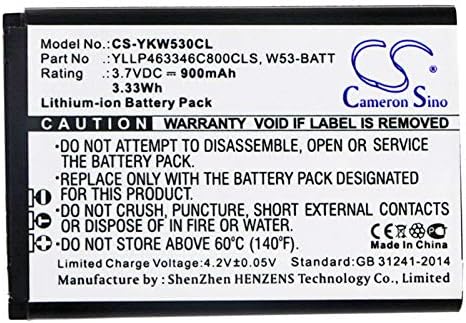
Image: Close-up of Estry CS-YKW530CL Battery Label. This image provides a clear view of the battery's specifications and critical safety warnings printed on its label.
Troubleshooting
If you experience issues with your new battery, consider the following:
- Device Not Powering On:
- Ensure the battery is correctly inserted and the battery compartment cover is secure.
- Verify the battery has sufficient charge. Connect the device to its charger.
- Check for any visible damage to the battery or device contacts.
- Battery Not Charging:
- Confirm the charger and charging cable are functioning correctly with other devices, if possible.
- Ensure the charging port on your device is clean and free of debris.
- Try restarting your device.
- Shortened Battery Life:
- Ensure the device's software is up to date.
- Review device settings for power-saving options.
- Avoid extreme temperatures during use.
If problems persist after following these steps, please contact the seller for further assistance.
Specifications
| Model Number | CS-YKW530CL |
| Compatible Part Numbers | W53-BATT, YLLP463346C800CLS |
| Compatible Devices | Yealink W53, Yealink W53P |
| Battery Type | Lithium-ion |
| Voltage | 3.7V |
| Capacity | 900mAh |
| Watt-Hours (Wh) | 3.33Wh |
| Dimensions | 49.5 x 33.85 x 4.7mm (1.95 x 1.33 x 0.19 inches) |
| Weight | 160.0g (5.6 ounces) |
| Certifications | ISO9001, RoHS, CE, UN38.3, MSDS |
Warranty Information
For specific warranty terms and conditions, please refer to the information provided at the time of purchase or contact the seller directly. Keep your proof of purchase for any warranty claims.
Customer Support
If you have any questions, require technical assistance, or need further clarification regarding the Estry Battery Replacement, please contact the seller or manufacturer. Providing your battery details or pictures may help in receiving professional suggestions and support.