
Introduction
This manual provides essential instructions for the proper setup, operation, and maintenance of your XQISIT Wired Mono Headset with Microphone, Model 43587. Please read this guide thoroughly before using the product to ensure optimal performance and longevity. Keep this manual for future reference.
Product Overview
The XQISIT Wired Mono Headset is designed for clear audio communication. It features a single earphone for listening and an adjustable microphone for speaking.
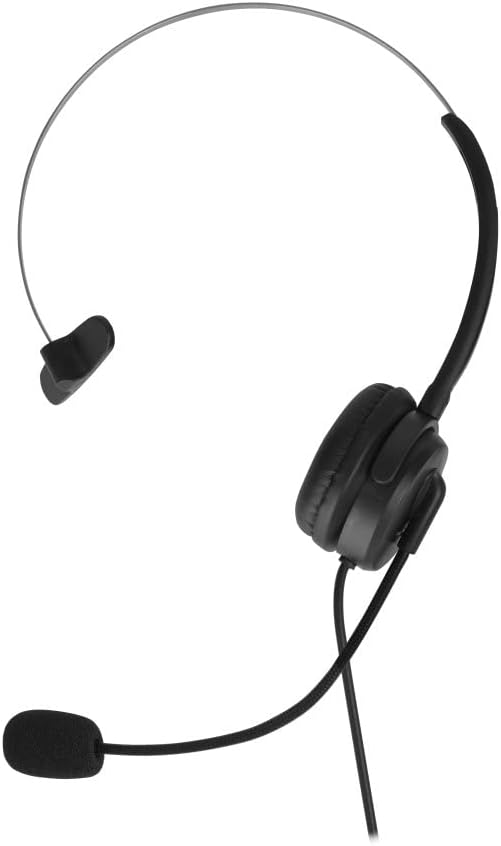
Figure 1: Front view of the XQISIT Wired Mono Headset, showing the single earphone, adjustable headband, and microphone boom.

Figure 2: Side view of the XQISIT Wired Mono Headset, illustrating the flexible microphone arm and the ear cushion.
Components:
- Single Earphone: Provides audio output to one ear.
- Adjustable Headband: For comfortable fit over the head.
- Microphone Boom: Flexible arm with integrated microphone for voice input.
- Wired Connector: For connecting to your device.
Setup
- Connect the Headset: Plug the wired connector of the headset into the appropriate audio jack (typically a 3.5mm jack) on your computer, smartphone, or other compatible device. Ensure the connection is secure.
- Adjust the Headband: Place the headset on your head and adjust the headband to a comfortable position. The earphone should rest gently over one ear.
- Position the Microphone: Bend the flexible microphone boom so that the microphone is positioned approximately 2-5 cm (1-2 inches) from your mouth. This ensures optimal voice pickup.
- Configure Audio Settings (if necessary): On your device, navigate to the audio settings. Select the XQISIT headset as the default input (microphone) and output (speaker) device. Adjust volume levels as needed.
Operating Instructions
Audio Playback:
- Once connected and configured, audio from your device will be played through the headset's earphone.
- Adjust the volume using your device's volume controls.
Microphone Usage:
- The integrated microphone will capture your voice for calls, online meetings, or voice recordings.
- Ensure the microphone is properly positioned near your mouth for clear communication.
- If your device has a microphone mute function, use it to temporarily disable the microphone when not speaking.
Maintenance
- Cleaning: Use a soft, dry cloth to wipe the headset. For stubborn dirt, a slightly damp cloth can be used, but ensure no moisture enters the earphone or microphone. Do not use harsh chemicals or abrasive cleaners.
- Storage: When not in use, store the headset in a clean, dry place away from direct sunlight and extreme temperatures. Avoid tangling the cable.
- Cable Care: Do not pull on the cable to disconnect the headset. Always grasp the plug firmly. Avoid bending or twisting the cable excessively to prevent internal damage.
- Water Resistance: While the product is listed as water-resistant, it is not waterproof. Avoid submerging it in water or exposing it to heavy rain. Dry immediately if it gets wet.
Troubleshooting
| Problem | Possible Cause | Solution |
|---|---|---|
| No audio from headset | Headset not properly connected; Device volume too low; Incorrect audio output selected on device. | Ensure the connector is fully inserted. Increase device volume. Check device audio settings and select the headset as output. |
| Microphone not working | Microphone muted on device; Incorrect audio input selected; Microphone boom not positioned correctly. | Unmute the microphone on your device. Check device audio settings and select the headset as input. Adjust microphone position closer to your mouth. |
| Poor audio quality | Loose connection; Damaged cable; Device audio issues. | Ensure connection is secure. Try the headset with another device to rule out device issues. If the cable is visibly damaged, the headset may require replacement. |
Specifications
- Model Number: 43587
- Brand: Xqisit
- Connectivity: Wired (3.5mm connector)
- Color: Black
- Form Factor: On-ear, mono headset (Note: Product specifications may sometimes list 'Intra-Auriculaire' but visual inspection confirms an on-ear design.)
- Microphone: Integrated, adjustable boom microphone
- Material: Leather (ear cushion material, as per specifications)
- Special Features: Water-resistant (Note: While listed as water-resistant, this product is not waterproof. Avoid submersion.)
- Included Components: One (1) XQISIT Wired Mono Headset with Microphone
Warranty and Support
For warranty information, technical support, or service inquiries regarding your XQISIT Wired Mono Headset, please refer to the warranty card included with your purchase or visit the official Xqisit website. Contact details for customer support can typically be found on the product packaging or the manufacturer's website.