
1. Introduction
This manual provides essential information for the setup, operation, and maintenance of your PAXCESS PH88C 88-Key Digital Piano Keyboard. Please read it thoroughly to ensure proper use and to maximize your musical experience.
Key Features:
- 88 Full-sized, Velocity-Sensitive Keys: Designed to replicate the feel of a traditional acoustic piano, with adjustable touch response.
- Built-in Stereo Speakers: Delivers 24 Watts of high-quality sound for an immersive playing experience.
- 129 Tones & Polyphony: Features a wide range of professionally crafted voices including Acoustic Piano, Electric Grand Piano, Church Organ, and more, with 129-note polyphony for rich sound.
- Educational Features: Includes rhythm programmer, music player function, and multi-function buttons for enhanced learning.
- Rechargeable Lithium Battery: Equipped with a 2200mAh battery for portable use, or power via the included adapter.
- Multiple Connectivity Options: Connects to earphones, external speakers, sustain pedals, and MP3 sound sources via 3.5mm jacks and USB.
2. What's in the Box
Verify that all items are present in the package:
- PAXCESS PH88C Digital Piano Keyboard
- Sustain Pedal
- Music Stand
- Charging Adapter
- User Guide (this manual)
- Piano Stickers
- Piano Bag

Figure 2.1: All included accessories with the PAXCESS PH88C Digital Piano.
3. Setup
3.1 Unpacking and Placement
- Carefully remove the keyboard and all accessories from the packaging.
- Place the keyboard on a stable, flat surface. Ensure there is adequate space for playing and connecting accessories.
- Attach the music stand to the designated slot on the keyboard.
3.2 Power Connection
The keyboard can be powered by the included AC adapter or its internal rechargeable lithium battery.
- To use the AC adapter, connect the adapter to the 'DC 5V' port on the rear of the keyboard and plug it into a standard wall outlet.
- To charge the internal battery, connect the AC adapter. The charging indicator will illuminate.
3.3 Connecting Accessories
The keyboard features various ports for external devices:
- Sustain Pedal: Connect the sustain pedal cable to the 'Sustain Pedal Input' jack.
- Headphones: For private practice, plug standard 3.5mm headphones into the 'Headphones Jack'.
- External Audio (Aux In): Connect an external audio source (e.g., MP3 player, smartphone) to the 'LINE IN' jack using a 3.5mm audio cable to play along with music.
- USB: Use the 'USB 0.5V' port for MIDI connectivity to a computer or other compatible devices.
- Microphone: Connect a microphone to the 'Mic Port' for vocal input.
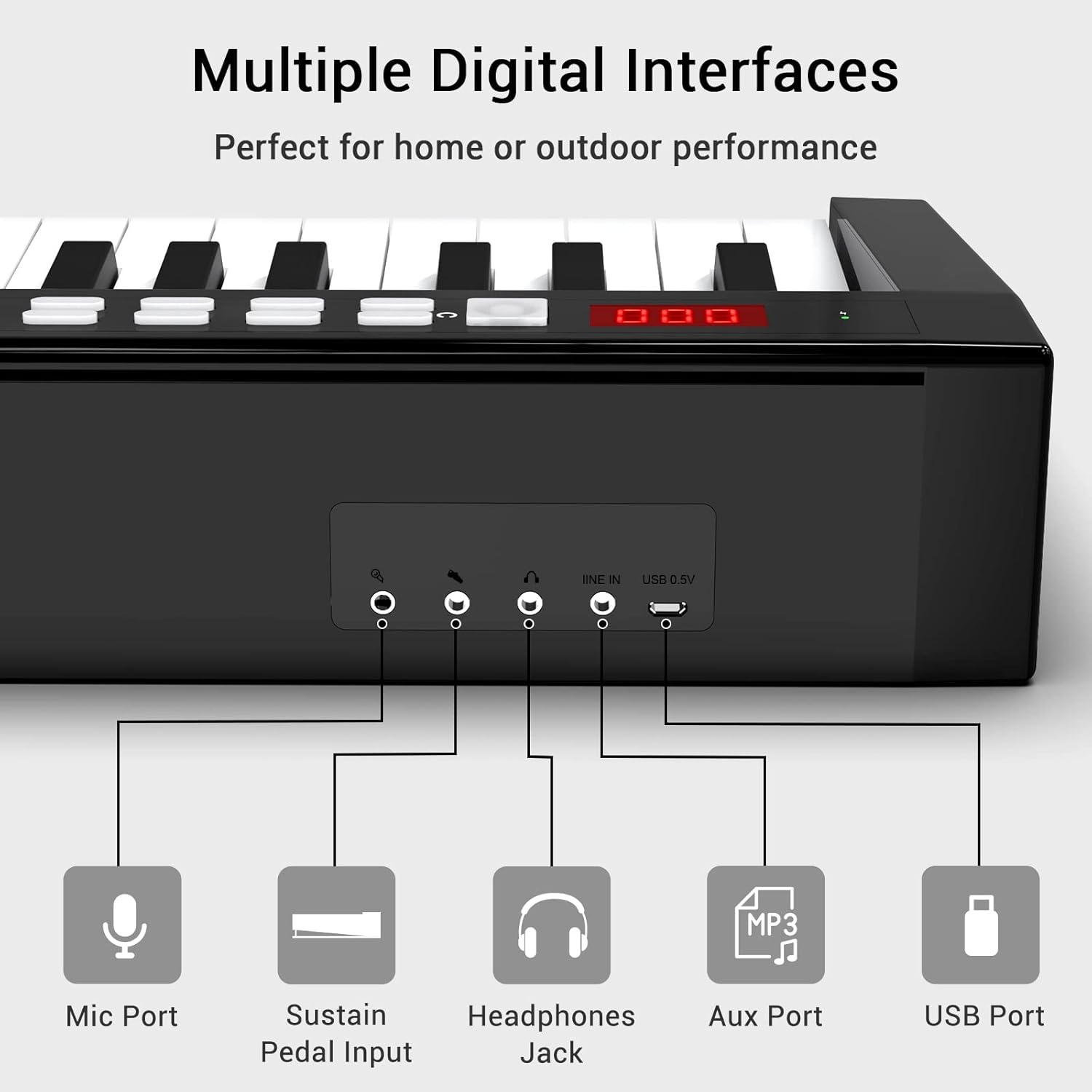
Figure 3.1: Overview of the keyboard's connectivity ports.
4. Operating Instructions
4.1 Power On/Off
Press and hold the power button located on the control panel to turn the keyboard on or off. The LED display will show the current settings.

Figure 4.1: Control panel with LED display and function buttons.
4.2 Adjusting Volume and Tones
- Volume: Use the 'Vol' buttons (up/down arrows) to adjust the master volume.
- Tones: Press the 'Tone' button and use the number keys or up/down arrows to select from 129 available instrument tones.
- Dynamics (Touch Response): Press the 'Dynamics' button to adjust the touch sensitivity of the keys.
4.3 Using Educational Features
The keyboard includes features to aid learning and practice:
- Demo Songs: Press the 'Demo' button to play pre-loaded demonstration songs.
- Rhythm: Use the 'RHY' button to select and play various rhythm patterns. Adjust tempo with the 'Tempo' buttons.
- Recording: Press 'REC' to start recording your performance. Press 'Play/Pause' to stop and listen.
- Piano Stickers: Apply the included piano stickers to the keys to help identify notes, especially useful for beginners.
4.4 Bluetooth Audio Function
Connect your smartphone or tablet via Bluetooth to play music through the keyboard's speakers.
- Ensure the keyboard is powered on.
- On your device, go to Bluetooth settings and select 'Music Piano' to pair.
- Once connected, audio from your device will play through the keyboard's speakers.
Video 4.1: Demonstration of the 88-Key Digital Piano Keyboard with Sustain Pedal, showcasing its features and sound.
5. Maintenance
To ensure the longevity and optimal performance of your PAXCESS PH88C Digital Piano Keyboard, follow these maintenance guidelines:
- Cleaning: Use a soft, dry cloth to wipe the surface of the keyboard. For stubborn dirt, slightly dampen the cloth with water. Avoid using abrasive cleaners, solvents, or waxes.
- Storage: When not in use, store the keyboard in a cool, dry place away from direct sunlight, extreme temperatures, and high humidity. Use the provided piano bag for protection during storage or transport.
- Handling: Avoid dropping the keyboard or subjecting it to strong impacts. Do not place heavy objects on the keys or control panel.
- Power: Disconnect the power adapter when the keyboard will not be used for an extended period.
6. Troubleshooting
If you encounter any issues with your keyboard, refer to the following table for common problems and solutions:
| Problem | Possible Cause | Solution |
|---|---|---|
| No sound | Volume is too low or muted. Headphones are connected. | Increase the volume. Disconnect headphones if using speakers. |
| Keyboard does not power on | Power adapter not connected or faulty. Battery is depleted. | Ensure power adapter is securely connected and plugged in. Charge the battery. |
| Keys are not responding | Keyboard is in a specific mode (e.g., demo mode). | Try resetting the keyboard by pressing the 'Reset' button or power cycling. |
| Bluetooth connection issues | Device is out of range. Bluetooth is not enabled on the device. | Ensure device is within range. Enable Bluetooth and re-pair. |
| Sustain pedal not working | Pedal not fully plugged in. Faulty pedal. | Check the pedal connection. If issue persists, contact support. |
7. Specifications
| Feature | Detail |
|---|---|
| Brand | PAXCESS |
| Model Name | PH88C |
| Number of Keys | 88 |
| Key Type | Velocity-sensitive, Full-sized |
| Polyphony | 129-note |
| Tones | 129 |
| Speakers | Built-in Dual Stereo, 24 Watts |
| Connectivity | 3.5mm Mic, 3.5mm Sustain Pedal, 3.5mm Headphones, 3.5mm Line In (Aux), USB 0.5V |
| Power Source | Electric (AC Adapter) or 2200mAh Rechargeable Lithium Battery |
| Dimensions (L x W x H) | 53 x 11 x 6 inches (approx.) |
| Item Weight | 18.5 Pounds |
| Color | White/Black |
8. Warranty and Support
For warranty information, product registration, or technical support, please refer to the contact details provided on the PAXCESS official website or the documentation included with your purchase. Keep your proof of purchase for warranty claims.