1. Product Overview
This manual provides instructions for the JIARUIXIN 12V Central Control Switch, designed as a replacement part for children's electric ride-on vehicles. This multi-function unit integrates power supply, central control, Bluetooth connectivity, music playback, and power display features.

Image 1.1: Front view of the JIARUIXIN 12V Central Control Switch. This image displays the user interface with various buttons and ports, including a USB port, power indicator lights, and a power socket.
Key Features:
- Music playback functionality.
- Storytelling feature.
- Integrated power supply display.
- Adjustable speed settings.
- Bluetooth connection capability.
2. Setup and Installation
This central control switch is intended for installation in 12V children's powered ride-on cars. Ensure the vehicle's power system is compatible with a 12V unit before proceeding. Professional installation is recommended if you are unfamiliar with electrical components.
Installation Steps:
- Safety First: Disconnect the main power source from the children's electric vehicle before beginning any installation.
- Access the Control Panel Area: Carefully remove any covers or panels necessary to access the existing control unit or the designated installation area.
- Verify Compatibility: Compare the appearance and connectors of the new JIARUIXIN control switch with the original unit or the vehicle's wiring harness. Ensure all connections match.
- Connect Wiring: Connect the wiring harness from the vehicle to the corresponding ports on the new central control switch. Pay close attention to polarity and connector types.
- Secure the Unit: Mount the central control switch securely within the designated slot or housing in the vehicle.
- Reconnect Power: Once the unit is securely installed and all connections are verified, reconnect the vehicle's main power source.
- Test Functionality: Power on the vehicle and test all functions of the new control switch, including power display, music, Bluetooth, and speed adjustment.

Image 2.1: Rear view of the JIARUIXIN 12V Central Control Switch circuit board. This image shows the various electronic components and connection ports on the reverse side of the control unit, crucial for wiring during installation.
Important: Ensure the purchased part has the same appearance and connector configuration as the original unit to ensure proper fit and function.
3. Operating Instructions
The JIARUIXIN 12V Central Control Switch offers several functions for an enhanced ride-on experience. Familiarize yourself with the button layout and indicators.
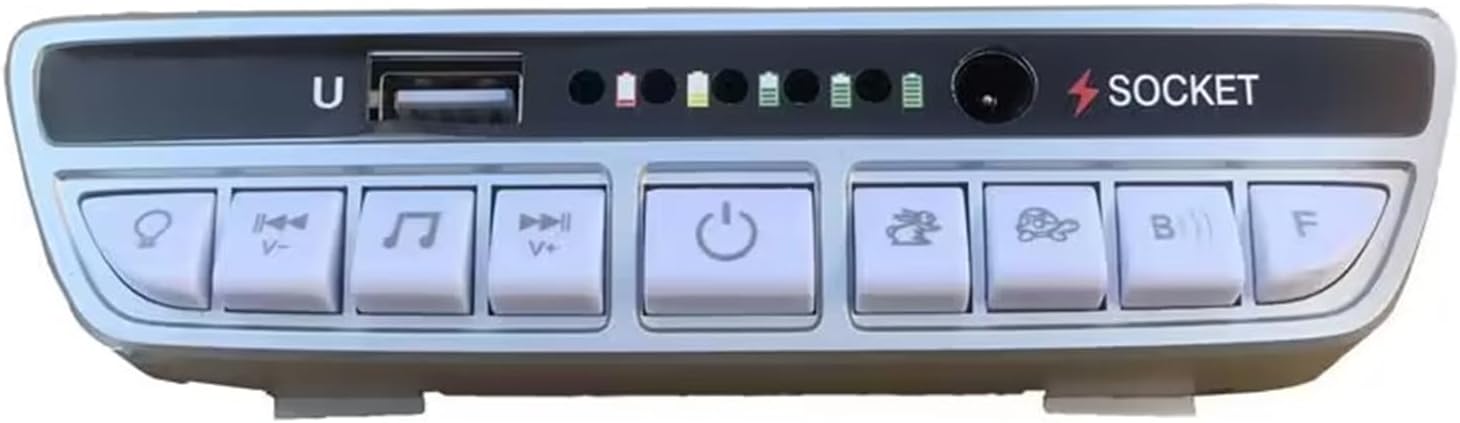
Image 3.1: Close-up of the JIARUIXIN 12V Central Control Switch front panel. This image highlights the individual buttons and their corresponding icons, such as power, music controls, and mode selections.
Button Functions:
- Power Button (⏻): Press to turn the unit on or off.
- Music Playback (♫): Press to play or pause music. Use the adjacent buttons (V- / V+) to skip tracks or adjust volume.
- Bluetooth Connection (B): Activate Bluetooth mode to pair with a compatible device for audio streaming. Refer to your device's Bluetooth pairing instructions.
- Speed Adjustment (F): Cycles through available speed settings (e.g., slow, medium, fast) for the electric vehicle.
- Storytelling/Mode Button (Icon varies): Activates storytelling mode or switches between different operational modes.
- Power Display Indicators: A series of LED lights (typically 4-5) indicate the current battery charge level of the 12V system.
- USB Port (U): For connecting USB devices, potentially for music playback from a USB drive.
- Socket (⚡ SOCKET): Power input/output port for the 12V system.
4. Maintenance
To ensure the longevity and proper function of your JIARUIXIN Central Control Switch, follow these maintenance guidelines:
- Cleaning: Use a soft, dry cloth to wipe the surface of the control panel. Avoid using abrasive cleaners or solvents, which can damage the plastic and electronic components.
- Environmental Protection: Keep the unit dry and away from direct sunlight or extreme temperatures. Moisture can cause damage to the internal circuitry.
- Connection Checks: Periodically inspect all wiring connections to ensure they are secure and free from corrosion.
- Storage: If the electric vehicle is stored for an extended period, ensure the control unit is clean and dry.
5. Troubleshooting
If you encounter issues with your central control switch, refer to the following common problems and solutions:
| Problem | Possible Cause | Solution |
|---|---|---|
| Unit does not power on. | No power from vehicle battery; loose connection; faulty unit. | Check vehicle battery charge. Verify all wiring connections are secure. If issues persist, the unit may require replacement. |
| Music/Sound not working. | Volume too low; incorrect mode selected; faulty speaker connection. | Increase volume. Ensure correct mode (e.g., Bluetooth, USB) is selected. Check speaker wiring. |
| Bluetooth connection fails. | Device not in pairing mode; interference; unit not in Bluetooth mode. | Ensure both devices are in pairing mode. Move closer to the unit. Select Bluetooth mode on the control switch. |
| Speed adjustment not working. | Motor or wiring issue; faulty speed button. | Check connections to the motor. If other functions work, the speed button or internal component may be faulty. |
If troubleshooting steps do not resolve the issue, contact customer support or a qualified technician.
6. Specifications
- Model: 12V
- Product Dimensions: 5.3 x 2.6 x 1.3 inches
- Item Weight: 1.66 ounces
- Power Input: 12V DC (for children's electric vehicles)
- Functions: Music playback, storytelling, power display, speed adjustment, Bluetooth connection.
- Manufacturer: JIARUIXIN
7. Safety Information
Warning:
- This product is for external use only within the specified children's electric vehicles.
- Keep away from naked flames or direct heat sources.
- Do not attempt to modify or disassemble the unit beyond what is described in this manual. Unauthorized modifications can lead to malfunction, electric shock, or fire.
- Ensure installation is performed by an adult or under adult supervision.
- Always disconnect power before installation or maintenance.
8. Warranty and Support
For warranty information or technical support, please refer to the original purchase documentation or contact the manufacturer, JIARUIXIN, through their official channels. Keep your purchase receipt as proof of purchase.
For further assistance, you may visit the JIARUIXIN Store on Amazon.


