
Socobeta B08KXXJDFV
Socobeta Digital Peephole Viewer Doorbell Mini HD Smart Security Camera Instruction Manual
Model: B08KXXJDFV
Introduction
This manual provides detailed instructions for the installation, operation, and maintenance of your Socobeta Digital Peephole Viewer Doorbell Mini HD Smart Security Camera. Please read this manual thoroughly before using the product to ensure proper function and to maximize its lifespan. This device is designed to enhance home security by providing a clear view of visitors through a digital display.
Safety Information
- Do not expose the device to extreme temperatures, humidity, or direct sunlight.
- Avoid dropping or subjecting the device to strong impacts.
- Do not attempt to disassemble or repair the device yourself. Refer all servicing to qualified personnel.
- Keep the device away from water and other liquids.
- Use only the specified power source (batteries) for the device.
- Ensure proper battery polarity when inserting batteries.
Package Contents
Please check the package for the following items:
- Indoor LCD Monitor Unit
- Outdoor Peephole Camera Unit
- Mounting Plate
- Screws for Installation
- User Manual (this document)
Product Overview
The Socobeta Digital Peephole Viewer consists of an indoor monitor and an outdoor camera. Familiarize yourself with the components:

Figure 1: Socobeta Digital Peephole Viewer with indoor monitor and outdoor camera unit. This image displays the main components of the Socobeta Digital Peephole Viewer: the indoor LCD monitor and the outdoor peephole camera. The monitor features a large screen and a control button, while the camera is designed to fit into a standard door peephole.
Component Identification
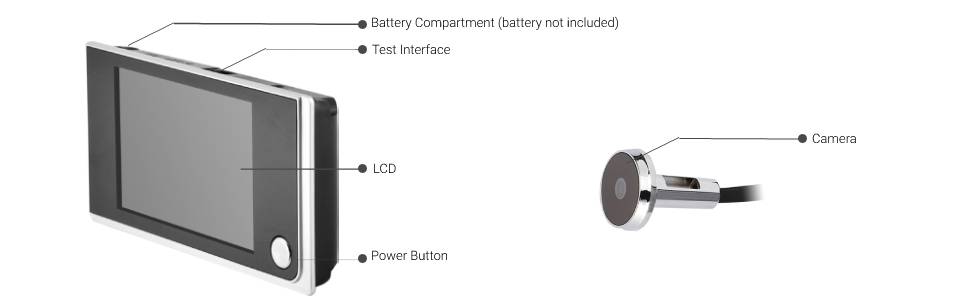
Figure 2: Diagram showing the battery compartment, test interface, LCD, power button, and camera. This diagram labels the key parts of both the indoor monitor (Battery Compartment, Test Interface, LCD, Power Button) and the outdoor camera (Camera lens).
- Indoor LCD Monitor: Features a 3.5-inch color display for viewing the outdoor feed. Includes a power button and battery compartment.
- Outdoor Peephole Camera: A compact camera unit with a 120-degree wide-angle lens and 720P resolution, designed to replace a standard door peephole.
Installation
Follow these steps to install your digital peephole viewer:
- Prepare the Door: If you have an existing peephole, remove it. Ensure the hole diameter is suitable for the new camera unit (typically 14-22mm). If no peephole exists, drill a hole of the appropriate size.
- Install Outdoor Camera: Insert the outdoor camera unit through the peephole from the outside of the door. Ensure the camera is facing outwards and is level.

Figure 3: Hand installing the outdoor peephole camera component into a door. This image demonstrates the simple process of inserting the outdoor camera into the door's peephole.
- Attach Mounting Plate: From the inside of the door, thread the camera's cable through the mounting plate. Secure the mounting plate to the door using the provided screws. Ensure the plate is oriented correctly for the indoor monitor.

Figure 4: Comparison of 'New Type' and 'Old Type' mounting plates for the indoor monitor. This image shows variations in mounting plate designs. Ensure you use the correct plate and orientation for your specific unit. The 'New Type' plate has a label with the number 202112111882.
- Connect Indoor Monitor: Connect the cable from the outdoor camera to the corresponding port on the indoor LCD monitor.
- Install Batteries: Open the battery compartment on the indoor monitor and insert the required batteries (not included), ensuring correct polarity.
- Mount Indoor Monitor: Slide the indoor monitor onto the secured mounting plate until it clicks into place.
- Test Functionality: Press the power button on the indoor monitor to turn it on. Check if the display shows a clear image from the outdoor camera.
Operating Instructions
Viewing Visitors
To view who is at your door, simply press the power button on the indoor LCD monitor. The screen will activate and display a live feed from the outdoor camera. The 120-degree wide-angle lens provides a broad view of the area outside your door.

Figure 5: Close-up of the 3.5-inch HD LCD screen displaying a clear image of a person. The screen provides a clear and smooth visual of the visitor.
Doorbell Function
The outdoor camera unit also functions as a doorbell. When a visitor presses the doorbell button (if equipped), the indoor monitor will ring, alerting you to their presence.

Figure 6: Collage illustrating the doorbell function and various monitoring scenarios. This image shows how the system provides security and alerts for visitors.
24-Hour Monitoring
The system is designed for 24-hour monitoring, providing continuous surveillance of your doorstep. The camera's high-definition resolution ensures clear images day and night.

Figure 7: Outdoor peephole camera visible on a door with a hand knocking, emphasizing 24-hour monitoring and 120-degree viewing angle. The camera provides a wide field of view for enhanced security.
Maintenance
- Cleaning: Use a soft, dry cloth to clean the indoor monitor screen and the outdoor camera lens. Do not use abrasive cleaners or solvents.
- Battery Replacement: When the battery indicator shows low power, replace the batteries in the indoor monitor unit. Ensure to use the correct battery type and observe polarity.
- Environmental Protection: While the outdoor unit has an IP54 rating, avoid direct exposure to heavy rain or prolonged extreme weather conditions to ensure longevity.
Troubleshooting
| Problem | Possible Cause | Solution |
|---|---|---|
| No image on screen | Batteries are dead or incorrectly inserted. Cable connection is loose. Device is off. | Replace batteries and check polarity. Ensure the cable between camera and monitor is securely connected. Press the power button to turn on the device. |
| Image is blurry or unclear | Camera lens is dirty. Poor lighting conditions. | Clean the camera lens with a soft cloth. Ensure adequate lighting for optimal image quality. |
| Doorbell not ringing | Doorbell button is faulty. Internal connection issue. | Check if the doorbell button on the outdoor unit is functioning. Contact customer support if the issue persists. |
Specifications
| Feature | Detail |
|---|---|
| Brand | Socobeta |
| Model | B08KXXJDFV |
| Display Screen | 3.5-inch LCD Color Display |
| Display Resolution | 480 x 320p |
| Camera Resolution | 720P (HD) |
| Viewing Angle | 120 Degrees |
| Connectivity Technology | Wireless (Wi-Fi) |
| Power Source | Battery Powered (Batteries not included) |
| Material | Plastic (Indoor Unit), Zinc Alloy (Outdoor Camera) |
| Item Weight | 7.4 ounces |
| International Protection Rating | IP54 |
| Indoor/Outdoor Usage | Indoor (Monitor), Outdoor (Camera) |
Warranty and Support
This product comes with a standard manufacturer's warranty. For specific warranty details, please refer to the documentation included with your purchase or contact Socobeta customer support. If you encounter any issues not covered in this manual, or require further assistance, please visit the official Socobeta website or contact their customer service department.
Socobeta Official Store: Visit the Socobeta Store on Amazon
Ask a question about this manual
Ask about setup, troubleshooting, compatibility, parts, safety, or missing instructions. Manuals+ will review the question and use this page’s manual context to help answer it.