
1. Introduction
This manual provides instructions for the safe and efficient operation, maintenance, and troubleshooting of your Solis Barista Perfetta Plus Espresso Machine. Please read all instructions carefully before using the appliance and retain this manual for future reference.
2. Safety Instructions
- Always connect the appliance to a grounded power outlet.
- Do not immerse the machine, power cord, or plug in water or other liquids.
- Keep hands and fingers away from hot surfaces and steam.
- Unplug the machine from the power outlet before cleaning or when not in use.
- Do not operate the appliance with a damaged cord or plug.
- This appliance is not intended for use by persons (including children) with reduced physical, sensory, or mental capabilities, or lack of experience and knowledge, unless they have been given supervision or instruction concerning use of the appliance by a person responsible for their safety.
- Ensure the water tank is filled with fresh, cold water before operation.
3. Package Contents
Verify that all items are present in the packaging:
- Solis Barista Perfetta Plus Espresso Machine
- Portafilter
- Single Shot Filter Basket
- Double Shot Filter Basket
- Tamper
- Measuring Scoop
- Cleaning Brush
- Water Filter (if included)
- User Manual

Image: Solis Barista Perfetta Plus Espresso Machine with its various accessories, including portafilter, tamper, and filter baskets.
4. Product Overview
Familiarize yourself with the components of your espresso machine:

Image: Front view of the Solis Barista Perfetta Plus Espresso Machine, showing the control panel, pressure gauge, portafilter, and drip tray.
- Control Panel: Buttons for Program (Prog.), Single Espresso, Double Espresso, and Steam.
- Pressure Gauge: Displays brewing pressure.
- Portafilter: Holds the ground coffee for brewing.
- Steam Wand: Used for steaming milk.
- Drip Tray: Collects excess water and coffee drips.
- Water Tank: Removable reservoir for water supply.
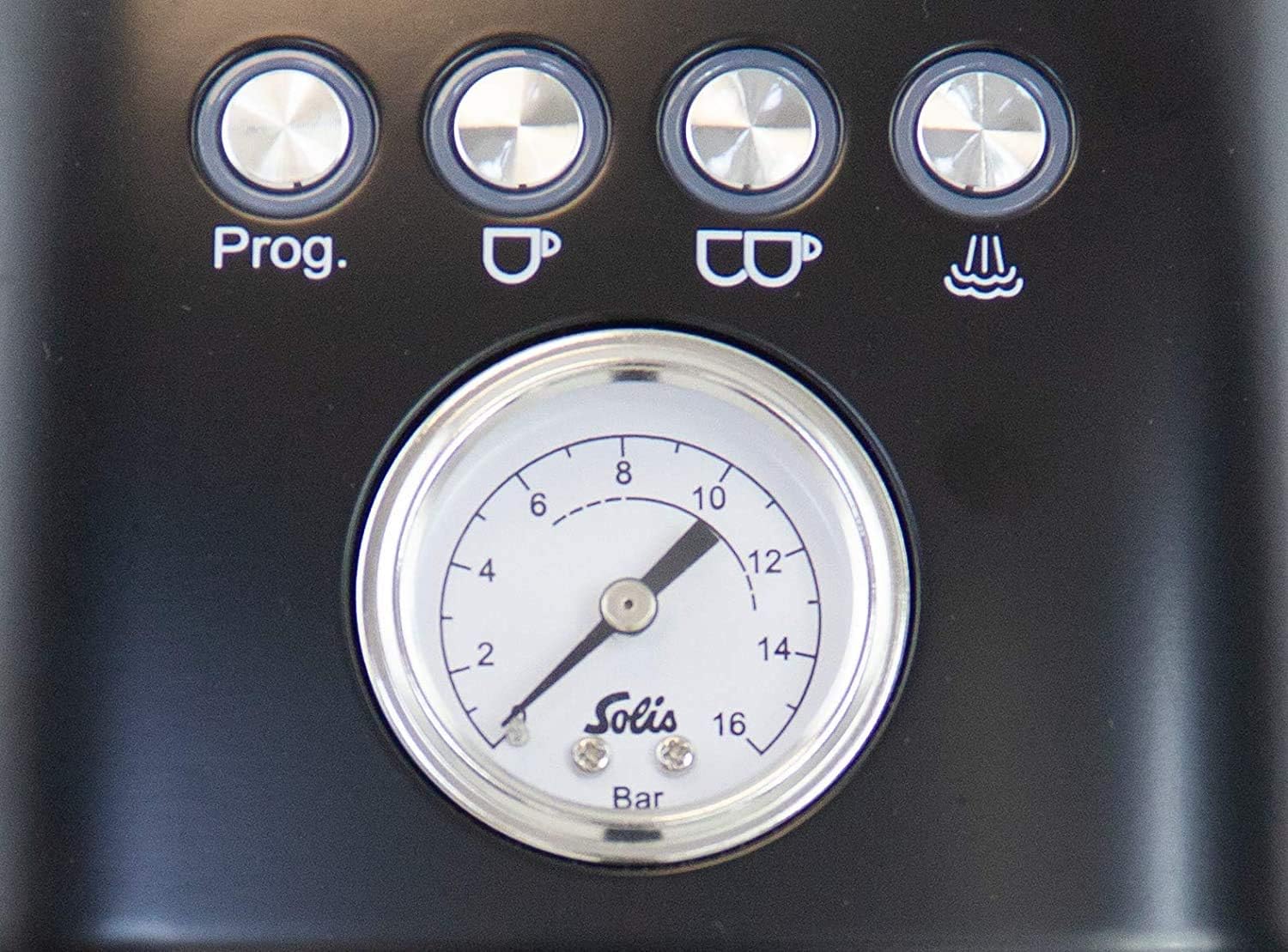
Image: Close-up of the control panel, highlighting the 'Prog', single and double espresso buttons, steam button, and the central pressure gauge.

Image: Side view of the Solis Barista Perfetta Plus Espresso Machine, clearly showing the removable water tank with 'Max' and 'Min' level indicators.
5. Setup
5.1 Unpacking and Placement
- Remove all packaging materials and protective films from the machine.
- Place the machine on a stable, level, and heat-resistant surface, away from water sources and heat.
- Ensure adequate ventilation around the appliance.
5.2 Filling the Water Tank
- Remove the water tank from the back of the machine.
- Fill the tank with fresh, cold drinking water up to the 'Max' level indicator.
- Replace the water tank securely into its position.
5.3 First Use / Priming the Machine
- Plug the power cord into a grounded electrical outlet.
- Press the 'ON/OFF' button to turn on the machine. The buttons will flash as the machine heats up.
- Once the buttons are steadily lit, the machine is ready.
- Place a cup under the portafilter spout (without coffee).
- Press the 'Double Espresso' button to run water through the group head. This primes the pump and flushes any manufacturing residue. Repeat this step for the steam wand by activating the steam function and letting water/steam flow for a few seconds.
6. Operating Instructions
6.1 Making Espresso
- Prepare the Portafilter: Select the appropriate filter basket (single or double) and insert it into the portafilter.
- Grind Coffee: Grind fresh coffee beans to a fine consistency suitable for espresso. The grind size significantly impacts extraction.
- Fill and Tamp: Fill the filter basket with ground coffee. Use the tamper to press the coffee evenly and firmly.
- Insert Portafilter: Attach the portafilter to the group head by aligning it and rotating it to the right until it is secure.
- Place Cup: Position your espresso cup(s) under the portafilter spouts.
- Brew Espresso: Press the 'Single Espresso' or 'Double Espresso' button. The machine will automatically brew the pre-programmed volume of espresso.
- Monitor Pressure: Observe the pressure gauge during brewing. Optimal pressure is typically within the indicated range.
6.2 Programming Shot Volume
- With the machine ready, press and hold the 'Prog.' button until it flashes.
- Press either the 'Single Espresso' or 'Double Espresso' button to start brewing.
- Once the desired volume of espresso is dispensed, press the same espresso button again to stop. The machine will save this volume for future use.
6.3 Steaming Milk
- Fill a milk pitcher with cold milk, typically to just below the spout.
- Press the 'Steam' button. The button will flash as the machine heats up to steaming temperature.
- Once the 'Steam' button is steadily lit, purge the steam wand by opening the steam knob briefly to release any condensed water. Close the knob.
- Insert the steam wand tip just below the surface of the milk. Open the steam knob fully.
- Steam the milk until it reaches the desired temperature and texture.
- Close the steam knob and remove the pitcher.
- Immediately wipe the steam wand with a damp cloth to prevent milk residue from drying. Purge the wand again briefly to clear any internal milk.
7. Maintenance and Cleaning
7.1 Daily Cleaning
- Drip Tray: Empty and rinse the drip tray after each use or when the 'Full' indicator appears.
- Portafilter and Filter Baskets: Remove spent coffee grounds, rinse the portafilter and filter baskets under hot water.
- Steam Wand: Wipe the steam wand immediately after each use with a damp cloth. Purge the wand to clear any milk residue.
7.2 Group Head Cleaning
Periodically clean the group head to remove coffee oils and residue:
- Insert a blind filter (if provided) into the portafilter.
- Add a small amount of espresso machine cleaning detergent to the blind filter.
- Attach the portafilter to the group head.
- Run a short brewing cycle (e.g., single espresso button) for 10 seconds, then stop. Wait 10 seconds. Repeat 5 times.
- Remove the portafilter, rinse it, and repeat the process with clean water to flush out detergent.
7.3 Descaling
Descaling is necessary to remove mineral buildup and maintain machine performance. The frequency depends on water hardness and usage. Refer to the descaling indicator (if present) or descale every 2-3 months.
- Empty the water tank and fill it with a descaling solution mixed according to the manufacturer's instructions.
- Place a large container under the group head and steam wand.
- Follow the specific descaling procedure outlined in your machine's full manual or activate the descaling program if available. This typically involves running the solution through the group head and steam wand.
- After the descaling cycle, rinse the water tank thoroughly and fill it with fresh water. Run several cycles of fresh water through the machine to flush out any remaining descaling solution.
8. Troubleshooting
If you encounter issues, consult the following table before contacting customer support:
| Problem | Possible Cause | Solution |
|---|---|---|
| No water flow from group head | Water tank empty; machine not primed; pump airlock; clogged filter basket. | Fill water tank; prime the machine; clean filter basket. |
| Espresso brews too slowly or not at all | Coffee ground too fine; coffee tamped too hard; clogged filter. | Use coarser grind; tamp with less pressure; clean filter. |
| Espresso brews too quickly / weak coffee | Coffee ground too coarse; not enough coffee; coffee tamped too lightly. | Use finer grind; increase coffee dose; tamp with more pressure. |
| No steam from steam wand | Steam button not activated; steam wand clogged. | Ensure steam function is on and heated; clean steam wand tip. |
| Machine not turning on | Not plugged in; power outlet issue. | Check power connection; try a different outlet. |
9. Specifications
- Brand: Solis
- Model: Perfetta Plus
- Product Dimensions: 17 x 7 x 12.5 inches
- Item Weight: 17.44 pounds
- Coffee Input Type: Ground Coffee
- Operation Mode: Fully Automatic
- Special Feature: Programmable
- Included Components: Filter
10. Warranty and Support
The Solis Barista Perfetta Plus Espresso Machine comes with a manufacturer's warranty. For specific warranty terms, duration, and conditions, please refer to the warranty card included with your product or visit the official Solis website. For technical support, spare parts, or service inquiries, please contact Solis customer service through their official channels.


