
Introduction
Thank you for choosing the NOKLEAD Digital Travel Alarm Clock, Model NK5247. This compact and versatile device is designed for convenience, offering time, alarm, temperature, and calendar functions, along with a practical makeup mirror. Please read this manual carefully to ensure proper use and to maximize your product experience.

Image: The NOKLEAD Digital Travel Alarm Clock displaying time, date, and temperature, with icons indicating its various features like alarm, calendar, temperature, snooze, 12/24 hour mode, weekend mode, blue backlight, battery powered, and ease of use.
Package Contents
- 1 x NOKLEAD Digital Travel Alarm Clock (Model NK5247)
- 1 x CR2032 Battery (pre-installed or included separately)
- 1 x Spare CR2032 Battery
- 1 x User Manual

Image: The NOKLEAD Digital Travel Alarm Clock, its retail box, a printed user manual, and a spare CR2032 battery, illustrating the complete package contents.
Setup
1. Battery Installation
The NOKLEAD Digital Travel Alarm Clock is powered by a CR2032 button cell battery. A battery is typically pre-installed, and a spare is provided.
- Locate the battery compartment on the back of the clock.
- Open the battery cover.
- Insert the CR2032 battery with the positive (+) side facing up.
- Close the battery cover securely.

Image: A detailed view of the back of the clock, highlighting the battery compartment where the CR2032 button cell battery is inserted. This image also shows the front control buttons.
2. Initial Time and Date Setting
The clock features five control buttons on the front for easy operation.
- 12/24h Button: Toggles between 12-hour and 24-hour time formats.
- Alarm Button: Used to set and activate/deactivate the alarm.
- °C/°F Button: Switches between Celsius and Fahrenheit temperature display.
- + Button: Increases values during setting.
- Zzz° Button: Activates snooze and backlight.
To set the time and date:
- Press and hold the 12/24h button for a few seconds until the hour digits start flashing.
- Use the + button to adjust the hour.
- Press the 12/24h button again to move to minutes, then use the + button to adjust.
- Continue pressing the 12/24h button to cycle through year, month, and day settings, adjusting each with the + button.
- Once all settings are correct, press the 12/24h button one last time or wait a few seconds for the clock to exit setting mode.
Operating Instructions
Time and Date Display
The LCD screen displays the current time, month, date, and day of the week. You can switch between 12-hour and 24-hour formats by pressing the 12/24h button briefly.
Temperature Display
The clock also shows the indoor temperature. Press the °C/°F button to toggle between Celsius and Fahrenheit units.

Image: The clock screen showing the indoor temperature in Celsius and the calendar display with month and date, demonstrating its multi-functional display capabilities.
Alarm Setting and Activation
- Press and hold the Alarm button for a few seconds until the alarm hour digits flash.
- Use the + button to adjust the alarm hour.
- Press the Alarm button again to move to alarm minutes, then use the + button to adjust.
- Press the Alarm button one more time to confirm the alarm time.
- To activate or deactivate the alarm, briefly press the Alarm button. An alarm icon will appear or disappear on the screen.
Snooze Function and Backlight
When the alarm sounds, press the large Zzz° button to activate the snooze function. The alarm will pause for 9 minutes and then sound again. This button also activates the blue backlight for approximately 10 seconds, allowing you to read the display in the dark.

Image: The clock display illuminated with a blue backlight, demonstrating its readability in low-light conditions. A hand is shown pressing the Zzz° button to activate the backlight.
Weekend Mode
To enable or disable weekend mode (alarm only sounds Monday to Friday), press and hold the Alarm button until the alarm time flashes, then briefly press the Zzz° button. A "WEEKEND" indicator will appear or disappear on the screen.
Makeup Mirror Function
The clock features a foldable cover that can be rotated up to 275 degrees. This cover serves as a protective screen for the display and can also be used as a convenient makeup mirror.
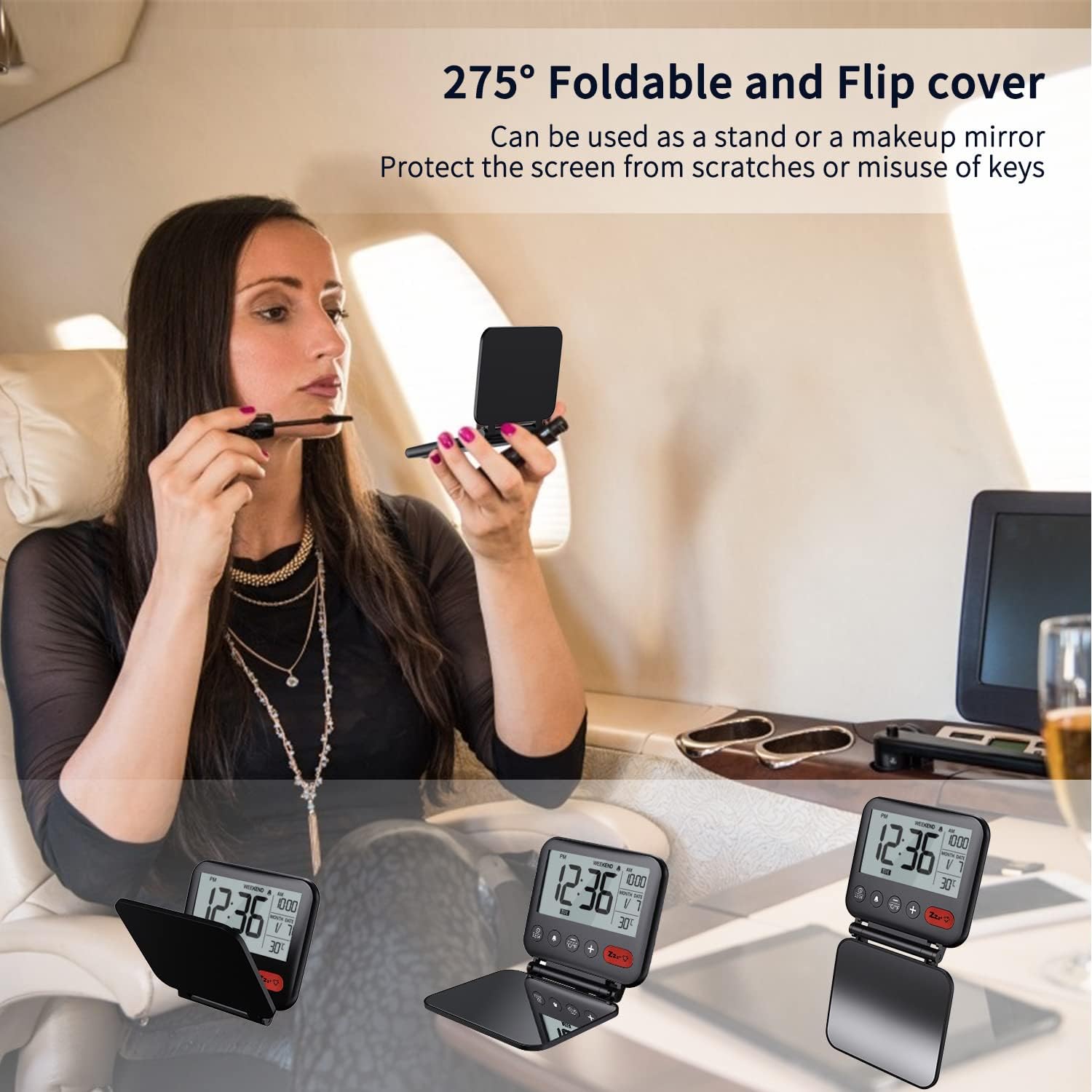
Image: A woman using the foldable cover of the NOKLEAD Digital Travel Alarm Clock as a makeup mirror, demonstrating its dual functionality and portability.
Maintenance
Battery Replacement
The clock is powered by a CR2032 battery, which typically lasts 6 to 8 months. When the display dims or functions become erratic, it's time to replace the battery. Follow the battery installation steps in the Setup section.
Note: A spare CR2032 battery is included with your purchase.
Cleaning
Wipe the clock gently with a soft, dry cloth. Do not use abrasive cleaners or immerse the device in water.
Troubleshooting
| Problem | Possible Cause | Solution |
|---|---|---|
| Display is dim or blank. | Low or depleted battery. | Replace the CR2032 battery. Ensure it is inserted correctly with the positive (+) side up. |
| Alarm does not sound or is very faint. | Alarm not activated, volume too low (not adjustable), or battery issue. |
|
| Clock resets to 00:00 or incorrect time. | Unstable battery contact or very low battery. |
|
| Cannot change time/date or other settings. | Not in setting mode or buttons are stuck. |
|
Specifications
| Feature | Detail |
|---|---|
| Model Number | NK5247 |
| Dimensions (L x W x H) | 9.04 x 8.51 x 1.3 cm (3.56 x 3.35 x 0.51 inches) |
| Weight | 20 Grams (0.71 ounces) |
| Display Type | Digital LCD |
| Screen Size | 8.2 cm (3.23 inches) |
| Power Source | 1 x CR2032 Button Cell Battery (included) |
| Special Features | Temperature Display (°C/°F), Alarm, Snooze, Blue Backlight, Calendar, Foldable Cover/Makeup Mirror, Weekend Mode |
| Material | Plastic |
| Color | Black |
| Movement Type | Quartz |

Image: A diagram showing the precise dimensions of the NOKLEAD Digital Travel Alarm Clock in inches, highlighting its compact and portable design.
Warranty and Support
NOKLEAD is committed to providing quality products and excellent customer service. Your NOKLEAD Digital Travel Alarm Clock comes with a standard warranty. For specific warranty details, please refer to the product packaging or contact NOKLEAD customer support.
If you encounter any issues or have questions regarding your product, please contact our customer service team. We offer reliable support and aim for your satisfaction.
- Customer Service: For assistance, please visit the NOKLEAD official website or contact the seller directly through your purchase platform.
- Quality Warranty: NOKLEAD products undergo rigorous testing to ensure quality and durability.
- After-Sale Support: We provide extended after-sale support to address any concerns you may have.

