
ARGO DRY NATURE 21
ARGO DRY NATURE 21 Dehumidifier User Manual
Model: DRY NATURE 21
1. Important Safety Information
Please read this manual carefully before operating the appliance and retain it for future reference. Failure to follow these instructions may result in electric shock, fire, or serious injury.
- Ensure the power supply matches the rating label on the unit.
- Do not operate the dehumidifier with a damaged cord or plug.
- Always unplug the unit before cleaning or servicing.
- Do not block the air inlet or outlet.
- Keep the unit on a stable, level surface to prevent water spillage.
- This appliance is for indoor use only.
- Do not use in areas where flammable gases or liquids are stored.
- Children should be supervised to ensure they do not play with the appliance.
2. Product Overview
The ARGO DRY NATURE 21 is a high-efficiency dehumidifier designed to reduce humidity levels in your living spaces. It features a sleek, slim design with a pure white finish and a silver top control panel.

Figure 2.1: Front view of the ARGO DRY NATURE 21 Dehumidifier. This image shows the overall slim and elegant design of the unit in pure white.
2.1 Control Panel
The control panel features soft-touch buttons and an LED display for easy operation. The air outlet flap is motorized for efficient air distribution.

Figure 2.2: Top view of the control panel. It includes buttons for speed, timer, humidity settings, swing function, and power, along with an LED display.
2.2 Key Features
- Dehumidification Capacity: Up to 21 liters per 24 hours (at 32°C, 80% RH).
- Humidistat: High-precision humidistat with adjustable humidity settings (40% – 80%).
- Timer: 1-24 hour ON/OFF timer.
- Air Filter: Removable and washable air filter for improved air quality.
- Water Tank: 3.8-liter capacity with a full tank alarm.
- Continuous Drainage: Quick connection for continuous condensate drainage.
- Operating Temperature: Functions effectively in low temperatures, from 5°C to 35°C.
- Automatic Defrost: Integrated automatic defrost system.
- Memory Function: Automatic restart after power outage, retaining previous settings.
- Portability: Equipped with multi-directional wheels and integrated handles for easy transport.
3. Setup
3.1 Unpacking
- Carefully remove the dehumidifier from its packaging.
- Remove all packing materials and ensure no components are missing or damaged.
- Keep the packaging for future storage or transportation.
3.2 Placement
- Place the dehumidifier on a firm, level surface.
- Ensure there is at least 20 cm (8 inches) of space around the unit for proper airflow.
- Avoid placing the unit near heat sources or in direct sunlight.
- For optimal performance, position the unit in the center of the room or area requiring dehumidification.
3.3 Continuous Drainage (Optional)
For continuous operation without needing to empty the water tank, you can connect a drainage hose.
- Locate the continuous drainage outlet on the back or side of the unit.
- Remove the rubber stopper (if present).
- Connect a suitable drainage hose (not included) to the outlet. Ensure the connection is secure to prevent leaks.
- Direct the other end of the hose to a floor drain or a larger container, ensuring the hose is sloped downwards for gravity drainage.
4. Operating Instructions
4.1 Power On/Off
- Plug the power cord into a grounded electrical outlet.
- Press the POWER button on the control panel to turn the unit ON or OFF.
4.2 Setting Desired Humidity Level
- Press the Humidity button (often indicated by a water droplet icon or up/down arrows) to adjust the desired humidity level.
- The LED display will show the current humidity, then flash the set humidity. Use the Up and Down arrows to select a target humidity between 40% and 80%.
- The unit will operate until the set humidity level is reached, then cycle on and off to maintain it.
4.3 Fan Speed Adjustment
- Press the SPEED button (often indicated by a fan icon) to cycle between two fan speeds: Low and High.
- Higher fan speed results in faster dehumidification.
4.4 Timer Function
- Press the TIMER button (often indicated by a clock icon).
- Use the Up and Down arrows to set the desired operating time (1-24 hours) for automatic ON or OFF.
- If the unit is OFF, setting a timer will turn it ON after the set hours. If the unit is ON, setting a timer will turn it OFF after the set hours.
4.5 Swing Function
- Press the SWING button to activate the motorized air flap, which oscillates to distribute dehumidified air more evenly.
- Press again to stop the swing function at a desired angle.
4.6 Water Tank Full Alarm
When the 3.8-liter water tank is full, the unit will automatically stop operating, and an alarm or indicator light (e.g., "POWER FULL" or a water droplet icon) will illuminate on the control panel. Empty the tank as described in the Maintenance section.
5. Maintenance
Regular maintenance ensures optimal performance and extends the lifespan of your dehumidifier. Always unplug the unit before performing any maintenance.
5.1 Emptying the Water Tank
When the water tank is full, the unit will stop operating. The tank has a capacity of 3.8 liters.
- Gently pull out the water tank from the front or side of the unit.
- Carefully carry the tank to a sink or drain.
- Empty the collected water.
- Slide the empty tank back into the unit until it clicks into place. Ensure it is properly seated to resume operation.

Figure 5.1: Image showing the water tank being removed from the side of the dehumidifier for emptying.
5.2 Cleaning the Air Filter
The air filter should be cleaned regularly (e.g., every two weeks or as needed) to maintain efficiency and air quality.
- Locate the air filter on the back or side of the unit.
- Gently remove the filter from its housing.
- Clean the filter using a vacuum cleaner to remove dust, or wash it with lukewarm water and a mild detergent.
- Rinse thoroughly and allow the filter to air dry completely before reinserting it. Do not expose to direct sunlight or high heat.
- Reinsert the dry filter into its housing.
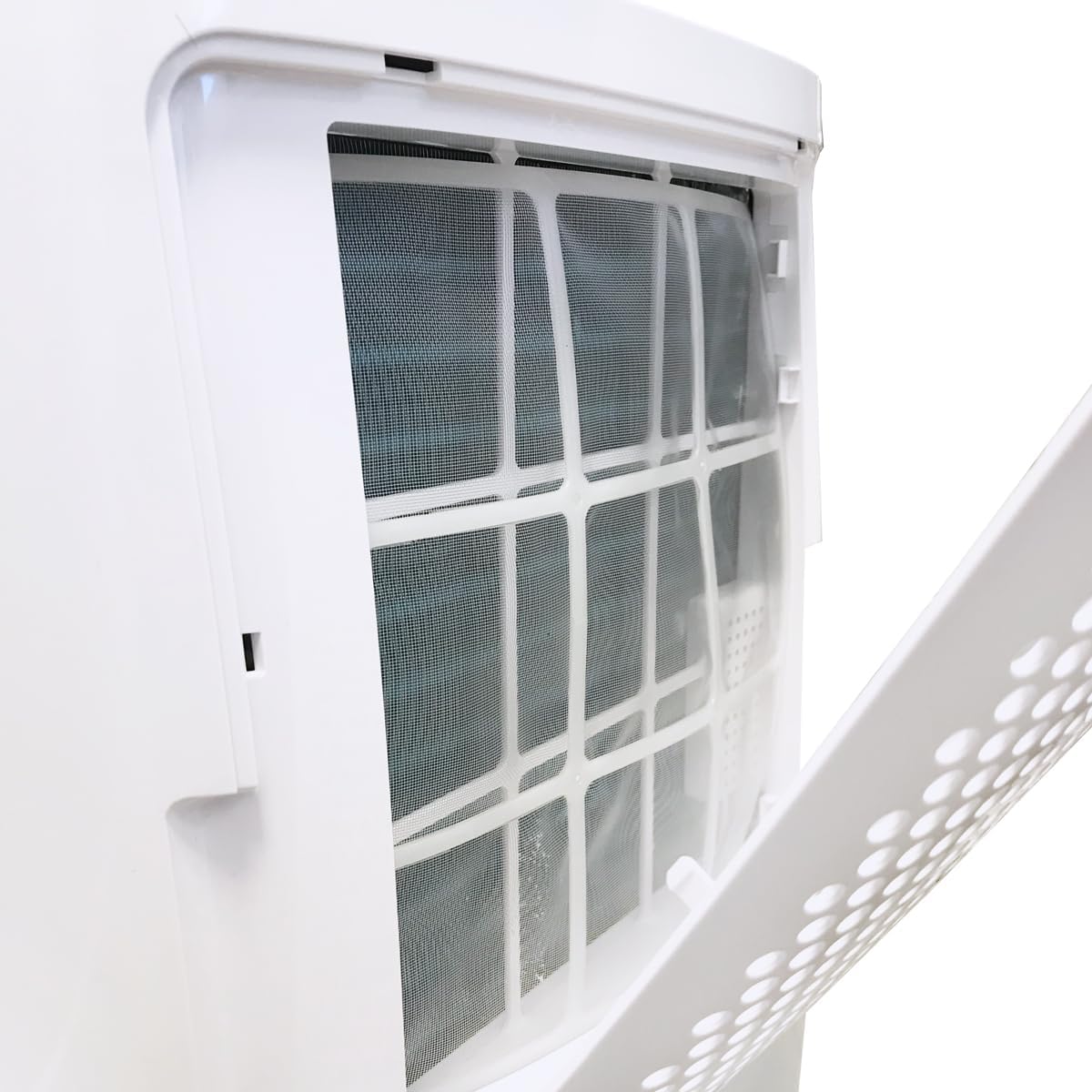
Figure 5.2: Close-up view of the removable air filter located on the side of the dehumidifier, shown partially open for access.
5.3 Cleaning the Exterior
- Wipe the exterior of the unit with a soft, damp cloth.
- Do not use harsh chemicals, abrasive cleaners, or solvents, as these can damage the surface.
- Ensure no water enters the internal components.
5.4 Storage
- If storing the unit for an extended period, ensure the water tank is empty and clean.
- Clean the air filter and allow it to dry.
- Cover the unit with a plastic bag to protect it from dust.
- Store the dehumidifier in a cool, dry place.
6. Troubleshooting
Before contacting customer support, please refer to the following troubleshooting guide for common issues.
| Problem | Possible Cause | Solution |
|---|---|---|
| Unit does not turn on. | No power supply. Power cord not properly plugged in. Water tank is full or not correctly inserted. | Check power outlet. Ensure power cord is securely plugged in. Empty the water tank and reinsert it correctly. |
| No water collected or low dehumidification. | Air filter is clogged. Room temperature is too low (below 5°C). Humidity setting is too high. Doors/windows are open. Unit size is too small for the room. | Clean the air filter. The unit may not operate efficiently below 5°C. Lower the desired humidity setting. Close all doors and windows. Consider using multiple units for larger spaces. |
| Unit is noisy. | Unit is not on a level surface. Air filter is clogged. | Place the unit on a flat, stable surface. Clean the air filter. |
| Water leaks from the unit. | Water tank not properly inserted. Continuous drainage hose is loose or blocked. | Reinsert the water tank correctly. Check the continuous drainage hose connection and ensure it is not blocked. |
7. Specifications
Technical specifications for the ARGO DRY NATURE 21 Dehumidifier.
| Feature | Detail |
|---|---|
| Brand | ARGO |
| Model Number | DRY NATURE 21 |
| Dehumidification Capacity | 21 Liters/24h (at 32°C, 80% RH) |
| Water Tank Volume | 3.8 Liters |
| Power Consumption | 310 Watts |
| Recommended Floor Area | Up to 24 square meters |
| Operating Temperature Range | 5°C to 35°C |
| Adjustable Humidity Range | 40% - 80% |
| Number of Speeds | 2 |
| Dimensions (D x W x H) | 234 mm x 342 mm x 560 mm |
| Weight | 8 Kilograms |
| Special Features | Automatic Defrost, Timer, Auto Restart, Continuous Drainage, Motorized Flap, Humidistat, Memory Function, Multidirectional Wheels, Transport Handles |
| Refrigerant | Natural refrigerant with zero impact on global warming |

Figure 7.1: Dimensional diagram of the ARGO DRY NATURE 21 Dehumidifier, showing height (560 mm), width (342 mm), and depth (234 mm).
8. Warranty and Support
This product comes with a standard manufacturer's warranty. Please refer to the warranty card included with your purchase for specific terms and conditions.
For technical assistance, troubleshooting beyond this manual, or to inquire about spare parts, please contact ARGO customer support. Contact information can typically be found on the manufacturer's website or in the product packaging.
Related documentsDRY NATURE 21


Ask a question about this manual
Ask about setup, troubleshooting, compatibility, parts, safety, or missing instructions. Manuals+ will review the question and use this page’s manual context to help answer it.