
Introduction
This manual provides detailed instructions for the installation, operation, and maintenance of your Fractal Design Pop XL Silent computer case. Please read this manual thoroughly before beginning any installation or operation to ensure proper usage and to prevent damage to the product or other components.

The Fractal Design Pop XL Silent case, designed for quiet operation and spacious component accommodation.
Safety Information
- Always disconnect power from all components before installing or removing any parts.
- Handle components with care to avoid electrostatic discharge (ESD). Consider using an anti-static wrist strap.
- Keep small parts and packaging materials away from children.
- Ensure proper ventilation around the case to prevent overheating.
- Do not attempt to modify the case or its components, as this may void your warranty and pose a safety risk.
Package Contents
Verify that all items listed below are present in your package:
- Fractal Design Pop XL Silent Case
- Accessory Box (screws, zip ties, standoffs, etc.)
- User Manual (this document)
- Four pre-installed 120 mm Aspect fans

An exploded view showing the various components of the Pop XL Silent case, including panels, fans, and drive trays.
Features Overview
The Fractal Design Pop XL Silent case offers a range of features designed for optimal performance and user convenience:
- Motherboard Compatibility: Accommodates E-ATX (up to 280 mm), ATX, mATX, and Mini ITX motherboards.
- Noise Reduction: Features a closed front, closed top, bitumen side panels, and sound-damping foam for excellent noise reduction.
- Tempered Glass Side Panel: An easily mounted tempered glass side panel allows for showcasing internal components.
- Storage Options: Supports up to four 3.5" HDDs and six 2.5" SSDs (or three 3.5" HDDs and five 2.5" SSDs with one optical bay in use).
- Pre-installed Fans: Comes with four 120 mm Aspect fans for efficient cooling.
- 5.25" Bays: Two neatly concealed 5.25" bays with a storage drawer and magnetic cover.

The Fractal Design Pop XL Silent case, showcasing its tempered glass side panel.
Setup
1. Preparing the Case
Before installing components, remove the side panels. The tempered glass side panel can be easily unlatched and removed. The solid side panel is secured with thumbscrews at the rear.

Interior view of the case, showing the spacious layout for component installation.
2. Motherboard Installation
Install the necessary motherboard standoffs into the motherboard tray. Align your motherboard with the standoffs and the I/O shield opening at the rear of the case. Secure the motherboard with screws provided in the accessory box.
3. Storage Drive Installation
The case supports both 3.5" HDDs and 2.5" SSDs. Utilize the dedicated drive trays and mounting points behind the motherboard tray and in the PSU shroud area.
- 2.5" SSDs: Mount SSDs directly onto the dedicated 2.5" drive brackets located behind the motherboard tray.
- 3.5" HDDs: Install HDDs into the removable drive cages located beneath the PSU shroud.

Rear interior view highlighting the 2.5" SSD and 3.5" HDD mounting locations.
4. Power Supply Installation
Install your ATX power supply into the dedicated compartment at the bottom rear of the case. Secure it with screws from the rear of the case.
5. Cable Management
Utilize the cable routing channels and Velcro straps behind the motherboard tray to manage cables neatly. This improves airflow and aesthetics.
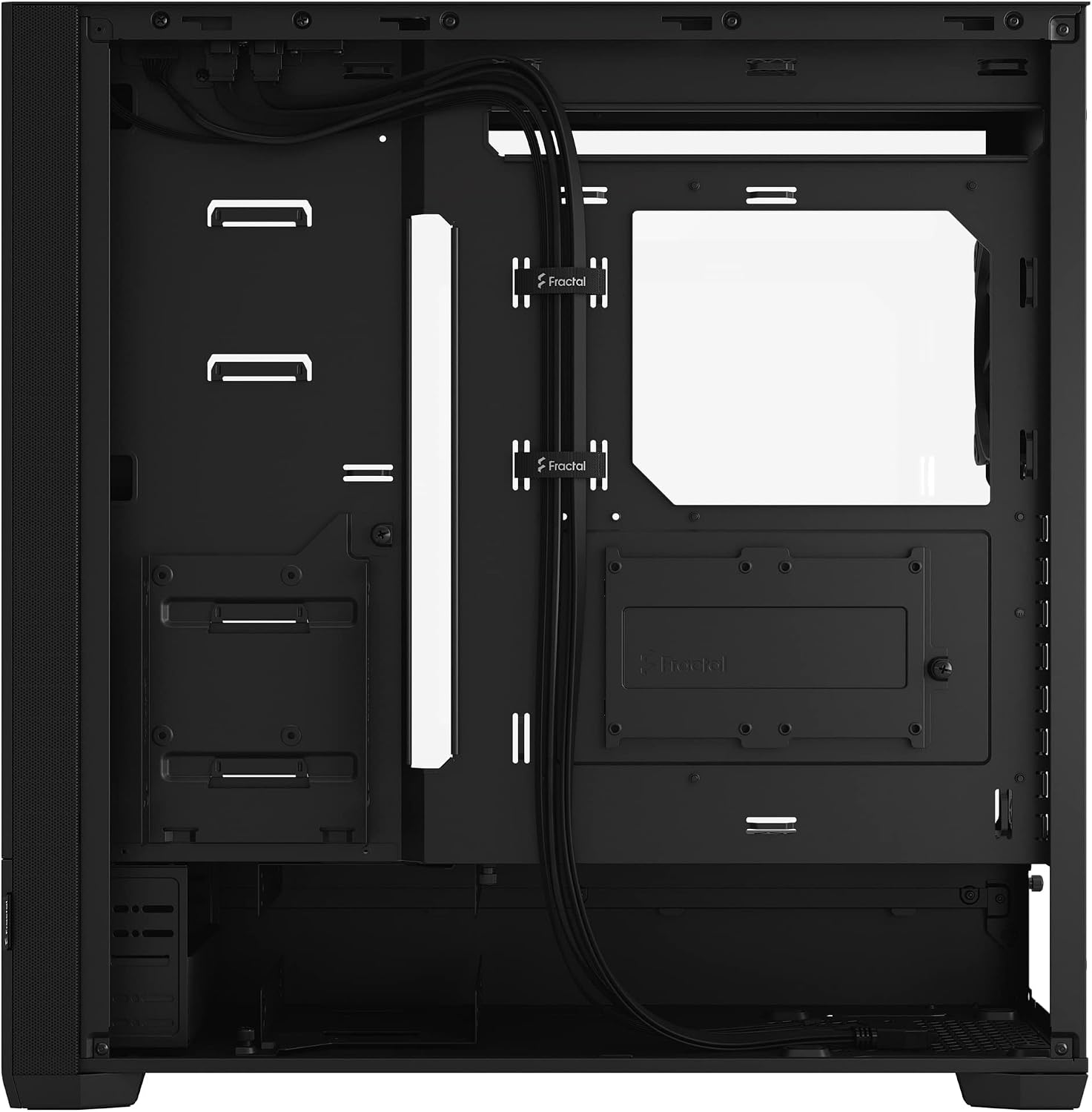
Cable routing channels and Velcro straps for organized cable management.
6. Front I/O Connections
Connect the front panel cables (USB 3.0, audio, power, reset, LED) to the corresponding headers on your motherboard. The Pop XL Silent features two USB 3.0 ports on the top panel.

Top panel view displaying the front I/O ports, including USB 3.0.
Operating
Once all components are installed and connected, replace the side panels. Connect your monitor, keyboard, mouse, and power cable to the system. Press the power button on the top panel to start your computer.

The Pop XL Silent case integrated into a desktop setup.
Maintenance
Dust Filter Cleaning
The Pop XL Silent case is equipped with easily removable dust filters to prevent dust buildup inside your system. Regularly clean these filters to maintain optimal airflow and cooling performance.
- Front Filter: The front panel can be removed to access the front dust filter.
- Top Filter: The top panel features a magnetic dust filter that can be easily lifted off for cleaning.
- Bottom Filter: A slide-out filter is located at the bottom, covering the PSU intake.

The magnetic top dust filter being removed for cleaning.
General Care
Wipe the exterior of the case with a soft, damp cloth. Avoid using harsh chemicals or abrasive materials that could damage the finish or tempered glass.
Troubleshooting
- No Power: Ensure all power cables (PSU to wall, PSU to motherboard, CPU, GPU) are securely connected. Check the power button connection to the motherboard.
- Fans Not Spinning: Verify fan cables are correctly connected to motherboard headers or fan controller. Check BIOS settings for fan control.
- Excessive Noise: Check for loose cables or components. Ensure fans are clean and free of obstructions. Verify all screws are tightened.
- Overheating: Clean dust filters. Ensure proper fan orientation for airflow. Verify CPU cooler and GPU cooler are properly seated.
Specifications
| Feature | Specification |
|---|---|
| Model Name | Pop XL Silent Black - Tempered Glass Clear Tint |
| Model Number | FD-C-POS1X-02 |
| Case Type | Full Tower |
| Motherboard Compatibility | E-ATX (up to 280 mm), ATX, mATX, Mini ITX |
| Dimensions (LxWxH) | 23.62 x 24.02 x 12.6 inches |
| Item Weight | 26.6 pounds |
| Material | Steel, Tempered Glass |
| Color | Black TG Clear Tint |
| USB 3.0 Ports | 2 |
| Pre-installed Fans | 4 x 120 mm Aspect fans |
| Drive Bays | Up to 4 x 3.5" HDD, 6 x 2.5" SSD (or 3 x 3.5" HDD, 5 x 2.5" SSD with 1 optical bay in use) |
| Optical Drive Bays | 2 x 5.25" |
| Cooling Method | Air |
| Power Supply Mounting | Bottom Mount |
Warranty Information
For detailed warranty information regarding your Fractal Design Pop XL Silent case, please refer to the official Fractal Design website or contact their customer support. Warranty terms and conditions may vary by region and purchase date.
Support
If you encounter any issues or have questions not covered in this manual, please visit the official Fractal Design support page for FAQs, troubleshooting guides, and contact options:
Fractal Design Support Website
You may also find helpful resources and community support on the Fractal Design Store on Amazon.


