1. Introduction
This manual provides essential information for the safe and efficient use of your Samsung RB34T603EEL/EF RB7300T combined refrigerator. Please read these instructions thoroughly before operating the appliance and retain them for future reference.
2. Safety Information
To ensure safe operation, always adhere to the following safety guidelines:
- Ensure the appliance is properly grounded to prevent electrical shock.
- Do not damage the refrigerant circuit. If the refrigerant circuit is damaged, avoid open flames or ignition sources and ventilate the room thoroughly.
- Keep ventilation openings clear of obstruction in the appliance enclosure or in the built-in structure.
- Do not use mechanical devices or other means to accelerate the defrosting process, other than those recommended by the manufacturer.
- Do not use electrical appliances inside the food storage compartments of the appliance, unless they are of the type recommended by the manufacturer.
- Supervise children to ensure they do not play with the appliance.
- Disconnect the appliance from the power supply before performing any maintenance or cleaning.
3. Product Overview and Features
The Samsung RB34T603EEL/EF is a combined refrigerator designed for efficient food storage with advanced cooling technologies.

Front view of the Samsung RB34T603EEL/EF combined refrigerator in Sand color.
Key Features:
- SpaceMax Technology: Provides increased internal capacity (344L total) with standard external dimensions (60 cm depth) by utilizing high-efficiency insulation.
- All-Around Cooling: Ensures uniform temperature distribution throughout the refrigerator compartment via a sophisticated ventilation system, maintaining consistent freshness.
- Total No Frost: Prevents frost buildup in both the refrigerator and freezer compartments, eliminating the need for manual defrosting and optimizing air circulation for constant temperature.
- Optimal Fresh+ Drawer: A versatile compartment that can be used as a single drawer or divided into two zones with different temperatures. The left side is colder for meat and fish (extending freshness up to two times), while the right side is ideal for fruits and vegetables.
- Humidity Fresh+ Drawer: Designed to preserve the texture, taste, and flavor of perishable foods. Humidity levels can be adjusted with a simple knob to create the ideal environment for various fruits and vegetables.
- Digital Inverter Compressor: Automatically adjusts its speed based on cooling demand, leading to energy savings, reduced noise (35dB), and enhanced durability.
- Clean Back: A protective cover for important wires and cables at the rear, providing a tidy appearance and easy cleaning while protecting components.
- Big Guard: Deeper door shelves designed to store large bottles and containers.

Interior view demonstrating SpaceMax technology, showing increased internal capacity for food storage within standard external dimensions.

Close-up of the Optimal Fresh+ drawer, illustrating its ability to be used as a single compartment or divided into two zones with different temperatures for meat, fish, and other produce.
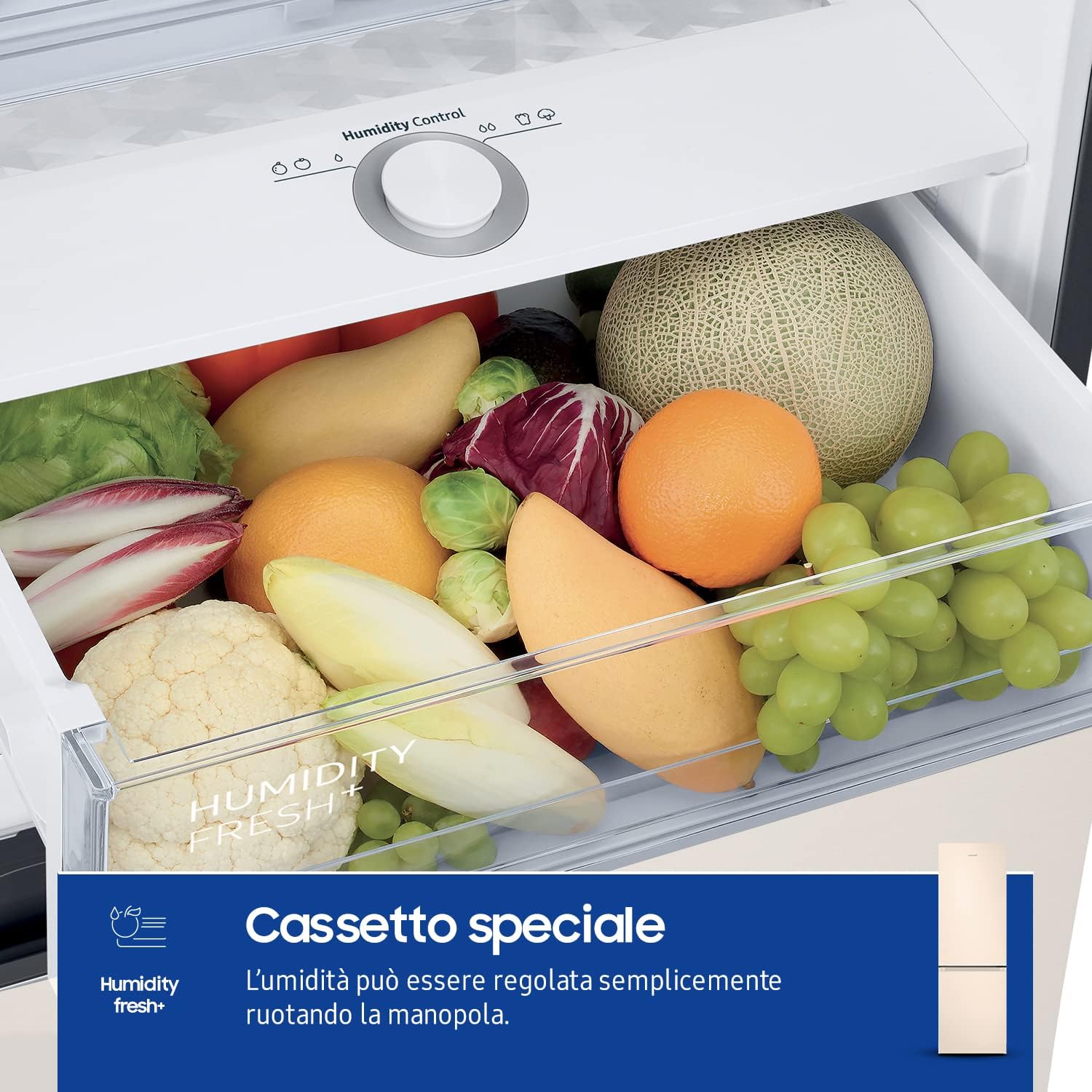
Close-up of the Humidity Fresh+ drawer, showing its humidity control knob and various fruits and vegetables stored inside, designed to maintain optimal freshness.
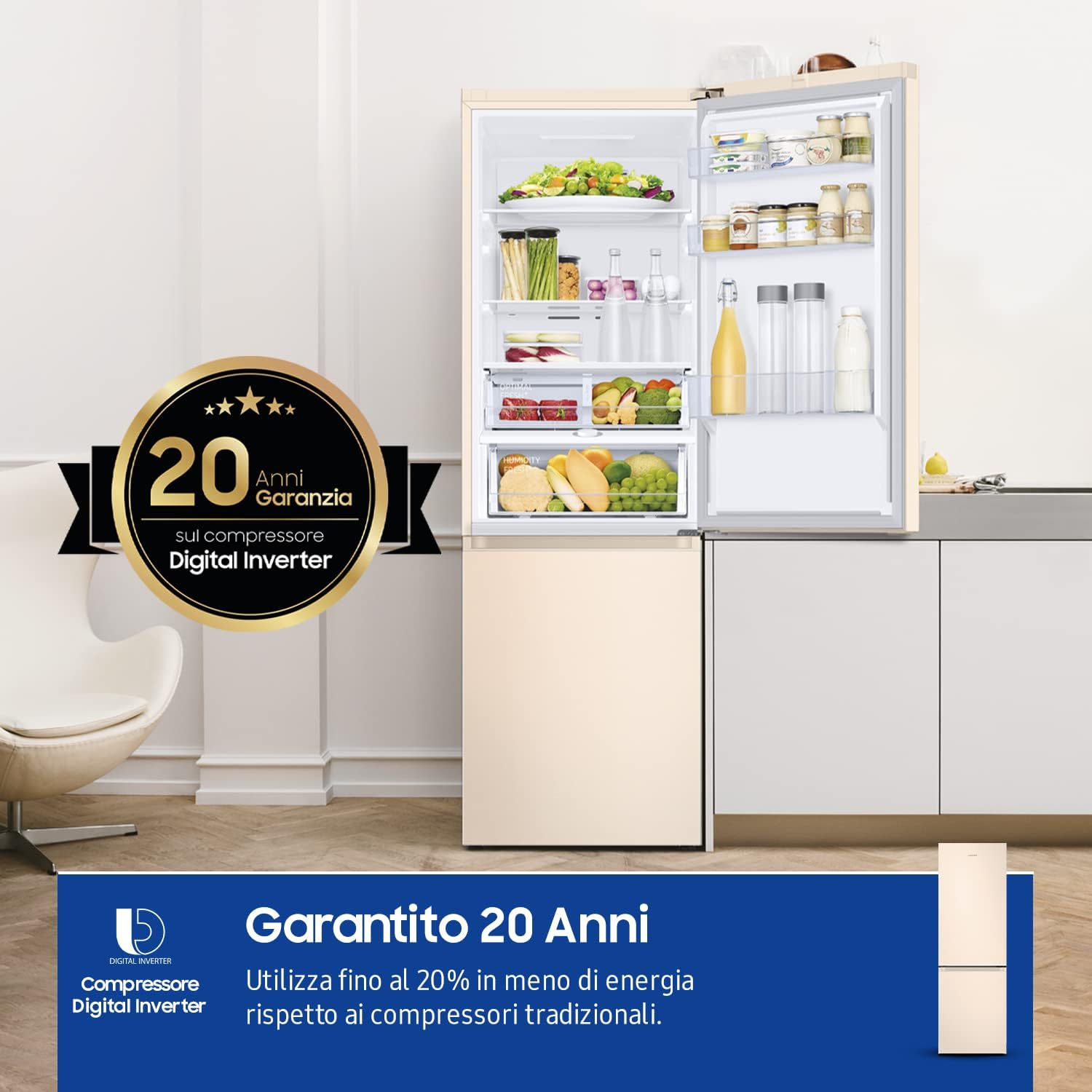
Interior view of the refrigerator compartment, highlighting the spacious shelves and drawers, with a visible 20-year warranty badge for the Digital Inverter compressor.
4. Setup and Installation
4.1 Unpacking
Carefully remove all packaging materials. Inspect the refrigerator for any damage incurred during transit. Keep packaging materials away from children.
4.2 Placement
- Place the refrigerator on a firm, level surface to ensure stability and proper operation.
- Ensure adequate ventilation around the appliance. Maintain a minimum clearance of 5 cm (2 inches) from walls and other appliances.
- Avoid placing the refrigerator in direct sunlight or near heat sources such as ovens, radiators, or stoves, as this can increase energy consumption.
- The appliance is designed for freestanding installation. Its standard depth allows it to align with other kitchen units.
4.3 Initial Cleaning
Before first use, clean the interior and exterior of the refrigerator with a soft cloth and mild detergent. Rinse and dry thoroughly.
4.4 Power Connection
Plug the refrigerator into a dedicated, properly grounded electrical outlet. Allow the appliance to stand for at least 2-3 hours before plugging it in to allow refrigerants to settle.
4.5 Door Reversal
The refrigerator door is reversible. Refer to the detailed instructions in the full product manual for steps on how to reverse the door swing, if desired.
5. Operating Instructions
5.1 Temperature Control
The refrigerator and freezer temperatures can be adjusted using the internal control panel. Refer to the display for current settings and adjust as needed for optimal food preservation. Recommended settings are typically 3°C (37°F) for the refrigerator and -18°C (0°F) for the freezer.
5.2 Using Optimal Fresh+ and Humidity Fresh+ Drawers
- Optimal Fresh+: To use as a single zone, place items requiring similar temperatures. To use as two zones, utilize the divider and adjust settings for meat/fish on one side and other produce on the other.
- Humidity Fresh+: Rotate the control knob to increase or decrease humidity levels, creating the ideal environment for specific fruits and vegetables to extend their freshness.
5.3 Power Cool and Power Freeze Functions
These functions allow for rapid cooling or freezing of newly added items. Activate Power Cool for the refrigerator compartment and Power Freeze for the freezer compartment when you need to quickly chill beverages or freeze fresh food. These functions will automatically deactivate after a set period or when the target temperature is reached.
5.4 Water Dispenser
If your model is equipped with a water dispenser, ensure it is properly connected to a water supply line as per the installation instructions. Regularly clean the dispenser nozzle and tray.
6. Maintenance and Cleaning
6.1 General Cleaning
- Always unplug the refrigerator before cleaning.
- Clean the interior regularly with a solution of mild detergent and warm water. Wipe dry with a soft cloth.
- Remove shelves and drawers for thorough cleaning.
- Clean the exterior surfaces with a soft, damp cloth. Avoid abrasive cleaners or solvents.
6.2 Defrosting
Thanks to the Total No Frost technology, manual defrosting of the freezer compartment is not required. The system automatically prevents ice buildup.
6.3 Clean Back
The Clean Back design simplifies cleaning the rear of the appliance. Periodically wipe down the protective cover to prevent dust accumulation.
7. Troubleshooting
Before contacting service, review the following common issues and solutions:
| Problem | Possible Cause | Solution |
|---|---|---|
| Refrigerator not cooling | Power cord unplugged; temperature set too high; door not closed properly. | Check power connection; adjust temperature setting; ensure door is fully closed. |
| Excessive noise | Appliance not level; items rattling inside; compressor operation. | Adjust leveling feet; rearrange items; compressor noise is normal during operation. |
| Water on floor | Drain hose clogged; water dispenser leak. | Clear drain hose; check water dispenser connections. |
| Food freezing in refrigerator | Temperature set too low; food placed too close to cooling vent. | Increase temperature setting; move food away from vents. |
8. Specifications
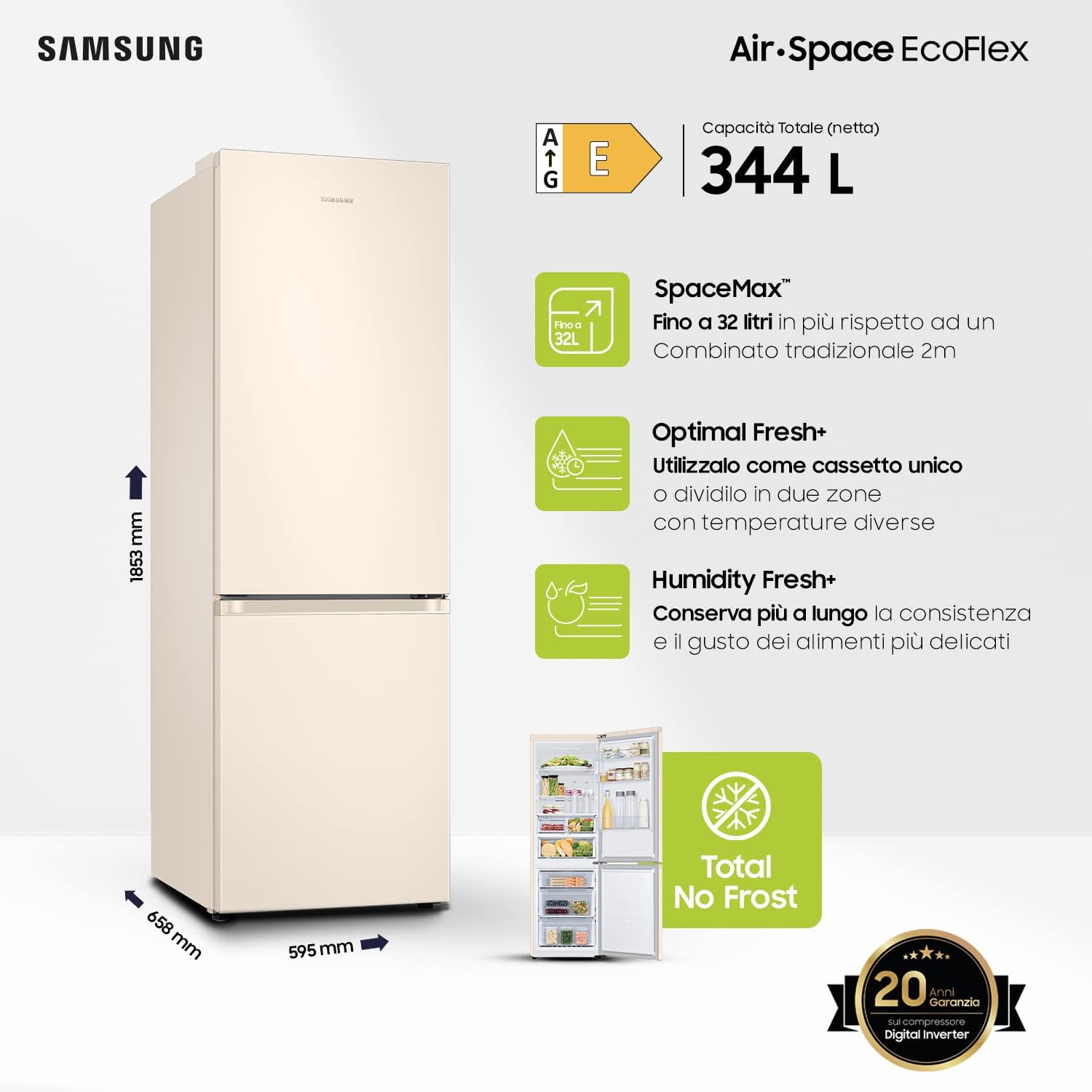
Diagram showing the dimensions (1853mm height, 595mm width, 658mm depth), total net capacity (344L), energy efficiency class E, and key features like SpaceMax, Optimal Fresh+, Humidity Fresh+, Total No Frost, and 20-year Digital Inverter compressor warranty.
| Specification | Value |
|---|---|
| Brand | Samsung |
| Model Number | RB34T603EEL/EF |
| Total Capacity | 340 Litres (Net: 344 Litres) |
| Refrigerator Volume | 230 Litres |
| Freezer Volume | 114 Litres |
| Dimensions (L x W x H) | 65.8 x 59.5 x 185.3 cm |
| Weight | 70 Kilograms |
| Energy Efficiency Class | E |
| Annual Energy Consumption | 256 kWh/annum |
| Noise Level | 35 Decibels |
| Installation Type | Freestanding |
| Defrost System | Automatic (Total No Frost) |
| Number of Shelves | 4 (Glass) |
| Number of Drawers | 2 |
| Color | Sand |
| Included Components | 1 combined refrigerator RB7300T |

The EU energy label for the Samsung RB34T603EEL refrigerator, indicating an energy efficiency class E, annual energy consumption of 254 kWh, freezer volume of 114L, refrigerator volume of 230L, and a noise level of 35 dB. For more details, visit the official EU EPREL database: https://eprel.ec.europa.eu/qr/377019
9. Warranty and Support
9.1 Warranty Information
Your Samsung RB34T603EEL/EF refrigerator comes with a comprehensive warranty. The Digital Inverter Compressor is covered by a 20-year warranty, ensuring long-term reliability and performance.
9.2 Customer Support
For technical assistance, warranty claims, or service requests, please contact Samsung customer support. You can find contact details on the official Samsung website for your region or through the documentation provided with your appliance.


