
LEPOWER LDD-25W-D
LEPOWER Smart LED Floor Lamp User Manual
Model: LDD-25W-D
Brand: LEPOWER
1. Introduction
The LEPOWER Smart LED Floor Lamp (Model: LDD-25W-D) is a versatile lighting solution designed for modern living spaces. This lamp offers advanced control options including touch, app, and voice control compatibility with Amazon Alexa and Google Home. It features a wide range of color choices, adjustable brightness, and color temperature, along with multi-scene and music sync functions to enhance your environment.
Its durable design, adjustable head, and stable base make it suitable for various rooms such as living rooms, bedrooms, and offices. The integrated USB charging port adds convenience for charging mobile devices.
2. Safety Instructions
- Ensure the power supply voltage matches the lamp's requirements (120 Volts).
- Do not disassemble or modify the lamp. Refer all servicing to qualified personnel.
- This product is designed for indoor use only. Do not expose to water or high humidity.
- Keep the lamp away from heat sources and direct sunlight.
- Place the lamp on a stable, level surface to prevent tipping.
- Unplug the lamp from the power outlet before cleaning or performing any maintenance.
- Avoid looking directly into the LED light source when the lamp is on, as it may cause eye strain.
3. Package Contents
Please check the package contents upon opening to ensure all parts are present and undamaged:
- LEPOWER Smart LED Floor Lamp (Main Body with Light Head and Base)
- Power Adapter (Corded Electric)
- User Manual
4. Assembly Instructions
Assembly of the LEPOWER Smart LED Floor Lamp is straightforward and typically takes only a few minutes.
- Carefully unbox all components and place them on a clean, flat surface.
- Connect the lamp pole sections by gently screwing them together clockwise until secure. Ensure the wires inside are not pinched.
- Attach the assembled lamp pole to the weighted base by screwing it clockwise until firmly tightened.
- Ensure the light head is securely attached to the top of the pole.
- Plug the power adapter into the lamp's power input port, then plug the adapter into a standard wall outlet.

Figure 4.1: Fully assembled LEPOWER Smart LED Floor Lamp.
5. Setup and Connectivity
5.1 Initial Power On
Once assembled and plugged in, the lamp can be turned on using the touch button on the pole. For smart features, proceed with app setup.
5.2 Smart Life App Setup (2.4 GHz Wi-Fi Required)
The LEPOWER Smart LED Floor Lamp requires a 2.4 GHz Wi-Fi network for smart control. 5 GHz networks are not supported. Ensure your mobile device is connected to a 2.4 GHz Wi-Fi network during the setup process.
- Download the "Smart Life" app from the App Store (iOS) or Google Play Store (Android).
- Register or log in to your Smart Life account.
- To put the lamp into pairing mode, long-press the Power Button on the lamp pole until the light blinks rapidly.
- In the Smart Life app, tap the "+" icon in the top right corner to add a device.
- Select "Lighting" or "Light Source (Wi-Fi)" from the device list.
- Follow the on-screen instructions to connect the lamp to your 2.4 GHz Wi-Fi network. You will need to enter your Wi-Fi password.
- Once connected, you can rename the lamp for easier control.

Figure 5.1: Controlling the lamp via the Smart Life App.
5.3 Voice Control Integration (Alexa/Google Home)
After successfully setting up the lamp in the Smart Life app, you can link it to Amazon Alexa or Google Home for voice control.
- Open the Amazon Alexa app or Google Home app.
- Navigate to the "Skills & Games" (Alexa) or "Works with Google" (Google Home) section.
- Search for and enable the "Smart Life" skill/service.
- Link your Smart Life account by entering your credentials.
- Discover devices. Your LEPOWER Smart LED Floor Lamp should now appear and be controllable via voice commands.

Figure 5.2: Voice control with Amazon Alexa and Google Home.
6. Operating Instructions
6.1 Touch Control
The lamp features two touch buttons and a USB charging port on the pole:
- Power Button:
- Short touch: Power ON or OFF.
- Long touch: Enter pairing mode for Wi-Fi setup.
- Light Button:
- Short touch: Switch between preset colors or color temperatures.
- Long touch: Steplessly dim the brightness.
- 5V/1A USB Charging Port: Conveniently charge your phone or other USB-powered devices.

Figure 6.1: Touch switch and USB charging port details.
6.2 App Control Features
The Smart Life app provides comprehensive control over your lamp:
- Color and Brightness Adjustment:
- Adjust color temperature from 2700K (warm white) to 6000K (cool white).
- Choose from 16 million RGB color choices.
- Steplessly adjust brightness from 1% to 100%.
- Multi-Scene Options: Select from various pre-set lighting scenes (e.g., Night, Read, Music) or create custom scenes to suit different moods and activities.
- Music Sync Mode: The lamp can change color and rhythm according to the beat of music playing nearby, creating a dynamic lighting experience.
- Timing Function: Set schedules for the lamp to automatically turn on or off at specific times, enhancing convenience and energy efficiency.
- Smart Memory Function: The lamp remembers your last lighting setting (color, brightness, scene) for next use, eliminating the need to reconfigure settings each time.
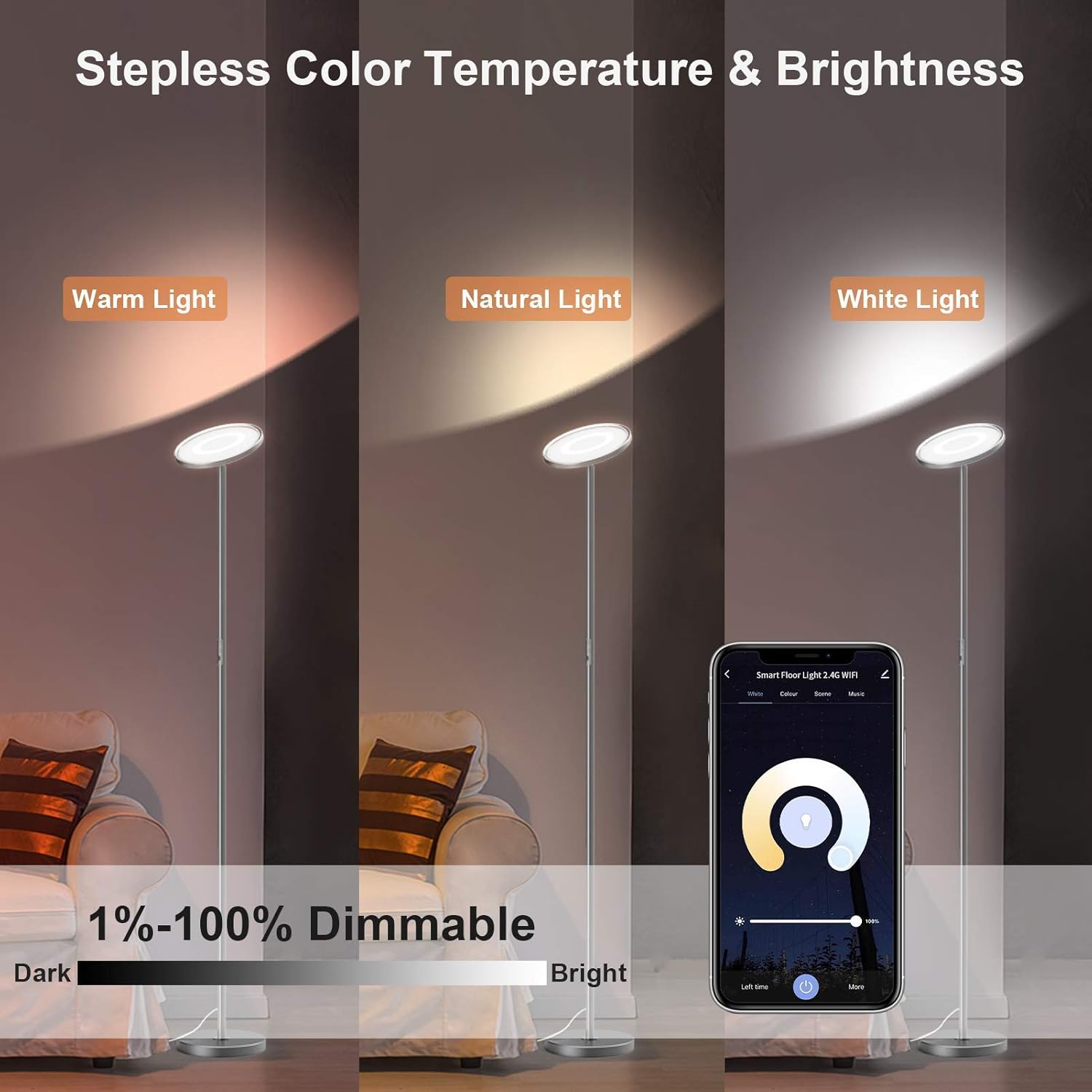
Figure 6.2: App interface for stepless color temperature and brightness control.

Figure 6.3: App interface for RGB color changing and saturation control.
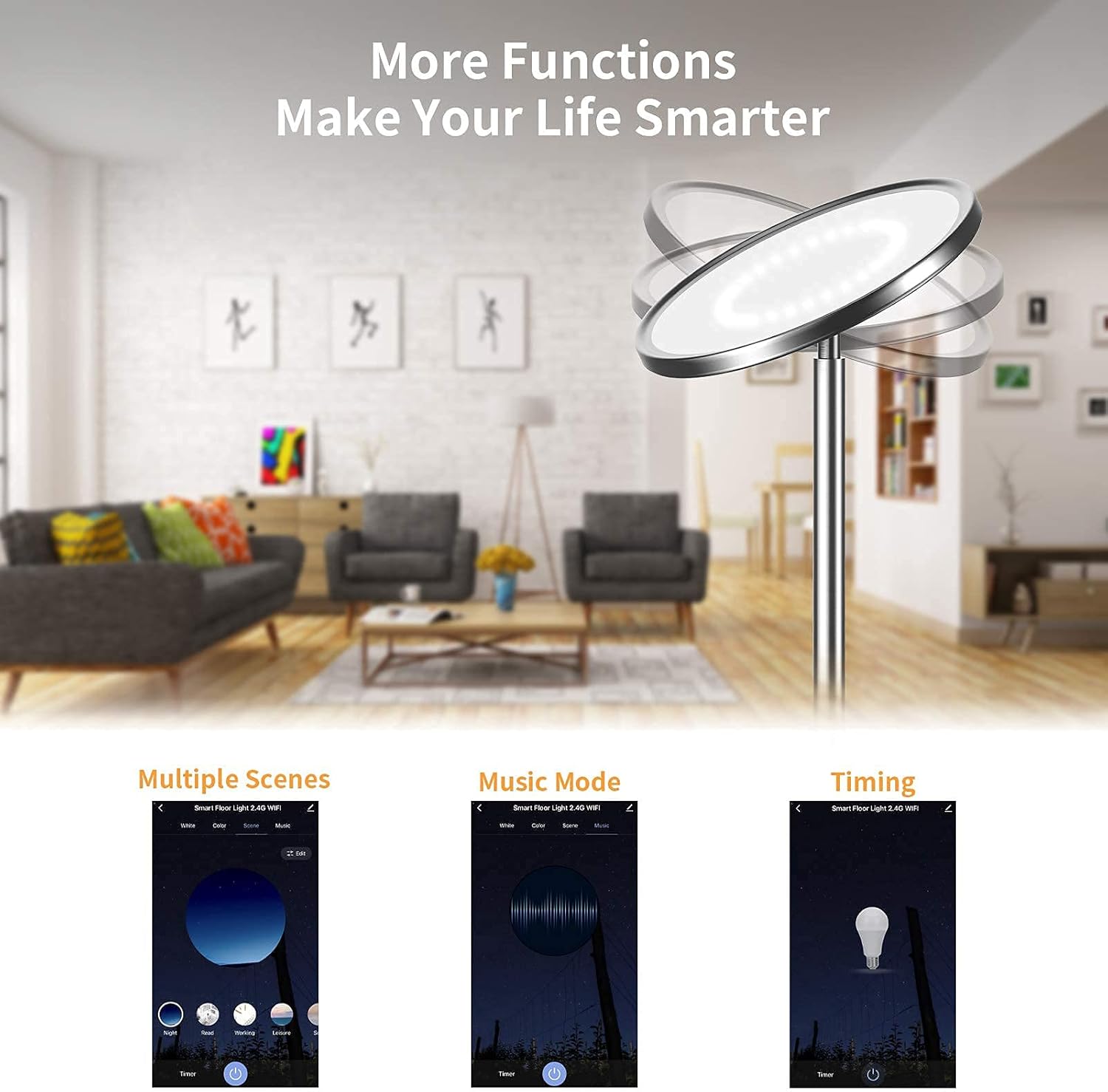
Figure 6.4: Overview of additional smart functions available in the app.
6.3 Lamp Head Adjustment
The head of the LEPOWER Smart LED Floor Lamp can be adjusted 30° up or down, allowing you to direct the light precisely where needed for optimal illumination.

Figure 6.5: Lamp head adjustability and stable base dimensions.
7. Maintenance
- Cleaning: Disconnect the lamp from power before cleaning. Use a soft, dry cloth to wipe the lamp's surface. Do not use abrasive cleaners, waxes, or solvents as they may damage the finish.
- Storage: If storing the lamp for an extended period, unplug it and store it in a cool, dry place, away from direct sunlight and moisture.
- LED Lifespan: The integrated LED light source is designed for long-term use and is not user-replaceable.
8. Troubleshooting
| Problem | Possible Cause | Solution |
|---|---|---|
| Lamp does not turn on. | No power, loose connection, power outage. | Check if the power adapter is securely plugged into the lamp and the wall outlet. Verify the wall outlet has power. |
| Cannot connect to Wi-Fi. | Incorrect Wi-Fi band (5GHz), wrong password, lamp not in pairing mode, weak signal. | Ensure your router is broadcasting a 2.4 GHz Wi-Fi signal and your phone is connected to it. Long-press the power button to enter pairing mode (light blinks rapidly). Double-check your Wi-Fi password. Move the lamp closer to the router. |
| Voice control not working. | Not linked to Alexa/Google Home, incorrect device name, network issue. | Verify the Smart Life skill/service is enabled and linked in your Alexa/Google Home app. Ensure the lamp's name is recognized by your voice assistant. Check Wi-Fi connection. |
| Lamp light flickers or changes unexpectedly. | Unstable power supply, Wi-Fi interference, software glitch. | Try plugging the lamp into a different outlet. Restart the lamp by unplugging and re-plugging it. Check for app updates. |
| USB charging port not working. | Lamp not powered on, device incompatibility. | Ensure the lamp is powered on. Try a different USB cable or device to confirm functionality. |
9. Specifications
| Feature | Detail |
|---|---|
| Model Number | LDD-25W-D |
| Brand | LEPOWER |
| Dimensions (D x W x H) | 8.6"D x 8.6"W x 66"H |
| Item Weight | 4.85 Pounds |
| Material | Plastic, Metal |
| Finish Type | Polished |
| Light Source Type | LED |
| Wattage | 28 watts |
| Brightness | 2200 Lumen |
| Color Temperature | 2700K - 6000K (Adjustable) |
| Color Choices | 16 Million RGB Colors |
| Connectivity Technology | Wi-Fi (2.4 GHz only) |
| Controller Type | Google Assistant, Amazon Alexa, iOS, Android (Smart Life App) |
| Power Source | Corded Electric |
| USB Output | 5V/1A |
| Lamp Head Adjustment | 30° Up/Down |
| Base Weight | 2.2 kg (approx. 4.85 lbs) |
10. Official Product Videos
Watch these official videos for a visual guide on the LEPOWER Smart LED Floor Lamp's features and operation.
LEPOWER Smart LED Floor Lamp Overview
Video 10.1: This video provides a comprehensive overview of the LEPOWER Smart LED Floor Lamp, showcasing its design, smart features, and various lighting capabilities.
LEPOWER Bright LED Floor Lamp for Living Room, Bedroom
Video 10.2: This video highlights the brightness and versatility of the LEPOWER LED Floor Lamp, demonstrating its suitability for living rooms and bedrooms with various lighting effects.
11. Warranty and Support
LEPOWER products are designed for quality and reliability. For warranty information, please refer to the warranty card included with your purchase or visit the official LEPOWER website. If you encounter any issues or require technical assistance, please contact LEPOWER customer support through their official channels. Be prepared to provide your product model number (LDD-25W-D) and purchase details.
For the latest support information and FAQs, please visit the LEPOWER Store on Amazon.
Related documentsLDD-25W-D


Ask a question about this manual
Ask about setup, troubleshooting, compatibility, parts, safety, or missing instructions. Manuals+ will review the question and use this page’s manual context to help answer it.