
BLUEAIR 3250i
Blueair Blue Max 3250i Air Purifier Instruction Manual
Model: 3250i | Brand: BLUEAIR
1. Introduction
Thank you for choosing the Blueair Blue Max 3250i Air Purifier. This device is designed to provide clean and healthy air in your home or office. It utilizes advanced filtration technology to remove airborne pollutants, allergens, and odors, ensuring a comfortable and safe environment. Please read this manual carefully before using the product to ensure proper operation and maintenance.
2. Safety Information
Always follow basic safety precautions when using electrical appliances to reduce the risk of fire, electric shock, or injury.
- Do not operate the air purifier with a damaged cord or plug.
- Do not place the unit near heat sources or in direct sunlight.
- Keep the air intake and outlet clear of obstructions.
- Do not insert fingers or foreign objects into the air inlets or outlets.
- Unplug the unit before cleaning or performing any maintenance.
- This appliance is not intended for use by persons (including children) with reduced physical, sensory, or mental capabilities, or lack of experience and knowledge, unless they have been given supervision or instruction concerning use of the appliance by a person responsible for their safety.
- Children should be supervised to ensure that they do not play with the appliance.
3. Product Overview and Features
The Blueair Blue Max 3250i air purifier incorporates innovative technology and design to deliver superior air purification.
Key Features:
- HEPASilent™ Technology: Blueair's unique filtration technology removes 99.97% of harmful substances down to 0.1 micrometers, including viruses, pollen, dust, pet dander, and PM2.5.
- 360-Degree Air Intake: Air is drawn in from all directions at the base of the unit, allowing for flexible placement without compromising performance.
- Optimized Airflow: Features a large top-mounted fan and increased filter surface area for enhanced pollen removal speed and low power consumption.
- Quiet Operation: Equipped with a noise shield, the unit operates quietly, especially in Night Mode (as low as 18dB(A)).
- Simple Control: Two intuitive buttons on the top panel for easy operation.
- Auto Mode: Automatically adjusts fan speed based on real-time air quality detected by the built-in air quality sensor (PM2.5).
- Night Mode: Operates at the lowest fan speed for minimal noise, ideal for bedrooms.
- Blueair App Connectivity (Wi-Fi): Monitor indoor air quality, adjust settings, and schedule operation remotely via the Blueair app (requires IEEE 802.11b/g/n 2.4GHz Wi-Fi network).
- Easy Maintenance: Filter replacement is simple and required approximately every 9 months. The pre-filter is washable.
- Nordic Design: A sleek, tapered design with interchangeable pre-filters in various colors to blend seamlessly with your home decor.

Figure 1: Blueair Blue Max 3250i Air Purifier. This image shows the overall design of the air purifier, highlighting its compact and modern aesthetic.

Figure 2: HEPASilent Technology Filter Layers. This diagram illustrates the multi-stage filtration system, including the pre-filter, main filter, and carbon sheet, designed to capture various pollutants.

Figure 3: Optimized Body Structure for Air Purification. This image highlights the internal components such as the large fan, noise shield, and 360-degree air intake, which contribute to efficient and quiet operation.
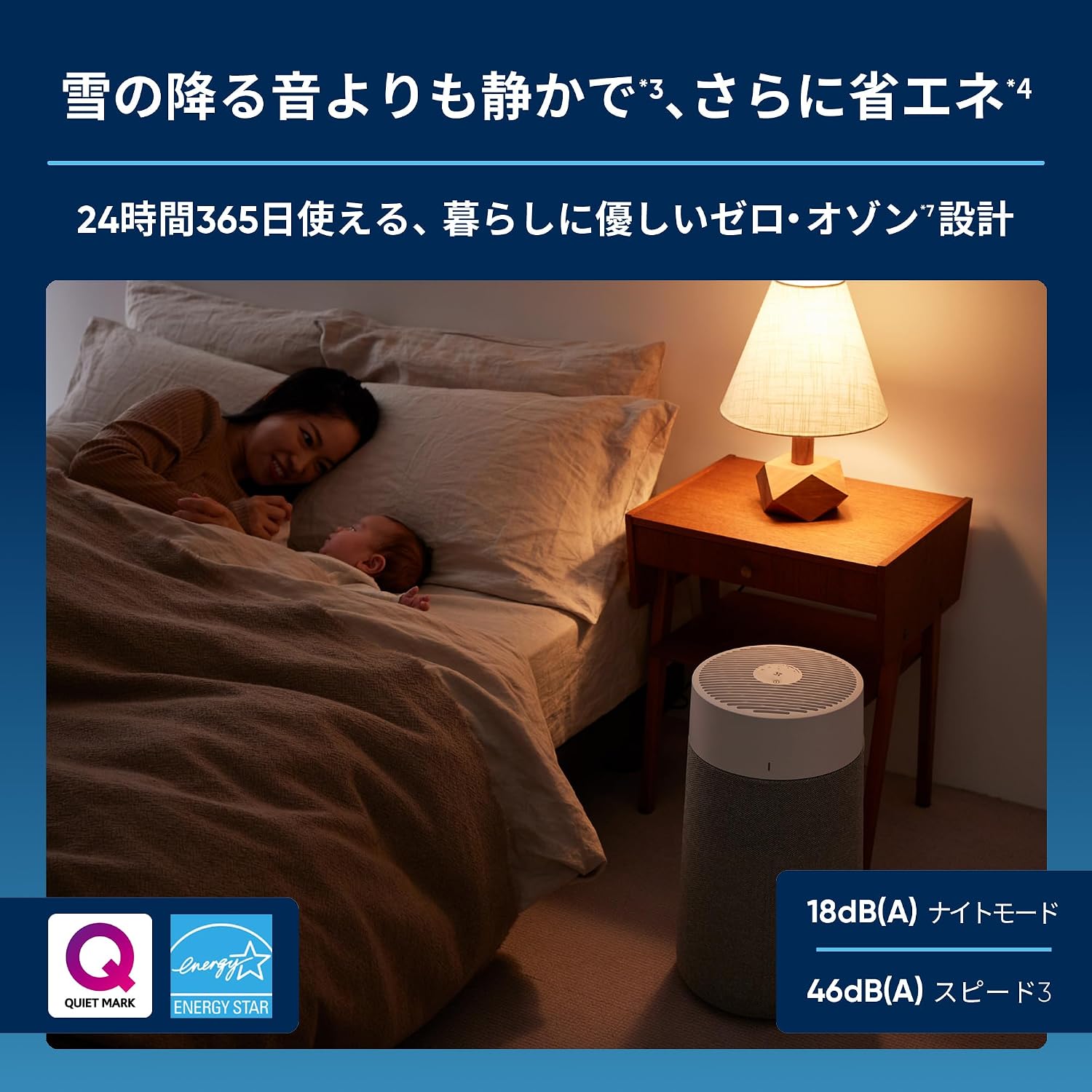
Figure 4: Various Air Pollutants Removed by Blueair. This graphic shows different types of airborne contaminants like pollen, dust, mites, mold, viruses, bacteria, pet odors, and tobacco smoke that the air purifier effectively addresses.
4. Setup
4.1 Unpacking
- Carefully remove the air purifier from its packaging.
- Check for any damage during transit. If damaged, contact customer support.
- Remove all protective films and packaging materials from the unit.
4.2 Placement
- Place the air purifier on a flat, stable surface.
- Due to its 360-degree air intake, the unit can be placed almost anywhere in a room without affecting performance.
- Ensure there is at least 10 cm (4 inches) of space around the unit for optimal airflow.
- Avoid placing the unit directly against walls or furniture that might obstruct air circulation.
4.3 Power Connection
- Plug the power cord into a standard electrical outlet (100V, 50/60Hz).
- The unit will enter standby mode, indicated by a soft light on the control panel.
5. Operating Instructions
5.1 Control Panel Overview
The control panel is located on the top of the unit and features two main buttons:
- Power Button (circle with vertical line): Turns the unit On/Off.
- Fan Speed/Mode Button (fan icon): Cycles through fan speeds and operating modes.

Figure 5: Control Panel of Blueair Blue Max 3250i. This image shows the top control panel with its two intuitive buttons for power and fan speed/mode selection.
5.2 Basic Operation
- Power On/Off: Press the Power Button once to turn the unit on. Press it again to turn it off.
- Adjust Fan Speed: Press the Fan Speed/Mode Button to cycle through the available speeds: Night Mode, Auto Mode, Speed 1, Speed 2, Speed 3.
- Night Mode: The lowest fan speed for quiet operation, ideal for sleeping.
- Auto Mode: The unit automatically adjusts the fan speed based on the detected air quality. The LED indicator on the side of the unit changes color to reflect air quality (e.g., blue for good, red for poor).
5.3 Blueair App (Wi-Fi Models Only)
For models with Wi-Fi connectivity (3250i), download the Blueair app from the App Store or Google Play to access advanced features:
- Real-time Air Quality Monitoring: View indoor air quality status (PM2.5 levels).
- Remote Control: Turn the unit on/off, adjust fan speed, and change modes from your smartphone.
- Scheduling: Set schedules for the air purifier to operate automatically.
- Filter Status: Monitor filter usage and receive notifications for replacement.
- Welcome Home Function: Automatically turns on the purifier as you approach home (location-based feature).
Refer to the Blueair app's in-app instructions for detailed setup and usage.

Figure 6: Blueair App Interface. This image displays the Blueair app's user interface, showing features like air quality monitoring, fan speed adjustment, and filter status.
6. Maintenance
Regular maintenance ensures optimal performance and extends the lifespan of your air purifier.
6.1 Filter Replacement
- The main filter should be replaced approximately every 9 months, depending on usage and air quality.
- The filter replacement indicator light will illuminate when it's time to change the filter.
- To replace the filter:
- Unplug the air purifier.
- Gently twist and lift the top section of the unit to access the filter compartment.
- Remove the old filter and dispose of it.
- Insert the new filter, ensuring it is seated correctly.
- Replace the top section of the unit.
- Plug in the unit. The filter indicator light should reset automatically. If not, consult the troubleshooting section.

Figure 7: Easy Filter Replacement. This image demonstrates the simple process of replacing the main filter by lifting the top section of the air purifier.
6.2 Pre-filter Cleaning
- The fabric pre-filter can be removed and washed to maintain its appearance and initial performance.
- To clean the pre-filter:
- Unplug the air purifier.
- Remove the fabric pre-filter from the unit.
- Machine wash on a gentle cycle or hand wash with mild detergent.
- Allow the pre-filter to air dry completely before reattaching it to the unit.
7. Troubleshooting
If you encounter any issues with your Blueair Blue Max 3250i, please refer to the table below before contacting customer support.
| Problem | Possible Cause | Solution |
|---|---|---|
| Unit does not turn on. | Power cord not properly connected. No power from outlet. | Ensure the power cord is securely plugged into both the unit and the wall outlet. Check if the outlet is functional. |
| Poor air purification performance. | Filter is dirty or needs replacement. Air inlets/outlets are blocked. Unit is too small for the room size. | Check the filter indicator light and replace the filter if necessary. Ensure no objects are blocking the air intake or outlet. Consider using a larger model for bigger rooms. |
| Unusual noise during operation. | Foreign object inside the unit. Filter not installed correctly. | Unplug the unit and check for any foreign objects. Reinstall the filter to ensure it is properly seated. |
| Wi-Fi connection issues. | Incorrect Wi-Fi password. Router issues. Unit out of Wi-Fi range. | Ensure correct Wi-Fi password. Restart your router. Move the air purifier closer to the Wi-Fi router. Ensure your network is 2.4GHz. |
| Air quality indicator always shows poor air. | Sensor is dirty. High levels of pollutants present. | Clean the air quality sensor (refer to the app or Blueair website for instructions). Ensure proper ventilation and reduce sources of pollution. |
8. Specifications
Technical specifications for the Blueair Blue Max 3250i Air Purifier.
| Specification | Value |
|---|---|
| Model Number | 3232111100 |
| Dimensions (D x W x H) | 26.9 cm x 26.9 cm x 48.1 cm |
| Weight | 3.4 kg |
| Applicable Floor Area (JEMA) | Up to 37 m² (22 tatami mats) |
| Recommended Floor Area (AHAM) | Up to 20 m² (12 tatami mats) |
| Air Quality Sensor / Auto Mode | PM2.5 detection / Yes |
| Wi-Fi Connectivity | Yes (IEEE 802.11b/g/n, 2.4GHz) |
| Operating Speeds | Night / Auto / 1-3 |
| Filter Replacement Notification | Yes (Red lamp indicator) |
| Filter Replacement Guideline | Approximately every 9 months |
| CADR (Clean Air Delivery Rate) | Tobacco Smoke: 141, Dust: 141, Pollen: 141 |
| 8 Tatami Mat Purification Time | Approximately 13 minutes |
| Air Supply Direction | Top |
| Air Intake Direction | 360 degrees from bottom of unit |
| Operating Noise Level | 18-46 dB(A) |
| Airflow Volume | 1.0-4.8 m³/min |
| Power Supply | 100V 50/60Hz |
| Power Consumption | 2.5-20W |
| Electricity Cost (per hour) | Approximately 0.08-0.6 JPY |
| Particle Retention Size | 0.1 microns |
| Contaminants Filtered | Tobacco smoke, pet dander, pet hair, dust, VOCs, odors, pollen |
| Certifications | AHAM Certified, ENERGY STAR Certified, Quiet Mark Certified, Zero Ozone Certified |
| Included Items | Main filter (pre-installed), pre-filter (Stockholm Fog Grey), instruction manual, warranty card |
| Country of Origin | China |
9. Warranty and Support
9.1 Warranty Information
The Blueair Blue Max 3250i Air Purifier comes with a 2-year warranty from the date of purchase. Please retain your proof of purchase for warranty claims. The warranty covers defects in materials and workmanship under normal use.
9.2 Customer Support
For further assistance, technical support, or warranty inquiries, please visit the official Blueair website or contact their customer service department. Contact details can typically be found on the Blueair website or in the included warranty card.
Online Resources: www.blueair.com
Related documents3250i


Ask a question about this manual
Ask about setup, troubleshooting, compatibility, parts, safety, or missing instructions. Manuals+ will review the question and use this page’s manual context to help answer it.