1. Introduction
Thank you for purchasing the LEMEGA MSY5 Music System. This device integrates a CD player, FM digital radio, internet radio, Spotify Connect, Bluetooth speaker, USB player, and alarm clock functions. This manual provides essential information for safe and efficient use of your new music system. Please read it thoroughly before operation and retain it for future reference.
2. Important Safety Information
Observe the following safety precautions to prevent electric shock, fire, or damage to the unit:
- Do not expose this appliance to rain or moisture.
- Do not block any ventilation openings.
- Ensure the power adapter is easily accessible.
- Only use attachments/accessories specified by the manufacturer.
- Unplug this appliance during lightning storms or when unused for long periods.
- Refer all servicing to qualified service personnel.
3. Package Contents
Verify that all items are present in the package:
- LEMEGA MSY5 Music System
- Power Adapter
- Remote Control
- Owner's Manual (this document)
4. Product Overview
4.1 Front Panel and Controls
The front panel features the display, CD slot, and primary control buttons/knobs for navigation and playback.
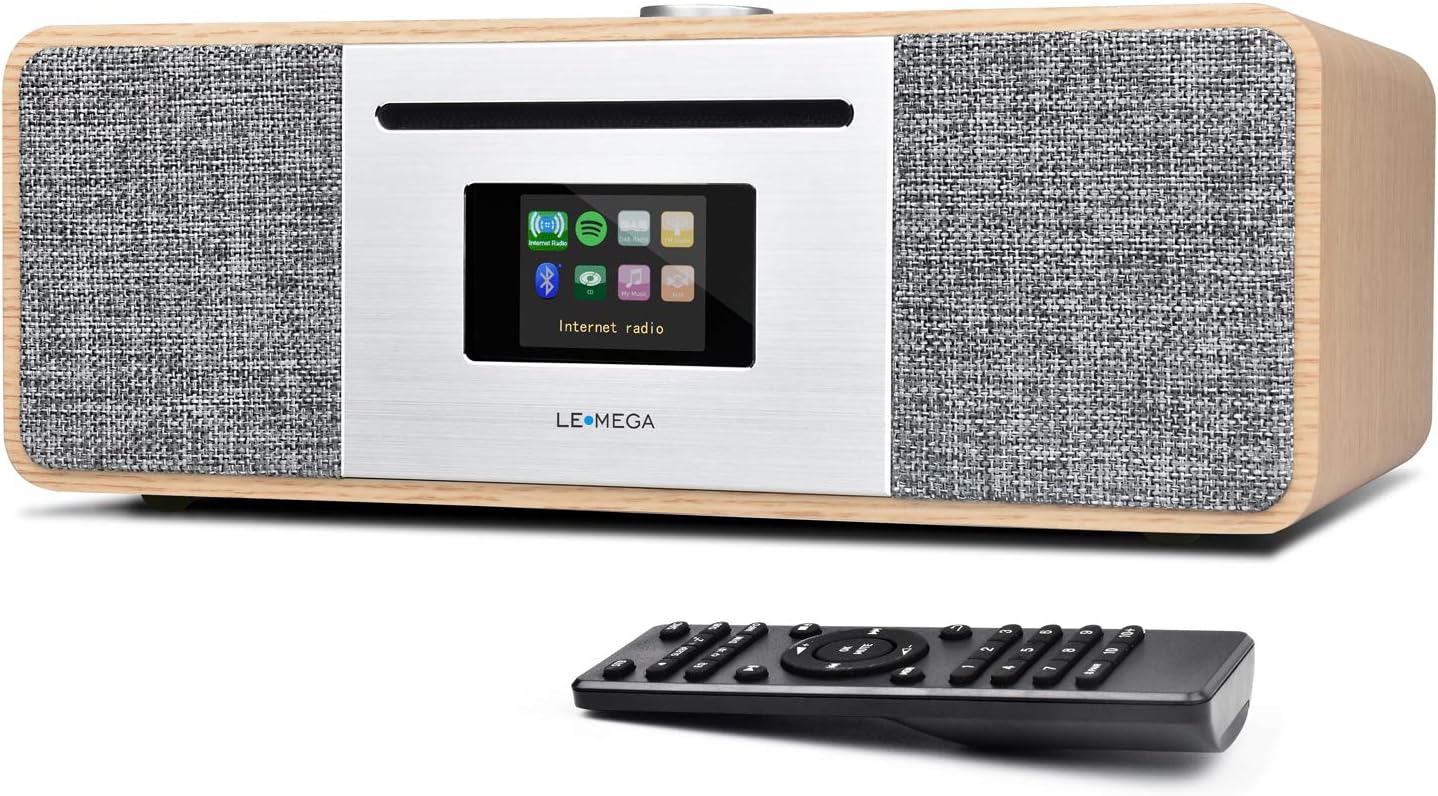
Image: Front view of the LEMEGA MSY5 Music System, showcasing the display, CD slot, and control knob, with the remote control positioned in front.
4.2 Rear Panel Connections
The rear panel provides various ports for power, external audio input, USB devices, and the FM antenna.

Image: Detailed view of the LEMEGA MSY5's rear panel, labeling connections for Mains Power, Aux Input, USB Charging, USB MP3, Headphone Output, and Antenna.
5. Initial Setup
5.1 Power Connection
- Connect the supplied power adapter to the DC 12V/3A input port on the rear of the MSY5.
- Plug the power adapter into a wall outlet.
5.2 Antenna Setup
Extend the telescopic antenna fully for optimal FM radio reception.
5.3 First-Time Use Wizard
Upon first power-on, the system will guide you through initial settings:
- Language Selection: Choose your preferred language.
- Network Setup: Connect to your Wi-Fi network for Internet Radio and Spotify Connect functionality. Select your network and enter the password.
- Time and Date: Set the current time and date. This can often be synchronized automatically via the internet.
6. Operating Instructions
6.1 Mode Selection
Use the 'Mode' button on the unit or remote control to switch between available sources: CD, Internet Radio, FM Radio, Bluetooth, USB, and Aux In.

Image: Graphic illustrating the MSY5 Music System's core features: CD Player, Internet Radio, Spotify, Bluetooth, and FM Radio.
6.2 CD Player
- Select 'CD' mode.
- Gently insert a CD into the slot until it is pulled in automatically.
- Playback will begin automatically. Use the Play/Pause, Skip Forward, and Skip Backward buttons for control.
- To eject a CD, press the Eject button.

Image: The LEMEGA MSY5 Music System on a table, highlighting its slot-in CD player and the included remote control.
6.3 Internet Radio & Spotify Connect
- Select 'Internet Radio' mode.
- Browse stations by location, genre, or search.
- To use Spotify Connect, ensure your MSY5 is connected to the same Wi-Fi network as your smartphone/tablet. Open the Spotify app, select a song, and choose your MSY5 as the playback device.

Image: The LEMEGA MSY5 Music System displaying an internet radio station on its screen, emphasizing its smart streaming capabilities.
6.4 FM Digital Radio
- Select 'FM' mode.
- Perform an auto-scan to find available stations or tune manually.
- Save your favorite stations to presets for quick access.
6.5 Bluetooth Pairing
- Select 'Bluetooth' mode on the MSY5. The display will show 'Pairing'.
- On your smartphone or tablet, enable Bluetooth and search for 'LEMEGA MSY5'.
- Select the device to pair. Once connected, you can stream audio from your device to the MSY5.

Image: A smartphone displaying a music app, wirelessly connected via Bluetooth to the LEMEGA MSY5 Music System, which is also shown charging a device via USB.
6.6 USB Playback & Charging
- Insert a USB drive containing MP3 files into the USB port on the rear panel.
- Select 'USB' mode. The system will automatically detect and play audio files.
- The USB port can also be used to charge compatible devices.
6.7 Auxiliary Input
Connect an external audio device (e.g., an MP3 player) to the 'AUX IN' port on the rear panel using a 3.5mm audio cable. Select 'Aux In' mode to play audio from the connected device.
6.8 Clock and Alarms
The MSY5 features a clock and dual independent alarms. Access these settings through the system menu to set wake-up times, alarm sources (radio, CD, buzzer), and snooze duration.

Image: The LEMEGA MSY5 Music System on a bedside table, with a person sleeping in the background, illustrating its dual alarm clock and sleep/snooze functions.
6.9 Sound Settings
Customize your audio experience by adjusting Treble, Bass, and Loudness levels. You can also select from preset equalizer modes such as POP, Classic, Jazz, Rock, and Normal via the system menu.
7. Maintenance
7.1 Cleaning the Unit
Wipe the exterior of the MSY5 with a soft, dry cloth. Do not use abrasive cleaners or solvents. Ensure the unit is unplugged before cleaning.
7.2 CD Care
Handle CDs by their edges. Clean discs with a soft, lint-free cloth, wiping from the center outwards. Avoid touching the playing surface.
8. Troubleshooting
| Problem | Possible Cause | Solution |
|---|---|---|
| No power | Power adapter not connected; outlet not active. | Check power adapter connection; try a different outlet. |
| No sound | Volume too low; incorrect source selected; headphones connected. | Increase volume; select correct input source; disconnect headphones. |
| Cannot connect to Wi-Fi | Incorrect password; out of range; router issue. | Verify password; move unit closer to router; restart router. |
| CD not playing | CD inserted incorrectly; disc scratched/dirty; incompatible disc type. | Reinsert CD correctly; clean or replace disc; ensure it's a standard CD/CD-R/CD-RW. |
| Bluetooth pairing fails | Device not in pairing mode; MSY5 not in Bluetooth mode; device too far. | Ensure both devices are in pairing mode; move devices closer. |
9. Specifications
- Model: MSY5
- Brand: LEMEGA
- Package Dimensions: 16.5 x 12 x 9 inches
- Item Weight: 10.83 pounds (4.92 Kilograms)
- Connectivity Technology: Auxiliary, Bluetooth, IR, USB, Wi-Fi
- Tuner Technology: Internet Radio, FM
- Radio Bands Supported: FM
- Special Features: Internet Radio, Spotify Connect, WiFi Connectivity, CD Player, USB Player, USB Charging, Clock Alarms, Remote & App Control
- Power Source: Corded Electric
- Included Components: Owner's Manual, Power Adapter
10. Warranty and Support
LEMEGA products are designed and manufactured to the highest quality standards. For detailed warranty information and technical support, please refer to the warranty card included with your product or visit the official LEMEGA website. You may also contact LEMEGA customer service directly for assistance.
Online Support: Visit the LEMEGA Store on Amazon


